
ShowBox is a movie and TV shows streaming app for Android that’s been blocked in most regions due to copyright issues. Thus, a VPN is the most effective way to access its huge library of movies and shows, and NordVPN is the best VPN for ShowBox.
It was the fastest VPN in my Android tests (28 Mbps on a 30 Mbps line, plenty for 4K), its 7,000+ servers in 150 countries reach ShowBox from almost anywhere, and a kill switch, Threat Protection, and an audited no-logs policy keep your streaming hidden from your ISP and copyright trolls.
But if NordVPN doesn’t do it for you, other alternatives exist.
You can use Surfshark (unlimited devices on one plan), PrivateVPN (port forwarding for ShowBox’s P2P sources at a budget price), CyberGhost (the largest server network), and PureVPN (dedicated streaming servers).
So, if you’re a huge movie buff and want to catch all the latest movies and shows straight from your Android device, this is for you.
The 3 Top VPNs for Streaming ShowBox

Surfshark
Best for ShowBox households
- Unlimited simultaneous connections
- 27 Mbps in my 4K ShowBox test
- Bypasser routes only ShowBox

NordVPN
Best for 4K ShowBox streaming
- Fastest in my test at 28 Mbps
- 7,000+ servers in 150 countries
- Kill switch and Threat Protection

PrivateVPN
Best for ShowBox P2P sources
- Port forwarding on selected servers
- Full-system kill switch on Android
- $2.00/mo on the 36-month plan
It’s hard finding a working ShowBox app right now, and there’s a good reason for that.
ShowBox was initially created for Android devices, and it makes use of P2P and non-P2P sources which users can then download or stream directly. Therefore, the main sources of ShowBox content are torrents, which makes it illegal since it’s pirated.
This is the biggest reason the app is blocked in many places and why it’s hard to find it anywhere right now; a la DMCA takedowns.
Fortunately, I had luck downloading and streaming content on ShowBox with my top VPNs. The best part is that my ISP and copyright trolls can no longer see my streaming activity or throttle my internet speeds.
Ready to see how the VPNs worked with ShowBox? Let’s roll!
Looking to Stream ShowBox Movies & Shows on Your Android Device? Here Are the Best VPNs to Use!
I know you’re excited to try ShowBox after that little teaser up there.
Before you dive in, here are the 5 VPNs that will make your experience wholesome.
- NordVPN – Fastest for Streaming & Downloading ShowBox Content
- Surfshark – Unlimited Devices for ShowBox on One Plan
- PrivateVPN – P2P-Friendly Budget VPN for ShowBox Downloads
- CyberGhost – Huge Server Network for Unblocking ShowBox
- PureVPN – Lag-Free, Streaming-Dedicated Servers With Secure Wi-Fi
For all the speed tests, I used base speeds of 30 Mbps which handles 4K streaming without lag.
The Best VPNs for Streaming ShowBox
I limited my tests to Android devices for a better picture of how each VPN performs with ShowBox. Even so, you can use ShowBox on Windows and macOS.
However, that requires using an emulator, which is a lot of work.
Moving on, here’s how the VPN tests panned out.
NordVPN - Fastest for Streaming & Downloading ShowBox Content

| Android Compatibility | Servers | Connections | Average Speeds | Best Deal |
|---|---|---|---|---|
| 6.0+ | 7,000+ | Ten | 28 Mbps | Show Offer |
Servers for Unblocking ShowBox

NordVPN is my top pick for ShowBox because it was the quickest VPN I ran on my Android tablet and gave up nothing on privacy, which matters more for this app than for almost any other streaming service.
Its 7,000+ servers in 150 countries span more countries than any rival here, so there’s always an exit close enough to keep 4K smooth.
There are no dedicated streaming servers, but every standard server allows P2P traffic, so ShowBox’s torrent-fed titles download over whichever server you’re streaming on.
ShowBox isn’t on Google Play, so you’ll likely sideload its APK from a mirror site, and Threat Protection blocks the malicious domains and trackers those sites are full of. On desktop, the Pro version (higher-tier plans) also scans downloads for malware.
Fast Speeds for 4K Streaming

NordVPN was the fastest VPN for streaming ShowBox, averaging 28 Mbps. This cleared 4K content like it was nothing without buffering.
For the test, I streamed, against my better judgment, an episode of Game of Thrones, and everything was smooth except for the GOT storyline.
I’ll never not be angry with how this series ended!
The secret to NordVPN’s incredible speeds lies in the NordLynx protocol, which delivers speed and doesn’t compromise security. Anytime you want to stream or download anything when using NordVPN, switch to NordLynx; you won’t regret it.
Additionally, you can take advantage of the split tunneling feature to only encrypt ShowBox traffic for a lesser overall encryption burden and faster speed.
User Privacy + No Logging Policy
First, the military-grade encryption will keep you safe if you choose to stream your ShowBox content using public networks. After all, it’s not strange to see people watching a movie at an airport lounge or in other public spaces with free Wi-Fi. NordVPN ensures snoopers and hackers stay out of your business.

Additionally, a kill switch automatically disconnects the internet when the VPN connection drops. This stops your actual IP from leaking out alongside any other sensitive information that may cause damage in the wrong hands (like copyright trolls and hackers).
Likewise, NordVPN doesn’t store any user data, a claim outside auditors have checked more than once, and its Panama base keeps it outside the big surveillance alliances. That benefits you in two ways.
First, if the authorities single you out for copyright infringement, that case won’t go anywhere since there won’t be any evidence.
Second, it stops hackers if they find a way into your connected server.
Without data, there’s nothing to use against you.
Double VPN and obfuscated servers add a second hop or hide the VPN itself, at some cost in speed.
Android Compatibility
NordVPN is compatible with Android devices running on version 6.0 and above. Plus, you can connect up to 10 devices at the same time.
Handy if you move from the Android TV to a tablet mid-movie.
One account to rule them all!

On price, NordVPN is the priciest of the five by a small margin, but none of the cheaper four matched its speed, and a 30-day money-back guarantee covers every plan. Offset the difference with these fantastic deals before they run out.
Pros
- Fastest streaming speeds in my tests (28 Mbps)
- 7,000+ servers in 150 countries for unblocking ShowBox
- P2P allowed on every standard server for torrent-fed titles
- Kill switch, Threat Protection, and an audited no-logs policy
- Double VPN and obfuscated servers for extra privacy
- Ten devices at once on Android 6.0 and above
Cons
- No streaming dedicated servers
- Costs a little more than Surfshark and PrivateVPN
Surfshark - Unlimited Devices for ShowBox on One Plan
| Android Compatibility | Servers | Connections | Average Speeds | Best Deal |
|---|---|---|---|---|
| 5.0+ | 4500+ | Unlimited | 27 Mbps | Show Offer |
Servers for Unblocking ShowBox

Surfshark is my runner-up for ShowBox: it finished a single megabit behind NordVPN in my 4K test and is the only provider here with no device cap. Its 4,500+ servers in 100 countries unblocked ShowBox everywhere I tried, even without the streaming-dedicated servers CyberGhost and PureVPN offer.
In fact, it makes up for that with shared Static IPs. Thus, you can use the same server every time you stream ShowBox, but with better anonymity (than dedicated IPs) since there’ll be too many users for anyone to be singled out.
But again, as much as Surfshark facilitates the unblocking of restricted platforms like ShowBox, it doesn’t condone piracy. Here’s a disclaimer lifted from the Surfshark website:
Surfshark does not encourage using a VPN in any way that would potentially violate the Terms of Service of other service providers.
Fast Speeds for 4K Streaming

I got average speeds of 27 Mbps, the second fastest after NordVPN, and sufficient for streaming 4K content on ShowBox. To confirm these speeds, I streamed Spiderman: Into the Spider-Verse, one of the most entertaining animated films I’ve watched in a long while. I set the movie to 4K UHD, and there wasn’t any buffering.
But how exactly does Surfshark pull off these amazing speeds?
Two main reasons.
First, the VPN provider has upgraded its servers from 1 Gbps to 10 Gbps.
In layman’s language, overcrowding becomes inconsequential since there’s enough bandwidth to handle multiple streaming requests.
Secondly, its WireGuard and IKEv2 protocols offer the best speeds, especially if you’re on mobile data, and they don’t consume too much of your data.
Another handy way to boost your speeds is using the Bypasser (split tunneling) feature. I exempted all the other apps on my Android tablet and only routed ShowBox through the VPN to reduce the encryption burden.
It worked.
User Privacy + No Logging Policy

Turning to a VPN to stream ShowBox content means you understand the risks of being caught. Surfshark also helps prevent this through two kill switches against accidental IP leaks when the VPN connection drops.
There’s also reliable encryption that keeps snooping parties out, including your ISP, which tends to scrutinize any traffic with spiked bandwidth consumption (like streaming and torrenting).
Likewise, the encryption protects you when using public networks to stream movies and shows. After all, hackers love prowling public Wi-Fi looking for clueless victims. Don’t be caught lacking.
Plus, Surfshark doesn’t keep user logs (Deloitte has audited that policy), so there’s no risk of getting into trouble if you’re tracked. Your ISP or copyright trolls may catch you in the act, but the case is dead in the water without evidence, which Surfshark doesn’t collect.
CleanWeb also strips the fake download buttons and malware domains that APK mirror sites are thick with.
NordVPN still edges it: it was a touch faster, reaches far more countries, and its Panama base sits outside the Nine Eyes alliance that includes Surfshark’s Netherlands.
Android Compatibility
Surfshark is compatible with Android 5.0 and above. So, you can stream ShowBox movies and shows directly from your smartphone, tablet, or Android TV.
Furthermore, you can simultaneously connect an unlimited number of devices, the only provider on this list with no cap, which is ideal if you have friends and family members who also need a secure way of using ShowBox.
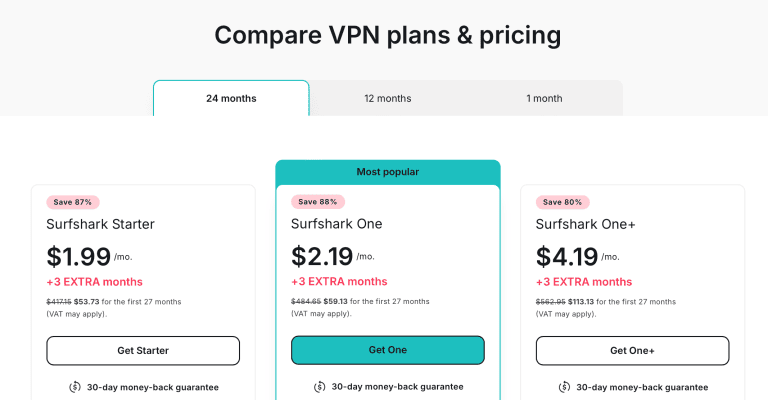
Lastly, Surfshark’s long plans cost a little less than NordVPN’s and carry a 30-day money-back guarantee. To save more, grab these exciting deals before they run out.
Pros
- 27 Mbps in my 4K test, one megabit behind NordVPN
- Unlimited simultaneous connections
- 4,500+ servers in 100 countries for unblocking ShowBox
- Two kill switches, CleanWeb, and an audited no-logs policy
- Bypasser sends only ShowBox through the VPN
- Compatible with Android 5.0 and above
Cons
- No streaming-dedicated servers
- Based in the Netherlands, a Nine Eyes country
PrivateVPN - P2P-Friendly Budget VPN for ShowBox Downloads
| Android Compatibility | Servers | Connections | Port Forwarding | Best Deal |
|---|---|---|---|---|
| Native app | 200+ | 10 | Selected servers | Show Offer |
Servers for Unblocking ShowBox

PrivateVPN earns third place for something none of the others include in the base price: it sells itself as a P2P-friendly service with unlimited bandwidth, and port forwarding is available on selected servers, which is exactly what ShowBox’s torrent-fed sources want when the app is pulling a film from peers rather than from a plain download link.
The network itself is small, 200+ servers in 63 countries, and there’s no streaming-optimized category like CyberGhost and PureVPN have. What you get instead is a static shared IP on every location, so the address ShowBox’s sources see doesn’t change from one night to the next, and selected locations add dynamic dedicated IPs over OpenVPN if you’d rather not share at all. Pick a server in a country where the app’s sources are reachable and stick with it.
Fast Speeds for 4K Streaming
I haven’t put PrivateVPN through this page’s 30 Mbps test on Android, so the fairest number I have comes from my CW TV roundup: on a 90.89 Mbps line it lost 15.03 Mbps, roughly a 17% drop and less than half a megabit behind NordVPN and Surfshark on that same line. A 4K stream needs about 25 Mbps, so that’s headroom to spare; a ShowBox download simply takes as long as the peers allow.
Protocol choice matters on Android: PrivateVPN’s Android download page lists OpenVPN, IKEv2/IPsec, L2TP, and PPTP but not WireGuard, so pick IKEv2 for speed. With only 200-odd servers, the nearest exit may also sit a country away, which explains most of that drop.
User Privacy + No Logging Policy

This is the section that matters if your ISP or a copyright troll ever looks at ShowBox traffic. PrivateVPN’s kill switch is a full-system one on Android (and in its Windows, macOS, and iOS apps): the moment the tunnel drops, every app goes dark until it reconnects, so a leaky streaming app can’t quietly keep pulling a torrent over your real IP.
AES-256 encryption and IPv6 leak protection are standard. The no-logs policy is the honest asterisk: PrivateVPN says it keeps nothing, but unlike CyberGhost’s, the policy has never been independently audited, and the company is based in Sweden, a 14-Eyes member. For a pirated-content app that’s a thinner shield than NordVPN or Surfshark give you, and it’s the main reason PrivateVPN stops at third.
Android Compatibility
There’s a native Android app on Google Play, so it runs on the same phones and tablets ShowBox does, and one account covers 10 devices at once, level with PureVPN and NordVPN and three more than CyberGhost. Surfshark’s unlimited slots are still the better deal for a whole household.

At $2.00 a month on the 36-month plan, renewing at $72 a year after the first term, it costs about what CyberGhost and PureVPN ask, and the 30-day money-back guarantee gives you a full month of ShowBox to decide. Grab the latest PrivateVPN deals here.
Pros
- P2P-friendly, with port forwarding on selected servers for ShowBox’s torrent sources
- Full-system kill switch on Android, so a dropped tunnel never leaks a download
- Static shared IPs everywhere, dynamic dedicated IPs on selected locations
- One plan covers ten devices
- 36-month plan at $2.00/mo with a 30-day refund window
Cons
- Smallest server network on this list (200+)
- No streaming-optimized servers
- No-logs policy has not been independently audited
- Not tested on this roundup’s 30 Mbps Android line
CyberGhost - Huge Server Network for Unblocking ShowBox

| Android Compatibility | Servers | Connections | Average Speeds | Best Deal |
|---|---|---|---|---|
| 5.0+ | 8800+ | Seven | 25 Mbps | Show Offer |
Servers for Unblocking ShowBox

When it comes to sheer server numbers, CyberGhost is king, and this makes unblocking ShowBox from anywhere easier. Plus, alongside PureVPN, this provider offers users streaming-optimized servers, which happens to be my favorite feature.
In other words, you don’t have to try random servers to find the best one to stream ShowBox. Simply tap on the streaming servers tab and choose any server since they’re all optimized for speed.
Again, like all the other premium VPNs, CyberGhost draws a fine line between legal and illegal streaming. Here’s a short disclaimer from its website.
If you’re using a VPN to stream events or shows that are not under any copyright rules, using a VPN for streaming is legal.
Fast Speeds for 4K Streaming

For this speed test, I decided to relive my childhood a little by streaming Home Alone, getting average speeds of 25 Mbps. This was just enough to stream 4K content without lag. I even tried downloading the movie and the waiting time wasn’t that long, although it still lagged a little behind Surfshark and NordVPN.
This wasn’t a big deal for me, though. Watching Mrs. McCallister shout KEVIN! brought back many good memories, and CyberGhost held its ground to the movie’s end without any incident. (Yes, I ended up watching the entire film, one of the perks of testing VPNs).
CyberGhost’s speeds are down to the streaming servers, and the WireGuard protocol also works very well for mobile networks. To further boost the speeds, try using the split tunneling feature to only focus the encryption on ShowBox traffic rather than forcing every app through the VPN.
For ShowBox, though, its streaming servers are tuned for the big subscription services rather than torrent peers, and PrivateVPN’s port forwarding does more for the app’s downloads.
User Privacy + No Logging Policy

CyberGhost offers military-grade encryption that works alongside a public Wi-Fi protection feature to keep external interference at bay.
With this, you can comfortably stream Showbox movies on any network without worries.
The same encryption keeps your ISP off your back if you’re on mobile data. So, it won’t try funny business like throttling your speeds.
CyberGhost also has an audited, strict no-logging policy.
Being located in Romania also helps a lot, as it’s not obligated by any law to hand over your data if you get into trouble with copyright authorities.
Android Compatibility
CyberGhost works on Android 5.0 and above. Thus, you can stream on your tablet, smartphone, or Android TV with a stable internet connection.
You can also connect up to 7 devices simultaneously on the same account, which is ideal for a small group of people looking for a secure ShowBox VPN without paying extra.

The pricing plans aren’t bad either and are almost in the same ballpark as Surfshark, meaning they’re within the affordable range of the typical ShowBox user. Plus, this is the only VPN that offers a 45-day money-back guarantee, the longest by far.
Grab these exclusive deals right now.
Pros
- Fast streaming speeds
- IP leak + public Wi-Fi protection
- 8800+ servers for unblocking ShowBox
- Compatible with Android 5.0 and above
- Streaming dedicated servers
Cons
- Slower than NordVPN
PureVPN - Lag-Free, Streaming-Dedicated Servers With Secure Wi-Fi

| Android Compatibility | Servers | Connections | Average Speeds | Best Deal |
|---|---|---|---|---|
| 5.1+ | 6000+ | 10 | 20 Mbps | Show Offer |
Servers for Unblocking ShowBox

PureVPN has the third largest server network here with 6,000+, behind CyberGhost and NordVPN. Plus, it provides streaming-dedicated servers, but not as detailed as CyberGhost’s offering. Thankfully, PureVPN unblocks ShowBox without hiccups.
You don’t have to try random servers to find the fastest; simply choose servers designated for streaming and start enjoying your shows with the best speeds possible. Most of the dedicated streaming servers are located in the US when you check the app, but there are other streaming servers from other countries too.
Fast Speeds for 4K Streaming

I tested PureVPN with an episode of Stranger Things and got 20 Mbps.
I had to switch to HD streaming because it wasn’t getting steady 4K streams. Otherwise, I kept running into buffering issues and long screen freezes, which took away the fun. HD streaming, on the other hand, was smoother.
PureVPN’s app for Android devices features five protocols, but WireGuard and IKEv2 are best optimized for speed. There’s also a split tunneling feature to choose the apps that go through the encryption tunnel.
Passing ShowBox traffic only will boost your speeds significantly.
User Privacy + No Logging Policy
There’s solid encryption that keeps external eyes out, including the government, your ISP, or hackers. PureVPN also has one of the most secure Wi-Fi protection features. Every time you try to connect to a new network, this feature scans the connection for any threats and keeps checking in the background.

As for IP and DNS leaks, a reliable kill switch shuts off the internet when there’s an interruption to your VPN connection. Without this, you’ll be like a sitting duck in the open.
Finally, PureVPN is located in the British Virgin Islands, which isn’t part of any surveillance alliances. Therefore, the strict no-logs policy is pretty effective here because the provider isn’t obligated to comply with any law forcing it to give up user data.
Android Compatibility
PureVPN works on Android 5.1 and above. Thus, it allows you to stream on ShowBox on any modern Android device, including Android TVs.
You can also connect up to 10 devices simultaneously, leaving enough slots for friends and family who need a secure streaming option.

This VPN is also one of the cheapest and offers a 31-day money-back guarantee. It sits last because it was the only VPN I ran that couldn’t hold 4K on my line, and it charges extra for the port forwarding PrivateVPN includes. Plus, you can save more by taking advantage of these amazing discounts. But these deals won’t last forever; you better hurry.
Pros
- Kill switch for IP leak protection
- 6,000+ servers for unblocking ShowBox
- Compatible with Android 5.1 and above
- Streaming dedicated servers
Cons
- Slowest VPN
How to Stream on ShowBox With a VPN?
You have your VPN and your ShowBox app. But how do you combine the two to get what you need? Here are the steps.
- Download and install Surfshark.

- Launch the VPN and connect to a server.

- Open ShowBox and start streaming.

FAQ
Can I Stream Showbox With a Free VPN?
You can stream Showbox with a free VPN, but you will experience several issues.
First, you won’t be able to unblock the streaming app in most places because free VPNs have limited server networks. You may not get 4K streams due to speed throttling and bandwidth limits since free VPNs can’t bypass regular ISP interference. Thus, it’s best to use a premium VPN like NordVPN, whose NordLynx speeds handle 4K without buffering.
Final Word
Finding the right VPN for streaming ShowBox could be the difference between an enjoyable experience and a night of frustration. I recommend NordVPN because it was the fastest in my tests, unblocks the app from almost anywhere, and pairs a kill switch and Threat Protection with an audited no-logs policy on every Android device you own.
If NordVPN meets your needs, ensure you grab your subscription using these discounts; the 30-day money-back guarantee lets you try it with ShowBox first.





