
Skype is gone: Microsoft retired it on 5 May 2025 and moved its users to Microsoft Teams Free. Most people now call on Teams, Zoom, or WhatsApp instead – and those apps run into the same problems Skype did: networks that block or throttle internet calls, and public Wi-Fi you shouldn’t trust with a work call.
NordVPN is the best VPN for that job. It averaged 20 Mbps in my tests, many times what Teams or Zoom needs for an HD video call, and its 8,400+ servers in 167+ countries put a nearby server within reach almost anywhere. For sensitive calls, Double VPN encrypts your traffic twice, obfuscated servers hide the fact you’re using a VPN at all, and Threat Protection (on the Complete and Ultra plans) stops malicious links shared in chat from doing any damage.
I’ll also explore other alternatives, including Surfshark (affordable prices), ExpressVPN (fastest speeds and obfuscation), PrivateVPN (dynamic dedicated IPs), and Private Internet Access (double kill switches).
I ran the speed and call tests on this page on Skype, before Microsoft retired it. Teams and Zoom need similar bandwidth, so the results carry over. If you make video calls from home or on the road, keep reading.
The Top 3 VPNs for Teams, Zoom, and WhatsApp Calls

Surfshark
Best for budget video calls
- Unlimited connections
- Camouflage Mode obfuscation
- 4500+ servers in 100 countries

NordVPN
Best for secure video calls
- 20 Mbps for HD video calls
- Double VPN and obfuscated servers
- Threat Protection for chat links

ExpressVPN
Best for auto-obfuscated calls
- 21 Mbps in my tests
- Automatic obfuscation
- Network Lock kill switch
Skype Is Gone: What Replaced It, and Where a VPN Helps
Microsoft retired Skype on 5 May 2025 and pointed its users to Microsoft Teams Free, where they could sign in with their Skype details and find their contacts and chats waiting. Skype data stayed available to export until January 2026.
Teams Free handles group calls and meetings of up to 60 minutes with up to 100 people, while Zoom’s free Basic plan caps meetings at 40 minutes and 100 participants. For personal calls, many people simply use WhatsApp.
A VPN doesn’t replace any of these apps. What it does is:
- Get calls through networks that block or throttle them – office, school, and hotel Wi-Fi that stops calling apps, or an internet provider that slows them down.
- Keep calls private on public Wi-Fi, where anyone on the same network could otherwise watch your traffic.
- Help in countries that block the app you use – China, for example, blocks WhatsApp and Google Meet.
Do You Want Secure and Uninterrupted Video Calls? Here Are the Best VPNs for Teams and Zoom at a Glance
Are you gearing up for an important call but unsure it’ll go through?
Here’s a glance at the VPNs you can use with Teams, Zoom, and WhatsApp.
- NordVPN – Best Overall for Secure Teams, Zoom, and WhatsApp Calls
- Surfshark – Unlimited Device Connections for Large Teams
- ExpressVPN – Fastest Speeds for Clear Video & Audio Calls
- PrivateVPN – Excellent for Private Calls
- Private Internet Access – Advanced Obfuscation for Hiding VPN Use on Calls
Video calls aren’t bandwidth intensive, but they need a stable connection.
Each VPN on this list was fast enough for VoIP calls, with extra features that make it a good fit for calling apps.
The 5 Best VPNs for Teams, Zoom, and WhatsApp Calls
In the mini-reviews, I’ll showcase how each VPN performed in speed tests and highlight the strengths that matter for secure calls. Are you ready to see which one keeps your calls going through? Here are the best 5 VPNs.
NordVPN - Best Overall for Secure Teams, Zoom, and WhatsApp Calls

| Location | Servers | Connections | Average Speeds | Best Deal |
|---|---|---|---|---|
| Panama | 8400+ | 10 | 20 Mbps | Show Offer |
Fast Connection Speeds

A video call cares less about raw bandwidth than about a connection that never wobbles, and that is where NordVPN earned the top spot. I averaged 20 Mbps over the NordLynx protocol, the second-fastest result here and a single megabit behind ExpressVPN.
That is enough to handle every bandwidth-heavy activity like clear video calls and sharing heavy files. For context, Microsoft says Teams can deliver HD video in under 1.5 Mbps and recommends 2.5 Mbps up and 4 Mbps down for meetings, while Zoom asks for 3.8 Mbps up and 3.0 Mbps down for 1080p video – so there is plenty of headroom.
With 8,400+ servers to spread users across, overcrowding is rarely an issue. Choose the closest servers to boost your performance and keep latency low.
Getting Calls Through Blocks

NordVPN has the largest server network on this list, 8,400+ servers in 167+ countries, so wherever you’re calling from, there is a nearby exit.
When I tested it on Skype, getting through blocks was quick, and NordVPN has specialty servers for the harder cases.
For example, Double VPN servers give you an extra layer of security if you’re worried your calls will be compromised.
There are also obfuscated servers for people who need to beat VPN detection on networks that block VPNs as well as calling apps.

However, NordVPN’s obfuscation was the slowest in my tests. I only averaged 4 Mbps, a considerable drop from 20 Mbps.
That is still above what Teams needs for HD video, and my test calls went through, but I noticed a slight lag and the exchange of files was slower. Treat obfuscated servers as the tool for when a VPN block is actually in your way rather than an everyday setting. If you’ll be living behind obfuscation full-time, ExpressVPN’s automatic version is faster.
Privacy & Security
I’ve been hacked on WhatsApp before, so I’m wary of every calling app. Luckily, NordVPN has my back now.
First, it has impressive Next-generation encryption that encrypts your data and keeps it from anyone who can misuse it. This includes blocking any interception of your calls or the files you share.
NordVPN also has Double VPN. This encrypts the data twice, so double the security for you.

Plus, like PIA, NordVPN has two kill switches.
The internet kill switch safeguards your device from unprotected connections if your VPN is compromised or drops.
And the App kill switch disconnects specified apps.
You won’t access the internet until the VPN connection comes back.
Additionally, NordVPN offers a dedicated IP feature at an extra cost.
An unshared IP address is handy for sensitive company calls, especially if your employer only lets approved addresses into its systems.

Finally, NordVPN allows split tunneling if you only want to protect your calling app. The speeds will be better, so ensure you have this activated when you use obfuscation. Microsoft’s own network guidance for Teams also recommends letting Teams traffic bypass a VPN where you can, because VPNs add latency and some don’t carry the UDP traffic Teams relies on.
One more thing worth switching on is Threat Protection. Chat windows are a favourite delivery route for dodgy links and attachments, and on the Complete and Ultra plans it blocks malicious domains and trackers before they load and scans downloads for malware.
Device Compatibility
You can use NordVPN on any device you make calls on.
It works with Android, iOS, macOS, Windows, and Linux.
Furthermore, NordVPN can connect up to 10 devices simultaneously, level with ExpressVPN’s Basic plan and PrivateVPN (Surfshark and PIA set no limit).
This is perfect for a small team holding secure calls remotely.
Regarding price, NordVPN costs more than Surfshark.
The good news is you can get it at reduced prices with these discounted rates.

Pros
- Gets calls through restrictive networks
- 20 Mbps for clear video calls and file sharing
- Double VPN, obfuscated servers, and two kill switches
- Threat Protection blocks malicious links shared in chat
- Dedicated IP add-on
- Works on all your devices, 10 at a time
Cons
- Slowest obfuscation in my tests (4 Mbps)
- Dedicated IP costs extra
Surfshark - Unlimited Device Connections for Large Teams

| Location | Servers | Connections | Average Speeds | Best Deal |
|---|---|---|---|---|
| The Netherlands | 4500+ | Unlimited | 19 Mbps | Show Offer |
Fast Connection Speeds

I got 19 Mbps with Surfshark. This was slower than ExpressVPN and NordVPN by a tiny margin, so the gap wasn’t wide.
It handled VoIP services like video conferencing without issues, and transferring and receiving files were flawless.
For the test, I used WireGuard and IKEv2, the two fastest protocols.
But that’s not the only reason for the speeds. Surfshark also regularly updates its servers.
Choose either protocol and use the nearest server for faster results.
Getting Calls Through Blocks

With 4,500+ servers in 100 countries, I bypassed geo-restrictions without a hassle.
However, the server network is still a good deal smaller than NordVPN’s.
Surfshark sells a dedicated IP as a paid add-on, and it also has free Static IP servers. Static IPs are shared, but you get the same IP every time you connect, unlike PIA’s Multi-Hop, which gives you a new one with each connection.
Surfshark also offers obfuscation called Camouflage Mode.
It works automatically with OpenVPN. It’s more efficient than NordVPN but still slower than ExpressVPN. With Camouflage Mode, your VPN traffic looks like ordinary traffic to networks that block VPNs.

Privacy & Security
Surfshark offers AES 256-bit encryption. All your call traffic, including video, passes through an encrypted tunnel that keeps dangers at bay. Your ISP also can’t throttle your speeds since they can’t see what you’re doing in the first place.

Meanwhile, an automatic kill switch disables the internet when your VPN connection drops while you’re on a call. Everything will go offline, including the call, but that’s better than compromising your secure channel.
This is where NordVPN, PrivateVPN, and PIA have the edge over Surfshark for their double kill switches.
This budget-friendly VPN also has a Bypasser feature (split tunneling).
You can choose what to encrypt with the VPN and what to leave out.
This was convenient for me since I have PayPal on my Android phone, and it doesn’t entertain the use of VPNs.
Device Compatibility
Surfshark works on Android, iOS, macOS, Windows, and Linux.
That covers every device you’re likely to call from.
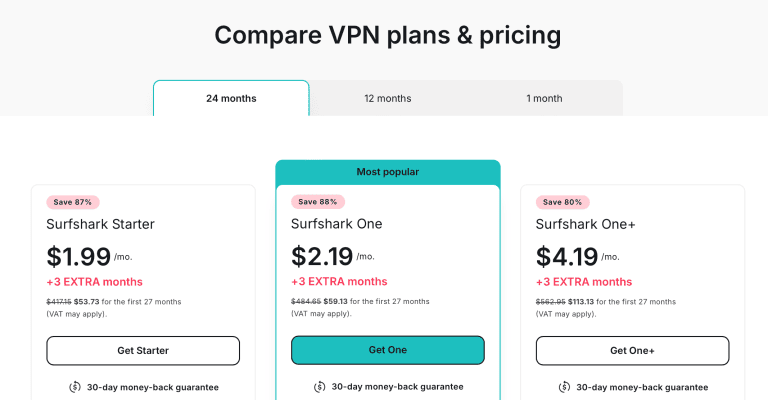
Surfshark is also one of two VPNs here (with PIA) that allow unlimited device connections.
For companies with large remote teams, one account is enough to secure all devices for calls.
That unlimited allowance and the price make Surfshark my runner-up. Two things stop it from overtaking NordVPN: the single kill switch and the smaller network. If your priority is covering twenty laptops on one login, though, it beats NordVPN on value.
Finally, Surfshark is very affordable, with incredible discounts to boot.
Pros
- Gets calls through restrictive networks
- Camouflage Mode
- Unlimited device connections
- Reliable security and privacy
- Apps for every device you call from
Cons
- 1 Mbps slower than NordVPN
- Slower obfuscation than ExpressVPN
- Single kill switch, and a dedicated IP costs extra
ExpressVPN - Fastest Speeds for Clear Video & Audio Calls

| Location | Servers | Connections | Average Test Speeds | Best Deal |
|---|---|---|---|---|
| BVI | Not published | 10 | 21 Mbps | Show Offer |
Fast Connection Speeds

ExpressVPN registered the fastest speeds in my tests, which isn’t surprising. The combination of fast protocols and optimized servers makes it fast enough to handle VoIP calls without interruptions.
I averaged 21 Mbps using random servers. I set up a group meeting with three friends and didn’t experience buffering from my end.
The video quality was also very clear, and sending and receiving files was fast.
Getting Calls Through Blocks

With servers in 113 countries, there’s a nearby server almost anywhere you call from.
On top of that, ExpressVPN has automatic obfuscation.
This matters on networks that block VPNs as well as calling apps.
Anyone who blocks calling apps knows people will switch to VPNs to get around it.
The obfuscation offered by ExpressVPN is the best way to beat VPN detection.
It’s also the only VPN here that does it automatically, and it is the single biggest reason to pick ExpressVPN over NordVPN if you’ll be calling from behind a serious firewall.
Plus, ExpressVPN’s obfuscation works across all servers and protocols, so the connection speeds are constant. Obfuscation in other VPNs, like NordVPN, comes with reduced speeds.
Privacy & Security
Calling apps aren’t beyond hackers trying to get their hands on sensitive company data. ExpressVPN has a few tricks up its sleeve for this.
First, there’s military-grade encryption which kept my calls secure. Breaching this is almost impossible, even for the best hackers. Second, there’s an automated Network Lock kill switch for disabling the internet when the VPN connection drops.

Additionally, you can take calls on public Wi-Fi if you hold a meeting while out. ExpressVPN uses encryption to stop packet sniffing programs used by hackers to read your traffic directly.
ExpressVPN also offers split tunneling, which I used to send only my calling app through the VPN rather than burdening it with traffic from all my apps.
ExpressVPN now sells a dedicated IP too: it’s included on the Pro plan and a paid add-on on Basic and Advanced. It also has an IP rotating feature that changes your IP to keep third parties out.
Device Compatibility

ExpressVPN is compatible with all the platforms you’re likely to call from.
This includes Android, iOS, macOS, Windows, and Linux.
You can connect up to 10 devices simultaneously on the Basic plan, level with NordVPN and PrivateVPN, and more than enough for a small team.

What separates it from NordVPN is what you give up for that one extra megabit: there’s no Double VPN, and the network reaches fewer countries (113 against NordVPN’s 167+). If obfuscation with no speed penalty matters more to you than either, it is worth the money. Either way, we have fantastic deals to get the VPN at a reduced price.
Pros
- Gets calls through VPN-blocking networks
- Fastest obfuscation
- Robust security and privacy
- Apps for every device you call from
Cons
- No Double VPN
- Dedicated IP costs extra below the Pro plan
PrivateVPN - Excellent for Private Calls

| Location | Servers | Connections | Average Speeds | Best Deal |
|---|---|---|---|---|
| Sweden | 200+ | Ten | 14 Mbps | Show Offer |
Fast Connection Speeds

4th on the list is PrivateVPN. I averaged 14 Mbps in the speed test, making it the 4th fastest VPN. That was enough for smooth video and audio calls and sharing files. It has fast servers that offer low latency.
PrivateVPN also purchases high-capacity internet (HQN) from the best IP transit providers and hosting companies, significantly improving speeds.
Like other alternatives, PrivateVPN has the IKEv2 protocol that offers the best speeds. I combined that with the closest server I could find, and the speeds improved.
Getting Calls Through Blocks

PrivateVPN has the smallest server network, and that was a challenge.
With only 200+ servers in 63 countries, you have fewer options for getting calls through, meaning overcrowded servers, which explains the speeds.
In better news, PrivateVPN has an obfuscation feature called StealthVPN. However, unlike ExpressVPN, it only works with OpenVPN, and the connection speeds reduce once activated.

I conducted a second speed test with StealthVPN, and the average speeds were cut to 9 Mbps. That’s still faster than Camouflage Mode and NordVPN’s obfuscated servers.
Privacy & Security
I always feel someone is listening in on my private calls.
But PrivateVPN’s state-of-the-art encryption settled my fears.
The AES 256-bit encryption kept my calls through the VPN secure. This blanket encryption also eliminates ISP monitoring that can lead to speed throttling.
PrivateVPN also secures devices on public Wi-Fi networks.
So you can take calls without worries anywhere.
Be it at the airport cafe before the flight or in the mall when doing your shopping.

There’s also an effective kill switch called Connection Guard that works alongside a second kill switch called Application Guard.
This disconnects the internet for an assigned app (similar to NordVPN’s App Kill Switch).
PrivateVPN also offers dynamic dedicated IPs on selected locations. They’re unshared while you use them, but you won’t get the same IP twice like Surfshark’s Static IP.
Every time you connect, you get a new one, so nobody can tie a string of calls to one address.
Unfortunately, for those who hate routing everything through the VPN, PrivateVPN doesn’t offer split tunneling.
Device Compatibility
PrivateVPN works with Windows, macOS, iOS, Android, and Linux (manual configuration).
Additionally, you can connect up to 10 devices simultaneously, level with ExpressVPN and NordVPN. This is enough for a small team needing to secure multiple devices for calls.

On price plans, PrivateVPN is among the cheapest.
Add these fantastic discounts, and you can have it for nearly nothing.
Pros
- Gets calls through restrictive networks
- Offers obfuscation
- Ten device connections
- Advanced security features
- Apps for Windows, macOS, iOS and Android
Cons
- Slower than NordVPN
- Only 200+ servers
- No split tunneling
Private Internet Access - Advanced Obfuscation for Hiding VPN Use on Calls
| Location | Servers | Connections | Average Speeds | Best Deal |
|---|---|---|---|---|
| United States | Unknown | Unlimited | 8 Mbps | Show Offer |
Fast Connection Speeds

I got 8 Mbps with Private Internet Access, the slowest connection so far.
I didn’t experience lags or freezes on the call, but sending large files took much longer.
And unlike other options, PIA only has two protocols: WireGuard (the fastest) and OpenVPN. I used WireGuard for the speed test.
Getting Calls Through Blocks

Private Internet Access has enough servers worldwide to get calls through quickly. These servers offer unlimited bandwidth, so your ISP can’t throttle your speeds when making important calls.
PIA has servers in all 50 US states, where none of these calling apps is restricted. That should get you through the door.
But what placed PIA on this list is its impressive obfuscation.
Unlike the other VPNs, it comes bundled with Multi-Hop.
So, on top of removing VPN traces from your traffic, your call traffic is routed through a VPN server and a proxy. This makes it faster than the typical obfuscation. However, it only works with OpenVPN, and your speeds will still reduce.

On my second speed test with obfuscation active, I got 7 Mbps, a mere 1 Mbps drop. This is faster than Surfshark and NordVPN.
Privacy & Security
PIA is a well-rounded VPN when it comes to privacy and security.
It’s the only VPN that offers 128-bit and 256-bit encryption.
You can select either from the settings.

The VPN also comes with two kill switches. A regular one disconnects the internet when the VPN connection comes down, and an Advanced kill switch blocks leaks even with the VPN deactivated.
You can also use PIA’s split-tunneling to only direct your calling app through the VPN for better performance. Furthermore, PIA has a dedicated IP feature that will cost you extra.
Device Compatibility
You can use PIA on Android, iOS, Windows, macOS, and Linux.
Like Surfshark, PIA now allows unlimited simultaneous device connections.

The VPN’s price tag is also fair. But you can get it discounted through this link.
Pros
- Gets calls through restrictive networks
- Offers obfuscation
- Unlimited device connections
- Offers dedicated IP
- Apps for every device you call from
Cons
- Slowest connection speeds
- Obfuscation is slow
Choosing a VPN for Teams, Zoom, and WhatsApp Calls: Things to Keep in Mind
Still struggling to make a decision? Here are tips to make things easier.
- Fast Connection Speeds: Calling apps rely on VoIP technology, so they need a steady connection more than raw speed. Microsoft recommends 1.5 Mbps each way for a one-to-one HD video call on Teams, and more for meetings, so the ideal VPN should leave plenty of headroom.
- Getting Past Blocks: Calls get blocked on office, school, and hotel networks, and some countries restrict calling apps – China blocks WhatsApp and Google Meet, and the UAE only allows licensed apps. A VPN with a big network and obfuscation handles network blocks, but check local law before you use one to get around a national ban.
- Privacy & Security: Video calls are often used for sensitive work conversations. Sensitive information is always at stake in these situations, so you need proper tools that prevent outside parties from intercepting communication channels. The ideal secure VPN should have military-grade encryption, kill switches, and obfuscation for networks that block VPNs.
- Device Compatibility: Teams, Zoom, and WhatsApp run on smartphones, tablets, and PCs. So go for a VPN compatible with Android, iOS, Windows, and macOS. Furthermore, consider a VPN with more slots for simultaneous device connections. This makes it easier for large teams to encrypt their calls through the same account.
How to Use a VPN for Teams or Zoom Calls?
You can protect your calls with a VPN using the following steps.
- Download, install, and log in to your NordVPN account.

- Choose a server near you and connect. If the network you’re on blocks VPNs, pick one under Specialty Servers > Obfuscated Servers instead.

- If only your calls need protecting, turn on split tunneling and send just Teams, Zoom, or WhatsApp through the VPN.
- Launch your calling app and start making secure VoIP calls.
Will a VPN Protect My Calls From Surveillance?
A VPN encrypts everything between your device and the VPN server, so your internet provider, the Wi-Fi operator, and anyone else on the network can’t see which services you’re using or tamper with the call on its way out.
Of course, no system is perfect. A VPN doesn’t change what the calling service itself can see: Teams and Zoom calls still pass through Microsoft’s and Zoom’s servers, and those companies can be asked for data by the authorities in the countries where they operate.
That said, using a reliable VPN service will at least make things significantly more difficult for anyone trying to access your data. It’s a classic “half a loaf is better than none.”
Calling From China
China has blocked WhatsApp since September 2017, and Google’s services, Meet included, are blocked too. Only government-approved VPNs are legal there, and Apple pulled VPN apps from its Chinese App Store in 2017.
So if you’re travelling to China, check the rules for the apps you rely on, and sort out your setup before you leave rather than after you land.
Where Internet Calls Are Blocked or Restricted
These are the places this guide’s readers ask about most:
- The UAE – only licensed or regulator-approved calling apps are legal. Microsoft Teams, Zoom, Google Meet, and BOTIM are on the approved list; WhatsApp and FaceTime calls aren’t, and the regulator warns that using unlicensed VoIP services may be a criminal offence.
- China – WhatsApp has been blocked since September 2017, and Google Meet is blocked along with the rest of Google.
- Oman – the regulator allowed Zoom, Google Meet, and Skype for Business in March 2020 as a pandemic measure. In April 2025, it said it doesn’t block apps like WhatsApp directly but regulates how their services are delivered, and reminded users that VPN use must follow national rules.
Outside these, the blocks you’re most likely to meet are closer to home: office, school, and hotel networks that stop calling apps. A VPN – with obfuscation if the network blocks VPNs too – gets you around those.
Calls Not Working With a VPN? Troubleshooting Guide
If you’re having trouble making calls with a VPN, try the following:
- De-activate the Kill Switch, then reactivate it again. Sometimes, the VPN takes a moment before establishing a stable connection, which makes the kill switch kick into action.
- Switch to another server. You may be using an overcrowded server.
- Change to a faster protocol like NordLynx (WireGuard) or IKEv2. Microsoft notes that some VPNs don’t carry the UDP traffic Teams relies on, and WireGuard-based protocols do.
- Use split tunneling so only your calling app goes through the VPN – or none of it, if the network isn’t blocking your calls.
- Check to see if your VPN app is updated.
FAQ
Can I Still Use Skype?
No. Microsoft retired Skype on 5 May 2025 and moved its users to Microsoft Teams Free, where they could sign in with their Skype details and find their contacts and chats waiting.
Skype data stayed available to export or delete until January 2026.
What’s the Best VPN for Teams and Zoom Calls?
NordVPN. It averaged 20 Mbps in my call tests – far more than the 1.5 Mbps Microsoft says Teams needs for HD video – and its obfuscated servers, Double VPN, and 8,400+ servers in 167+ countries cover restrictive networks.
Its split tunneling also lets you send just your calling app through the VPN, which is what Microsoft recommends for Teams where the network allows it.
Can I Use WhatsApp Calls in the UAE With a VPN?
WhatsApp and FaceTime calls aren’t on the UAE’s list of approved calling apps, and the regulator (TDRA) warns that using unlicensed VoIP services may be a criminal offence. A VPN doesn’t change that.
Use an approved app instead: Microsoft Teams, Zoom, Google Meet, and BOTIM are all on the list. A VPN is still worth having there to protect those calls on hotel and public Wi-Fi.
Can I Use WhatsApp in China?
Not normally. China has blocked WhatsApp since September 2017, and Google’s services, Meet included, are blocked too.
Only government-approved VPNs are legal in China, and Apple pulled VPN apps from its Chinese App Store in 2017, so check the rules and set everything up before you travel.
What’s the Best VPN for Calls on Android?
NordVPN is the best VPN for calls on Android. It offers high speeds over its NordLynx protocol, strong encryption, and obfuscated servers that make it difficult for networks to spot your VPN use.
Plus, the NordVPN Android app comes with split tunneling, so only your calling app has to go through the VPN, and Threat Protection on the Complete and Ultra plans blocks malicious links shared in chats.
Can a Free VPN Handle Video Calls?
A free VPN can work for calls, but data caps and slower speeds are a problem for video. Windscribe’s free plan, for example, allows 10 GB a month.
Many free VPNs also make money from your data. So, if privacy is a concern, use a paid VPN like NordVPN that doesn’t keep logs of your activity.
Can Teams or Zoom Accounts Be Hacked?
Any calling account can be hacked, usually through a reused password or a phishing link. To protect yourself, use a strong, unique password, turn on two-step verification, and use a premium VPN on public Wi-Fi.
Avoid clicking on links or opening attachments from unknown contacts. If you believe your account was compromised, change your password immediately and contact the app’s support team.
Does a VPN Slow Down Video Calls?
A VPN can slow down calls, depending on your VPN, your base internet speed, and how busy and far away the server is.
Microsoft recommends letting Teams traffic bypass a VPN where you can, because VPNs add latency. So, if the network isn’t blocking your calls, use split tunneling to keep your calling app outside the tunnel – and when you do need the VPN, a fast one keeps the delay barely noticeable.
Conclusion
Skype is gone, but the reasons you needed a VPN for it aren’t: blocked and throttled networks, and public Wi-Fi you can’t trust. For Teams, Zoom, and WhatsApp calls, NordVPN is my number one recommendation. It has the speed for clear video calls, the largest network here, and Double VPN, obfuscated servers, two kill switches, and Threat Protection for the calls you really don’t want overheard. Furthermore, it works on every device you call from.
For those looking for good alternatives, you can turn to Surfshark, ExpressVPN, PrivateVPN, and Private Internet Access.
Don’t forget to subscribe to NordVPN through this link to get amazing discounts, and keep your calls private wherever you make them.





