Yes – NordVPN sponsors MrBeast Gaming. The VPN has appeared in sponsored videos on MrBeast’s gaming channel, and the channel’s own NordVPN link still works: when we opened it on 28 September 2026, it offered a 2-year NordVPN plan plus 4 extra months.
You don’t have to scroll through the channel for the right description to pay that price. NordVPN’s own offer – up to 75% off, 3 bonus months included – put the same $94.23 on two years of Basic that day, the exact figure MrBeast Gaming’s link showed.
Level Up: NordVPN at Up to 75% Off
MrBeast Gaming’s NordVPN Offer: The Basics
The link from MrBeast Gaming’s sponsored videos lands on NordVPN’s “Exclusive deal” page. Here’s what it comes to:
- Four bonus months, as long as you choose a 2-year plan
- The link does the work – the offer loads with the page
- Regular 2-year pricing, starting at $94.23 for Basic
- A refund if you ask within 30 days – NordVPN’s money-back guarantee
Two Ways In, Compared
Both offers as they stood on 28 September 2026:
| MrBeast Gaming’s link | NordVPN’s public deal | |
|---|---|---|
| 2-year Basic | $94.23 | $94.23 |
| 2-year Complete | $121.23 | $121.23 |
| 2-year Ultra | $177.93 | $177.93 |
| Extra months | 4 | 3 |
| Where it lives | The description of a sponsored MrBeast Gaming video | The buttons on this page |
| Money-back guarantee | 30 days | 30 days |
Pick either door and the plan you choose costs the same; checkout converts it into your own currency.
Same Price, Five Steps
- Head to NordVPN’s public deal.
- Don’t switch away from the 2-year option – the discount and the bonus months live there.
- Choose Basic, Complete or Ultra (the next section helps).
- Use a card, PayPal or crypto to pay.
- Download NordVPN on your gaming PC, phone and laptop – the account allows 10 devices online together.
Which Plan for a Gaming Household?
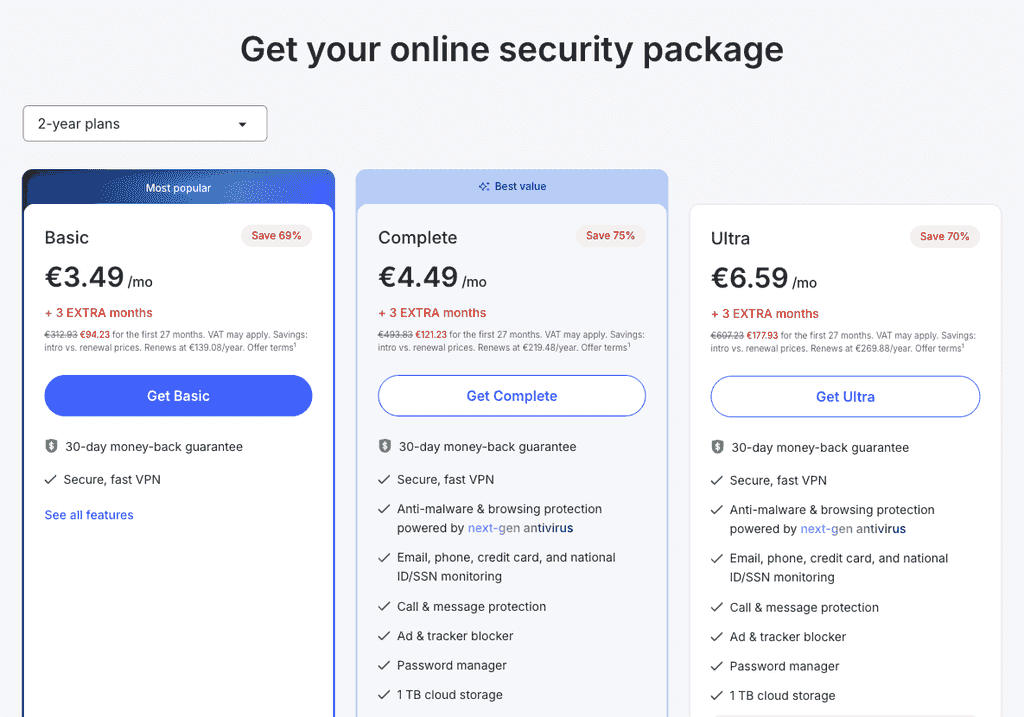
- Basic ($94.23, or $3.49 monthly). Everything a gamer needs from a VPN: the full server list, NordLynx, Meshnet and a kill switch.
- Complete ($121.23, or $4.49 monthly). Brings password management, a terabyte of cloud storage, blocking for ads and trackers, protection against many known scam and malware sites, and a warning if leaked data ever includes your email, phone number, card or ID.
- Ultra ($177.93, or $6.59 monthly). The Complete bundle with Incogni personal data removal on top.
For your own gaming PC, Basic does the job. If you’re buying for a home with younger MrBeast fans in it, Complete is the better spend, because its browsing protection sits between them and the fake giveaway pages described next.
Fake MrBeast Giveaways: How to Spot Them
MrBeast really does give away cars and cash, which is exactly why scammers borrow his face. In October 2023 a deepfake ad on TikTok showed an AI-generated MrBeast selling new iPhones for $2. MrBeast warned his followers about it on X, and TikTok pulled the ad – but the formula is easy to copy. Fakes like it tend to share four tells:
- A fee to claim the prize. Real giveaways never ask for “shipping”, “verification” or “processing” payments.
- A lookalike account. Check the handle rather than the profile picture: impersonators copy the name and slip in an extra letter or underscore.
- A page off the platform. The “claim” link leads to a site asking for card details, a login or a phone number.
- A countdown. “Only 50 left” or a ticking timer is there to stop you thinking.
On Complete and Ultra, NordVPN’s Threat Protection keeps many known scam and malware pages from ever opening, and breach monitoring warns you if your email address or card number turns up in leaked data.
Your Own Challenge Night: Meshnet for Friends
Watching MrBeast Gaming tends to end with someone saying “we should do that”. NordVPN makes the home-hosted version easier and safer:
- Host without port forwarding. Meshnet puts your PC and your friends’ machines on one private, encrypted network, so a game server running on your machine is reachable without opening ports on your router.
- Keep your home IP to yourself. In online lobbies, other players see a NordVPN address instead of your home connection, which makes you a far harder target for a DDoS attack – how NordVPN handles DDoS attacks is covered in our guide.
- Choose a server near the game host. Connect to a NordVPN location close to the game’s servers and stay on NordLynx to keep the extra delay small.
- Bring the consoles in. PlayStation and Xbox can’t install VPN apps, but a router running NordVPN covers every console on your network.
The Core Kit on Every Plan
- NordLynx, a quick WireGuard-based protocol that keeps lag down
- 8,400+ servers across 167+ countries, plenty of them near big game servers
- Meshnet for linking your devices with your friends’ machines
- Double VPN and obfuscated servers in the Specialty list, and an always-ready kill switch
- SmartDNS, so the living-room TV can join in without an app
- A no-logs claim that has been through outside audits, 10 devices per account and a money-back promise lasting 30 days
Our NordVPN review has the full speed and streaming results.
Is NordVPN Worth It for Gamers?
Yes, if you want your home IP out of game lobbies, an easy way to host friends and a VPN that doesn’t drag your connection down. For families, Complete adds a useful filter against the scam sites that trade on famous names.
Pros
- The same 2-year prices as MrBeast Gaming’s offer
- Meshnet hosts game nights without port forwarding
- Keeps your home IP out of online lobbies
- Complete blocks many scam sites aimed at young fans
Cons
- No console app – PlayStation and Xbox need a router setup
- Scam-site blocking starts at the Complete plan
Gaming on a Budget? Surfshark
Surfshark is the cheaper way to cover a house full of controllers, and it has no device limit at all. At the moment Surfshark discounts 2-year plans by up to 85% and throws in 3 extra months, so Starter costs $67.23 for 27 months, or $2.49 a month.
FAQs
Does MrBeast Gaming Have a NordVPN Code?
The MrBeast Gaming offer works through the link in the channel’s sponsored videos, which lands on NordVPN’s “Exclusive deal” page – 4 extra months switched on already. The public deal behind the buttons on this page skips codes too.
What Does NordVPN Cost via MrBeast Gaming’s Link?
Nothing extra. On 28 September 2026 the link asked $94.23 for Basic over two years – Complete was $121.23, Ultra $177.93 – figures NordVPN’s public deal matched to the cent, converted to your currency at checkout.
Is MrBeast the Only YouTuber With a NordVPN Deal?
Far from it. NordVPN sponsors creators from PewDiePie to Mark Rober, and our NordVPN YouTuber codes page rounds up more of them.
Does NordVPN Work on PS5 and Xbox?
Not directly – consoles can’t install VPN apps. A router running NordVPN covers every console in the house, and NordVPN’s SmartDNS, part of every plan, works for the streaming apps on them.
Is There a Free Trial for NordVPN?
Yes, in a way. Buy on NordVPN’s own website by card or PayPal from one of 15 countries and you start with a week’s free trial; Google Play users get 3 days, and all plans come with a 30-day money-back guarantee.
To Round Off
Whether you start from a MrBeast Gaming video or from this page, every 2-year plan costs the same. If digging through old uploads for the right description sounds like a chore, claim NordVPN’s current discount and game with a 30-day safety net.