NordVPN is the best VPN for BitTorrent, featuring P2P support on every standard server, infallible security, and SOCKS5 proxy.
If not NordVPN, try Surfshark for infinite simultaneous connections on a smaller budget, PrivateVPN for Port forwarding, ExpressVPN for the fastest torrenting speeds, and CyberGhost for P2P optimized servers.
After equipping you with the best VPN for BitTorrent, I’ll demonstrate the procedure to bind it with BitTorrent – so keep reading!
Top 3 VPNs for BitTorrent

Surfshark
Best for BitTorrent on a budget
- Unlimited simultaneous connections
- Test file done in under 90 seconds
- Kill switch and CleanWeb included

NordVPN
Best for private BitTorrent use
- P2P allowed on every standard server
- SOCKS5 proxy support
- Audited no-logs privacy

PrivateVPN
Best for port forwarding
- Port forwarding on selected servers
- Full-system kill switch
- 10 devices from $2.00 a month
Although P2P sharing of large files offers undeniable advantages, it can potentially expose you.
For example, using BitTorrent for downloading copyrighted content can drag you into a copyright lawsuit, not to mention the risk of hackers infiltrating your device.
Fortunately, a virtual private network can safeguard BitTorrent users from data theft, malware attacks, and legal disputes.
Unblock Torrenting Sites and Anonymously Download Torrents With My Top BitTorrent VPNs
Here are the top highlights of my handpicked VPN providers for BitTorrent:
- NordVPN: Top-Notch User Privacy for BitTorrent
- Surfshark: Best Budget-Friendly VPN for BitTorrent
- PrivateVPN: Port Forwarding for Better BitTorrent Seeding
- ExpressVPN: Fastest Speeds for BitTorrent
- CyberGhost: Dedicated P2P Servers for BitTorrent
I evaluated the BitTorrent download speeds of these VPNs by downloading a 258MB copyright-free file using a 100 Mbps connection. PrivateVPN is the exception, and its review below explains where its speed figure comes from.
Best VPNs for BitTorrent: Comparisons and Detailed Review
I dedicated significant effort to assessing 25+ VPN providers based on their performance with BitTorrent, server catalog, security & user privacy, availability of port forwarding, device compatibility, and other valid criteria for BitTorrent.
NordVPN - Top-Notch User Privacy for BitTorrent

| Location | Server Network | Port Forwarding | Simultaneous Connections | Average Speeds | Best Deal |
|---|---|---|---|---|---|
| Panama | 7,000+ in 150 countries | Paid Dedicated Server add-on only | 10 | 89 Mbps | Show Offer |
NordVPN is my top pick for BitTorrent because it ticks the whole checklist: torrent traffic on every standard server, an audited no-logs policy, and a SOCKS5 proxy for the client.
When I ran the 258MB test, torrenting meant picking a P2P specialty server. That category is gone from the current apps because NordVPN now allows P2P traffic on all of its standard servers: connect to whichever of its 7,000+ servers in 150 countries is closest, over NordLynx, and start the download.
My 89 Mbps came over OpenVPN on the Hong Kong P2P server, and the file took 113 seconds, almost twice ExpressVPN’s time; I haven’t re-run it since the change.
Privacy is where NordVPN pulls ahead. Its no-logs policy has been independently audited more than once, it’s based in Panama, and AES 256-bit encryption covers every connection, so a copyright troll watching the swarm sees a NordVPN address and nothing behind it.
Switch on the kill switch before you open BitTorrent. If the tunnel drops mid-download, it cuts your internet instead of letting the client carry on over your real IP address.
NordVPN’s Threat Protection dealt with the fake download buttons on torrent sites for me, and the Pro version (higher-tier plans) also scans downloaded files for malware and keeps filtering when you’re not connected.
The SOCKS5 proxy is a BitTorrent-specific bonus: paste NordVPN’s proxy details into the client’s connection settings for a fresh IP with barely any speed penalty. A proxy alone isn’t encrypted, so I run it inside the VPN tunnel rather than instead of it.
What NordVPN can’t do is forward a port. Downloads don’t need one, but if a private tracker insists on a connectable client, that’s PrivateVPN’s territory two spots down.
One subscription covers ten devices, with apps for Windows, macOS, Linux, Android, and iOS.
US dollars · checked Oct 22
Original pricing screenshot
Offers shown in this screenshot may differ from the current deal.

Interested? Take advantage of this limited-time offer and test NordVPN for BitTorrent risk-free via its 30-day money-back guarantee. Our page of verified NordVPN promo codes also covers refer-a-friend months, handy if a flatmate already uses NordVPN.
Pros
- Torrent traffic allowed on all 7,000+ standard servers in 150 countries
- NordLynx speeds on any server now that the separate P2P category is gone
- Audited no-logs policy, 256-bit encryption, a kill switch, and Threat Protection for anonymous torrenting
- SOCKS5 proxy for the BitTorrent client
- Ten simultaneous connections
Cons
- No port forwarding without the paid Dedicated Server add-on
- Not the fastest BitTorrent VPN in my test
Surfshark - Best Budget-Friendly VPN for BitTorrent

| Location | Server Network | Port Forwarding | Simultaneous Connections | Average Speeds | Best Deal |
|---|---|---|---|---|---|
| The Netherlands | 4500+ in 100 countries | Unavailable | Unlimited | 88 Mbps | Show Offer |
Surfshark takes second place by doing nearly everything NordVPN does for less money and without counting devices, which matters if the plan is shared with flatmates who all torrent.
Every one of its 4,500+ servers in 100 countries accepts P2P traffic, so there’s no category to hunt for. I pulled the test file through its UK server, and torrent sites such as The Pirate Bay and 1337x loaded without a hitch.
WireGuard is the default, but its IKEv2 connection did better on BitTorrent in my run, averaging 88 Mbps and finishing the 258MB file in under 90 seconds, well ahead of NordVPN’s time.
On the security side, you get AES 256-bit encryption, IP and DNS leak protection, a kill switch that cuts the connection if the tunnel drops mid-download, and an independently audited no-logs policy.
CleanWeb strips the ads and trackers that plaster torrent sites, and Bypasser, its split tunneling, sends only BitTorrent through the VPN on Windows and Android (macOS can exclude apps instead, and iOS only bypasses websites).
The gaps against NordVPN are small but real: no SOCKS5 proxy, no download scanning like Threat Protection Pro, and no port forwarding, which NordVPN at least sells through a paid Dedicated Server add-on.
What settles second place is unlimited simultaneous connections on one of the cheapest long-term plans on this list.
US dollars · checked Oct 13
Original pricing screenshot
Offers shown in this screenshot may differ from the current deal.

Seize these outstanding discounts to maximize savings on a Surfshark subscription with a 30-day money-back guarantee. Torrenting on a student budget? Our page of Surfshark deals covers the Student Beans code and the graduate discount too.
Pros
- 4,500+ servers in 100 countries, all of them P2P-friendly
- 88 Mbps over IKEv2, with the 258MB file done in under 90 seconds
- 256-bit encryption, leak protection, a kill switch, and an audited no-logs policy
- CleanWeb blocks torrent-site ads; Bypasser routes only BitTorrent through the VPN
- Unlimited simultaneous connections on a budget plan
Cons
- No port forwarding
- No SOCKS5 proxy for the BitTorrent client
PrivateVPN - Port Forwarding for Better BitTorrent Seeding

| Location | Server Network | Port Forwarding | Simultaneous Connections | Average Speeds | Best Deal |
|---|---|---|---|---|---|
| Sweden | 200+ in 63 countries | Available on selected locations | 10 | 83 Mbps (Omegle test) | Show Offer |
PrivateVPN is on this list for the one thing the two picks above can’t do: forward a port. With one, every peer in the swarm can reach you, which keeps a seed ratio healthy and stops a private tracker flagging you as unconnectable.
The setup lives in the desktop app: connect to a location that supports it, open Advanced View, and the dashboard shows the port PrivateVPN has assigned you, ready to paste into BitTorrent. The number can change when you reconnect, so check it before a long seeding session (my PrivateVPN port forwarding guide has the screenshots).
Its dynamic dedicated IP servers, on selected locations over OpenVPN, skip even that step: they open every port and hand you an address nobody else is using at the time. Everywhere else you get a shared static IP, and torrenting is allowed on every server (see my PrivateVPN BitTorrent guide).
The network is the smallest here, 200+ servers in 63 countries, but BitTorrent only needs one uncrowded server near you, and PrivateVPN’s never stalled on me.
I didn’t run the 258MB file through PrivateVPN for this page. The closest number I have is from my Omegle roundup, where it managed 83 Mbps down and 28 Mbps up over OpenVPN on the same 100 Mbps line, and OpenVPN is the protocol port forwarding wants anyway.
Protection is solid for the price: AES 256-bit encryption, a full-system kill switch on Windows, macOS, iOS, Android, and Linux, plus a Windows Application Guard that closes BitTorrent itself the moment the tunnel drops, and Stealth VPN for networks that block VPN connections.
The caveats: the zero-logs policy has never been independently audited, the company sits in Sweden (a 14 Eyes country), and there’s no ad blocker or split tunneling.
You can run it on ten devices, and the 36-month plan works out at $2.00 a month (billed $72 a year after that), with a 30-day money-back guarantee.
US dollars · checked Oct 23
Original pricing screenshot
Offers shown in this screenshot may differ from the current deal.

Grab this PrivateVPN deal if seeding matters as much to you as downloading.
Pros
- Port forwarding on selected locations, with the port shown in the desktop app
- Dynamic dedicated IP servers open every port automatically
- Torrenting allowed on all 200+ servers in 63 countries
- Full-system kill switch plus a Windows Application Guard for the client
- Ten devices for $2.00 a month on the 36-month plan
Cons
- Smallest network on this list
- Zero-logs claim has no independent audit, and Sweden is a 14 Eyes country
- No ad blocker or split tunneling
ExpressVPN - Fastest Speeds for BitTorrent

| Location | Server Network | Port Forwarding | Simultaneous Connections | Average Speeds | Best Deal |
|---|---|---|---|---|---|
| The British Virgin Islands | Servers in 113 countries | Available on routers | 10 | 94 Mbps | Show Offer |
ExpressVPN offers wicked-fast speeds on BitTorrent.
Through its Lightway protocol, I achieved an average download speed of 94 Mbps on the UK server, allowing the torrent file to download in less than a minute.
Thanks to its military-grade encryption, I could also freely browse torrenting websites without interference or concerns about hackers.
Furthermore, its Network Lock (kill switch) ensures your IP remains anonymous by halting the BitTorrent client whenever your VPN connection drops.
And the no-logs policy is a powerful defense against copyright trolls attempting to access your BitTorrent activity. Its TrustedServer technology also wipes your BitTorrent traffic history with every reboot.
Torrent sites are notorious for being infested with malware and viruses.
To tackle this, ExpressVPN offers a Threat Manager that blocks malicious files and sites.
One drawback is that ExpressVPN, like PrivateVPN, has no built-in ad blocker, so you’ll have to put up with the annoying ads on torrenting sites.
However, it offers port forwarding on routers, which Surfshark doesn’t offer at all and NordVPN only sells with a paid Dedicated Server add-on, though that’s a router-firmware job rather than PrivateVPN’s in-app toggle.
Moreover, its whole network, with servers in 113 countries, supports P2P traffic. Consequently, there’s no need to look for P2P servers or constantly switch servers due to overcrowding.
An ExpressVPN Basic subscription lets you download torrents on up to ten BitTorrent-supported devices, including macOS, Windows, and Android.
US dollars · checked Oct 23
Original pricing screenshot
Offers shown in this screenshot may differ from the current deal.

Price is part of the reason it sits fourth: Surfshark and PrivateVPN both cost less, and its 5 Mbps edge over NordVPN amounted to about a minute on a 258MB file. If you still want the fastest client here, these enticing discounts, backed by a 30-day money-back guarantee, soften the bill.
Pros
- Servers in 113 countries to access torrenting sites and BitTorrent
- Blazing-Fast speeds via the Lightway protocol
- Secure torrenting with 256-bit encryption, Network Lock, and Threat Manager
- Port forwarding available on routers
Cons
- Pricier than Surfshark, PrivateVPN, and CyberGhost
- No in-built ad blocker
CyberGhost - Dedicated P2P Servers for BitTorrent

| Location | Server Network | Port Forwarding | Simultaneous Connections | Average Speeds | Best Deal |
|---|---|---|---|---|---|
| Romania | 9000+ in 100 countries | Unavailable | 7 | 90 Mbps | Show Offer |
CyberGhost rounds out my list, offering P2P optimized servers as part of 9000+ of them in 100 countries. When combined with the WireGuard protocol, these servers deliver buttery-smooth torrenting speeds.
Using the Australian P2P server, I achieved an average 90 Mbps download speed, enabling me to download the torrent file in just 90 seconds.
CyberGhost also offers the convenient Smart Rules feature for Windows users to automatically establish the VPN connection when the BitTorrent app is launched.
Besides that, its robust 256-bit encryption and strict no-logs policy ensure you never receive DMCA notices while using BitTorrent.
Plus, thanks to its airtight DNS leak protection, I found no DNS leaks during my tests.
There’s also a kill switch to preserve anonymity even if the VPN connection drops while torrenting.
Like NordVPN, CyberGhost has an in-built ad blocker in all its apps to eliminate the pop-ups and ads on torrent sites.
Finally, CyberGhost allows up to seven simultaneous connections and can be used with BitTorrent on Windows, macOS, and Android.
US dollars · checked Oct 23
Original pricing screenshot
Offers shown in this screenshot may differ from the current deal.
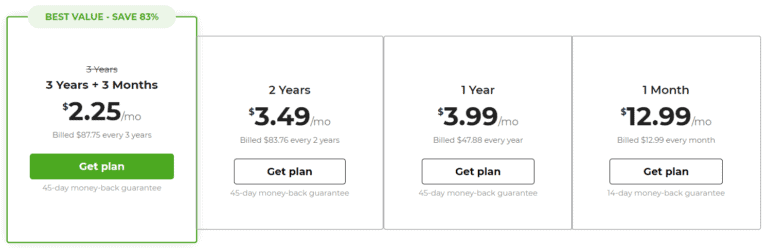
Grab CyberGhost’s current deal to save on its subscription with a benevolent 45-day money-back guarantee.
Pros
- 9000+ servers in 100 countries with P2P optimized servers for BitTorrent
- Set Smart rules to activate the VPN when BitTorrent is launched
- Avoid copyright lawsuits via AES 256-bit encryption, a kill switch, no-logs policy, and DNS leak protection
- Consistent torrenting speeds via the WireGuard protocol
Cons
- No port forwarding
- Not as fast as ExpressVPN
How to Set Up a VPN for BitTorrent?
You must install a VPN and activate its kill switch to enjoy secure torrenting via BitTorrent. Here’s a step-by-step guide to doing this using the best VPN for BitTorrent:
- Purchase a NordVPN subscription.
- Download the NordVPN app and sign in using your credentials.
- Activate its Kill switch by visiting Preferences > Kill Switch.

- Connect to a server, launch BitTorrent, and download torrent files without worrying about privacy.

How to IP Bind Your VPN to BitTorrent?
Binding your VPN to BitTorrent is the most effective method to avoid exposing your IP address. This setup ensures BitTorrent can only be utilized when the VPN tunnel is active, significantly minimizing the chances of any potential leaks.
Here’s the step-by-step guide:
- Launch the NordVPN app and connect to any location.

- Visit “What is My IP Address” and copy your VPN IP address.
- Launch the BitTorrent client, go to Options > Preferences, and select “Advanced.”

- Enter “bind” in the Filter field to locate the “net.bind_ip” option.

- Choose the “net.bind_ip” option and paste the VPN IP address you copied in the second step in the “Value” field.

- Click “Set” and then OK.
- Follow the same process for the “net.outgoing_ip” option and click “Set.”

- Click “OK” to save the changes and restart the BitTorrent app to apply newly configured settings.
How to Port Forward With VPN in BitTorrent?
If you wish to increase your download speeds in BitTorrent using Port Forwarding, follow these steps. For this demonstration, I’ll use the one VPN on my list that forwards a port from inside its app, PrivateVPN.
- Launch the PrivateVPN desktop app and connect to a location that supports port forwarding (or pick a Dedicated IP server, which opens every port).
- Click Advanced View and note the number next to “Port Forwarding” on the dashboard.
- Launch BitTorrent and navigate to Options > Preferences > Connection. Enter that number in the “Port used for incoming connections” field, then uncheck “Enable UPnP port mapping” and “Enable NAT/PMP port mapping.”

- Click Apply, then test the port on CanYouSeeMe.org while BitTorrent is running.
That’s it! Port forwarding with PrivateVPN is now active on BitTorrent, and you should see more peers connect. Re-check the port after you reconnect, as PrivateVPN may assign a new one.
FAQ
Can You Use a Free VPN With BitTorrent?
You can’t use a free VPN with BitTorrent because free VPN providers typically offer limited bandwidth and prohibit P2P activity. Most free VPNs cannot provide you with a safe and anonymous torrenting experience.
So for BitTorrent, it pays to invest in a reliable VPN like NordVPN or Surfshark, both of which provide a 30-day money-back guarantee.
Elevate Your BitTorrent Experience with a VPN!
A solid VPN can significantly improve your experience with BitTorrenting by concealing your IP address so you never fall victim to prying eyes and copyright lawsuits.
NordVPN stands out as the best VPN for BitTorrent because every standard server takes torrent traffic, its security is foolproof, and it throws in a SOCKS5 proxy.
So don’t hold back and spare no expense to try NordVPN for BitTorrent risk-free with this showstopper deal backed by a 30-day money-back guarantee.