
Yes, NordVPN works with WireGuard, in two ways. Its apps connect with NordLynx, NordVPN’s own protocol built around WireGuard, by default. And since early October 2026 you can download standard WireGuard config files from your Nord Account (NordVPN → Set up NordVPN manually → pick a server → WireGuard → Download config) for routers, Docker and devices that can’t run the app.
The second part is new. Until then NordVPN’s downloadable config files were OpenVPN-only, and manual WireGuard setups relied on unofficial scripts that pulled your private key out of NordVPN’s API. Below are both routes, what goes inside the file, and setups for Linux, routers and Gluetun, all checked against NordVPN’s help center on 22 October 2026.
Get NordVPN – 78% Off + 3 Months
NordVPN WireGuard at a Glance
| Answer | |
|---|---|
| Does NordVPN support WireGuard? | Yes: NordLynx (built on WireGuard) is the default in every NordVPN app, and manual WireGuard config files are available |
| Where to get a config file | Nord Account → NordVPN → Set up NordVPN manually → choose a server → WireGuard → Download config |
| Port | UDP 51820 |
| Servers that support it | 7,031 of the 7,195 servers in NordVPN’s public server list, in all 150 countries (22 October 2026) |
| Servers that don’t | Mainly the 97 obfuscated servers |
| What a manual file leaves out | The app’s extras: post-quantum encryption, the kill switch, real-time protection and Meshnet |
| Price | From $3.49 a month on the 2-year plan, with a 30-day money-back guarantee |
Is NordLynx the Same as WireGuard?
Almost. NordLynx is NordVPN’s technology built around WireGuard, so it has WireGuard’s speed and lean design (about 4,000 lines of code against OpenVPN’s 400,000, by NordVPN’s count) plus what NordVPN calls a custom double NAT system for added privacy. As TechRadar puts it, that extra layer means NordVPN “doesn’t need to store user identities on its servers”. Our guide to how NordLynx works goes deeper.
Inside NordVPN’s apps, NordLynx also unlocks post-quantum encryption. On 22 October 2026 NordVPN offered it on Windows, macOS, Linux, Android, iOS, tvOS and Android TV, and only over NordLynx: it switches off with OpenVPN, NordWhisper, a dedicated IP or Meshnet.
NordVPN keeps the two apart in its own help center: manual WireGuard is a setup for the official WireGuard app, while “NordVPN’s own apps use NordLynx”. In practice:
- On a phone or computer, use the app. NordLynx is already the default, and you never touch a WireGuard setting. If you’re new to the service, our overview of what NordVPN is and does covers the basics.
- On a router, NAS, Docker host or Linux server, a WireGuard file is now the fastest official option.
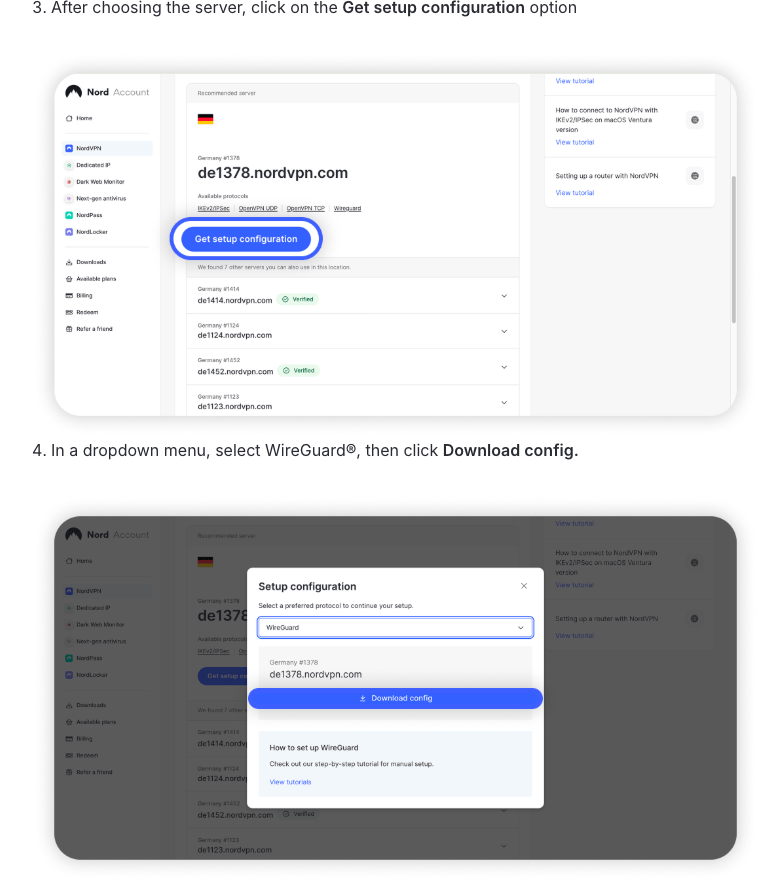
How to Download a NordVPN WireGuard Config File
You need an active NordVPN plan and access to your account’s email address, because Nord Account sends a verification code before it opens the manual setup tools. Then, following NordVPN’s help article on configuration files:
- Log in to your Nord Account and click NordVPN.
- Scroll down to Advanced settings and click Set up NordVPN manually.
- On the Server recommendation tab, take the recommended server or search for a country or server. Advanced filters change the server type.
- Where you can, pick a server with a Verified badge. NordVPN says the badge means the server “has been upgraded and is ready for use” and recommends those for manual setup.
- Click Get setup configuration (or WireGuard under Available protocols).
- Choose WireGuard in the drop-down menu and click Download config.
The file is named after its server, for example us5830.nordvpn.com_wireguard.conf. Repeat the steps for every location you want: each server gets its own file.
What’s Inside a NordVPN WireGuard Config
A WireGuard config is a short text file in the format WireGuard’s wg-quick tool reads. Whether you download it or build it yourself, a working NordVPN config needs these lines (the capitals mark where your own values go):
[Interface]
PrivateKey = YOUR_PRIVATE_KEY
Address = 10.5.0.2/32
DNS = 103.86.96.100, 103.86.99.100

[Peer]
PublicKey = SERVER_PUBLIC_KEY
AllowedIPs = 0.0.0.0/0, ::/0
Endpoint = us8660.nordvpn.com:51820
PersistentKeepalive = 25| Line | What it is |
|---|---|
| PrivateKey | Your own key, tied to your NordVPN account. Keep it secret |
| Address | 10.5.0.2 is the tunnel address NordVPN’s own Linux app uses (it’s in the app’s open-source code), and Gluetun’s default for NordVPN |
| DNS | NordVPN’s DNS servers, 103.86.96.100 and 103.86.99.100 |
| PublicKey | The server’s key, published in NordVPN’s public server list |
| AllowedIPs | 0.0.0.0/0, ::/0 sends all IPv4 and IPv6 traffic through the tunnel |
| Endpoint | The server’s hostname or IP address, plus port 51820, NordLynx’s UDP port |
| PersistentKeepalive | Optional. WireGuard’s documentation suggests 25 seconds for a device behind NAT that rarely sends traffic |
How to Build a NordVPN WireGuard Config Yourself
Before the download button existed, this was the only way, and it’s still handy for scripts. You need three things: your private key, a server, and that server’s public key.
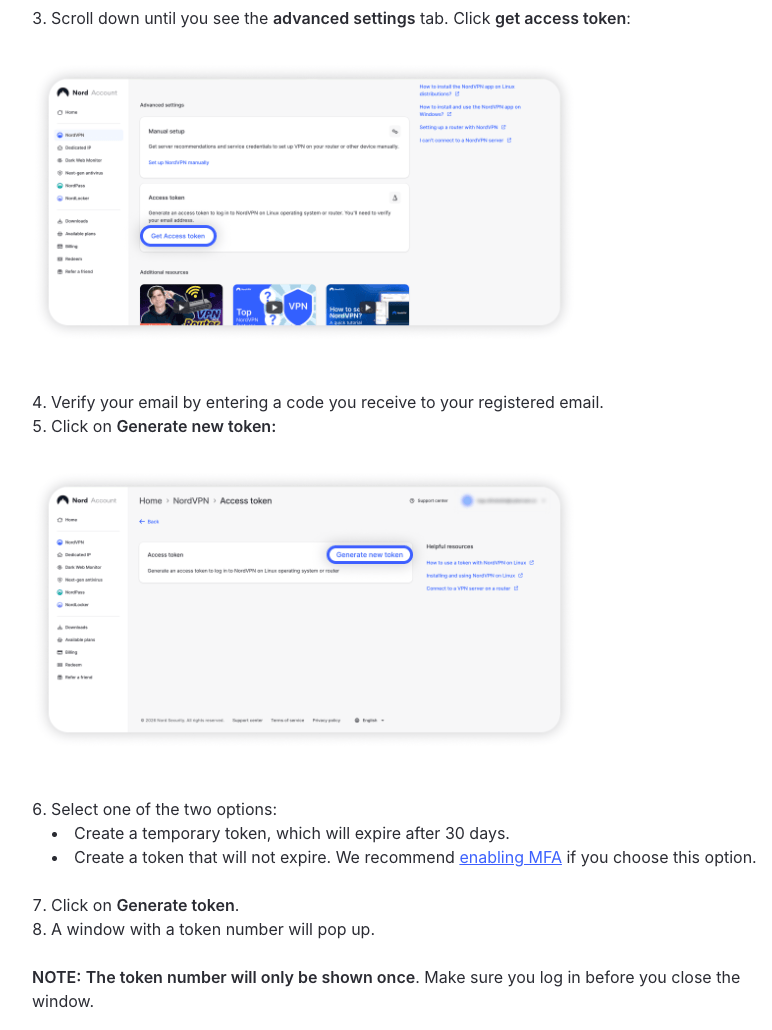
Step 1: Create a NordVPN Access Token
- In Nord Account, click NordVPN, scroll to Advanced settings and click Get access token.
- Enter the verification code NordVPN emails you.
- Click Generate new token and choose a token that expires after 30 days or one that doesn’t expire. NordVPN recommends turning on multi-factor authentication if you pick the second.
- Click Generate token and copy it straight away: NordVPN shows it only once.
The same token logs the NordVPN Linux app in on a machine without a browser (nordvpn login --token) and sets up routers that have NordVPN built in. If you lose it, or think someone else has it, click Revoke next to it in Nord Account.
Step 2: Get Your NordVPN Private Key
curl -s -u "token:YOUR_ACCESS_TOKEN" https://api.nordvpn.com/v1/users/services/credentials | jq -r .nordlynx_private_keyThis asks the credentials endpoint that NordVPN’s own open-source Linux app uses, and the reply includes a nordlynx_private_key field. Logging in with token: plus your token is the method Gluetun users documented on GitHub, most recently in July 2026. NordVPN doesn’t document this call for customers, so treat it as a workaround that could change. Keep the jq -r: the raw reply escapes slashes as \/, and a key copied with backslashes won’t work.
Step 3: Pick a Server and Its Public Key
NordVPN’s server list is public and needs no login. This command asks for the recommended WireGuard server in the US (country ID 228) and prints its hostname, IP address and public key:
curl -sg "https://api.nordvpn.com/v1/servers/recommendations?filters[servers_technologies][identifier]=wireguard_udp&filters[country_id]=228&limit=1" \
  | jq -r '.[0] | .hostname, .station, (.technologies[] | select(.identifier=="wireguard_udp") | .metadata[] | select(.name=="public_key") | .value)'
When we ran it on 22 October 2026, it returned a New York server:
us8660.nordvpn.com
62.182.99.240
0/x2PdBGfcIGr0ayFPFFjxcEEyhrlBRjR4kMcfwXJTU=
Three things worth knowing:
- The
-gswitch matters. It stops curl from reading the square brackets as a pattern; without it, the command returns nothing. - Other country IDs: 227 is the UK, 38 Canada and 81 Germany.
curl -s https://api.nordvpn.com/v1/servers/countrieslists them all. - Keys are shared by city. On 22 October 2026, every WireGuard server in a city listed the same public key: all 461 in New York had the one above. The Endpoint line, not the key, decides which server you reach.
Step 4: Fill In the Template
Put your private key, the server’s public key and its hostname into the template in the previous section, and save it with a short name such as nordvpn-us.conf. That gives you the same kind of file Nord Account now hands out.
How to Use NordVPN WireGuard on Linux
NordVPN’s Linux WireGuard guide uses WireGuard’s standard wg-quick tool:
-
Install WireGuard’s tools:
sudo apt install wireguardon Ubuntu and Debian,sudo dnf install wireguard-toolson Fedora, orsudo pacman -S wireguard-toolson Arch. -
Move the file into place under a short name, and make it readable by root only (
wg-quickwarns if other users can read it):sudo mv ~/Downloads/us5830.nordvpn.com_wireguard.conf /etc/wireguard/nordvpn-us.conf sudo chmod 600 /etc/wireguard/nordvpn-us.conf -
Connect with
sudo wg-quick up nordvpn-us. -
Check it with
sudo wg show: a recent handshake and growing transfer numbers mean the tunnel works. -
Disconnect with
sudo wg-quick down nordvpn-us. To connect at every boot, runsudo systemctl enable --now wg-quick@nordvpn-us.
wg-quick has no kill switch of its own. WireGuard’s documentation suggests one: add these two lines under [Interface] and nothing leaves your machine outside the tunnel (add matching ip6tables lines if you use IPv6).
PostUp = iptables -I OUTPUT ! -o %i -m mark ! --mark $(wg show %i fwmark) -m addrtype ! --dst-type LOCAL -j REJECT
PreDown = iptables -D OUTPUT ! -o %i -m mark ! --mark $(wg show %i fwmark) -m addrtype ! --dst-type LOCAL -j REJECT
If wg-quick stops with a resolvconf error, install the package that provides the resolvconf command on your distro, or delete the DNS line.
For a desktop or laptop, the app is still the easier choice: it has NordLynx with post-quantum encryption, a kill switch and automatic server switching built in. Our NordVPN Linux guide walks through it.
How to Use NordVPN WireGuard on a Router
Routers gain the most. Until October, manual router setups were limited to OpenVPN and IKEv2, and in TechRadar’s router tests, reported on 14 October 2026, NordVPN reached 950+ Mbps over NordLynx but peaked at 173 Mbps over OpenVPN. A router also takes up only one of NordVPN’s 10 device slots, however many gadgets sit behind it.
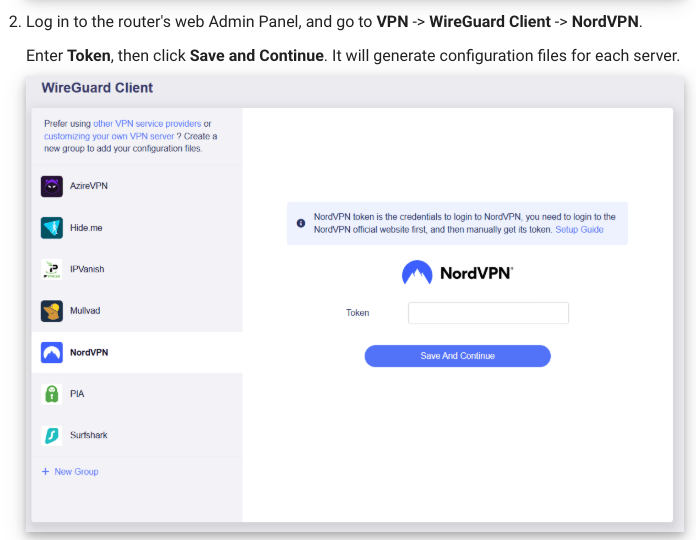
- GL.iNet (firmware 4.7 and later). NordVPN is built into the WireGuard client: go to VPN → WireGuard Client → NordVPN, paste an access token, click Save and Continue, pick servers and connect. If the token route fails, upload a downloaded file through the manual option instead. GL.iNet’s WireGuard guide covers both.
- ASUS (firmware newer than 3.0.0.4.388.23000). Go to VPN → VPN Fusion → Add profile, click Upload Config, then assign devices and apply, as ASUS’s FAQ describes.
- UniFi gateways. In the VPN section of the UniFi Network app, create a WireGuard VPN client by uploading the file, then add a Traffic Route. Ubiquiti notes that devices don’t use the VPN until you do.
- OpenWrt 24.10 and 25.12. NordVPN’s own NordVPN Lite package connects with an access token instead of a file.
- No WireGuard client at all? FlashRouters’ Privacy Hero 2, the router NordVPN recommends, has NordLynx built in. Our NordVPN router guide covers OpenVPN setups for other models, and pfSense has its own walkthrough.
NordVPN WireGuard With Docker and Gluetun
Gluetun, a popular VPN client container, supports NordVPN over WireGuard and needs just one secret: your private key. Its NordVPN setup page says to take it from the manual setup section of Nord Account, so copy the PrivateKey value from a file you downloaded there (or use the API call above). Gluetun fills in the 10.5.0.2 address and chooses the server and its public key itself.
services:
  gluetun:
    image: qmcgaw/gluetun
    container_name: gluetun
    cap_add:
      - NET_ADMIN
    devices:
      - /dev/net/tun:/dev/net/tun
    environment:
      - VPN_SERVICE_PROVIDER=nordvpn
      - VPN_TYPE=wireguard
      - WIREGUARD_PRIVATE_KEY=YOUR_PRIVATE_KEY
      - SERVER_COUNTRIES=United States
    restart: unless-stopped
Start it with docker compose up -d, then check the exit address with docker exec gluetun wget -qO- https://ipinfo.io/ip: it should show a NordVPN server, not your own IP. To send another container through the tunnel, give it network_mode: "service:gluetun" and publish its ports on the Gluetun service instead, as NordVPN’s Gluetun article shows for OpenVPN.
SERVER_CITIES and SERVER_HOSTNAMES narrow the choice further, though Gluetun warns that pinning one hostname breaks the container if that server disappears. NordVPN also documents a Docker image that runs its own app and logs in with an access token.
NordLynx vs WireGuard vs OpenVPN vs IKEv2: Which NordVPN Protocol?
Use NordLynx in the app, a WireGuard file where the app can’t go, NordWhisper on networks that block VPNs, and OpenVPN or IKEv2 only for hardware that supports nothing newer.
| Protocol | Where you get it | Best for |
|---|---|---|
| NordLynx | Every NordVPN app (the default) | Everyday use: NordVPN’s fastest option, with post-quantum encryption available |
| WireGuard (manual) | Config files from Nord Account | Routers, Docker, a NAS or Linux servers |
| NordWhisper | NordVPN’s Windows, macOS, Linux, Android and iOS apps | Office, campus, hotel and airport Wi-Fi that filters VPNs |
| OpenVPN UDP or TCP | NordVPN’s apps, plus .ovpn files for manual setup | Older routers; TCP on port 443 when UDP is blocked |
| IKEv2/IPsec | Manual setup on Windows, macOS, iOS, Android, Linux and routers such as MikroTik and DrayTek | Built-in system VPN clients, and NordVPN’s suggested fallback for connecting from China |
Two of these have their own guides: the difference between NordVPN and NordVPN IKE, and how NordVPN’s obfuscated servers hide VPN traffic. For OpenVPN files, see how to download NordVPN config files.
Get NordVPN – 78% Off + 3 Months
NordVPN WireGuard Not Working? Common Fixes
- Two devices on one server. NordVPN lets only one device per protocol use a given server at a time, so give each device a file for a different server.
- It worked yesterday. Servers go offline for maintenance. NordVPN’s Linux app, for one, now switches you to another server automatically when that happens; a file can’t. Download a fresh file for another server, ideally one with the Verified badge.
- It won’t connect on office, campus or hotel Wi-Fi. Networks that filter VPNs can block WireGuard outright. NordVPN built NordWhisper for exactly that, so use the app there.
FAQ
Does NordVPN Support WireGuard?
Yes. NordVPN’s apps use NordLynx, its own protocol built around WireGuard, by default. Since early October 2026, Nord Account also lets you download standard WireGuard config files for routers, Linux servers, Docker and other devices that can’t run the NordVPN app.
How Do I Get a WireGuard Private Key From NordVPN?
The easiest way is to download a WireGuard config file from Nord Account (NordVPN, then Set up NordVPN manually, pick a server, WireGuard, Download config): the key is on its PrivateKey line. For scripts, create an access token in Nord Account and request the nordlynx_private_key field from NordVPN’s credentials API. Either way, keep the key private.
Where Do I Find My NordVPN Access Token?
Log in to Nord Account, click NordVPN, scroll to Advanced settings and click Get access token. Enter the code NordVPN emails you, click Generate new token, choose a token that expires after 30 days or one that doesn’t expire, and copy it right away, because NordVPN shows it only once.
What Are NordVPN Service Credentials?
A separate username and password for manual OpenVPN and IKEv2 connections and for third-party apps and routers. You’ll find them in Nord Account under Set up NordVPN manually, on the Service credentials tab. They aren’t your Nord Account email and password, and a WireGuard file doesn’t ask for them.
Is NordLynx Better Than Plain WireGuard?
For everyday use, yes. NordLynx is WireGuard plus NordVPN’s double NAT privacy system, and inside the NordVPN apps it comes with post-quantum encryption, a kill switch and automatic server selection. Plain WireGuard files are for routers, Docker and other devices that can’t run the app.
Which VPNs Offer WireGuard?
Most big VPNs do. NordVPN uses it as NordLynx and now offers WireGuard files, Surfshark publishes manual WireGuard guides for Linux, Windows, macOS and routers, PrivateVPN has WireGuard setup guides for Ubuntu, Fedora and Manjaro, and Private Internet Access lists WireGuard among its protocols.
The Bottom Line
NordVPN’s WireGuard is NordLynx inside its apps, and since October 2026 also plain WireGuard files you can download from Nord Account. Use the app wherever it runs; take a file for routers, Docker and Linux servers, keep it private, and give each device its own server. Check NordVPN’s current prices for what each plan adds, or read our full NordVPN review.
Get NordVPN’s 2-year deal – up to 78% off with 3 extra months in its Black Friday sale, and 30 days to change your mind.
More NordVPN guides
 NordVPN Price & Plans 2026: How Much Does It Cost?
 NordVPN Black Friday 2026: 78% Off + 3 Months, Live Now
 How to Buy & Connect to NordVPN Dedicated IP Address?
 NordVPN Servers List: Locations, States & Types (2026)
 NordVPN Threat Protection Pro: Ad Blocker, Antivirus and How Good It Is (2026)
 How to Whitelist an IP Address on NordVPN? (2026)

