
 4.1 / 5
- Faster than NordVPN
- Allows seeding & port forwarding
- Has a free option
- 20,000+ servers in 140+ countries
 4.7 / 5
- Better security features than ProtonVPN
- Has a 24/7 Live Chat
- Better for streaming
- 7,000+ servers in 150 countries
ProtonVPN and NordVPN are two popular VPN providers offering awesome security features, speed, and good value. But is one of them better than the other?
That depends entirely on what you’re looking for in a VPN. But whether it’s speed, privacy, streaming, or many simultaneous connections, both providers have a lot to offer.
So, which one should you choose?
Read this comparison of ProtonVPN vs. NordVPN to find out!
I went through their policies and tested their features side-by-side to help you decide! Or grab the current ProtonVPN or NordVPN deals to test them for yourself!
Here’s a sneak preview of everything I cover in my ProtonVPN vs. NordVPN comparison:
| ProtonVPN | NordVPN | |
|---|---|---|
| Jurisdiction | Switzerland | Panama |
| Servers | 20,000+ servers in 140+ countries | 7,000+ servers in 150 countries |
| Speed | 5.5% average drop (OpenVPN UDP) | 11% average drop (NordLynx) |
| Logging Policy | No logs, audited | No logs, audited |
| VPN Protocols | WireGuard, OpenVPN, IKEv2, and Stealth | WireGuard (NordLynx), NordWhisper, and OpenVPN (IKEv2/IPsec by manual setup) |
| Streaming | Netflix, BBC iPlayer, foreign TV channels on 26 server locations | Netflix, BBC iPlayer, foreign TV channels on all servers |
| Gaming | Minor lag on mobile, no lags on Desktop | No lag on mobile or Desktop |
| P2P | P2P-optimized servers, Port Forwarding, and seeding support | P2P on all standard servers |
| Devices | Windows, macOS, iOS, Android, Linux, Chrome devices, Firestick, routers | Windows, macOS, iOS, Android, Linux, Chrome devices, Firestick, gaming consoles, Raspberry Pi, Edge, routers |
| Simultaneous Connections | 10 | 10 |
| Discount | ProtonVPN Discount | NordVPN Discount |
GET DISCOUNT NOW
ProtonVPN vs. NordVPN Overview
NordVPN may fall slightly behind ProtonVPN in our speed and torrenting tests, but it makes up for that in almost every other department. While NordVPN lacks a free option, its premium plans cost the same per month as ProtonVPN’s on a 2-year deal.
Both now offer 24/7 live chat, but NordVPN’s is open to anyone, while Proton’s is only for paying customers.
But that’s just an overview. Dig into our tests and findings to see how they go head-to-head.
Privacy and Jurisdiction
| ProtonVPN | NordVPN | |
|---|---|---|
| Privacy-friendly jurisdiction? | Yes, Switzerland | Yes, Panama |
| Does it store traffic logs? | No | No |
| Does it store IP addresses? | No | No |
| Does it store personal information? | Yes, limited and necessary only | Yes, limited and necessary only |
| Is it audited? | Yes | Yes |
A no-logging policy verified by an independent third-party audit, and operating from a country with no mandatory data retention laws, guarantees that a VPN doesn’t keep your logs and keeps your data private.
ProtonVPN Jurisdiction, Logging Policy & Audits
ProtonVPN operates out of Switzerland. The country isn’t part of the 5/9/14 Eyes alliance and has robust privacy and data protection laws – they’re even included in the Swiss constitution!
Swiss companies aren’t required to store user logs, and ProtonVPN’s privacy policy specifies that it doesn’t.

However, it collects data needed to provide services properly, such as:
- Email and username
- Data you share with customer service
- Payment data (name and last four digits of your card)
To check that ProtonVPN’s no-logging policy was true to its word, I read through the report of its external audit conducted by Securitum, and verified the no-logging claims as accurate.

However, according to this report, ProtonVPN’s free version monitors the users’ BitTorrent traffic to block it, although it doesn’t log the traffic.
That’s because ProtonVPN’s free version doesn’t support torrenting, so it’s done for compliance purposes.

NordVPN Jurisdiction, Logging Policy & Audits
NordVPN works out of Panama, which has no data retention laws and, like ProtonVPN’s native Switzerland, isn’t a party to the 5/9/14 eyes alliance.
Moreover, its laws don’t require companies to store user logs.
According to NordVPN’s privacy policy, it doesn’t store user logs, just like ProtonVPN.

However, it does keep some customer information, like ProtonVPN, such as users’ email, payment data, and country details.

NordVPN’s no-logs policy has passed six independent assessments: by PwC in 2018 and 2020, and by Deloitte in 2022, 2023, 2024 and 2025, the latest published in February 2026.
I read that report, too, and was pleased to see that it confirmed the no-logs claim as accurate, like with ProtonVPN.

Based on all that, both providers are equally privacy-friendly!
ProtonVPN and NordVPN don’t log user data, have their headquarters outside the 14 Eyes surveillance nations, and have audited their no-logging policies.
Security and Encryption
| ProtonVPN | NordVPN | |
|---|---|---|
| Protocols? | OpenVPN, WireGuard, IKEv2, Stealth | NordLynx, NordWhisper, OpenVPN (IKEv2 by manual setup) |
| IP Leak Protection? | Yes | Yes |
| DNS Leak Protection? | Yes | Yes |
| Encryption? | 256-bit | 256-bit |
| RAM-only Servers? | No | Yes |
| Security Features? | Kill switch, Ad blocker, Multihop, Obfuscation (Android only) | Customizable kill switch, Ad blocker, Multihop, Obfuscation |
From top-level encryption and secure protocols to built-in leak protection and kill switches, neither provider cuts corners.
ProtonVPN Protocols
ProtonVPN offers a range of secure protocols to choose from:
- WireGuard
- OpenVPN UDP
- OpenVPN TCP
- IKEv2 (mobile devices)
- Stealth (Android devices)
WireGuard, OpenVPN, and Stealth are the most secure. The last is ProtonVPN’s custom-made protocol to bypass VPN traffic blocks and firewalls.
It’s very secure but slower than other supported protocols.
OpenVPN UDP was the fastest one, as you’ll see in my speed tests!
NordVPN Protocols
Like ProtonVPN, NordVPN offers several secure protocols:
- OpenVPN TCP
- OpenVPN UDP
- NordWhisper (for networks that block VPNs)
- NordLynx
IKEv2 is no longer in NordVPN’s apps, mobile ones included; NordVPN now documents it only as a manual setup.
So, NordVPN also has a custom-made protocol (NordLynx) based on WireGuard, with a double NAT system added so no user’s IP address has to be stored.
Common & Different Security Features
ProtonVPN and NordVPN offer AES-256-bit encryption – the best encryption in the industry!
They also provide kill switches. NordVPN’s kill switches can be configured only to quit selected apps when disconnected from the VPN or entirely cut off the Internet access. ProtonVPN doesn’t offer that kind of customization, which is a minor negative point for me.

Also, both providers offer an adblocker feature. With NordVPN, it’s called Threat Protection, and you can customize it to block ads, trackers, and malware.

ProtonVPN’s ad blocker feature, called NetShield, is available on ProtonVPN’s paid plans. Like NordVPN’s, it can be customized to block malware, ads, and trackers.

NordVPN also offers a multihop feature called DoubleVPN, encrypting your traffic twice for extra protection.

ProtonVPN provides a similar multihop feature through its “Secure Core” servers. These servers first route your traffic through one of its extra-secure servers in Switzerland, Iceland or Sweden and then to your destination server.

Finally, both VPN providers offer an obfuscation feature, which hides the fact that you’re using a VPN from your ISP. With NordVPN, this obfuscation feature can be enabled by going to “Obfuscated servers” and choosing a server from 16 available locations.

ProtonVPN, on the other hand, offers obfuscation through its Stealth VPN protocol, available on its free and paid plans.
Stealth arrived on Android, iOS and macOS in 2022 and on Windows in 2024 (Linux has it in beta), so, like NordVPN’s obfuscated servers, it now covers every major platform.

RAM-Only vs. Disk-Based Servers
One other thing that distinguishes NordVPN from ProtonVPN is that NordVPN’s servers are diskless and RAM-only. Any recorded data is erased as soon as the server reboots, offering an extra layer of protection.
ProtonVPN’s servers are disk-based. Although they’re fully encrypted, the server can still be stolen or seized. With the RAM-only servers, if that happens, there’s no danger of your data being compromised.
Security Tests
I conducted an IP Leak test, a DNS Leak test, a kill switch, and an encryption test on both providers. I used IPLeak.net to run the IP leak test on ProtonVPN’s Greek server, which passed.

Furthermore, I used DNSLeakTest.com to test ProtonVPN for DNS leaks by connecting to its Spanish server. As you can see, there are no leaks there either.

I also used Wireshark to test ProtonVPN’s encryption when connected to its Belgian server via the WireGuard protocol.

Since I got this gibberish from my test, I’m satisfied that ProtonVPN’s encryption works fine!
Like with ProtonVPN, I tested NordVPN for IP Leaks, DNS Leaks, and encryption.
And just like with ProtonVPN, there weren’t any leaks whatsoever.


Like with ProtonVPN, I used Wireshark to test NordVPN’s encryption.
Here’s a screenshot confirming that it works as intended:

Considering its RAM-only servers and customizable kill switch, NordVPN offers better security, although Proton’s Stealth now matches its obfuscation on every major platform.
Countries and Servers
| ProtonVPN | NordVPN | |
|---|---|---|
| Countries and Servers | 20,000+ in 140+ countries | 7,000+ in 150 countries |
| Server Locations | Europe, APAC, Russia, The Americas, Africa, and the Middle East, Australia. | Europe, APAC, The Americas, Australia, Africa, the Middle East |
| Server Types | P2P, Streaming, Obfuscated, Multihop, TOR | Obfuscated, Multihop, Dedicated IP, Onion Over VPN (P2P on all standard servers) |
ProtonVPN offers over 20,000 servers in 140+ countries on its paid plans.
But its free plan only connects you to servers in 10 randomly selected countries.

These servers are all owned by ProtonVPN, mitigating the risks of being compromised by a third party.

NordVPN, meanwhile, offers 7,000+ servers in 150 countries!

However, unlike ProtonVPN, NordVPN owns some servers and rents others, which can be a drawback. The more parties involved in managing a network, the higher the risk of these servers being compromised.

As I discussed above, it’s not a significant issue since NordVPN’s servers are RAM-only.
As you can see, ProtonVPN now has more servers overall, while NordVPN covers more countries – though ProtonVPN’s list includes Russia.
NordVPN also offers specialty servers, such as:
- Obfuscated servers in 15 countries (its server list on 1 October 2026).
- Double VPN servers in 10 countries.
- Dedicated IP servers in 31 countries.
- Onion over VPN (Tor) servers in Switzerland, Sweden and the Netherlands.
- P2P on every standard server (the separate P2P category is gone).
Likewise, ProtonVPN provides different types of servers, including Secure Core servers. In addition, you can choose from:
- P2P-optimized servers in many countries.
- Streaming-optimized servers.
- Smart Routing locations, which give you an IP address in one country from a server in another.
- Tor over VPN servers.
Unlike NordVPN, however, ProtonVPN doesn’t offer Dedicated IP servers.

Both providers cover plenty of countries and offer specialty servers. ProtonVPN now runs far more servers, while NordVPN reaches more countries, so neither pulls ahead here.
Speed and Performance
| ProtonVPN | NordVPN | |
|---|---|---|
| Fastest Protocol? | OpenVPN UDP | NordLynx |
| Smallest Drop for UK Server | 3% (OpenVPN UDP) | 4% (NordLynx and OpenVPN UDP) |
| Smallest Drop for Swiss Server | 2.5% (IKEv2) | 2% (OpenVPN UDP) |
| Smallest Drop for US Server | Increase of 3% (OpenVPN UDP) | 1% (NordLynx and OpenVPN UDP) |
A fast Internet connection is a must, especially when you’re streaming, gaming or torrenting. Thankfully, both ProtonVPN and NordVPN are fast.
This was my benchmark for the speed testing for the two providers:

ProtonVPN Speed Test
I tested ProtonVPN’s speed across three servers and four protocols using Speedtest.net, with its VPN Accelerator feature activated. These are my results:
| Protocol | Server | Ping, ms | Download, Mbps | Upload, Mbps | Download speed change |
|---|---|---|---|---|---|
| WireGuard | UK (Manchester) | 15 | 66.4 | 19.5 | -5% |
| Switzerland (Zurich) | 27 | 59 | 19.2 | -15% | |
| USA (New York) | 81 | 67.6 | 19.6 | -3% | |
| OpenVPN UDP | UK (Manchester) | 13 | 67.5 | 19.7 | -3% |
| Switzerland (Zurich) | 29 | 67 | 20.4 | -4% | |
| USA (Dallas) | 109 | 71.2 | 19.8 | +3% | |
| IKEv2 | UK (Manchester) | 17 | 67.2 | 19.1 | -3.5% |
| Switzerland (Zurich) | 27 | 67.9 | 19.4 | -2.5% | |
| USA (Chicago) | 100 | 65.5 | 19.4 | -6% | |
| Stealth | UK (Manchester) | 14 | 60.2 | 20 | -14% |
| Switzerland (Zurich) | 26 | 63 | 20 | -9.5% | |
| USA (Atlanta) | 101 | 64.6 | 19.3 | -7% |
NordVPN Speed Test
NordVPN was slower than ProtonVPN across some protocols, but the difference was negligible. I also tested it across three servers on four protocols.
Here are my results:
| Protocol | Server | Ping, ms | Download, Mbps | Upload, Mbps | Download speed change |
|---|---|---|---|---|---|
| NordLynx | UK (London) | 9 | 67 | 21.1 | -4% |
| Switzerland (Zurich) | 26 | 67.4 | 19.4 | -3% | |
| USA (New York) | 79 | 68.9 | 19.4 | -1% | |
| OpenVPN UDP | UK (Manchester) | 15 | 67 | 19.9 | -4% |
| Switzerland (Zurich) | 27 | 68.4 | 20 | -2% | |
| USA (Dallas) | 113 | 69.2 | 20.1 | -1% | |
| OpenVPN TCP | UK (London) | 28 | 64.6 | 20.6 | -8% |
| Switzerland (Zurich) | 56 | 65.8 | 21.2 | -5.5% | |
| USA (Denver) | 190 | 11.7 | 13.3 | -83% | |
| IKEv2 | UK (London) | 12 | 65.5 | 18.6 | -6% |
| Switzerland (Zurich) | 25 | 63.3 | 19 | -9% | |
| USA (Atlanta) | 100 | 66.3 | 19.5 | -5% |
NordLynx had the smallest speed drop, and OpenVPN TCP had the largest.
The average NordVPN speed drop was 11%.
EXPERT SUMMARYProtonVPN and NordVPN offered incredible speeds, but ProtonVPN’s OpenVPN UDP protocol was the fastest.

Gaming
| ProtonVPN | NordVPN | |
|---|---|---|
| Latency Ping (mobile, PC)? | 27 ms, 42 ms | 80-111 ms, 19 ms |
| Protocol? | WireGuard | NordLynx |
| Tested Games? | Devil Book, March of Empires | Devil Book, March of Empires |
| Lags? | Only when downloading files, not during gaming | None |
| DDoS Protection? | Yes | Yes, on all plans |
Avid gamers want a fast VPN that can also prevent DDoS attacks and doesn’t allow UX lags. I tested ProtonVPN and NordVPN with two games to see if they could do that.
ProtonVPN Gaming Latency Test
To get an idea of how ProtonVPN performs with games, I played “March of Empires” on my Desktop and “Devil Book” on my mobile. I used a Swiss ProtonVPN server with the WireGuard protocol enabled on both devices.
When playing “Devil Book,” I experienced some delay while downloading the game’s files over ProtonVPN. Still, once it got going, my experience was seamless.

I didn’t experience any lags with my Desktop game “March of Empires” with ProtonVPN either.

To understand the performance better, I conducted latency tests on both devices using Speedtest.net. The baseline on my Desktop was 11 ms and 17 ms on mobile.
Once I connected to the ProtonVPN Swiss server, my mobile latency jumped to 27 ms. So, the impact on my gaming UX was minimal.
The desktop latency rose to 42 ms, but it didn’t impact my gaming experience either.
NordVPN Gaming Latency Test
Same as with ProtonVPN, I tested NordVPN on “Devil Book” and “March of Empires,” using the NordLynx protocol on a Dutch server in both cases.
With “Devil Book,” I experienced no lag whatsoever with NordVPN! Moreover, the game helpfully shows the latency, which ranged from 80 to 111 ms as I played, compared to my baseline of 17 ms.

The same was when I played “March of Empires” with NordVPN – the VPN connection had no impact on my UX!

As you can see, both ProtonVPN and NordVPN are suitable for gaming.
However, since ProtonVPN caused slower file downloads, NordVPN is the winner for gaming.
DDoS Protection
I didn’t experience any DDoS attacks when playing my games and connected to NordVPN for several days.

Moreover, a NordVPN representative confirmed that DDoS protection is included in the NordVPN packages.
Since ProtonVPN didn’t have a live chat when I ran this test, I couldn’t get the same confirmation from its representatives until two days later. Luckily, they did confirm that the DDoS protection was included in ProtonVPN’s packages, as you’ll see in the Customer Service tests section.
EXPERT SUMMARYNordVPN ensures no lag and offers DDoS protection. ProtonVPN also offers robust DDoS protection on all servers but produces minimal lag while gaming.
Torrenting
| ProtonVPN | NordVPN | |
|---|---|---|
| P2P servers? | Yes | Yes (all standard servers) |
| Average download speed? | 1.4 MiB/S | 1.6 MiB/S |
| Max download speed? | 2.6 MiB/S | 3.9 MiB/S |
| Shortest download time? | 31 minutes | 32 minutes |
| Port Forwarding? | Yes | Only with the paid Dedicated Server add-on |
| Seeding? | Yes | No |
If you engage in P2P file-sharing or torrenting, you need a fast VPN that can conceal your IP address from your peers and ensure your downloads are kept private from your ISP/copyright trolls.
ProtonVPN for Torrenting
ProtonVPN offers an optimized torrenting experience on its P2P servers. However, you can still torrent over other ProtonVPN servers, much like NordVPN, which now allows P2P on all of its standard servers.
ProtonVPN also allows seeding, thanks to its port forwarding.
You can set this up directly in the Desktop app and use it if all torrenting servers are overloaded, under maintenance, or you just want a boost in torrent download/upload speeds.

I tested ProtonVPN with uTorrent across three servers – the UK, Sweden, and the USA – using a 3.9 GB-sized copyright-free file. Here are my test results:
| Server | Average download speeds | Maximum download speeds | Download completion time |
|---|---|---|---|
| UK - London | 1.4 MiB/S | 2.6 MiB/S | 31 minutes |
| Sweden - Stockholm | 648 KB/S | 1.3 MiB/S | 1 hour 14 minutes |
| USA - Miami | 456 KB/S | 630 KB/S | 2 hours 8 minutes |
| Port Forwarding Enabled - UK (London) | 1 MiB/S | 2.4 MiB/S | 42 minutes |
As expected, the ProtonVPN server closest to me (UK) provided the best results.

Furthermore, ProtonVPN’s terms and conditions don’t prohibit torrenting.
However, the provider specifies that the service mustn’t be used to infringe on others’ intellectual property, often done via torrenting. Therefore, I don’t recommend using ProtonVPN to download copyrighted files.

NordVPN for Torrenting
NordVPN allows P2P file-sharing on all of its standard servers, so there’s no special location to hunt for. Unlike ProtonVPN, it doesn’t allow port forwarding or seeding on standard plans; port forwarding needs the paid Dedicated Server add-on.
I also tested NordVPN for torrenting across three servers – the UK, Denmark, and the USA – on the same 3.9 GB file. Here are my test results:
| Server | Average download speeds | Maximum download speeds | Download completion time |
|---|---|---|---|
| UK - London | 1.6 MiB/S | 2.6 MiB/S | 1 hour 22 minutes |
| Denmark - Copenhagen | 1.1 MiB/S | 2.8 MiB/S | 54 minutes |
| USA - New York | 1.3 MiB/S | 3.9 MiB/S | 32 minutes |

Similar to ProtonVPN, NordVPN’s Terms of Use doesn’t prohibit torrenting. However, it emphasizes that NordVPN mustn’t be used for illegal activity, including copyright infringement. That’s why I don’t endorse utilizing either provider for torrenting copyrighted files!

Both providers offer fast and secure torrent downloads, but ProtonVPN does better with its incredible download speeds, port forwarding, and seeding support.
Media Streaming
| ProtonVPN | NordVPN | |
|---|---|---|
| Streaming Servers? | 26 locations | All 7,000+ servers |
| Unblocks Netflix? | Yes | Yes |
| Unblocks BBC iPlayer? | Yes | Yes |
| Unblocks Foreign TV? | Yes | Yes |
ProtonVPN and NordVPN are excellent choices to unblock different streaming services like Netflix libraries, BBC iPlayer, Hulu, Amazon Prime Video, and foreign TV channels.
ProtonVPN for Streaming
When I tested it, ProtonVPN offered streaming servers in 26 locations. I tested these servers with Netflix, BBC iPlayer, and a Swiss TV channel to see how well they could unblock the services.
Does ProtonVPN Work With Netflix?
I connected to ProtonVPN’s LA-based server in the US and unblocked US Netflix to watch shows like “iCarly.”

Does ProtonVPN Work With BBC iPlayer?
I connected to ProtonVPN’s London server optimized for streaming.
Fortunately, ProtonVPN worked seamlessly with BBC iPlayer, and I could watch “Strictly Come Dancing” to my heart’s content.

Does ProtonVPN Unblock Foreign TV Channels?
To see whether I could enjoy foreign TV with ProtonVPN, I tested it on a Swiss channel, Telebasel, over a streaming-optimized Swiss server.
As you can see, it worked very well!

NordVPN for Streaming
Unlike ProtonVPN, which doesn’t offer streaming servers in every location, the Panama-based provider claims you can stream with NordVPN on any server.
I tested NordVPN to see whether that was indeed the case.
Does NordVPN Work With Netflix?
I unblocked US Netflix and watched shows like “Madam Secretary” over NordVPN’s New York server. So, I’m happy to report that, like ProtonVPN, NordVPN works with Netflix.

Does NordVPN Work With BBC iPlayer?
NordVPN also works well with BBC iPlayer. I tested it with “Doctor Who” and enjoyed a buffer-free streaming experience.

Does NordVPN Unblock Foreign TV Channels?
I unblocked the Danish TV channel, DRTV, and watched its shows seamlessly over NordVPN’s Denmark server. So, NordVPN can unblock foreign TV channels with ease too.

ProtonVPN and NordVPN offer excellent streaming capabilities. But since all NordVPN servers are optimized for streaming, in contrast to ProtonVPN’s 26 server locations, NordVPN takes this round.
Multi-Platform Compatibility
| ProtonVPN | NordVPN | |
|---|---|---|
| Native Apps? | Windows, macOS, Android, iOS, Linux, Firestick, Chromebook, Chromecast, Routers | Windows, macOS, Android, iOS, Linux, Chromebook, Edge |
| Other Devices? | Roku, Smart TVs | Roku, Smart TVs, Gaming consoles, Raspberry Pi, Kindle Fire |
| Browser Extensions? | Chrome | Chrome, Firefox, Edge |
| Simultaneous Connections? | 10 | 10 |
A VPN should be installable across several platforms and work on several devices simultaneously for the best value.
You can use ProtonVPN on Windows, macOS, iOS, Android, Chrome, Linux, Firestick, Smart TV (Apple/Amazon), Roku, and different routers, including AsusWRT and Tomato, DD-Wrt.

NordVPN’s native app is also compatible with these platforms, plus the Microsoft Edge browser.

You can even configure NordVPN manually on Raspberry Pi, gaming consoles, and Kindle Fire, which you don’t get with ProtonVPN.

Simultaneous Connections
You can download the free ProtonVPN option on as many devices as you want but can only connect to one device at a time.
However, when you get the paid plan, you can use the VPN software on ten simultaneous connections. That’s the same as NordVPN, which also allows ten simultaneous connections.
EXPERT SUMMARYNordVPN is compatible with more platforms than ProtonVPN, and both paid versions offer 10 connections.
Customer Support
| ProtonVPN | NordVPN | |
|---|---|---|
| Live Chat? | Yes, 24/7 (paid plans only) | Yes, 24/7 (anyone) |
| Email/Tickets? | Yes | Yes |
| Help Center? | Yes | Yes |
A good VPN needs a communication channel between the customer and a customer support team for quick answers to your queries.
When I ran these tests, ProtonVPN didn’t have a live chat. It has since added 24/7 live chat for paying customers, while free users still rely on email and the support site; NordVPN’s live chat is open to anyone, even before you buy.
Without a paid plan, you contact ProtonVPN using a comprehensive form that takes a while to complete.

Alternatively, send ProtonVPN an email at support@protonvpn.zendesk.com.
ProtonVPN also offers an extensive library of guides and tutorials that answer the most common questions.

But that’s not enough to give it a leg up over NordVPN since the Panama-based provider also offers a comprehensive library of guides and tutorials, plus a ticket system over email at support@nordvpn.com.
On top of that, NordVPN’s Live Chat, open even to people who haven’t bought yet, gives it the edge in customer support!

Customer Support Tests
To test ProtonVPN’s customer support, I asked two questions using the above form.
My first question was a simple query about DDoS protection.

My second question was a more difficult one. I asked, “If I’m traveling to a restrictive country like Russia, how can I be sure that my ISP won’t register that I’m using a VPN when connected to the Stealth Protocol? Does it use the 22 or the 443 port?”
ProtonVPN’s representatives only responded to the DDoS query two days later.
This was their response:

Unfortunately, I didn’t get an answer to my question about the Stealth protocol, not even three days later. Proton’s newer live chat should speed this up for paying customers.
With NordVPN’s 24/7 Live Chat, I didn’t have to wait that long, although I had to request a Live Agent instead of a bot. I was transferred to a different department to answer my question, though.

I’m happy with this response, as the agent explained the technical details of not allowing seeding with NordVPN.
For my second question, I asked about how obfuscated servers worked and how NordVPN ensured that the ISPs didn’t detect the traffic as VPN traffic.
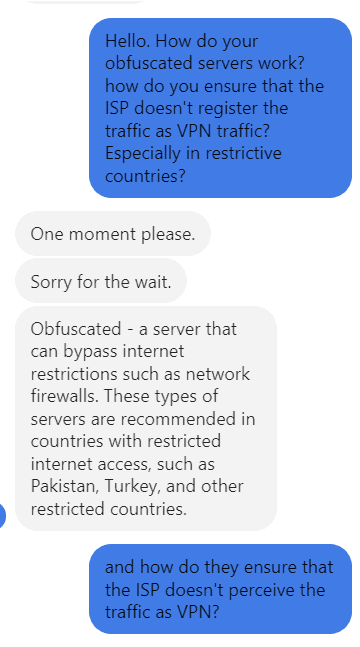
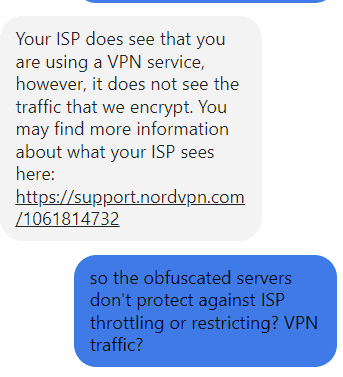
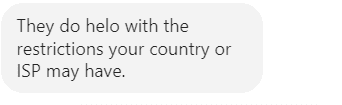
The representative confirmed that my ISP can still see that I’m using a VPN, even with obfuscated servers. It took about 5 minutes to answer my question, which is much better than ProtonVPN’s 2-day wait time!
EXPERT SUMMARYNordVPN and ProtonVPN provide email support, live chat, a wealth of blog-based tutorials, and a massive video guide library on YouTube. NordVPN edges it because its live chat is open to everyone and answered me in minutes.
Usability
| ProtonVPN | NordVPN | |
|---|---|---|
| User-friendliness? | High | High |
| Drawbacks? | No way to look up servers by type | Not as sleek |
| Split Tunneling? | Yes | Yes |
| Quick Connect? | Yes | Yes |
| Server Map? | Yes | Yes |
| Server Sort by Type? | No | Yes |
Both VPNs have easy-to-install native apps for many devices. I used the Windows and Android VPN apps in my usability tests.
ProtonVPN Apps (Windows, Android)
ProtonVPN’s Windows app is easy to use, offering a pleasant Dark Mode interface, a map of servers to choose from, and a “Quick Connect” feature that automatically selects the best server.

The list of server locations on the left is also easy to use. My only complaint here is that you can’t filter by server type (e.g., P2P or streaming), although it does indicate (with the relevant icons) which server locations offer specialty functions.

The four buttons above the server list allow me to enable the Secure Core servers quickly, set up the Netshield Ad Blocker, kill switch, and port forwarding.
On top of that, ProtonVPN offers split tunneling, which you can find and enable via the hamburger menu in the top left corner. This feature allows you to specify which programs are affected by your VPN connection and which can bypass the VPN’s encryption burden.

This straightforward menu also allows you to set up your protocol, turn on the VPN accelerator and tweak other settings.

That said, the ProtonVPN Android app is even simpler to use. The list of servers is the first thing you see; scroll to the one you want or click the triangle button in the bottom right corner to enable “Quick Connect.”

To change the protocol and other settings, go to the hamburger menu and click “Settings.” This menu contains all settings you need, including the kill switch, the VPN Accelerator, the ad blocker, split tunneling, and protocols, to name a few.

NordVPN Apps (Windows, Android)
The NordVPN Windows app has a similar interface to ProtonVPN’s, given the server map and the instantly-available “Quick Connect” button, for example.
However, the NordVPN interface is slightly clunkier and less sleek than ProtonVPN’s.

I did, however, find NordVPN more attractive in Dark Mode after enabling it in Settings. If looks are a thing for you, this one wins slightly in that department.

You can quickly look up the NordVPN server list by clicking the arrow pointing down. And I like that NordVPN allows me to look up the server by type, which ProtonVPN doesn’t do.

Like ProtonVPN, the NordVPN Windows app has a settings menu; a little gear icon in the bottom left corner.

There, you can customize your kill switch, split tunneling, and other connection settings (such as the protocol).

The NordVPN Android app is quite busy but also very straightforward to use.
For instance, you can choose a server on the map or use the “Quick Connect” feature for the best server.

And unlike ProtonVPN, NordVPN’s Android app also allowed me to look up servers by type – P2P was one of them when I tested it, though P2P now works on every standard server.

Tapping the three dots close to each specialty server type reveals the available server locations, sorted by country.

And like with ProtonVPN, you can tweak the split tunneling, ad blocker, and protocol options in the “Settings” menu of NordVPN’s Android app, accessible via your profile in the bottom right corner of the screen.

ProtonVPN and NordVPN offer user-friendly interfaces. But NordVPN allows you to sort servers and display them by type, which is useful when you need a specific server.
Pricing, Plans, and Deals
| ProtonVPN | NordVPN | |
|---|---|---|
| Plans? | Free, 1-month, 1-year, 2-year | Monthly, 1-year, 2-year |
| Most Savings? | Free plan and 2-year plan | 2-year plan |
| Payment Methods? | Credit/debit card, bank transfer, PayPal, Cash, Bitcoin | Credit/debit card, PayPal, Apple Pay/Google Pay, Amazon Pay, Direct Debit, Cryptocurrency |
| Free Trial? | Lifetime on free option | 7 days on its website (15 countries); 3 days on Android |
| Add-ons? | No | Password manager, encrypted storage, data breach scanner |
| Money-back Guarantee? | 30 days | 30 days |
| Best Deal? | Best ProtonVPN Deal | Best NordVPN Deal |
Finally, the ideal VPN shouldn’t break the bank and still offer good value for money.
ProtonVPN, unlike NordVPN, offers a free option. So, on the one hand, ProtonVPN’s cheapest plan is cheaper than NordVPN’s as it doesn’t cost you anything!
On the other hand, ProtonVPN’s best plan (2 years) is no cheaper than NordVPN’s: both cost $3.49 a month (checked September 2026).
ProtonVPN Plans & Payment

ProtonVPN’s best-value plan, after its free plan, is its 2-year plan.
The free plan gives you access to servers in 10 randomly selected countries, privacy protections, the Stealth VPN protocol, and one connection at a time.
On the paid plans, you get all the free features plus access to its entire server library, streaming and torrenting capabilities, Secure Core servers, the ad blocker, and Tor over VPN functionality.

Once you’ve decided on a plan, you can pay for ProtonVPN via:
- A credit/debit card
- PayPal
- Cryptocurrency (Bitcoin)
- Cash
- Bank transfer
For cash payments, contact contact@protonvpn.com for instructions.

NordVPN Plans & Payment
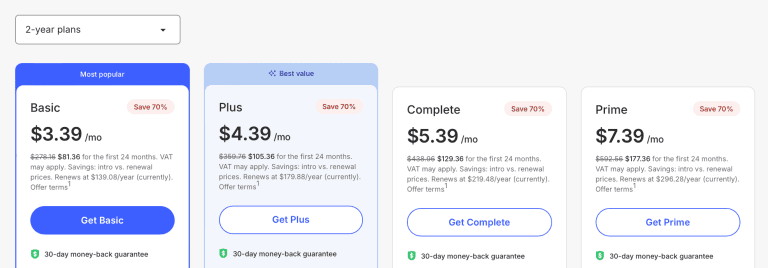
NordVPN’s best plans are its 2-year plans, like with ProtonVPN.
You can also purchase add-ons like a dedicated password manager, 1TB encrypted storage, and a data breach scanner.
And like ProtonVPN, NordVPN allows cash payment via a retail store purchase (but only for US-based users).
NordVPN has the edge over ProtonVPN because it allows Apple and Google Pay, which ProtonVPN doesn’t. Both also take PayPal: it was back at NordVPN’s checkout when we checked in October 2026.
Other ways to pay for a NordVPN plan include:
- Credit/debit card
- Google/Apple Pay
- Direct Debit
- Cryptocurrency (Bitcoin, Ethereum)

Free Trials & Money-Back Guarantees
ProtonVPN’s free version lasts forever, unlike traditional free trials, but with limited features.
NordVPN, meanwhile, does offer a 7-day free trial on its website in 15 countries, including the US, UK, Canada and Australia, plus a separate 3-day trial for new Android users on Google Play.
After its expiry, you’ll be charged for the entire subscription.
Both ProtonVPN and NordVPN offer 30-day money-back guarantees on their plans, and they work in much the same way.
ProtonVPN refunds you in full if you cancel within 30 days (it can’t refund cash or bank-transfer payments); after that, its terms say plans aren’t refundable.

NordVPN also gives a full refund within 30 days, and nothing after that.
Note that NordVPN’s guarantee is for first-time customers.

Discounts
I recommend the current ProtonVPN and NordVPN discounts to save more on these VPNs and get their risk-free guarantees. On the NordVPN side, our NordVPN discount codes guide sets out every offer we could verify, including the codes NordVPN publishes itself.
EXPERT SUMMARYBoth providers offer fantastic value, and only ProtonVPN has a free plan. NordVPN takes the round narrowly: for the same $3.49 a month on a 2-year plan it adds 3 extra months, it accepts a few more payment methods, and new customers in 15 countries can try it free for 7 days.
Conclusion
Both providers performed admirably, but I’m confident that NordVPN is the clear winner in more places than not. It offers top-level security features, a vast server library, great streaming options, and an excellent support system.
Keep in mind, however, that ProtonVPN offers a free option.
Either way, both providers offer no-logging policies, incredible speeds and security, and streaming options.
Want to try them out for yourself? Grab the current ProtonVPN or NordVPN discounts today!
Protect private web traffic from snooping, interference, and censorship. All plans are covered by a no-hassle 100% money-back guarantee for your first 30 days of service.
Explore More
 Bitdefender VPN vs NordVPN: Should You Pay for Both?
 NordVPN vs Norton VPN: Keep Your Bundle or Switch?
 NordVPN vs PIA (2026): Which VPN Is Better?
 Surfshark vs. ProtonVPN: Which Should You Choose? (2026)
 TunnelBear vs. ExpressVPN: Which VPN Wins? (2026)
 CyberGhost vs. ExpressVPN: An In-Depth Comparison (2026)
