
NordVPN is the best VPN for Peacock TV if you live outside the US, Ireland, Germany, the UK, Switzerland, Austria, and Italy.
Why?
Because it has 2,000+ US servers spread across all 50 states (the biggest US server count any VPN on this list publishes), 27 Mbps over NordLynx on my 30 Mbps line for buffer-free 4K, a kill switch and AES 256-bit encryption to keep Peacock and your ISP out of your business, and SmartDNS for the smart TVs that can’t run a VPN app.
Is NordVPN the only VPN for Peacock TV? Not really.
Other alternatives include Surfshark (unlimited devices at a budget price), ExpressVPN (the fastest speeds in my tests), CyberGhost (streaming dedicated servers), and PureVPN (best for streaming on public networks).
So, if you want to catch the latest Dutton family drama on Yellowstone or relive old classics like the Doctor Who series, then you’re in the right place. Stick with me to the end to find out more.
The 3 Top VPNs for Unblocking Peacock TV

Surfshark
Best for Peacock on many devices
- 27 Mbps in my 4K test
- Unlimited simultaneous connections
- Apps for Fire TV, Android TV, Apple TV

NordVPN
Best for Peacock TV
- 2,000+ US servers in all 50 states
- 27 Mbps NordLynx 4K streaming
- Kill switch and SmartDNS

ExpressVPN
Best for raw speed and obfuscation
- 28 Mbps in my tests
- Automatic obfuscation
- MediaStreamer SmartDNS
Licensing issues are why streaming platforms like Peacock TV are only available in selected regions. The process of granting global licenses is very slow since the content creators have to be consulted. If you multiply this with over 190 countries, you start getting the picture. Bureaucracy is truly the thief of joy!
Fortunately, we have reliable VPNs to unblock Peacock TV anywhere, and I’ll be diving into details on how you can get the best out of your Peacock TV subscription.
Want to Watch the Latest Movies and Shows on Peacock TV? Here Are the 5 VPNs to Use
Before you jump in to stream your favorite movie or show, here’s a quick look at the 5 VPNs that will unblock desired content and keep your streaming activities under the radar.
- NordVPN – Best Overall With Servers in All 50 US States + SmartDNS
- Surfshark – Great Value With Unlimited Device Connections
- ExpressVPN – Fastest Streaming Speeds + MediaStreamer
- CyberGhost – Unblocking Peacock TV + Streaming-Dedicated Servers
- PureVPN – Fast Streaming Speeds + Reliable App & Web Filters
The most important factor influencing the VPN ranking on this piece, besides unblocking capabilities, was connection speeds. Streaming is a bandwidth-intensive activity, especially where 4K content is involved.
So, I conducted speed tests using base internet speeds of 30 Mbps.
So, keep that in mind when comparing the VPN speeds.
The Best VPNs for Unblocking & Streaming Peacock TV
You can catch countless movies, series, and live sports events on Peacock TV, even with a free account. The only stumbling block is gaining that access in the first place.
Here’s how each VPN performs when it comes to Peacock TV.
NordVPN - Best Overall With Servers in All 50 US States + SmartDNS

| Location | US Servers | Connections | Average Speeds | Best Deal |
|---|---|---|---|---|
| Panama | 2000+ | 10 | 27 Mbps | Show Offer |
Unblocking Peacock

Peacock blocks VPNs by IP address, so the VPN with the most US addresses to burn through wins the long game. NordVPN has 2,000+ servers in the US alone, spread across all 50 states, which is why it sits at the top of this list. The closest competitor is PureVPN, with 1800 servers.
I seamlessly unblocked Peacock TV using random US, Italy, and Ireland servers, and the US one worked on the first try.
NordVPN does have specialty servers, only that none of them are optimized for streaming. But its standard servers, which now all allow P2P too, are built for speed, and that works in your favor.
One tip: don’t let the app choose for you. NordVPN’s “Presets” section on macOS (Downloads, Browsing, and Speed) connected me to the fastest server it could find, in Iceland, which Peacock doesn’t serve, and it took a few tries to land an Irish server Peacock accepted. Search for a US city instead and you skip all of that.
Streaming Speeds

NordVPN averaged 27 Mbps on my 30 Mbps line: a single megabit behind ExpressVPN, level with Surfshark, and comfortably above the 25 Mbps threshold for 4K.
I achieved these speeds on the US, UK, and Austrian servers.
There wasn’t any buffering even when I cranked the quality to 4K when streaming Vampire Academy.
To replicate these results, know that NordVPN achieves these speeds in two ways. First is the NordLynx protocol, the fastest one in its arsenal that offers the best security. So you get the best of both worlds.
Secondly, NordVPN is habitually improving its servers and adding more to its US roster. So, chances of landing on an overcrowded server are very minimal. There’s also split tunneling which limits encryption to your chosen traffic, leaving all the other apps and device processes untouched.
But I got to be honest: I don’t have anything against Vampire Academy, but they don’t make vampire shows these days like they used to.
Remember Klaus Mikaelson and his family? Now those were vampires.
We need to go back to that.
Privacy From Detection by Peacock TV

One thing NordVPN is best known for is its security and privacy.
It has a very reliable kill switch that will stop accidental IP leaks when your connection drops for any reason. You get an extra kill switch for double the privacy if using the Windows PC app.
NordVPN is also equipped with AES 256-bit encryption that blocks all external threats when you use public networks to stream Peacock TV content. Opportunistic hackers will need a miracle to crack your traffic and snoop in on your activities without the deciphering keys.
And if a network ever blocks VPN traffic altogether, NordVPN’s obfuscated servers disguise it as ordinary HTTPS. They cost some speed, so I keep them as a fallback rather than a default.
Device Compatibility + SmartDNS
You can stream Peacock TV shows and movies via NordVPN on your smartphone, tablet, or PC on Android, iOS, macOS, Windows, or Linux, and there are native apps for Android TV, Fire TV, and Apple TV as well.
This way, you won’t be limited to streaming on one device or from a fixed location.
NordVPN also offers a SmartDNS feature to set up unrestricted access to Peacock TV directly on any smart TV that can’t run an app. It won’t protect your TV like a regular VPN, but you’ll enjoy amazing speeds.
Whichever route you take, one subscription covers ten devices at once.

On the price front, NordVPN is costlier than Surfshark and CyberGhost and starts at about the same price as ExpressVPN. You also get a 30-day money-back guarantee, which you can combine with these fantastic discounts to save money in the long run.
Pros
- 27 Mbps over NordLynx for 4K Peacock streams
- 2,000+ US servers across all 50 states – the biggest published US count here
- Reliable kill switch and AES 256-bit encryption
- SmartDNS plus native TV apps for the big screen
- Ten simultaneous connections
Cons
- 1 Mbps behind ExpressVPN in my speed test
- No streaming-dedicated servers, so pick a US server yourself rather than using the Speed preset
Surfshark - Great Value With Unlimited Device Connections
| Location | US Servers | Connections | Average Speeds | Best Deal |
|---|---|---|---|---|
| The Netherlands | 600+ | Unlimited | 27 Mbps | Show Offer |
Unblocking Peacock

Surfshark offers 4,500+ servers in 100 countries, with about 600+ servers in the US alone.
That’s a fraction of NordVPN’s US footprint but far more than ExpressVPN’s, and I could unblock Peacock TV without problems.
Likewise, there are no dedicated streaming servers like CyberGhost or PureVPN, but getting things started was a walk in the park.
If you’re a first-time Surfshark user, there’s a “fastest location” button that automatically connects you to the best server perfect for streaming.
I got a South African server on my first attempt, which couldn’t unblock Peacock TV. Therefore, it’s safe to assume that this works similarly to NordVPN’s speed preset. To get a specific US server, simply use the search bar to get a preferred server, and connect.
Streaming Speeds

For this speed test, I streamed Bel-Air, the new-age reprisal of the famous Fresh Prince of Bel-Air that captivated generations of kids ages ago.
I got 27 Mbps, level with NordVPN and one megabit behind ExpressVPN.
This was enough to stream 4K content without a single frame freeze.
I replicated this result on all the devices I used, including my Android and Macbook. Like all the other premium VPNs, Surfshark constantly upgrades its servers to meet the growing streaming demands as more people turn to VPNs to beat regional restrictions.
Furthermore, the WireGuard and IKEv2 protocols also greatly deliver fast speeds to Surfshark users. So, check to ensure you have one of those two active before you begin your movie marathon.
You can also use the Bypasser (split tunneling) to only route your streaming traffic through the VPN to boost performance.
Privacy From Detection by Peacock TV

For Android users, Surfshark offers two kill switches and one kill switch for all the other platforms. This ensures your real IP isn’t leaked to the public when your VPN connection is interrupted, something your ISP would truly relish since they never seem to enjoy seeing people happy. Wicked.
There’s also the industry-standard encryption that keeps external threats at bay, like hackers who may try to infiltrate your traffic on public Wi-Fi.
The same encryption effectively counters ISP interference since they can’t even see the websites you’re opening.
Device Compatibility + TV Apps
Surfshark has native Android, iOS, macOS, Windows, and Linux apps.
Thus, you can conveniently stream on the nearest device from any location.
Fire TV, Android TV, and Apple TV (tvOS 17+) get native apps too. Surfshark ended its SmartDNS service in February 2026, so Samsung and LG TVs need it on a router or a Windows hotspot.

Surfshark also holds a unique position on this list for being the only alternative with unlimited simultaneous device connections.
This should take care of all your needs if you have multiple devices and leave room for any friend/family member who may need a secure way to stream Peacock TV too.
That’s what earns it second place. The only thing keeping it behind NordVPN on a service as IP-hungry as Peacock is server depth: 600-odd US servers will get blocklisted faster than 2,000+, and the fastest-location button is no better at finding a Peacock-friendly one. For a household sharing one login, it’s the smarter buy.
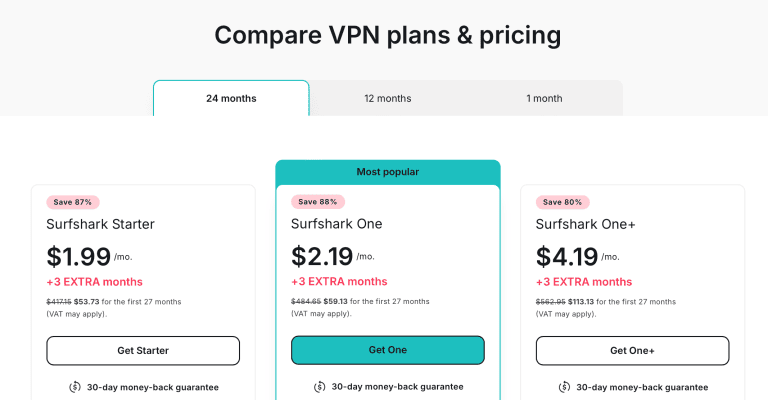
Finally, you don’t have to worry too much about your pockets because Surfshark is one of the cheapest VPNs on this list.
Once you apply these amazing discounts, you’ll be saving quite a sum.
Pros
- 27 Mbps for 4K streaming, level with NordVPN
- Unlimited device connections
- Great privacy and security features
- Native apps for Fire TV, Android TV, and Apple TV
- One of the cheapest VPNs on this list
Cons
- 1 Mbps slower than ExpressVPN
- Far fewer US servers than NordVPN
ExpressVPN - Fastest Streaming Speeds + MediaStreamer

| Location | US Servers | Connections | Average Test Speeds | Best Deal |
|---|---|---|---|---|
| BVI | Not published (all 50 states) | 10 | 28 Mbps | Show Offer |
Unblocking Peacock

ExpressVPN posted the fastest result in my Peacock tests, and if that extra megabit matters more to you than anything else, it’s the one to buy.
With servers in 113 countries, I had no trouble accessing Peacock’s vast library of shows and movies.
Another notable bit is that ExpressVPN doesn’t say how many US servers it runs, only that they cover all 50 states. I half expected crowded servers, but surprisingly, there was no lag of any kind.
That’s testament to ExpressVPN’s claims of upgrading its servers with better speeds, and I guess that’s how it counters the effects of overcrowded servers.
Streaming Speeds

I tested three servers (USA, Germany, and Switzerland) while streaming Yellowstone, and I got average speeds of 28 Mbps, the fastest on this list.
This was enough to handle 4K streaming, and I didn’t experience any buffering throughout the session.
ExpressVPN makes use of two key features to attain these amazing speeds. First is the Lightway UDP protocol, which is designed for speed.
Secondly, the VPN service is constantly upgrading its servers, optimizing them for speed.
Combine these two, and you get a streaming experience like no other.
An added tip is that ExpressVPN’s split tunneling feature can significantly boost your streaming speeds by only routing Peacock TV traffic through the VPN. This reduces the encryption burden and I never miss a chance to use it.
Privacy From Detection by Peacock TV
Peacock TV isn’t a fan of VPN use, and it’s actively trying to shut down any account that exhibits VPN behavior. How does ExpressVPN deal with this?
First, there’s the life-saving automatic obfuscation that works with all protocols and servers to hide traces of VPN usage from your traffic.
The best part? You don’t lose any speed in the process, a feature exclusive to ExpressVPN.

In addition, there’s a kill switch that shuts off the internet connection to your device when the VPN connection drops. I tested this by switching from Wi-Fi to mobile data in the middle of streaming, and I was immediately hit with a connection error page.
The best-in-class encryption is another handy security feature that keeps third parties out, including potential hackers, if you’re using public Wi-Fi.
I’ve never understood people who use public Wi-Fi for streaming, though. Most times, it’s too slow to handle anything other than simple browsing.
Device Compatibility + SmartDNS
ExpressVPN is compatible with Android, iOS, macOS, Windows, and Linux, and its Basic plan now covers ten simultaneous connections.
So you can stream Peacock TV on your PC or smartphone without problems.
For those with smart TVs without native VPN apps, there’s a SmartDNS feature called MediaStreamer, but it can’t change your location, so it only helps with Peacock TV if you’re already in the US; from abroad, use ExpressVPN’s router app instead. It’s faster since there’s no encryption involved, but that’s a downside, too, because you’ll be exposed.

Two things hold it back.
The first is the price tag: it costs more than Surfshark, CyberGhost, and PureVPN, which may deter some people. The second is US depth. ExpressVPN doesn’t say how many servers sit behind its locations in all 50 states, while NordVPN lists 2,000+, and on a service that blocks VPNs one IP address at a time, that megabit of extra speed doesn’t help once your server is on Peacock’s list. If you want the fastest possible Peacock stream with obfuscation always on, ExpressVPN delivers; for most people, NordVPN gets you there for about the same price and with 2,000+ US servers in reserve.
Fortunately, we have amazing discount deals to get ExpressVPN on the cheap.
Pros
- Fastest streaming speeds
- Unblocks Peacock TV anywhere
- Automatic obfuscation with no speed loss
- Compatible with most streaming devices
Cons
- Expensive
- No published US server count
CyberGhost - Unblocking Peacock TV + Streaming Dedicated Servers

| Location | US Servers | Connections | Average Speeds | Best Deal |
|---|---|---|---|---|
| Romania | 1300+ | Seven | 26 Mbps | Show Offer |
Unblocking Peacock

CyberGhost has the biggest published server count on this list.
This includes 1300+ US servers, well over Surfshark’s 600+. I quickly unblocked movies and shows on Peacock TV from my location using servers in the US, the UK, and Austria.
Another area where CyberGhost beats the rest is with its streaming-dedicated servers. Rather than wasting time trying random servers to get the fastest, you simply tap on a streaming server and watch 4K content without buffering issues.
PureVPN is the only alternative with streaming dedicated servers on this list.
But unlike PureVPN, CyberGhost narrows down the streaming servers to the platform itself. For example, the US server I used for the tests is specifically optimized for PeacockTV US. This makes CyberGhost a beginner-friendly option for people who’ve never used a VPN before.
Streaming Speeds

I streamed Doctor Who and averaged 26 Mbps, behind ExpressVPN, NordVPN, and Surfshark. This is above the 4K streaming threshold of 25 Mbps, so I didn’t experience any problems while following the adventures of the most bizarre doctors to ever exist.
I know I’ll be crucified for this, but David Tennant is the best Doctor Who, followed closely by Matt Smith, then Peter Capaldi.
We can fight if you don’t agree, just pick a place and I’ll send my assassin (ha-ha).
Like ExpressVPN and the other alternatives, CyberGhost owes its speeds to two reliable protocols; WireGuard and IKEv2. They’re also handy if you use mobile data to stream Peacock TV because they’re data friendly.
There’s also a split tunneling feature to encrypt streaming traffic, keeping other apps and processes untouched.
And trust me, there are some apps you don’t want to use with VPNs.
Can you imagine using a food delivery app with an active VPN only to be told the delivery can’t be made because your location shows you’re in North America?
Privacy From Detection by Peacock TV
First, you get a public Wi-Fi protection feature that keeps you safe if you stream on the move using any public network. In addition, there’s the famed military-grade encryption that provides protection against external threats like hackers and even prevents Peacock TV from figuring out you’re streaming from an out-of-market region.
The same also deals with ISPs who tend to throttle speeds when they detect heavy bandwidth use.

Furthermore, there’s a reliable kill switch that prevents IP and DNS leaks when the VPN connection is disrupted. That little window of opportunity is all it takes for your actual IP to get exposed to anyone lurking around.
I always ensure it’s on every time I launch CyberGhost and so should you.
Device Compatibility + SmartDNS
CyberGhost is compatible with streaming platforms like Android, iOS, macOS, Windows, and Linux. So, you can stream your Peacock TV content on your preferred devices as long as you have a reliable internet connection.
In addition, if you love to watch everything on the big screen, but your TV isn’t compatible with VPNs, a router is your best bet. CyberGhost still lists a SmartDNS feature, but it says it’s no longer compatible with streaming services.
A router setup also encrypts your TV’s traffic, which SmartDNS never did.
If you own an Android TV like me, skip the router setup and install CyberGhost directly from the Play Store. You can also connect seven devices simultaneously, three fewer than NordVPN, ExpressVPN, and PureVPN allow, but still enough if you have friends who need to stream Peacock TV too.

CyberGhost isn’t expensive like ExpressVPN either, so most people on a budget can afford it. It’s also the only VPN that offers a 45-day money-back guarantee; that’s 15 extra days than the rest.
If this VPN appeals to your needs, grab your subscription with these amazing deals to save money for your Peacock TV premium account.
Pros
- Handles 4K streaming
- Largest server network with streaming dedicated servers
- Robust privacy and security features
- Compatible with most streaming devices
Cons
- Slower than ExpressVPN, NordVPN, and Surfshark
- Fewest simultaneous connections on this list
PureVPN - Fast Streaming Speeds + Reliable App & Web Filters

| Location | Servers | Connections | Average Speeds | Best Deal |
|---|---|---|---|---|
| BVI | 1800+ | 10 | 24 Mbps | Show Offer |
Unblocking Peacock

Last on the list is PureVPN, another reliable streaming option with a 6,000+ server network, the third-biggest published count here after CyberGhost and NordVPN. Out of this, 1800+ are US-only, plenty for unblocking Peacock TV.
Like CyberGhost, PureVPN offers streaming dedicated servers, but it’s not as detailed as the former. All you get is a general list optimized for the best streaming speeds. I experimented with random servers in the US, Austria, and Germany, all of which worked like a charm.
Streaming Speeds

I got average speeds of 24 Mbps with PureVPN, the slowest on this list.
The best-performing server was from Austria, and since this doesn’t crack the 4K streaming threshold of 25 Mbps, I experienced some stuttering from time to time. There wasn’t any problem with HD streaming, though.
For the test, I watched The Croods: Family Tree, a continuation of one of the best animation films created in the last decade. It’s easy to get lost in a movie when a VPN behaves well.
However, you should be able to stream 4K shows and movies without buffering on PureVPN with faster base internet speeds.
Lastly, like other premium alternatives, a split tunneling feature on PureVPN can significantly push the speeds a notch higher by keeping unnecessary traffic from the encryption tunnel.
Privacy From Detection by Peacock TV

An internet kill switch ensures your identity remains hidden when the VPN connection drops. Not even your ISP can see what you’re up to since the kill switch kicks into action immediately.
In addition, the military-grade encryption adds an extra layer of security that keeps external threats like hackers out of your business.
This is a lifesaver if you habitually connect your devices to public Wi-Fi.
But where PureVPN outshines the rest is the addition of two extra security features.
The first one is the Web Filter to keep people from streaming inappropriate content, which is ideal for users with kids. There’s also an App Filter that restricts other apps in the background, stopping them from using too much bandwidth. This leaves more for streaming, reducing lags.
Device Compatibility + SmartDNS
There’s a SmartDNS feature for anyone who wants to stream Peacock TV on their smart TV that’s incompatible with VPNs. This is common with LG and Apple TVs since a majority of Samsung TVs are now running on the Android OS.
Furthermore, you can install the PureVPN app on Android, iOS, macOS, Windows, or Linux for a personal streaming experience.
You can also connect up to 10 devices simultaneously, level with NordVPN and ExpressVPN and behind only Surfshark.
That should be enough to cover all your devices and leave slots for friends and family.

PureVPN is the most affordable VPN here and offers a 31-day money-back guarantee. We also offer exclusive discounts, but you better hurry before they run out.
Pros
- Fast speeds for HD streaming
- 10 simultaneous device connections
- Amazing privacy and security features
- Compatible with most streaming devices
Cons
- Slowest alternative
How to Unblock and Stream Peacock TV With a VPN
You can unblock Peacock TV from anywhere using NordVPN with the following steps.
- Download and install NordVPN.

- Launch the VPN and connect to a server in the US.

- Open Peacock TV on your browser and watch all your favorite shows and movies.

What Can You Watch on Peacock TV?
Peacock TV provides the following types of entertainment.
| MOVIES | TV SHOWS | LIVE SPORTS | NEWS |
|---|---|---|---|
| Couples Retreat | Yellowstone | NFL | NBC News Now |
| The Last Witch Hunter | Vampire Academy | Premier League | Sky News |
| The Prince of Egypt | Doctor Who | IndyCar Series | WNBC |
| Apollo 13 | The Croods: Family Tree | United States Football League | WTVJ |
| The 40-Year-Old-Virgin | Bel-Air | Major League Baseball | KNBC |
Is There a Difference Between Peacock (Free), Peacock Premium and Peacock Premium Plus?
As of October 2022, Peacock TV offers three pricing tiers.
- Peacock Free: This is the base version and doesn’t cost a dime. However, it has ads, and a limited selection of movies and shows. Overall, you get a combined 7,500 hours worth of content on this free service.
- Peacock Premium: This is a paid monthly plan that costs $5, or you can choose to pay a discounted price of $50 for the yea However, it still has some ads, but you get more than 15,000 hours of content.
- Peacock Premium Plus: This is the most expensive premium plan that costs $10/month or $100/year. It has no ads, and you can watch unlimited hours of content.
Peacock TV Not Working With VPN? Troubleshooting Guide
Once in a while, you may run into issues when you try to stream Peacock TV with a VPN. Try the following quick fixes to get things running smoothly again.
- Update the VPN: Using an outdated version of a VPN can lead to connection issues due to existing bugs. Updating it is the best way to get rid of these bugs.
- Check your router: Running your router with outdated firmware is bound to cause problems with your VPN when you try to stream Peacock TV. Update the router to iron out issues. Switching the router on and off could also do the trick.
- Change servers: Not all servers work with Peacock TV, even in the US. If you keep running into connection issues, try changing servers until you find the one that works.
- Check with VPN support: If nothing works at this point, try getting in touch with the VPN customer support. They can provide you with solutions that may work.
FAQ
Can I Use a Free VPN for Peacock TV?
You can use a free VPN for Peacock TV, but it won’t be as efficient as a premium one for several reasons. Free VPNs have limited server networks, and this makes unblocking Peacock TV hard.
Most free VPNs also lack proper security features and sell user data to third parties to raise revenue. This makes it easy for anyone to snoop in on your streaming activities, including your ISP.
How Do I Get Around the Peacock VPN Block?
The best way to get around the Peacock VPN block is to use obfuscation VPNs.
This feature hides traces of VPN from your streaming traffic, making it appear regular to anyone monitoring you.
However, except for ExpressVPN, every other VPN that offers obfuscation sacrifices speed in exchange, leading to serious buffering and negatively impacting your streaming experience.
Can I Watch Peacock in the Philippines?
You can watch Peacock TV in the Philippines by using a VPN.
All you have to do is to connect to a server in the US, UK, Germany, Ireland, Austria, or Italy and start streaming restricted content from anywhere in the Philippines.
Will I Get In Trouble for Streaming Peacock With a VPN?
You may get in trouble for streaming Peacock TV with a VPN because the streaming platform is against using VPNs to access restricted content, due to licensing issues. For this reason, Peacock employs DPIs to sniff out VPN use.
If you get caught, you may lose your Peacock account for good.
Final Word
Peacock is home to exciting movies, TV shows, live sports, and informative news channels. It’s therefore understandable that you would want to access it even when you’re in a restricted corner of the world. To that extent, NordVPN is my top pick.
Its 2,000+ US servers in all 50 states, 27 Mbps NordLynx speeds, reliable kill switch, and SmartDNS for the TV ensure you get the best out of Peacock without interference.
And because we care about you, here is an exclusive NordVPN discount to get the VPN at a cheaper price. So, enjoy your streaming!





