
Yes, NordVPN works on Mac: it runs on macOS 14 Sonoma or later, on Apple silicon and Intel Macs alike, and you can install it from the Mac App Store or as a direct download from NordVPN’s website. Both versions use the same servers and protocols. The website version adds a per-app kill switch, custom DNS, full Meshnet and file scanning with NordVPN’s antivirus; the App Store version installs and updates through Apple and adds VPN bypass prevention.
Setup takes about five minutes. You’ll need a NordVPN plan: in the Black Friday sale, the 2-year Basic plan is $3.49 a month ($94.23 for 27 months), with a 30-day money-back guarantee. If you’re new to the service, our explainer on what NordVPN is covers the basics. Everything below was checked on 22 October 2026.
Get NordVPN – 78% Off + 3 Months
| NordVPN on Mac | |
|---|---|
| Works on | macOS 14 Sonoma or later (including macOS 15, 26 and 27), on Apple silicon and Intel |
| Older Macs | Legacy app versions for macOS 10.15 to 13 |
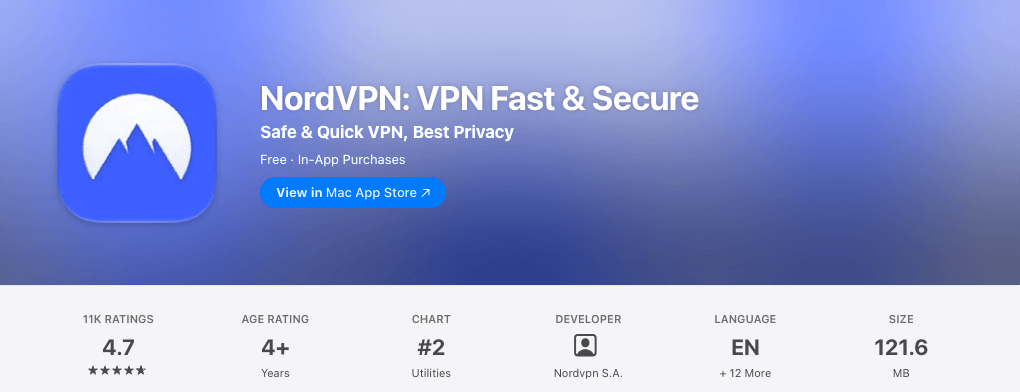
| Two versions | Mac App Store (121.6 MB) or NordVPN’s website (NordVPN.pkg) |
| Mac App Store rating (US) | 4.7 out of 5 from 11K ratings |
| Current version | 10.13 (October 2026) |
| Kill switch | App Kill Switch (website version) or VPN bypass prevention (App Store version) |
| Devices per plan | 10 at the same time |
| Price | From $3.49 a month on the 2-year plan (Black Friday price) |
Got an Apple TV as well? NordVPN has a native tvOS app: see NordVPN on Apple TV.
Does NordVPN Work on Mac?
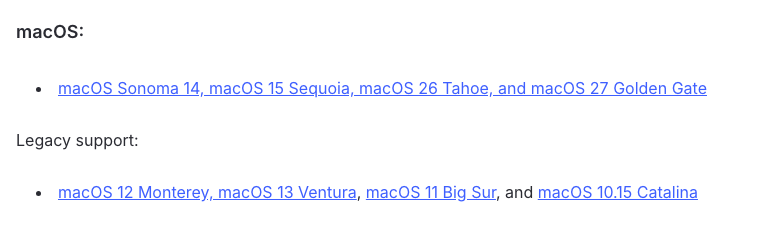
Yes, on any Mac running macOS 14 Sonoma or later. NordVPN’s list of supported systems names macOS 14 Sonoma, 15 Sequoia, 26 Tahoe and 27, and the Mac App Store listing asks for macOS 14.0 or later.
It runs natively on both kinds of Mac. When we checked the installer on NordVPN’s website on 22 October 2026 (version 10.13.1, signed and notarized by Nordvpn S.A.), it contained native code for Apple silicon (arm64) and Intel (x86_64). Any MacBook Air, MacBook Pro, iMac or Mac mini works, as long as it runs macOS 14 or later.
Older Macs can still use NordVPN, but only on older app versions without new features: 10.8.1 for macOS 12 Monterey and 13 Ventura, 9.3.1 for macOS 11 Big Sur and 8.24.2 for macOS 10.15 Catalina. One more limit: NordVPN protects the whole Mac, so if several people have user accounts on it, they can’t run the app at the same time.
App Store or Website: Which NordVPN Mac App Should You Get?
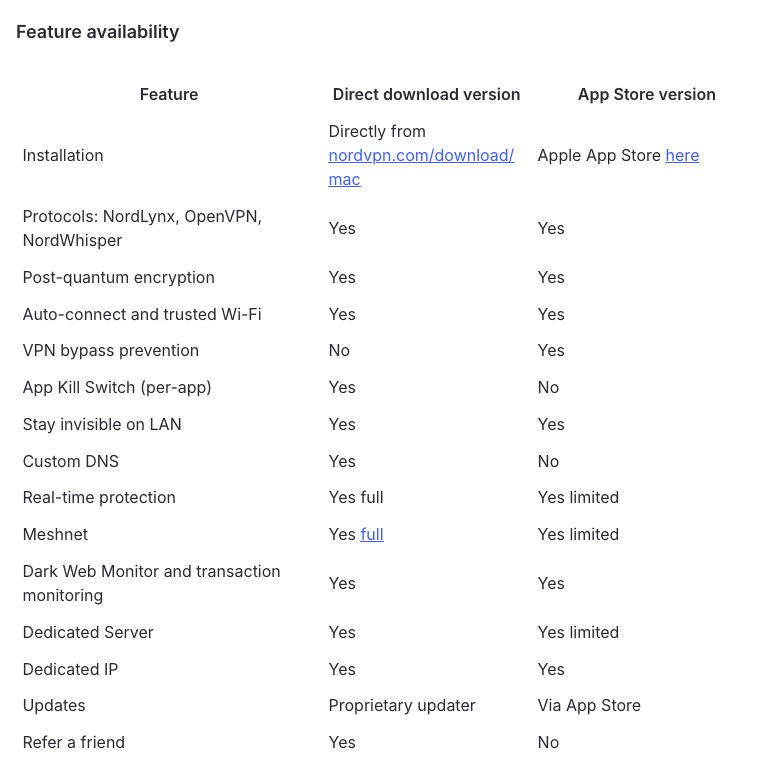
Get the website version unless you specifically want App Store updates and Apple billing. NordVPN builds the App Store version inside Apple’s app sandbox, while the website version uses system-level components, which is why it has more features. According to NordVPN’s own comparison, updated on 22 October 2026:
| Feature | Website version | App Store version |
|---|---|---|
| Where to get it | nordvpn.com/download/mac | Mac App Store |
| Protocols | NordLynx, NordWhisper, OpenVPN | Same |
| Kill switch | App Kill Switch (cuts off the apps you choose) | VPN bypass prevention (keeps all traffic in the VPN) |
| Custom DNS | Yes | No |
| Real-time protection | Full, including file scanning | Limited |
| Meshnet | Full | Limited |
| Updates | NordVPN’s own updater | App Store |
Both include Double VPN, Onion Over VPN, post-quantum encryption, auto-connect, Dark Web Monitor and dedicated IP support. For many people the deciding feature is NordVPN’s next-gen antivirus, which comes with Complete and Prime: it only scans files in the website version, and NordVPN’s advice for App Store users who want it is to switch.
Older guides, including an earlier version of this one, describe separate “IKEv2” and “OpenVPN” Mac apps. NordVPN now offers just the two versions above, and IKEv2 survives only as a manual setup in macOS. Don’t keep both versions on one Mac: NordVPN says to delete any older copies before installing the latest one.
How to Install NordVPN on Mac
Both installs follow NordVPN’s macOS installation guide and its App Store setup article, both updated on 22 October 2026.
Install the Website Version
- Get a NordVPN plan on NordVPN’s website, or create a Nord Account during setup.
- Download the installer from NordVPN’s Mac download page. Save it on the Mac itself, not in a cloud-synced folder such as Dropbox.
- Open your Downloads folder and double-click NordVPN.pkg. It was 297.5 MB when we downloaded it on 22 October 2026.
- Click Continue, then Install, approve with your Mac password or Touch ID, and click Close when it finishes.
- Open NordVPN: press Command + Space, type NordVPN and press Return.
- Click Log In (or Create account), then Continue to open the Nord Account page in your browser. Sign in with your email and password, Google, Apple or a one-time code, then let Nord Account open the app. NordVPN notes the sign-in page can use a domain other than nordaccount.com in some regions.
- Follow the short onboarding: pick why you use NordVPN, set up Real-time protection and turn on Dark Web Monitor.
- Click Secure my connection, and click Allow when macOS asks to add VPN configurations.

Real-time protection in the website version needs three macOS approvals during setup: Allow extension, Allow configurations and Allow disk access, which turns on Full Disk Access for “NordVPN Real-time protection” under System Settings > Privacy & Security. You’ll need your Mac password and admin rights, and the app shows a Permissions alert if one goes missing later.
Install the App Store Version
- Open the App Store on your Mac, search for NordVPN and click the download button. The seller should read Nordvpn S.A.
- Open NordVPN with Command + Space.
- Click Log In, then Continue, sign in through your browser and let Nord Account open the app.
- Click Secure my connection in the top-left corner, or search for a country, and allow the VPN configuration when macOS asks.
- Turn on VPN bypass prevention under the profile icon, Settings, in the VPN connection section.
The NordVPN Mac Settings Worth Changing
Open Settings from the profile (person) icon in the top-right corner of the app. These are the ones I’d check:
- Auto-connect (its own tab): switch it on so NordVPN connects whenever you join a network, choose a country under Connect to if you don’t want the recommended one, and mark trusted Wi-Fi networks to skip. See our NordVPN auto-connect guide.
- Kill switch: in the website version, the Kill Switch tab lets you pick apps whose connection NordVPN cuts if the VPN drops. In the App Store version, turn on VPN bypass prevention, NordVPN’s new name for its “Advanced kill switch”. More in our NordVPN kill switch guide.
- VPN protocol (General): keep NordLynx, the fastest. Use NordWhisper on office, campus or hotel networks that block VPNs.
- Post-quantum encryption (General): on, unless it causes problems. It only works with NordLynx.
- Launch the app on system startup (General): handy with auto-connect.
- Stay invisible on a local network (General): hides your Mac from other devices on the same network, which is worth having on public Wi-Fi. In the App Store version it also blocks traffic while the VPN reconnects, but it gets in the way of AirDrop and printers.
- Custom DNS (website version only): leave it alone unless you need it.
The left sidebar holds the rest: Real-time protection (the shield), which blocks ads, trackers and malicious websites, Meshnet, Dark Web Monitor and the specialty servers. There’s no split tunneling on a Mac, though; NordVPN’s help center covers split tunneling for Windows, Android, Android TV and Linux, not macOS. For the shield’s features, see our NordVPN Threat Protection guide.
Why Won’t NordVPN Connect on My Mac?
Usually because of a stale VPN configuration, the protocol or security software. Work through NordVPN’s fixes in order, testing after each; they come from its macOS connection troubleshooting, updated on 22 October 2026.
- Pick a specific country instead of using Secure my connection.
- Update the app. In the website version, Settings shows an Update now banner when a new version is out; the App Store version updates through the App Store.
- Add NordVPN to your antivirus exclusions.
- Try each protocol under Settings, General.
- Reapply the VPN configuration: Apple menu > System Settings > VPN, click the info button (i) next to NordVPN, approve the change, then click Remove Configuration and Remove. Quit NordVPN with Command + Q, reopen it, connect and allow the configuration again.
- If it keeps disconnecting, turn off post-quantum encryption and Meshnet, or connect to an obfuscated server.
- If websites won’t load while you’re connected, pause Real-time protection (shield icon, Pause) and turn off other VPNs or antivirus web protection.
- If you’ve retried the same server many times, wait a few minutes before connecting again.
Our guides to NordVPN not connecting and NordVPN that keeps disconnecting cover network and router causes.
Keychain Password Prompts
macOS keeps VPN credentials in Keychain, so it may ask for your keychain password the first time NordVPN connects or after an update. Enter your Mac login password and click Always Allow; NordVPN says you may need to do this up to five times. If a NordLynx keychain prompt keeps coming back, switch to OpenVPN, or lock and unlock your login keychain in Keychain Access (Applications > Utilities). Our guide to the “NordLynx wants to use your confidential information” prompt goes deeper.

Why Does NordVPN Keep Closing or Disappearing on My Mac?
If the app won’t open, quits right after launching or freezes on its logo, NordVPN’s fix for crashes on macOS is a clean reinstall:
- Check your macOS version. The current app needs macOS 14 or later; older Macs need the legacy versions listed above.
- Rule out your antivirus by adding NordVPN to its exclusions or switching it off briefly.
- Move NordVPN to the Bin from the Applications folder.
- Delete its leftover folders with Finder’s Go to Folder. For the website version, delete
com.nordvpn.macosin~/Library/Application Supportand in~/Library/Caches. For the App Store version, deleteW5W395V82Y.group.com.nordvpnin~/Library/Group ContainersandNordVPNin~/Library/Containers. - Restart the Mac and install the latest version from NordVPN’s website.
If NordVPN slows your Mac down instead, NordVPN suggests turning off post-quantum encryption and pausing Real-time protection to find the cause.
How to Uninstall NordVPN on Mac
Quit NordVPN, open Finder > Applications, right-click NordVPN and choose Move to Bin, then restart. If you had both versions installed, remove both. Deleting the app doesn’t cancel your subscription: cancel auto-renewal in your Nord Account under Billing, or in the App Store’s Subscriptions page if you paid through Apple. Our guides on how to uninstall NordVPN and how to cancel NordVPN cover every case.
How to Get NordVPN for Mac for Less
Buy it on NordVPN’s website. In the Mac App Store, NordVPN’s in-app plans ran from $11.99 for a month to $99.99 for a year on 22 October 2026. On the website, 27 months of Basic cost $94.23 in the Black Friday sale, and Complete $107.73 ($3.99 a month). Website purchases also get NordVPN’s 30-day money-back guarantee directly, while App Store payments are refunded through Apple, and you can use a website plan in either Mac version.
Basic covers the VPN. On a Mac, Complete is the plan worth a look: it adds the next-gen antivirus that scans files (website version only), an ad and tracker blocker, email protection, the NordPass password manager and 1 TB of cloud storage. Our NordVPN price guide compares the plans, and the NordVPN Black Friday guide tracks the sale. New customers in the US and 14 other countries can also try NordVPN free for 7 days on its website, with a 1- or 2-year Prime plan.
The current offer is on NordVPN’s Black Friday page: up to 78% off plus 3 extra months. To find the cheapest way to buy NordVPN, our coupon page sets this deal against every other offer we could verify.
Get NordVPN’s Black Friday Deal
FAQs
Does NordVPN Work on Mac?
Yes. NordVPN’s current Mac app runs on macOS 14 Sonoma or later, on both Apple silicon and Intel Macs. Macs on macOS 10.15 to 13 can still use older app versions that NordVPN keeps available, without the newest features.
Why Won’t NordVPN Work on My Mac?
Try a specific country and another protocol first. If it still won’t connect, remove NordVPN’s configuration in the VPN section of System Settings, quit the app with Command + Q, reopen it and allow the VPN configuration again. NordVPN also lists antivirus software, post-quantum encryption and Meshnet as possible causes.
Why Is NordVPN Disappearing From My Mac?
If the app won’t open, quits right after launching or crashes, check that your Mac runs macOS 14 or later (older Macs need a legacy version) and add NordVPN to your antivirus exclusions. If that doesn’t help, move the app to the Bin, delete its leftover folders in your Library, restart and install the latest version from NordVPN’s website.
How Do I Download NordVPN on Mac Without the App Store?
Download NordVPN.pkg from NordVPN’s Mac download page (nordvpn.com/download/mac), open it from your Downloads folder and click Continue, then Install. This website version has more features than the App Store one, including a per-app kill switch, custom DNS and full Meshnet.
Does NordVPN Work With Safari?
Yes. The Mac app protects all of your Mac’s traffic, Safari included. NordVPN has no Safari extension (its browser extensions are for Chrome, Firefox and Edge), so on a Mac you use the app.
Should I Get NordVPN From the App Store or the Website?
For most people, the website version: it adds a per-app kill switch, custom DNS, full Meshnet and file scanning with NordVPN’s antivirus. Pick the App Store version if you prefer App Store updates and Apple billing; it adds VPN bypass prevention, which keeps all traffic inside the VPN.
The Bottom Line
NordVPN works on any Mac with macOS 14 or later, Apple silicon or Intel. Download the website version for the full feature set (or the App Store version for simpler updates), log in, click Secure my connection and allow the VPN configuration. Then switch on auto-connect and the kill switch, and leave NordLynx on.
Get NordVPN’s 2-year deal for $3.49 a month, then download the Mac app. It’s covered by a 30-day money-back guarantee.
More NordVPN guides
-
 NordVPN Coupons, Promo Codes & Deals November 2026: Up to 78% Off
-
 NordVPN Free Trial (2026): How to Get 7 Days Free, and Is NordVPN Free?
-
 NordVPN for iPhone and iPad: How to Install and Set It Up (2026)
-
 NordVPN Chrome Extension (2026): How to Install, Use and Fix It
-
 NordVPN on Fire TV Stick (2026): Does It Work and How to Install It
-
 NordVPN on Linux: Install, Commands and GUI Setup (2026)

