
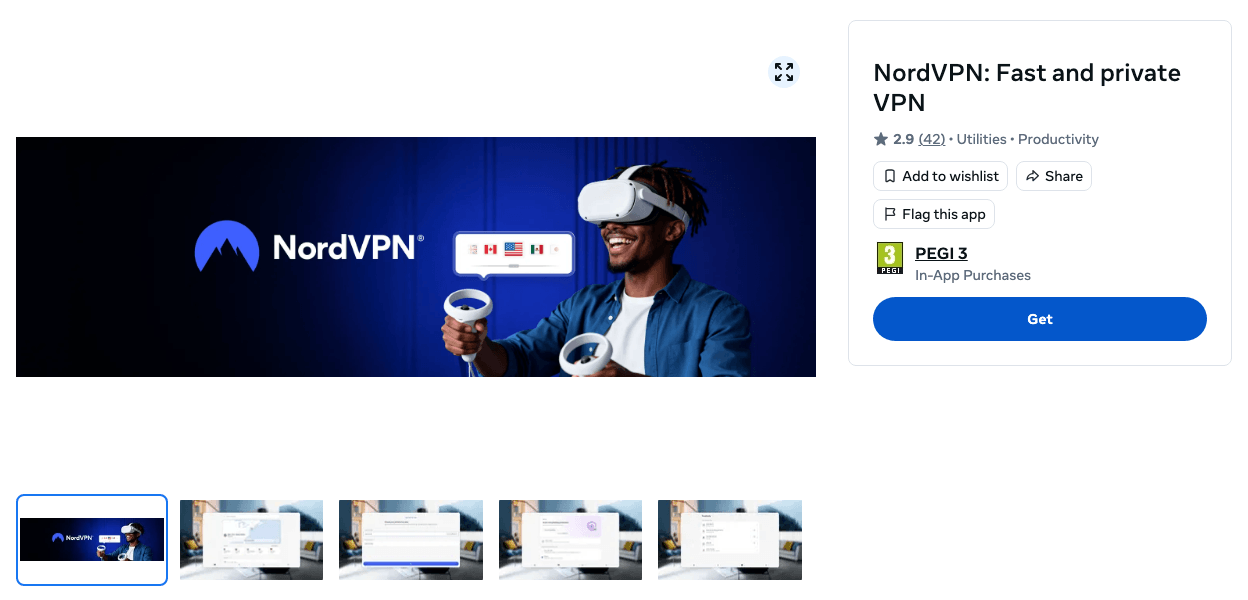
Yes – NordVPN has a native app for Meta Quest. It’s called “NordVPN: Fast and private VPN” in the Meta Horizon Store, it’s free to download, and it runs on the Meta Quest 3, 3S, Pro and 2. It arrived on 4 March 2026, so you no longer need developer mode or SideQuest to put NordVPN on a headset.
You do need a NordVPN subscription; any plan works, from $3.49 a month on the 2-year Basic plan (new to the service? Start with what NordVPN is and what each plan includes). Below are the install steps from Meta’s and NordVPN’s own help pages, what the VPN does and doesn’t do in VR, and how to fix casting, all checked on 22 October 2026.
Get NordVPN – Up to 78% Off + 3 Months
NordVPN on Meta Quest at a Glance
| The short answer | |
|---|---|
| Native Quest app? | Yes: “NordVPN: Fast and private VPN” by Nord Security, in the Meta Horizon Store since 4 March 2026 |
| Headsets | Meta Quest 3, Quest 3S, Quest Pro and Quest 2 |
| App price | Free to download; you log in with a paid NordVPN account |
| Size and version | 88.97 MB, version 9.15.2+vr |
| Store rating | 2.9 out of 5 from 42 ratings |
| Sideloading needed? | No (it was the only way before March 2026) |
| Devices per account | 10 at once; the headset uses one |
| Cheapest plan | Basic: $3.49 a month on the 2-year plan ($94.23 for 27 months) |
How to Install NordVPN on Meta Quest 3, 3S, Pro or 2
You install it from the Meta Horizon Store like any other app. These steps follow Meta’s guide to installing apps and NordVPN’s Meta Quest help article:
- Get a NordVPN plan if you don’t have one. Any plan works on the headset, and new customers in the US and 14 other countries can start a 7-day free trial on NordVPN’s website instead.
- Open the Navigator by pressing the Meta button on your right controller.
- Select Meta Horizon Store and search for NordVPN. The app you want is “NordVPN: Fast and private VPN”, published by Nord Security.
- Select Free to install it. It shows up in your Library when it’s done. You can also get it from the Meta Horizon app on your phone; Meta says apps you get there install automatically.
- Open NordVPN and log in with your Nord Account. One owner described it in a September 2026 review: “I gave it my account email, requested my 6-digit code to activate it within the headset, and it just worked.”
- Connect to a server. Pick a country or let the app choose one. If the headset asks you to allow a VPN connection, accept it.
Everything on the headset now runs through NordVPN. In NordVPN’s words, “because the VPN runs on the headset itself, it protects all Meta Quest traffic without needing a router or a shared connection.”
Which VR Headsets Does NordVPN Support?
NordVPN’s Quest app supports the Meta Quest 3, 3S, Pro and 2; the original 2019 Oculus Quest isn’t on the listing. The Quest’s operating system, Meta Horizon OS, runs Android apps, and NordVPN’s help article says the headset “runs the NordVPN Android app” (the store build is version 9.15.2+vr). Our NordVPN Android guide covers the same settings on a phone.
On other VR setups, NordVPN goes on whichever device does the work:
| VR setup | How to use NordVPN |
|---|---|
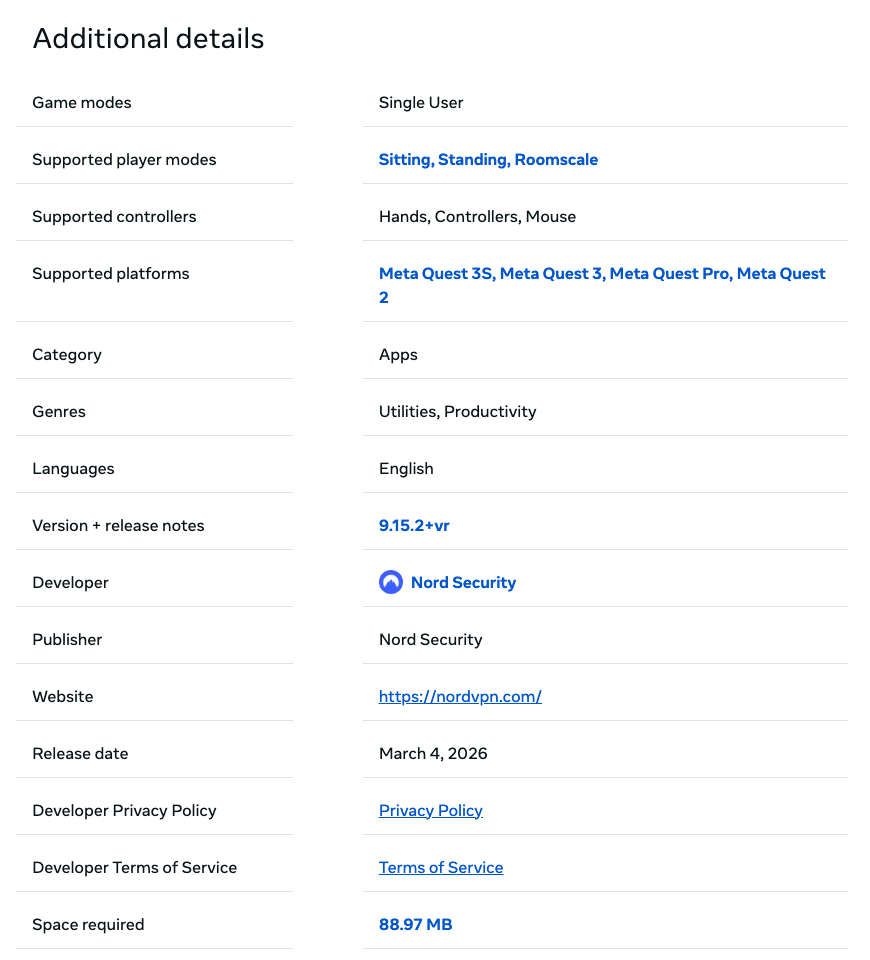
| Meta Quest 3, 3S, Pro or 2 | The NordVPN app from the Meta Horizon Store |
| Apple Vision Pro | NordVPN’s App Store app, which lists Apple Vision (visionOS 1.0 or later) |
| PC VR: a Quest on Link or Air Link, or another PC headset | The games run on your Windows PC, so install NordVPN there |
| PlayStation VR2 | It runs on a PS5, which has no NordVPN app: use a VPN router or a shared connection |
Meta describes Link and Air Link as connecting your headset “with a Windows computer to access PC VR games and apps”, which is why the computer’s VPN is the one that counts for PC VR.
What NordVPN Does on a Quest, and What It Doesn’t
On the headset, NordVPN does what it does on a phone: it encrypts your traffic and swaps your IP address for the server’s. That helps in four ways:
- Public and hotel Wi-Fi. Everything the headset sends is encrypted, from the browser to multiplayer sessions.
- Your IP address stays hidden from other players and game servers. A five-star review credits NordVPN with stopping IP grabbing in Gorilla Tag; NordVPN’s reply adds a fair caveat that it’s “one layer of protection among several good habits”.
- Your location changes for apps and websites that check your IP address: they see the country of the server you pick.
- The extras come along. The listing advertises NordVPN’s free Meshnet feature for linking devices to “share files, collaborate on projects, or play together”, and the latest release notes mention Real-time protection, NordVPN’s filter for malicious sites.
What it won’t do:
- Lower your ping. NordVPN’s speed advice for its Android app warns that ping can rise “when connecting to a country far away from your physical location”. For multiplayer, pick a server in or near your own country (NordVPN has 7,000+ in 150 countries, 2,500+ of them in 55 US cities; see our server list), and if it’s still slow, NordVPN suggests another protocol or turning off post-quantum encryption. More in our guide to NordVPN for gaming.
- Cover PC VR games played over Link or Air Link, which use your computer’s connection.
- Keep casting working by default. With the VPN on, the headset may not see your TV or phone. The fix is below.
How to Fix Casting With NordVPN Turned On
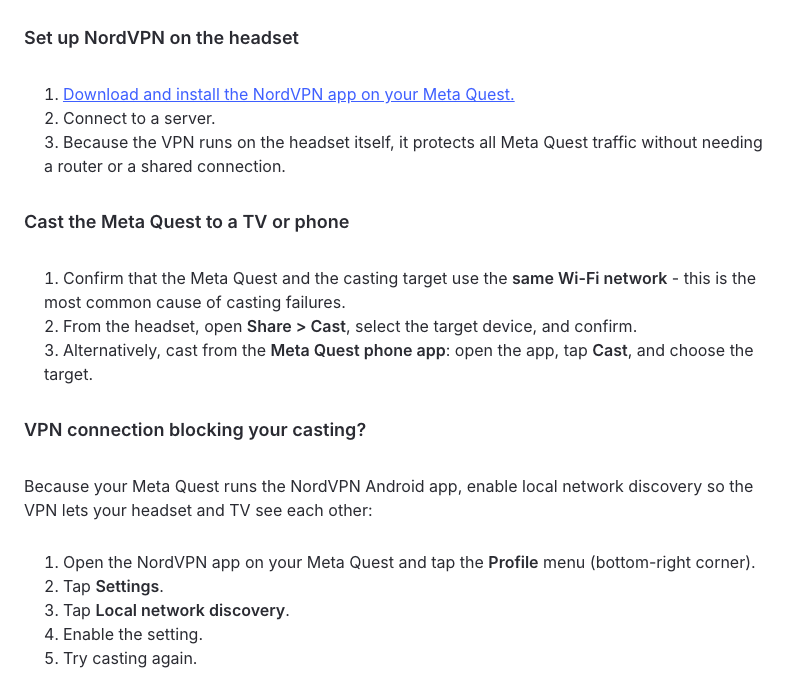
If casting to a TV or phone fails while NordVPN is connected, switch on the app’s local network discovery so the headset and the TV can see each other. NordVPN’s steps:
- Check the Wi-Fi. The Quest and the TV or phone must be on the same Wi-Fi network; NordVPN calls this the most common cause of casting failures.
- Open NordVPN on the Quest and tap the Profile menu in the bottom-right corner.
- Tap Settings, then Local network discovery, and turn it on.
- Cast again from Share > Cast in the headset.
Still stuck? NordVPN suggests casting from the Meta Horizon phone app instead, or disconnecting the VPN briefly while you start the cast.
Is NordVPN’s Quest App Any Good?
Owners are split. The app has 2.9 stars from 42 ratings: 42% of them five stars and 48% one star. Of the 18 written reviews on 22 October 2026, eight were positive and ten negative, and login trouble was the most common complaint, in five reviews between May and early October 2026. NordVPN replied in August that a login fix had been released, but one review from early October still reports a failed login.
The good reviews are short and to the point: “Brilliant just works,” wrote one owner, and another, who already used NordVPN on a PC, said it “works and is fast”.
If you can’t log in, update the app, restart the headset and try again, then ask NordVPN’s 24/7 support. Every plan has a 30-day money-back guarantee, so if it doesn’t work on your headset, you can ask for your money back.
You don’t need these for a Quest anymore, but they help if the app won’t log in or you want every device at home covered:
- NordVPN on your router. Every device on your Wi-Fi goes through the VPN, the Quest included, and NordVPN says the router uses only one of your 10 device slots. Your router needs to support an OpenVPN client; see how to set up NordVPN on a router.
- A hotspot from a Windows PC. NordVPN’s hotspot guide shares a Windows 10 or 11 PC’s VPN connection over Wi-Fi: switch the app to OpenVPN (a mobile hotspot won’t work with NordLynx), turn on Mobile hotspot in Windows settings, allow sharing on the “OpenVPN Data Channel Offload for NordVPN” adapter, then join the hotspot from the Quest.
What About Surfshark or Other VPNs?
Few VPNs have a Quest app. A search of the Meta Horizon Store on 22 October 2026 turns up apps from NordVPN, ExpressVPN (2.6 stars from 27 ratings), AdGuard VPN, SpatialVPN and Ustreaming VPN, but none from Surfshark, Proton VPN, Private Internet Access or CyberGhost.
That matters if you’d prefer Surfshark, our second pick for most people. Its help center has no Quest guide, and the only way onto the headset is sideloading its Android app, which brings back developer mode. If you already pay for Surfshark, put it on your router instead: its help center covers dozens of router models, and one account covers unlimited devices.
How Much Does NordVPN Cost for a Quest?
The VPN is the same on every plan, so Basic is all a Quest needs. Complete’s extras, such as next-gen antivirus and the ad and tracker blocker (both desktop only), a password manager and 1 TB of cloud storage, add nothing in VR. Here are NordVPN’s US prices on 22 October 2026, during its Black Friday sale:
| Plan | 2 years + 3 months | Then each year |
|---|---|---|
| Basic | $94.23 ($3.49/mo) | $139.08 |
| Complete | $107.73 ($3.99/mo) | $219.48 |
| Prime | $188.73 ($6.99/mo) | $296.28 |
The month-to-month Basic plan costs $14.99, so a long plan is much better value. The headline 78% discount applies to Complete; our NordVPN Black Friday guide tracks the sale, and the NordVPN price guide explains every plan.
FAQ
Does NordVPN Work on Meta Quest 3?
Yes. NordVPN has a native app, “NordVPN: Fast and private VPN”, in the Meta Horizon Store. It supports the Meta Quest 3, 3S, Pro and 2, it’s free to download, and you log in with a paid NordVPN account.
Is the NordVPN Meta Quest App Free?
The app is free to download, but it needs an active NordVPN subscription. Plans start at $3.49 a month on the 2-year Basic plan, new customers in 15 countries, including the US, can try it free for 7 days through NordVPN’s website, and every plan has a 30-day money-back guarantee.
Do I Need SideQuest or Developer Mode to Use NordVPN on Quest?
No. NordVPN has been in the Meta Horizon Store since 4 March 2026, so you install it like any other app. Sideloading needs developer mode, which Meta only allows for registered developers with a verified account who are at least 18.
Does NordVPN Work on Meta Quest 2 and the Original Oculus Quest?
The Quest 2 is supported, along with the Quest 3, 3S and Pro. The original 2019 Oculus Quest isn’t on the store listing’s list of supported headsets.
Does NordVPN Slow Down VR Gaming?
It can add some delay, mostly on distant servers. NordVPN says ping can rise when you connect to a country far from you, so for multiplayer games pick a server in or near your own country.
What Is the Best VPN for VR Headsets?
For a Meta Quest, NordVPN. It’s one of the few well-known VPNs with an app in the Meta Horizon Store (ExpressVPN has one too; Surfshark, Proton VPN and Private Internet Access don’t), it covers 10 devices at once, and it also has apps for Apple Vision Pro and for the Windows PCs that run PC VR games.
The Bottom Line
NordVPN is the easiest VPN to put on a Meta Quest right now: a free download from the Meta Horizon Store for the Quest 3, 3S, Pro and 2 that covers everything on the headset. Pick a nearby server for multiplayer, switch on local network discovery if casting breaks, and if the login gives you trouble, the 30-day money-back guarantee has you covered.
Get NordVPN for your Quest – from $3.49 a month on the 2-year Basic plan, with up to 78% off and 3 extra months during the Black Friday sale.
More NordVPN guides
 NordVPN Price & Plans 2026: How Much Does It Cost?
 NordVPN Free Trial: How to Get 7 Days Free (2026)
 NordVPN for iPhone and iPad: How to Install and Set It Up (2026)
 NordVPN Chrome Extension (2026): How to Install, Use and Fix It
 How to Set Up and Use NordVPN on PS5? (2026)
 How to Use NordVPN on Xbox: Step-by-Step Tutorial (2026)

