
To uninstall NordVPN, remove it like any other app: Settings > Apps > Installed apps on Windows, drag it to the Trash on a Mac, touch and hold it and tap Remove App on an iPhone, or run sudo apt-get --purge remove 'nordvpn*' on Ubuntu or Debian. Uninstalling won’t cancel your subscription (you do that in your Nord Account), and on a Mac with the website version it won’t remove NordVPN’s background helper, which lives outside the app.
Below are the steps for every device from NordVPN’s, Microsoft’s, Apple’s and Google’s help pages, the leftovers each one misses, and how to just turn NordVPN off, checked on 22 October 2026.
Reinstalling? Get the Latest NordVPN App
How to Uninstall NordVPN on Any Device
| Device | How to uninstall NordVPN |
|---|---|
| Windows 11 and 10 | Start > Settings > Apps > Installed apps > More (…) next to NordVPN > Uninstall |
| Mac | Quit NordVPN, drag it from Applications to the Trash; for the website version, also remove its helper |
| iPhone and iPad | Touch and hold the app > Remove App > Delete App > Delete |
| Android | Settings > Apps > NordVPN > Uninstall |
| Linux (Ubuntu, Debian, Mint) | sudo apt-get --purge remove 'nordvpn*', then delete NordVPN’s repository |
| Linux (Fedora) | sudo dnf remove 'nordvpn*', then delete /etc/yum.repos.d/nordvpn.repo |
| Linux (Snap) | sudo snap remove nordvpn --purge |
| Chrome, Edge or Firefox | Right-click the NordVPN extension icon and remove it |
| TVs, Meta Quest, routers | See the table further down |
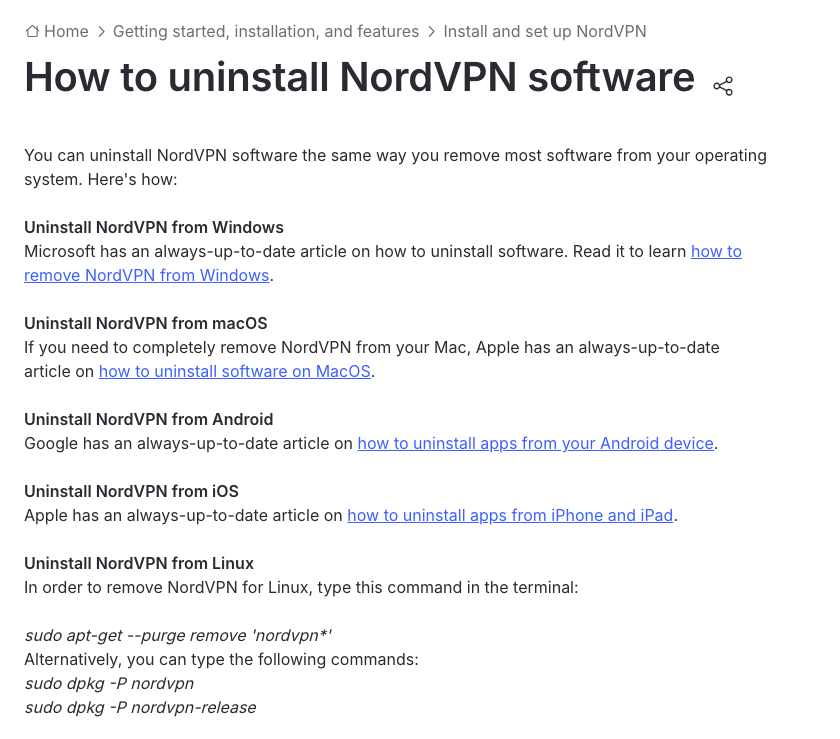
NordVPN’s own uninstall article just points to Microsoft, Apple and Google and lists two Linux commands. That removes the app, but not everything NordVPN installs, so each section below adds the cleanup.
Uninstalling Doesn’t Cancel Your Subscription
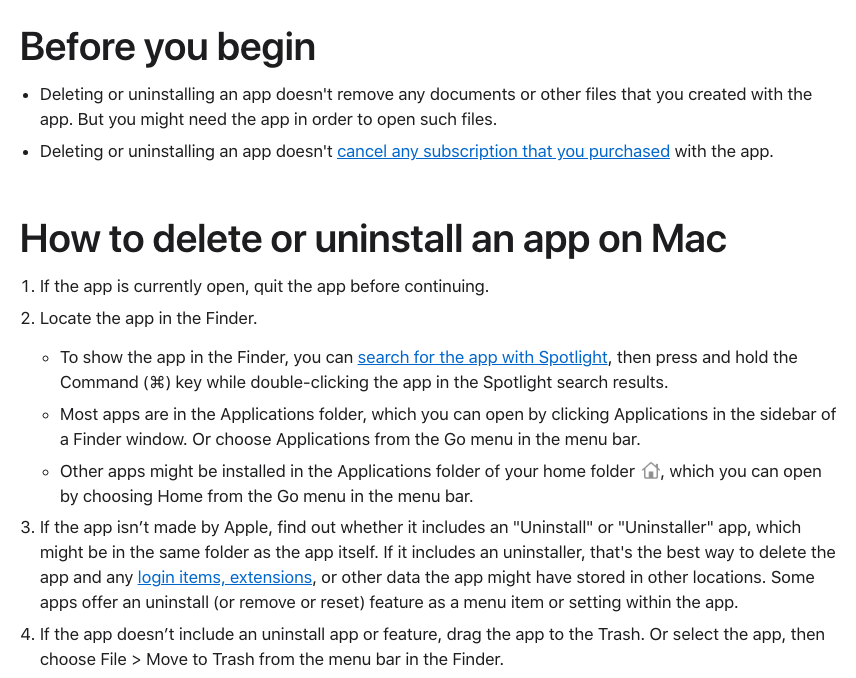
Deleting the app doesn’t stop billing or delete your account. Apple says “deleting or uninstalling an app doesn’t cancel any subscription that you purchased with the app”, and Google agrees: “When you uninstall an app, your subscription won’t cancel.” If you’re leaving NordVPN:
- Turn off auto-renewal. Log in to your Nord Account, open the Billing tab, click Cancel next to auto-renewal and confirm with Cancel auto-renewal; NordVPN emails you a confirmation. If you bought through the App Store, Google Play or the Amazon Appstore, cancel it there instead.
- Ask for a refund if you’re within 30 days of paying: every plan has a 30-day money-back guarantee. Our guide on how to cancel NordVPN and get a refund walks through it.
- Delete the account only if you want your data gone. It’s permanent, and NordVPN deletes your whole Nord Account with it, including NordPass and NordLocker. In your Nord Account, click your email address, open the account settings and choose Delete account at the bottom, then enter the code NordVPN emails you and follow the remaining steps.
How to Uninstall NordVPN on Windows 11 and 10
Uninstall it in Settings, then restart. These are Microsoft’s steps, which NordVPN points to:
- Select Start > Settings > Apps > Installed apps.
- Find NordVPN, select More (…) next to it, then Uninstall.
- Confirm and follow the uninstaller’s prompts.
- Restart your PC, as NordVPN’s own reinstall instructions do.
If NordVPN won’t uninstall from Settings, open Control Panel, select Programs > Programs and Features, right-click NordVPN and choose Uninstall. Microsoft’s Program Install and Uninstall troubleshooter helps if you get an error.
Uninstalling to fix a problem? Try NordVPN’s built-in repairs first: for connection trouble, click the question mark in the app’s lower-left corner, then Run diagnostics > Reset network; if the app crashes, search Windows for NordVPN Diagnostics and click Reset app. Our guides to NordVPN not connecting and the “background process is not running” error cover the rest, and the Windows 11 setup guide shows how to reinstall.
What Windows Leaves Behind
- Browser extensions. The Windows installer offers to add NordVPN and NordPass browser extensions. They’re separate from the app, so remove them in your browser (steps below).
- Network adapters. NordVPN connects through virtual adapters called “OpenVPN Data Channel Offload for NordVPN” and “TAP-NordVPN Windows Adapter V9”. If one is still listed after a restart, open Device Manager, select View > Show hidden devices, expand Network adapters, right-click the NordVPN adapter and choose Uninstall device.
- Startup entries. In a 2024 Microsoft Q&A thread, a Windows 11 user found NordVPN still launching at sign-in after uninstalling it. The suggested fix was Microsoft’s free Autoruns tool: look for NordVPN entries on its Logon and Scheduled Tasks tabs and delete them.
How to Uninstall NordVPN on a Mac
Quit NordVPN, move it to the Trash, and if you installed it from NordVPN’s website, remove the helper it leaves in /Library. NordVPN has two Mac apps: the App Store version, which “runs fully within Apple’s App Sandbox”, and the website version (NordVPN.pkg from nordvpn.com), which “uses system-level components for deeper protection”. NordVPN notes you may have both installed, so delete both. Apple’s steps:
- Quit NordVPN. Apple: “If the app is currently open, quit the app before continuing.”
- Open the Finder and click Applications in the sidebar.
- Drag NordVPN to the Trash, or select it and choose File > Move to Trash.
- Enter your Mac’s password if asked, then choose Finder > Empty Trash.
For the App Store version, that’s it, apart from the System Settings check below. The website version also leaves a helper behind.
Remove the Website Version’s Helper
NordVPN’s website installer (version 10.13.1, the current download on 22 October 2026) copies a helper tool to /Library/PrivilegedHelperTools and adds a launch daemon in /Library/LaunchDaemons that starts it at boot and keeps it running. Both live outside the app, so the Trash doesn’t touch them; a December 2025 Apple Community thread found the daemon still running after a normal uninstall. Apple’s advice is that an app’s own uninstaller is “the best way to delete the app and any login items, extensions, or other data”, and NordVPN doesn’t ship one.
To remove the helper, open Terminal and run these commands, the same cleanup NordVPN’s installer performs before it installs a new helper, then restart your Mac:
sudo launchctl remove com.nordvpn.macos.helper
sudo rm -f /Library/LaunchDaemons/com.nordvpn.macos.helper.plist
sudo rm -f /Library/PrivilegedHelperTools/com.nordvpn.macos.helper
The installer also creates a hidden user group, nordvpn_helper; sudo dseditgroup -o delete nordvpn_helper removes it.
Finally, for either version, check two places in System Settings:
- VPN. If NordVPN is still listed, click the Info button next to it and choose Remove configuration.
- General > Login Items & Extensions. If NordVPN still appears under Open at Login, select it and click the minus button; under App Background Activity, switch it off. Apple says macOS uninstalls an app’s system extensions when you delete the app, so NordVPN’s shouldn’t linger in the Extensions list.
Want to put it back? See how to install NordVPN on macOS.
How to Uninstall NordVPN on iPhone and iPad
Delete the app, then check that no VPN entry is left. Apple’s steps:
- Touch and hold the NordVPN app.
- Tap Remove App, then Delete App.
- Tap Delete to confirm.
Don’t pick Remove from Home Screen: Apple notes it only moves the app to App Library. Afterwards, open Settings > General > VPN & Device Management and make sure no NordVPN entry is left; if one is, open it and delete it.
No Delete option? Screen Time’s Deleting Apps setting must be set to Allow, and a phone managed by an employer may block deleting apps. If you bought NordVPN in the app, cancel it in your Apple Account subscriptions too: deleting an app “doesn’t automatically cancel in-app subscriptions”, Apple says. Our NordVPN iOS guide covers reinstalling.
How to Uninstall NordVPN on Android
Uninstall it from Settings. NordVPN’s steps (menu names vary a little by phone):
- Open Settings > Apps (on some phones, Apps & Notifications or Manage Apps).
- Tap NordVPN.
- Tap Uninstall and confirm.
You can also long-press the NordVPN icon and tap App info > Uninstall, or tap Uninstall on NordVPN’s Google Play page if you installed it from there. If you subscribed through Google Play, cancel it in Google Play’s subscriptions too. Reinstalling? See our NordVPN Android setup guide.
How to Uninstall NordVPN on Linux
Turn off the kill switch, disconnect, then remove the packages and the repository NordVPN added. On Ubuntu, Debian, Mint or Raspberry Pi OS:
-
Turn off the kill switch and disconnect, so you don’t lose your internet connection. NordVPN says disconnecting also cleans up “any firewall configuration left behind”.
nordvpn set killswitch off nordvpn disconnect -
Remove NordVPN with the command from NordVPN’s uninstall article. The wildcard also catches the GUI app and the older nordvpn-release package, and
--purgedeletes each user’s NordVPN settings in ~/.config and ~/.cache, according to the package’s own removal script.sudo apt-get --purge remove 'nordvpn*' -
Delete the repository and key. NordVPN’s install script adds them, and removing the package doesn’t delete them.
sudo rm -f /etc/apt/sources.list.d/nordvpn-app.list /etc/apt/trusted.gpg.d/nordvpn_public.asc sudo apt-get update -
Restart the computer.
The package also creates a nordvpn user group; sudo groupdel nordvpn removes it. On Fedora, run sudo dnf remove 'nordvpn*' and delete /etc/yum.repos.d/nordvpn.repo, the repository file NordVPN’s script creates there. If you installed the Snap, run sudo snap remove nordvpn --purge; without --purge, Snap keeps a snapshot of the app’s data for 31 days. To reinstall, see how to set up NordVPN on Linux.
How to Remove the NordVPN Browser Extension
The browser extensions are separate from the app, so uninstalling NordVPN doesn’t remove them:
- Chrome: right-click the NordVPN icon next to the address bar and choose Remove from Chrome. Or open the menu, then Extensions > Manage Extensions, and click Remove on NordVPN.
- Microsoft Edge: right-click the NordVPN icon and choose Remove from Microsoft Edge, then Remove.
- Firefox: open the menu, then Add-ons and themes > Extensions, click the three-dot menu next to NordVPN and choose Remove.
Sources: Google, Microsoft and Mozilla. Our NordVPN Chrome extension guide covers the extension itself.
Remove NordVPN From a TV, Meta Quest or Router
| Device | How to remove NordVPN |
|---|---|
| Amazon Fire TV | Settings > Applications > Manage Installed Applications > NordVPN > Uninstall |
| Android TV | Settings > Apps > NordVPN (under Downloaded apps) > Uninstall > OK |
| Apple TV | Highlight NordVPN, press and hold the clickpad > Delete App > Delete (Offload keeps its data) |
| Meta Quest | Navigator > App library > long-press NordVPN > Remove from library > Uninstall |
| Router | In the router’s admin page, turn off its OpenVPN client and delete the NordVPN profile |
Sources: Amazon, Google, Apple and Meta. A router has nothing to uninstall: NordVPN runs through the router’s own OpenVPN client, so that’s what you switch off.
How to Turn Off NordVPN Without Uninstalling It
Open the app and click Disconnect, the icon next to Pause; to stop it only for a while, choose a time from Pause instead. On Linux, type nordvpn d (NordVPN’s steps).
| Device | Turn NordVPN off | Stop it reconnecting |
|---|---|---|
| Windows | Disconnect icon next to Pause | Settings: switch off Auto-connect and Launch at Windows startup |
| Mac | Disconnect icon next to Pause | Settings > Auto-connect: switch it off |
| iPhone and iPad | Disconnect icon next to Pause | Profile icon > Settings > Auto-connect |
| Android | Disconnect icon next to Pause | Profile icon > Settings > Auto-connect, and Android’s Always-on VPN |
| Linux | nordvpn d | nordvpn set autoconnect off |
Three settings can keep NordVPN working after you disconnect:
- Auto-connect. NordVPN warns that with it on, the app “may reconnect on its own when you join a network”. Our NordVPN auto-connect guide shows each setting.
- Kill switch. On Windows, the Internet Kill Switch “cuts off your internet connection when disconnected from NordVPN servers”, and on Linux it blocks the internet even when you disconnect manually. If your connection dies when NordVPN is off, switch it off (Settings > Kill Switch on Windows,
nordvpn set killswitch offon Linux); on Android, also check Android’s Always-on VPN (on Samsung phones: Settings > Connections > More connection settings > VPN, then the cog next to NordVPN). See our kill switch guide. - Protection features. On phones, NordVPN’s Real-time protection can keep filtering without a VPN connection (on iPhone and iPad, that’s its “Always” mode), and on computers, Next-gen antivirus works “without requiring an active VPN connection”. To stop them, tap the shield icon and Turn off protection on iPhone or Android, click the shield icon and Pause on Windows, or type
nordvpn set protection offon Linux.
Switching Devices? You Don’t Need to Uninstall
NordVPN’s limit is 10 devices connected at the same time, not 10 installs, so you can set it up on a new phone or laptop before removing it from the old one. Just log in with the same Nord Account; our overview of what NordVPN is and what each plan includes covers the apps for every device.
Download NordVPN for Your New Device
FAQ
Does Uninstalling NordVPN Cancel My Subscription?
No. Deleting the app doesn’t stop billing or delete your account. To stop the renewal, log in to your Nord Account, open the Billing tab and click Cancel next to auto-renewal. If you paid through the App Store, Google Play or the Amazon Appstore, cancel it there instead.
How Do I Completely Uninstall NordVPN?
Uninstall the app the normal way, then clear what it leaves: on a Mac with the website version, NordVPN’s helper in /Library; on Windows, any leftover NordVPN network adapters; on Linux, NordVPN’s software repository and key; and the browser extension, which is separate from the app. Restart the device afterwards.
How Do I Completely Uninstall a VPN?
Uninstall the app, then remove any VPN configuration it left behind (System Settings > VPN on a Mac, Settings > General > VPN & Device Management on an iPhone), remove its browser extension and restart. Cancel the subscription separately, because deleting an app doesn’t cancel it.
Why Can’t I Uninstall NordVPN?
Usually because it’s still running. Quit it first, or restart and try again; Apple suggests Safe Mode if a Mac still says the app is in use. On an iPhone, Screen Time’s Deleting Apps setting must be set to Allow. On Windows, try Control Panel or Microsoft’s Program Install and Uninstall troubleshooter.
How Do I Turn Off NordVPN on My iPhone?
Open the NordVPN app and tap the Disconnect icon next to Pause. To stop it reconnecting, tap the profile icon, then Settings, then Auto-connect, and switch it off. If sites stay blocked, tap the shield icon and turn off Real-time protection, which can filter traffic without a VPN connection.
Why Is NordVPN Still Running After I Uninstalled It?
On a Mac, the website version leaves a helper, com.nordvpn.macos.helper, in /Library that starts at every boot; remove it with the three Terminal commands in this guide. On Windows, look for leftover startup entries with Microsoft’s free Autoruns tool.
The Bottom Line
Uninstalling NordVPN takes a minute on any device, and a clean removal adds two steps: cancel auto-renewal in your Nord Account if you’re leaving, and on a Mac, delete the helper the website version leaves in /Library. If you’re only moving to a new device, you don’t need to uninstall anything first: one plan covers 10 devices at once.
See NordVPN’s current deal – if your plan has run out, the 2-year Basic plan is $3.49 a month during the Black Friday sale, with 30 days to change your mind.
More NordVPN guides
 NordVPN Coupon & Promo Codes October 2026: Up to 78% Off
 NordVPN Free Trial: How to Get 7 Days Free (2026)
 How to Cancel NordVPN and Get a Refund (2026)
 NordVPN Customer Service (2026): Live Chat, Email and Why There’s No Phone Line
 Why Does NordVPN Keep Disconnecting?
 How to Update NordVPN on Linux? (2026)

