
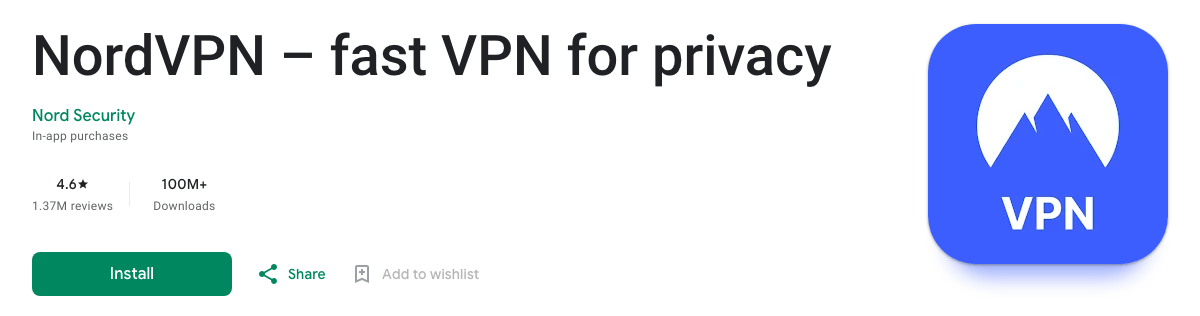
NordVPN’s Android app is a free download from Google Play: install it, log in, tap “Secure my connection” and tap OK when Android asks to allow the VPN connection. It needs Android 9 or later; phones on Android 7 or 8, or without Google Play, can install the official APK from NordVPN’s website instead. In the US, the app is rated 4.6 stars from 1.37 million reviews on Google Play, has more than 100 million downloads and was last updated on 16 October 2026.
You still need a NordVPN plan to use it. New Android users can try it free for 3 days through Google Play, and NordVPN’s Black Friday deal is live: the 2-year Basic plan is $3.49 a month ($94.23 for 27 months), with a 30-day money-back guarantee. If you’re new to the service, start with our explainer on what NordVPN is and what it includes. Everything below was checked on 22 October 2026.
Get NordVPN – 78% Off + 3 Months
| NordVPN on Android | |
|---|---|
| App | NordVPN – fast VPN for privacy, by Nord Security (free download) |
| Works on | Android 9 or later from Google Play; Android 7 and 8 with NordVPN’s APK |
| Google Play rating (US) | 4.6 out of 5 from 1.37M reviews; 100M+ downloads |
| Last updated | 16 October 2026 |
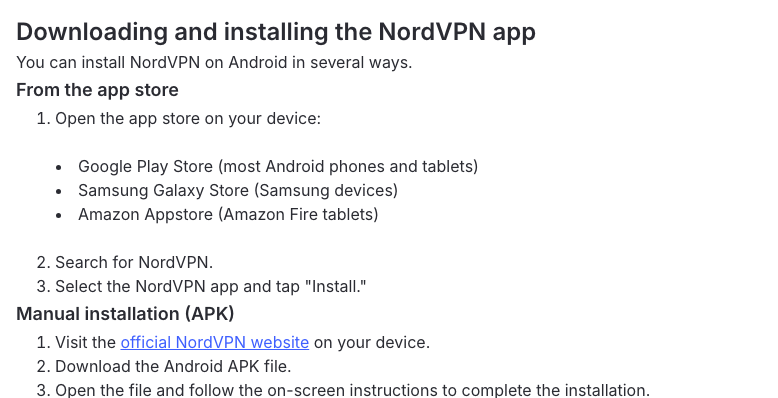
| Where to get it | Google Play, Samsung Galaxy Store, Amazon Appstore or NordVPN’s APK |
| Kill switch | Yes, system-wide on Android 8.0 and later |
| Split tunneling | Yes, per app |
| Free trial | 3 days through Google Play, for first-time Android users |
| Price | From $3.49 a month on the 2-year plan (Black Friday price) |
How to Set Up NordVPN on Android
Setup takes a couple of minutes. These steps follow NordVPN’s Android setup guide, updated on 22 October 2026; menu names can differ slightly between phone makers.
- Get a NordVPN plan on NordVPN’s website, or tap Sign up in the app to create a Nord Account. First-time Android users can start Google Play’s 3-day trial instead (see below).
- Install the app. Open Google Play, search for NordVPN and tap Install. The developer should read Nord Security.
- Open NordVPN and tap Log in. Your browser opens the Nord Account page: enter your email and password, or sign in with Google or Apple, tap Continue and go back to the app.
- Connect. Tap Secure my connection for the fastest server, swipe up to the country list, or tap the magnifying glass to search for a country or city.
- Tap OK when Android asks to let NordVPN create a VPN connection. You only see this the first time.
- Disconnect with the icon next to Pause, or pick a duration from the Pause menu to switch the VPN off for a while.
The same app runs on Android TV and Google TV, as our NordVPN Android TV guide shows, and on most Chromebooks through Google Play, although NordVPN says some older models can’t run it (see NordVPN on a Chromebook).
Where to Download NordVPN for Android
Google Play suits almost everyone. NordVPN lists four official sources:
- Google Play, for most Android phones and tablets running Android 9 or later.
- Samsung Galaxy Store, on Samsung phones and tablets.
- Amazon Appstore, for Fire tablets. For a Fire TV Stick, use our NordVPN Fire Stick guide.
- NordVPN’s APK, downloaded from its website. You need it on Android 7 and 8, which NordVPN supports only through this sideloaded version, and on phones without Google Play.
How to Install the NordVPN APK on Android
The APK is the same NordVPN app, installed by hand. Download it only from NordVPN’s Android download page, then follow the steps for your Android version. Android asks for permission first because, as Google’s developer documentation puts it, it blocks installs from outside Google Play until you opt in.
Android 8.0 and Later
- Download the APK on your phone from NordVPN’s Android page.
- Open the downloaded file from your browser’s downloads or the Files app.
- Allow your browser to install it. Android sends you to its Install unknown apps screen for that browser; turn the permission on (it’s usually called Allow from this source).
- Go back and tap Install, then Open, and log in as in the setup steps above.
- Turn the permission off again for your browser once NordVPN is installed.
Android 7
On Android 7, the permission is a single system-wide switch: Settings > Security > Unknown sources. Turn it on, install the APK, then turn it off again. Android 7 is the oldest version NordVPN still supports; it stopped supporting older ones in November 2024.
The NordVPN Android Settings Worth Knowing
The Android app has a few more controls than the iPhone version. Unless noted, everything below is under the profile icon (bottom right), then Settings.
Protocol
Keep NordLynx, NordVPN’s WireGuard-based protocol. It’s the default in NordVPN’s apps, its fastest option, and the only protocol that works with post-quantum encryption. Switch to NordWhisper on networks that block VPNs, such as office, campus or hotel Wi-Fi, and to OpenVPN (UDP or TCP) if NordLynx won’t connect. Our NordLynx guide explains the difference.
Auto-Connect
Tap Auto-connect and choose All networks, On Wi-Fi or On mobile networks. NordVPN connects to the fastest server unless you tap Fastest server and pick a country. Our NordVPN auto-connect guide covers the other apps.
Split Tunneling
Split tunneling lets chosen apps skip the VPN, which NordVPN suggests for apps such as banking apps that need your local IP address, and Android is one of the few platforms where NordVPN offers it. Tap Split tunneling, switch it on and select the apps to exclude. NordVPN notes one catch: excluded apps still use NordVPN’s DNS, so some streaming apps may misjudge your location. More in our NordVPN split tunneling guide.
Real-Time Protection (Formerly Threat Protection Lite)
Tap the shield icon in the bottom bar. Real-time protection uses DNS filtering to block ads, trackers and malicious domains, and every plan includes it. The heavier ad and tracker blocker and the antivirus in NordVPN’s Complete plan work on desktop apps only. See our NordVPN Threat Protection guide.
Call and Message Protection
With Complete or Prime, NordVPN can flag scam calls before you answer and warn you about scam texts from unknown senders; it checks messages for scam patterns without storing their content. To turn it on, tap the shield icon, then Call and message protection, then Turn On, and make NordVPN your default caller ID and spam app. Complete costs $3.99 a month on the 2-year Black Friday deal. NordVPN also offers HangUp, a separate call-screening app that is free for now for anyone with a Nord Account.
Specialty Servers
Swipe up on the main screen to reach your dedicated IP and the specialty servers: Onion Over VPN, obfuscated servers (which now run on NordWhisper) and Double VPN. You don’t need a special server for torrenting with NordVPN, either: NordVPN says all its regular servers now support P2P.
Meshnet
Meshnet, under Products in the bottom bar, links your own devices in a private network for remote access, file sharing, gaming or routing your phone’s traffic through your home computer. Our NordVPN Meshnet guide shows how to set it up.
Does NordVPN Have a Kill Switch on Android?
Yes. Turn on Kill Switch under the profile icon, Settings. According to NordVPN’s kill switch article, on Android 8.0 or later it works system-wide, blocking all internet access when there’s no VPN connection. For a second layer, turn on Android’s own Always-on VPN:
- Open your phone’s VPN settings: Settings > Network & internet > VPN on a Pixel, or Settings > Connections > More connection settings > VPN on a Samsung. If you can’t find it, search Settings for “VPN”.
- Tap the gear icon next to NordVPN.
- Turn on Always-on VPN.
- Turn on Block connections without VPN too, if your phone shows it.


More on how NordVPN’s kill switch works across devices in our NordVPN kill switch guide.
NordVPN Not Working on Android? How to Fix It
Most problems go away with another protocol or a different server. Test after each step; they come from NordVPN’s Android connection troubleshooting and related articles, updated in October 2026.
- Pick a country yourself instead of using Secure my connection, and try a few.
- Try every protocol under the profile icon, Settings, Protocol.
- Turn off post-quantum encryption and Meshnet. NordVPN lists both as possible causes.
- If it keeps disconnecting, connect to an obfuscated server, close any other VPN app and add NordVPN to your antivirus exclusions.
- Stop battery savers from closing it. NordVPN’s own advice for keeping its app running in the background (from its call protection troubleshooting) is Settings > Battery > Battery optimization > NordVPN > Don’t optimize; on a Samsung, also exclude it from Put unused apps to sleep and Deep sleep.
- Reset network settings: Settings > Reset Wi-Fi, mobile & Bluetooth (called Reset network settings on some phones). This also deletes saved Wi-Fi passwords.
- Restart the phone.
- Reinstall from the other source: if you installed from Google Play, try the APK from NordVPN’s website, and the other way round.
- Still stuck? Send diagnostic logs from the app’s Help section and contact NordVPN’s 24/7 support.
For problems that aren’t specific to Android, see why NordVPN isn’t connecting and what to do when NordVPN keeps disconnecting.
Is NordVPN Free on Android?
No, but you can use it free for a few days. NordVPN’s free trial help article lists two trials and a refund guarantee:
- 3 days through Google Play, for first-time Android users who install the app from Google Play (one per customer). Google Play runs it, so you cancel it there: Google Play > profile icon > Payments & subscriptions > Subscriptions > NordVPN > Cancel subscription. Uninstalling the app doesn’t cancel it. It isn’t offered in Bangladesh, India, South Korea or Sri Lanka.
- 7 days on NordVPN’s website, for new customers in the US and 14 other countries. It comes with a 1- or 2-year Prime plan (the top US plan) and needs a card or PayPal. Our NordVPN free trial guide walks through it.
- A 30-day money-back guarantee on first purchases. For Google Play payments, NordVPN’s support handles refunds within those 30 days, and Google itself refunds payments made in the last 48 hours.
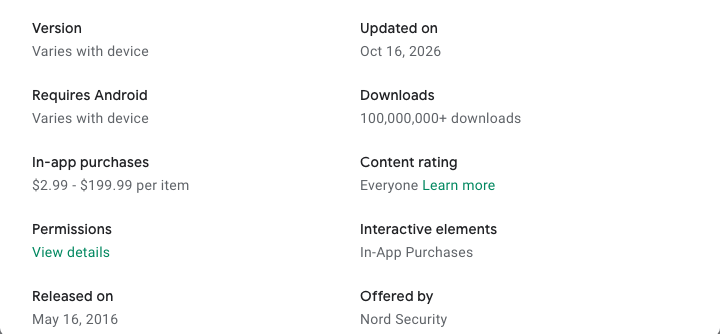
Google Play lists NordVPN’s in-app purchases at $2.99 to $199.99 per item. For a long plan, NordVPN’s website is the better deal right now: 27 months of Basic cost $94.23, and Complete $107.73 ($3.99 a month). Our NordVPN price guide compares every plan, and our NordVPN discounts page lists the offers running now.
Get NordVPN’s Black Friday Deal
FAQ
Is NordVPN Free on Android?
No, but you can try it free. First-time Android users get a 3-day free trial when they install NordVPN from Google Play (not in Bangladesh, India, South Korea or Sri Lanka), and new customers in the US and 14 other countries can get a 7-day trial on NordVPN’s website. Plans bought from NordVPN also come with a 30-day money-back guarantee.
Does NordVPN Block Ads on Android?
Yes. Real-time protection (the shield icon in the app) uses DNS filtering to block ads, trackers and malicious domains, and it’s included in every plan. The stronger ad and tracker blocker in NordVPN’s Complete plan works on desktop apps only.
Where Can I Download the NordVPN APK?
Only from NordVPN’s own website: open its Android download page on your phone and download the APK. NordVPN recommends installing the app from Google Play or its website, so skip third-party APK sites. Android 7 and 8 need this APK, because the Google Play version requires Android 9 or later.
Does NordVPN Have a Kill Switch on Android?
Yes. Turn on Kill Switch in the app’s settings; on Android 8.0 and later it blocks all internet access whenever the VPN connection drops. For a second layer, turn on Always-on VPN for NordVPN in Android’s own VPN settings.
What Android Version Does NordVPN Need?
The Google Play app needs Android 9 or later. Android 7 and 8 can run NordVPN’s sideloaded APK from its website, and Android 7 is the oldest version NordVPN still supports.
Does NordVPN Work on Android TV and Chromebooks?
Yes. Android TV and Google TV devices install NordVPN from Google Play, and most Chromebooks run the Android app from Google Play too, although NordVPN says some older Chromebook models don’t support it.
The Bottom Line
Install NordVPN from Google Play (or the APK from NordVPN’s website on Android 7 and 8), log in, tap Secure my connection and allow the VPN request. Then turn on the Kill Switch and Android’s Always-on VPN, keep NordLynx, and use split tunneling for any app that won’t work over a VPN.
Get NordVPN’s 2-year deal for $3.49 a month, then install the Android app. If you need more than 10 devices, Surfshark covers unlimited devices for $2.49 a month on its 2-year plan.
More NordVPN guides
-
 NordVPN Coupons, Promo Codes & Deals November 2026: Up to 78% Off
-
 NordVPN Black Friday 2026: $3.49/mo, 78% Off, Ends Dec 9
-
 NordVPN for iPhone and iPad: How to Install and Set It Up (2026)
-
 NordVPN Chrome Extension (2026): How to Install, Use and Fix It
-
 NordVPN for Mac: How to Download, Install and Set It Up (2026)
-
 NordVPN on Fire TV Stick (2026): Does It Work and How to Install It

