
Surfshark One is Surfshark’s VPN plus antivirus, data-breach alerts and scam protection, and right now it’s the Surfshark plan to buy. In the Black Friday sale it costs exactly what the VPN-only Starter plan costs: $67.23 for 27 months ($2.49 a month), so the extras are free until your first renewal.
The antivirus is good at its main job: AV-TEST gave it 6 out of 6 for protection in May–June 2026. But it slowed some everyday tasks more than the average antivirus, runs only on Windows, macOS and Android, and covers five devices. Below is what each plan includes, what the lab found and who should pay more for One+, with prices from Surfshark’s US site on 22 October 2026. If you’re still weighing up the VPN itself, start with what Surfshark is.
Surfshark One at a Glance
| Surfshark One | |
|---|---|
| Adds to the VPN | Antivirus, Alert (breach monitoring) and scam protection |
| Price now (US) | $67.23 for 27 months ($2.49/mo), the same as Starter in the Black Friday sale |
| Renews at | $99 a year (Starter: $79) |
| Antivirus runs on | Windows, macOS and Android, up to 5 devices |
| Lab result | AV-TEST, May–June 2026: protection 6/6, performance 4.5/6, usability 6/6 |
| Antivirus engine | Avira’s, according to Surfshark |
| Try it first | 7-day free trial on 12- and 24-month plans; 30-day money-back guarantee |
What Does Surfshark One Include?
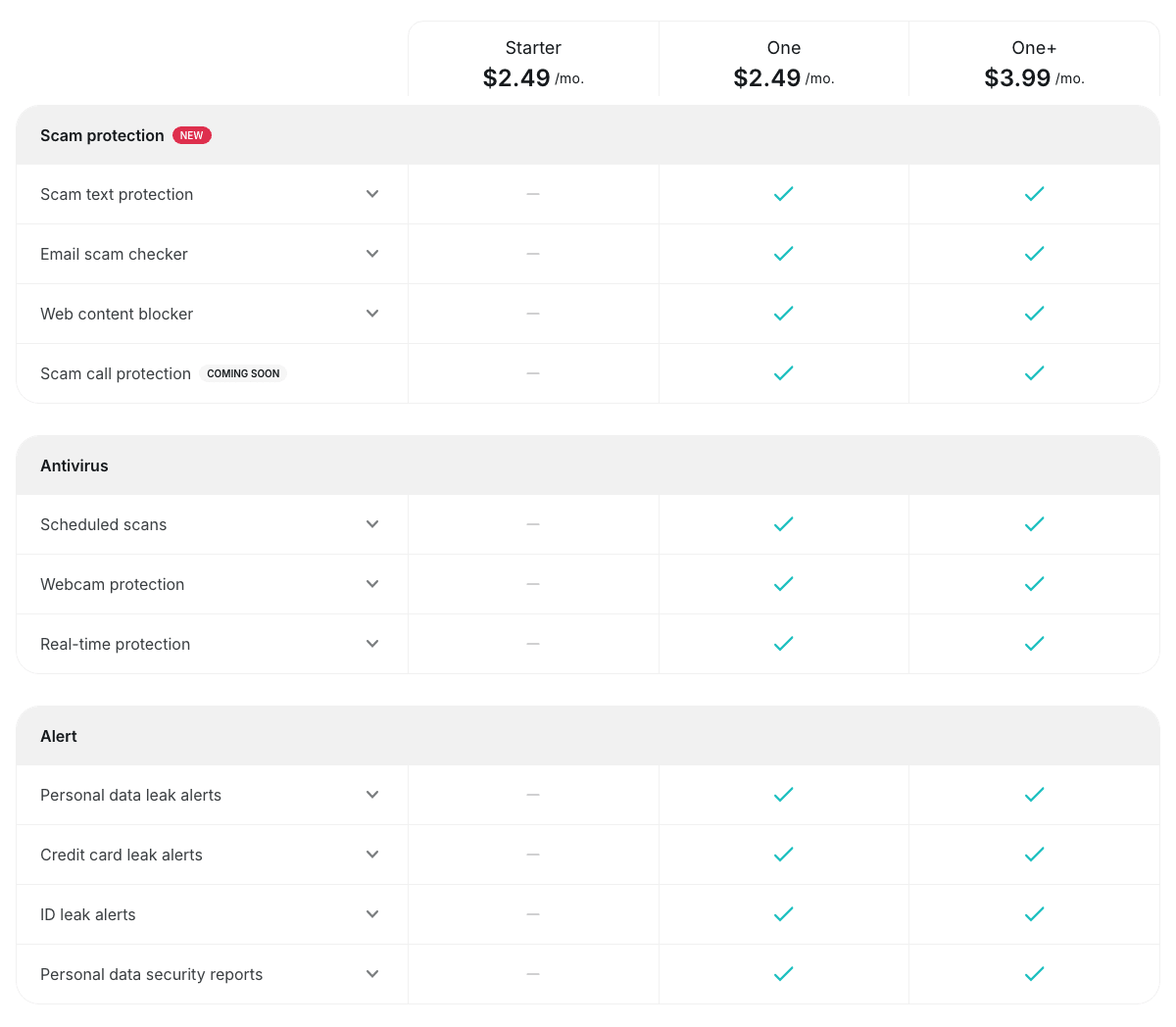
Everything in Starter, plus three extra tools. Starter is the VPN on unlimited devices, with CleanWeb (an ad, tracker, cookie pop-up and malicious-site blocker), Bypasser, Rotating IP and Dynamic MultiHop, plus Alternative ID, which gives you a masked email address and a made-up persona for sign-ups. One adds:
- Surfshark Antivirus: real-time protection and malware scans on Windows, macOS and Android, plus webcam protection on computers.
- Surfshark Alert: watches your email addresses, credit cards and ID numbers, including a US Social Security number, and tells you when they turn up in a data breach.
- Scam protection: a scam text filter, an AI email scam checker for Gmail, a web content blocker and scam call protection.
One tool is on its way out. On 3 August 2026, Surfshark announced it is removing Surfshark Search, its ad-free search engine: it has already gone from the iPhone and Android apps and will disappear from other platforms by the end of 2026. Some Surfshark pages and help articles still list Search as part of One, but it’s no longer on the pricing page, so don’t buy One for it.
Surfshark One vs Starter vs One+
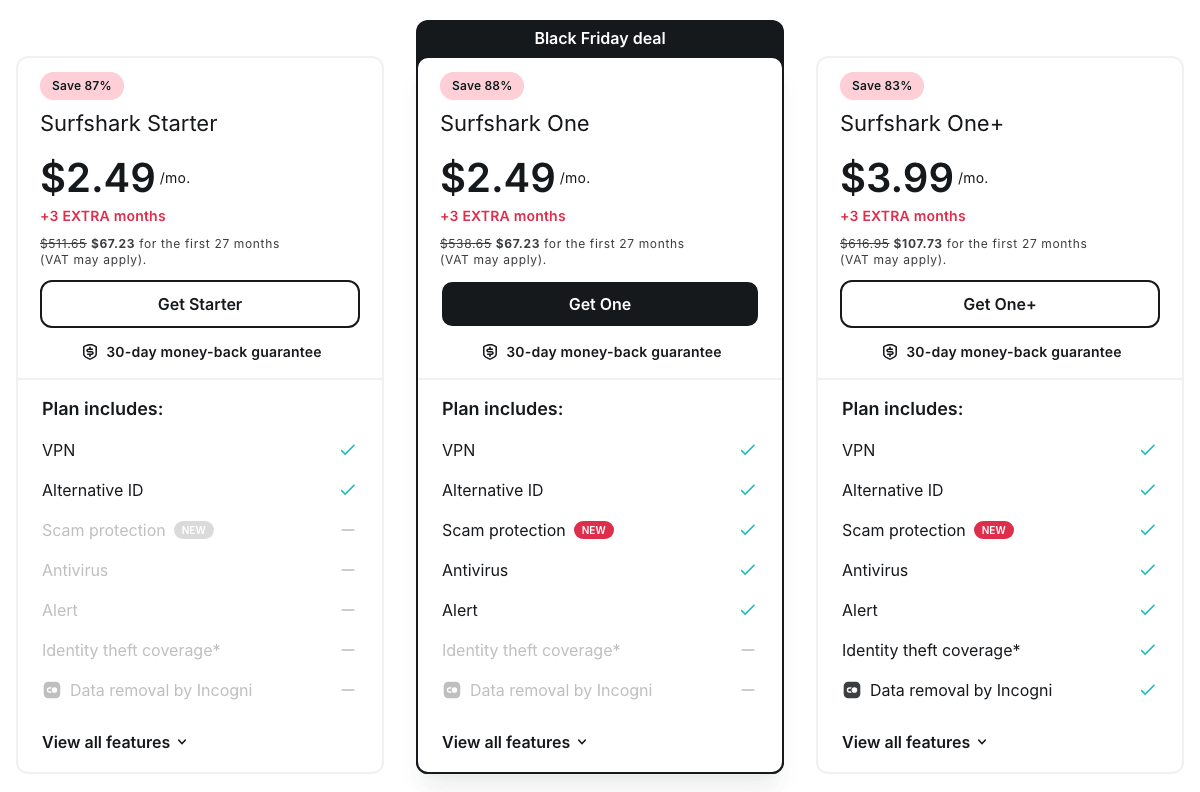
The three plans differ only in the extras. Here’s what each cost on 22 October 2026:
| Plan | 2 years + 3 months | Renews at |
|---|---|---|
| Starter: VPN, CleanWeb, Alternative ID | $67.23 ($2.49/mo) | $79 a year |
| One: + antivirus, Alert, scam protection | $67.23 ($2.49/mo) | $99 a year |
| One+: + Incogni, ID theft coverage | $107.73 ($3.99/mo) | $119 a year |
Shorter terms cost more. Starter and One are both $44.85 for 15 months on the 1-year plan ($2.99 a month), and month to month Starter costs $18.95, One $19.95 and One+ $22.85. Surfshark adjusts those prices more often than the 2-year ones, so check the total at checkout. Our Surfshark price guide tracks every plan and term.
Which should you buy?
- One, if you want antivirus or breach alerts: during the sale it costs nothing extra for 27 months, and $20 a year more after that.
- Starter, if you only want the VPN or already pay for a security suite you like: it renews for less.
- One+, if you want your details removed from data-broker sites and live where Incogni works (more below).
Is Surfshark Antivirus Any Good?
For catching malware, yes; for speed, it’s below average. We haven’t run our own malware tests, so the figures here come from AV-TEST, the German lab, which has certified Surfshark Antivirus in four Windows tests since 2022. In its latest test, run in May and June 2026 on Windows 11 with versions 6.9 and 6.11:
- Protection, 6 out of 6. It stopped 100% of 0-day attacks in May and 99.8% in June (the industry average was 99.9%), and detected 100% of 11,772 widespread malware samples.
- Usability, 6 out of 6. It raised no false alarms on websites or legitimate software.
- Performance, 4.5 out of 6. On a standard PC it slowed the installation of frequently used apps by 137%, against an industry average of 30%, and the launch of standard software by 18% (average 12%). It slowed web browsing and file copying less than average.
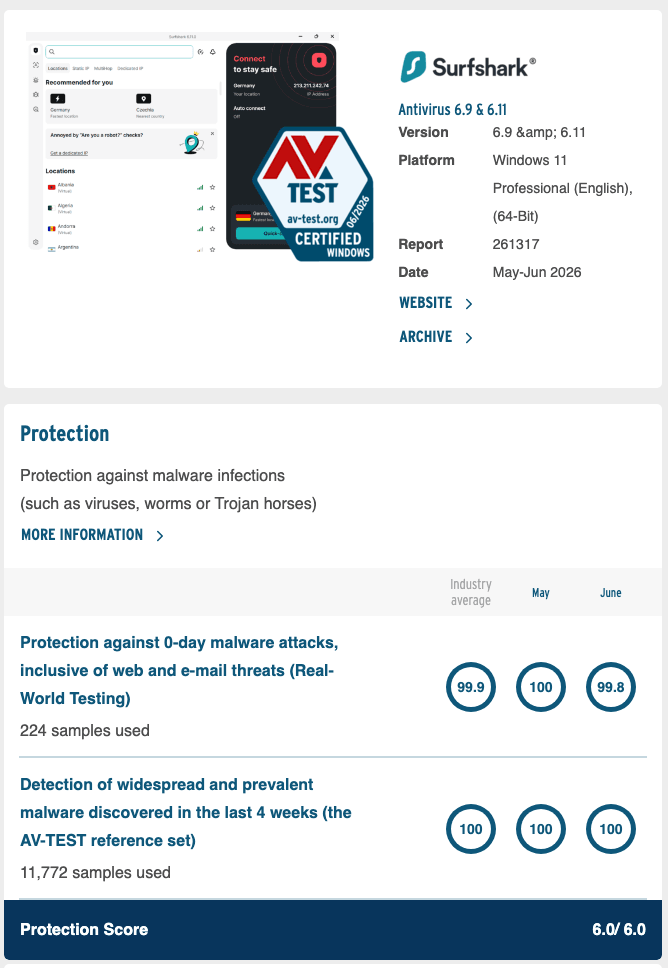
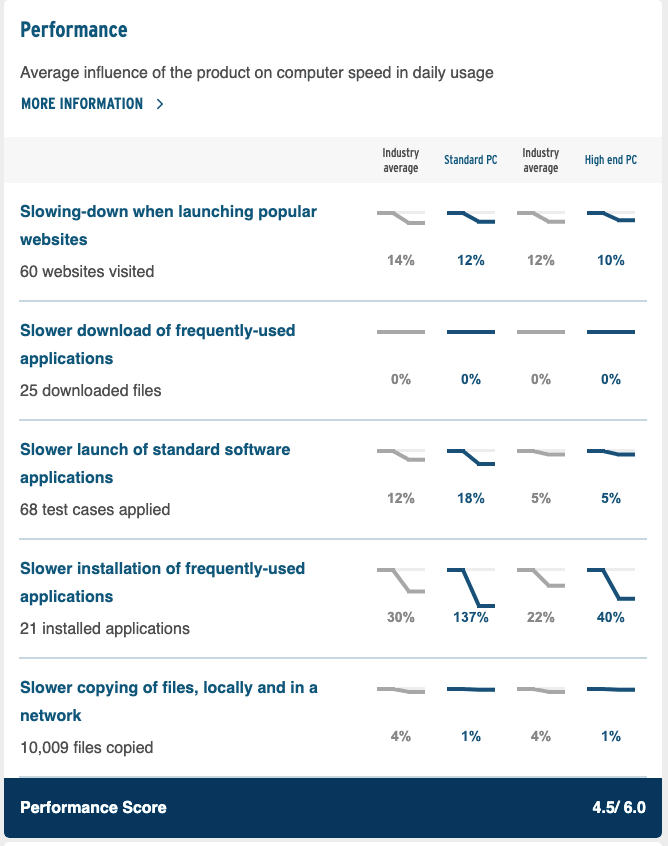
Its protection score has been a perfect 6 since 2024, while its performance score fell in 2026:
| AV-TEST test (Windows) | Protection / performance / usability |
|---|---|
| Nov–Dec 2022, Windows 10 | 4.5 / 4.5 / 6.0 |
| May–Jun 2024, Windows 10 | 6.0 / 5.5 / 6.0 |
| May–Jun 2025, Windows 10 | 6.0 / 5.5 / 5.5 |
| May–Jun 2026, Windows 11 | 6.0 / 4.5 / 6.0 |
Each category is scored out of 6, and AV-TEST certifies any product that scores 10 of the 18 points or more. Under the hood, Surfshark says the core of its engine is Avira’s Endpoint Protection SDK, and its virus database updates every three hours. AV-Comparatives, the other big testing lab, hasn’t published a test of Surfshark Antivirus; its only mention of Surfshark is in a 2025 user survey.
What Surfshark Antivirus Does on Each Device
The features vary by platform, according to Surfshark’s help center:
| Feature | Where it works |
|---|---|
| Real-time protection | Windows, macOS, Android |
| Quick, full and custom scans | Windows, macOS (Android: manual and daily scans) |
| Scheduled scans | Windows, macOS |
| Webcam protection | Windows, macOS |
| Web protection (blocks malicious sites and downloads) | Windows |
| Ransomware shield | macOS |
| USB and external drive scans | Windows, macOS |
Know the limits before you buy:
- Five devices. The VPN covers unlimited devices, but Surfshark’s terms of service allow Antivirus on “a maximum of five simultaneous connections per account”.
- No iPhone or iPad version. iOS users get the VPN, Alert and scam text protection instead.
- Not in the Mac App Store app. On a Mac, Antivirus appears only in the .DMG version downloaded from Surfshark’s website.
- Not sold on its own. You get it only with One or One+.
- Windows web protection installs a root certificate, so it can check encrypted web pages. Surfshark says the certificate is generated locally and can’t be used to identify your activity.
How to Set Up Surfshark Antivirus
On Windows (10 or newer, with 2 GB of free disk space), following Surfshark’s Windows guide:
- Open the Surfshark app and select the Antivirus tab.
- Click Install Antivirus.
- Click Yes when Windows asks to allow changes.
- Click Continue to run your first scan.
- Click the cogwheel at the top right to schedule scans, add exclusions or turn on external storage scans.
- Click Extra tools to switch on webcam protection.
On a Mac, following Surfshark’s macOS guide:
- If you installed Surfshark from the Mac App Store, uninstall that version.
- Download the .DMG version from Surfshark’s website, install it and sign in.
- Open the Antivirus tab and click Quick scan.
- Click Open Login Items & Extensions and approve with Touch ID or your password.
- Back in the app, click Open Full Disk Access and approve again.
- When the scan finishes, click Turn on protection.
On Android, following Surfshark’s Android guide:
- Open the Surfshark app and tap Products.
- Tap Antivirus, then Scan.
- Tap Open settings and turn on Allow access to manage files.
- Go back to the Surfshark app; the scan starts on its own.
- On the dashboard, switch on Real-time protection and Daily scan.
What Is Surfshark Alert?
Alert is a breach monitor that notifies you when your details appear in a leak. It watches:
- Email addresses, and shows what else leaked with them, such as passwords, usernames and home addresses
- Credit card numbers
- ID numbers from more than 90 countries, including US Social Security numbers
It checks known data breaches and data stolen by malware on your devices, sends regular personal data security reports, and works in Surfshark’s apps for Windows, macOS, Linux, Android and iOS and its browser extensions. Surfshark’s privacy policy says it stores ID and card numbers encrypted, and for card or Social Security number leaks shows only which kinds of data were exposed. To see what Alert would find, Surfshark’s free Data Leak Checker checks one email address without storing it.
Surfshark Scam Protection
This is the newest part of One, and Surfshark is still filling it in:
- Scam text protection screens incoming texts. On an iPhone, suspicious ones go straight to the Messages spam folder; on Android, you get a warning. Surfshark says it scans message content instantly and doesn’t store it.
- Email scam checker uses AI to rate emails you open in Gmail through Surfshark’s Chrome extension.
- Web content blocker blocks categories of sites you choose, from scam and phishing pages to adult, gambling or drug-related ones, which makes it a light parental filter; on Windows you can allow specific sites.
- Scam call protection checks unknown callers against a scam-number database and can block them. The pricing page still marks it “coming soon”, but Surfshark’s help center already explains how to set it up on Android.
Is Surfshark One+ Worth It?
Only if you’ll use Incogni. For $40.50 more than One over the first 27 months ($107.73 in total, then $119 a year), One+ adds two things:
- Incogni, Surfshark’s data-removal service, which sends deletion requests to more than 420 data brokers and people-search sites on your behalf. It’s available to residents of the US, UK, EU, Switzerland and Canada. Our Incogni review covers how well it works, and Surfshark Incogni explained shows how the two connect.
- Identity theft coverage of up to $1 million, added in March 2026 and covered by HSB Specialty Insurance Company. It pays for restoring your identity, including up to $5,000 in lost wages and up to $1,000 for counseling, and gives you a licensed identity theft investigator. It’s only for new One+ customers living in the US, outside New York State.
If you live outside Incogni’s regions, One+ adds nothing you can use.
Surfshark One vs NordVPN Complete
NordVPN’s nearest equivalent is its Complete plan. In NordVPN’s own Black Friday sale it costs $107.73 for 27 months ($3.99 a month), then $219.48 a year. That buys anti-malware and an ad and tracker blocker (both desktop only), call protection, message protection on Android, the NordPass password manager, 1 TB of encrypted cloud storage and dark web monitoring for up to eight emails plus your phone, card and Social Security numbers, on 10 devices.
Surfshark One is $40.50 cheaper for the first term and $120.48 a year cheaper at renewal, and its VPN covers unlimited devices. NordVPN Complete is the better buy if you’d use a password manager and cloud storage, or want NordVPN’s bigger network and longer audit record. Our guide to NordVPN Threat Protection explains its security features, and the NordVPN price guide lists every plan.
How to Try Surfshark One Free
Surfshark’s 7-day free trial works with One as well as Starter. Pick a 12- or 24-month plan on Surfshark’s website and pay by card, PayPal or Apple Pay; the trial covers three devices, and you’re charged for the plan when the 7 days end unless you turn off auto-renewal. Our Surfshark free trial guide has the steps. After that, your first purchase still comes with a 30-day money-back guarantee.
Get Surfshark One – Same Price as Starter
FAQ
Is Surfshark Antivirus Any Good?
It’s good at catching malware and below average on speed. In AV-TEST’s May–June 2026 test on Windows 11 it scored 6 out of 6 for protection and usability but 4.5 for performance, because it slowed some everyday tasks, such as installing apps, far more than the industry average. It’s built on Avira’s scanning engine.
What Does Surfshark One Include?
Everything in Starter (the VPN with CleanWeb, plus Alternative ID), and Surfshark Antivirus, Surfshark Alert data-breach monitoring and scam protection for texts, emails, websites and calls. Surfshark Search used to be part of it, but Surfshark is removing it from all platforms by the end of 2026.
Is Surfshark One Worth It?
Right now, yes. In Surfshark’s Black Friday sale, One costs the same $67.23 for 27 months ($2.49 a month) as the VPN-only Starter plan, so the extras cost nothing for the first term. After that it renews at $99 a year, $20 more than Starter.
Does Surfshark Antivirus Work on iPhone?
No. Surfshark Antivirus runs on Windows, macOS and Android only. On an iPhone or iPad, Surfshark One still gives you the VPN, Alert and scam text protection.
What Is the Difference Between Surfshark One and One+?
One+ adds Incogni, which asks data brokers to delete your personal details (for US, UK, EU, Swiss and Canadian residents), and identity theft coverage of up to $1 million for new US customers outside New York State. It costs $107.73 for 27 months ($3.99 a month), then $119 a year.
How Many Devices Does Surfshark One Cover?
The VPN works on unlimited devices, but Surfshark’s terms of service limit Surfshark Antivirus to five devices per account (three during the free trial).
The Bottom Line
Surfshark One is the plan to buy while the Black Friday sale lasts: you pay the Starter price, $67.23 for 27 months, and get an AV-TEST-certified antivirus, breach alerts and scam filters on top of the VPN. Know its limits before you rely on it: five antivirus devices, nothing for iPhones, a noticeable slowdown when you install software, and a renewal at $99 a year.
Get Surfshark One at the Starter price – and check our Surfshark coupon page for student and referral discounts before you pay.
More Surfshark guides
 Surfshark Pricing & Plans 2026 – All You Need to Know
 The Greatest Surfshark Black Friday Deals (2026)
 How to Get a Surfshark Free Trial? (2026)
 Surfshark Coupon & Promo Codes October 2026: Up to 87% Off
 MSI × Surfshark Deal: What MSI Owners Get and How It Compares (2026)
 How Many Devices Does Surfshark Allow? (2026)

