
Surfshark is a VPN service with a privacy toolkit built around it, launched in 2018 and run today by Surfshark B.V. in Amsterdam. Its app encrypts your internet traffic and sends it through one of 4,500+ servers in 100 countries, on as many devices as you like at once, and during Surfshark’s Black Friday sale the 2-year plan costs $2.49 a month ($67.23 for the first 27 months).
The VPN is the heart of it; the bigger plans add antivirus, data-leak alerts, private search and Incogni’s data-removal service. Below: how Surfshark works, what each plan includes and costs (checked on 22 October 2026), what people use it for, who’s behind it, and a directory of every Surfshark guide on vpnAlert.
Surfshark at a Glance
| Surfshark | |
|---|---|
| What it is | A VPN plus privacy tools: antivirus, data-leak alerts, private search and data removal |
| Company | Surfshark B.V., Amsterdam, the Netherlands |
| Launched | 2018, by founder Vytautas Kaziukonis; Dovydas Godelis has been CEO since March 2026 |
| Sister company | NordVPN: the two have shared a holding company since 2022 but run separately |
| Servers | 4,500+ in 100 countries, all running from RAM |
| Devices | Unlimited, at the same time |
| Protocols | WireGuard, OpenVPN, IKEv2 and Surfshark’s own Dausos (in beta on Mac) |
| Plans | Starter, One and One+ |
| Price | From $2.49 a month on the 2-year plan ($67.23 for 27 months) |
| Free version | None; a 7-day free trial and a 30-day money-back guarantee instead |
| No-logs audits | Deloitte, in 2023 and 2025 |
What Does Surfshark Do?
Surfshark hides your IP address and encrypts your connection, so the network you’re on, your internet provider and the sites you visit can’t easily tie what you do online to you. Day to day, that adds up to four things:
- Privacy on any network. On hotel, airport or café Wi-Fi, the network’s owner and anyone snooping on it see only scrambled traffic heading to Surfshark. At home, your internet provider can’t see which sites you open.
- A virtual location in 100 countries. Connect to a server abroad and websites see that country’s IP address, which is how travelers keep using the services they pay for at home.
- Fewer ads and threats. CleanWeb, included in every plan, blocks ads, trackers, malware and phishing sites inside the apps.
- Extra protection, if you want it. Surfshark One adds antivirus, data-leak alerts and private search; One+ also gets your details removed from data brokers.
What it can’t do is make you anonymous to accounts you’re signed in to, or override a service’s own rules. Netflix, for one, says VPNs aren’t supported on its ad-supported plans or for live events, whichever VPN you use.
How Does Surfshark Work?
Surfshark creates an encrypted tunnel between your device and one of its servers, and all your internet traffic travels through it:
- The app encrypts everything leaving your device and sends it to the Surfshark server you picked.
- The server decrypts it and passes it on to the website or app, using the server’s IP address instead of yours.
- Replies come back the same way, encrypted until they reach your device.
How that tunnel is built depends on the protocol. By default the apps choose one for you, and Surfshark says that’s usually WireGuard, which now comes with post-quantum protection switched on. You can switch to OpenVPN (UDP or TCP), which Surfshark automatically obfuscates so it’s harder to recognize as VPN traffic, or to IKEv2, which recovers quickly when your phone hops between Wi-Fi and mobile data. Our Surfshark WireGuard guide shows where to change it.
Surfshark has also built its own protocol, Dausos. It gives every user a separate tunnel and uses AEGIS-256X2 encryption, and Cure53 audited it in 2026. Surfshark says it can be up to 30% faster, but for now it’s a beta, and only the Mac App Store version of the app has it.
Behind the apps, the network does the rest:
- RAM-only servers. Every server runs from memory and keeps nothing once it restarts; here’s why Surfshark’s RAM servers matter.
- Fast ports. Every server has a 10Gbps port, and the busiest locations get up to 100Gbps.
- Nexus. Surfshark’s software-defined network links its servers together. It powers Dynamic MultiHop, Rotating IP and FastTrack, a route optimizer that now covers most of the network in the Mac app.
- Everlink. On WireGuard connections, Everlink rebuilds the tunnel when a server drops out, instead of disconnecting you.
What Is the Surfshark App?
The Surfshark app is what you install to use the VPN. It’s free to download from Surfshark’s website and the app stores, but it needs a subscription, or the free trial, before it connects. It looks much the same on every platform:
- Quick-connect joins the fastest available location, usually the one nearest you, in one click.
- The locations list covers all 100 countries, with separate tabs for Static IP, MultiHop and Dedicated IP servers.
- Settings > VPN settings is where you change the protocol and switch on CleanWeb, the Kill Switch and auto-connect.
- On Windows, the One tools (Alert and Antivirus) and Alternative ID sit in the app’s left-hand menu.
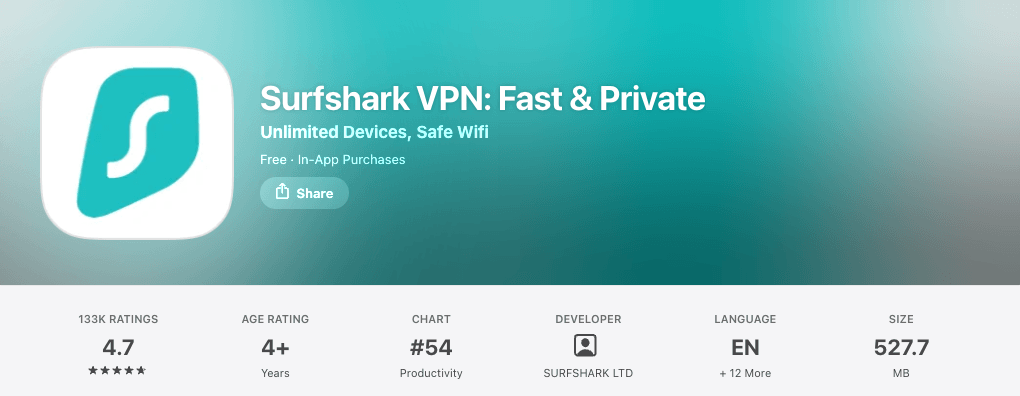
Users rate it well. On the US App Store, “Surfshark VPN: Fast & Private” has 4.7 stars from about 133,000 ratings and needs iOS 17 or later; on Google Play, “Surfshark: Secure VPN service” has 4.6 stars from about 319,000 reviews and more than 10 million downloads.
What Is Surfshark Used For?
Here are the five main things Surfshark is used for, with our step-by-step guides for each.
Streaming
Surfshark changes the country that streaming services see, so you can keep watching what you pay for while you travel. Its own site lists Netflix, Hulu, BBC iPlayer, Disney+ and HBO Max among the services people use it with, and our guides cover watching Netflix with Surfshark, Hulu, BBC iPlayer and YouTube TV.
Streaming services block VPN addresses from time to time. When one does, Surfshark’s own advice is to clear the streaming app’s cache and try another server, and our Netflix, Hulu and YouTube TV guides each have a troubleshooting section for that service’s errors.
Gaming
A VPN hides your home IP address from other players and can connect you through another region. Surfshark puts no cap on bandwidth or speed, but every VPN adds some distance, so pick a server close to you or to the game’s servers. Our guide to Surfshark for gaming covers the setup on PCs and consoles. Consoles have no Surfshark app, so the devices section below has the workarounds.
Torrenting
Surfshark supports P2P traffic in most of its locations (its server list marks which), and the kill switch stops your real IP address from leaking if the VPN drops mid-download. What it doesn’t offer is port forwarding: Surfshark says open ports would expose users to unwanted connections. Our Surfshark torrenting guide covers the setup, the kill switch and which servers to use.
Travel and Censorship
On networks that restrict VPNs, Surfshark’s NoBorders mode switches on by itself and shows the servers that work best there, and OpenVPN connections are obfuscated. How far that gets you depends on the country, so read our guides to using Surfshark in China and in Turkey before you go, and our Surfshark Russia guide for why it’s uncertain there.
Everyday Privacy at Home
Because one subscription covers unlimited devices, a household can put Surfshark on every phone, laptop and TV it owns. The one catch is that Surfshark watches for abuse, such as accounts resold or spread across a very large number of devices; our guide to how many devices Surfshark allows explains what happens if an account gets flagged. For work tools or banks that block shared VPN addresses, a Surfshark dedicated IP gives you an address nobody else uses.
Surfshark Plans: Starter vs One vs One+
Every Surfshark plan includes the VPN on unlimited devices; the plans differ in the extra tools:
- Starter: the VPN with CleanWeb ad and tracker blocking, Bypasser, Rotating IP, Dynamic MultiHop and Alternative ID, a masked email address and made-up persona for sign-ups you don’t trust.
- One: everything in Starter, plus Surfshark Antivirus (Windows, Mac and Android, up to 5 devices), Alert (warnings when your email, credit card or ID number turns up in a leak), Search (ad-free private search, which Surfshark is phasing out: it’s already gone from iPhone and Android and leaves the other apps by the end of 2026) and Surfshark’s new scam protection (a scam-text filter, an AI email scam checker and a web content blocker).
- One+: everything in One, plus Incogni, which asks 420+ data brokers to delete your personal details (for US, UK, EU, Swiss and Canadian residents), and up to $1 million of identity theft coverage for US residents outside New York State.
Here’s what they cost on the 2-year plan, the cheapest way to buy:
| Plan | 2 years + 3 months | Then each year |
|---|---|---|
| Starter | $67.23 ($2.49/mo) | $79 |
| One | $67.23 ($2.49/mo) | $99 |
| One+ | $107.73 ($3.99/mo) | $119 |
US prices before sales tax, from Surfshark’s pricing page and price data on 22 October 2026, during its Black Friday sale.
The other terms cost more per month: the 1-year plans are $44.85 for 15 months (Starter or One) or $104.85 (One+), and month to month you pay $18.95, $19.95 or $22.85. Our Surfshark pricing guide breaks down every term and renewal, and the Surfshark Black Friday page tracks the sale.
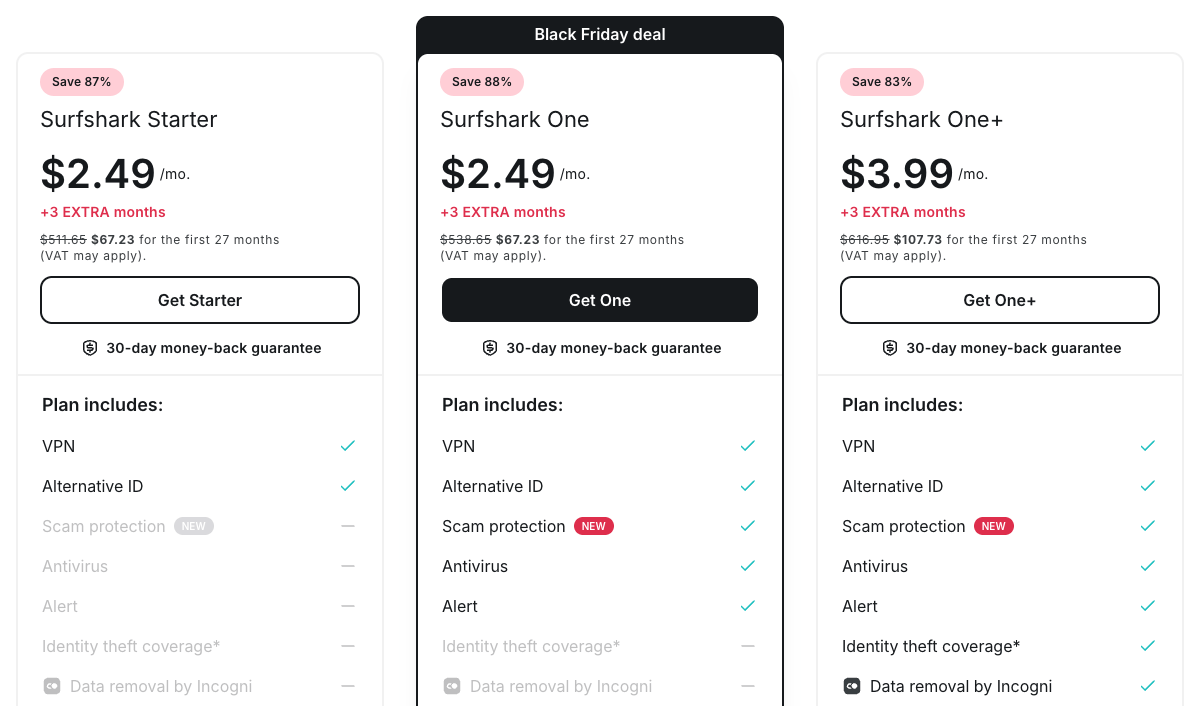
Which plan should you pick? Right now One costs exactly what Starter does, so I’d take One: the antivirus, leak alerts and private search come at no extra cost. The only argument for Starter is the renewal, because after the first 27 months Starter renews at $79 a year and One at $99. One+ costs $40.50 more over 27 months and is worth it mainly for Incogni; our Surfshark One guide and guide to Surfshark’s Incogni go deeper.
Two paid add-ons work with any plan: a Dedicated IP, from $3.75 a month, and Alternative Number, a virtual US phone number for receiving calls and texts.
Is Surfshark free? No. The app is free to download, but there’s no free plan. New users can get a 7-day Surfshark free trial on Surfshark’s website with a 12- or 24-month plan, paid by card, PayPal or Apple Pay (up to 3 devices during the trial), and every plan bought on the website has a 30-day money-back guarantee (for your first purchase, not a renewal). If it isn’t for you, here’s how to cancel Surfshark and get a refund. Our Surfshark coupon page lists every other offer we’ve verified, including the student and referral discounts.
See Surfshark’s Black Friday Prices
Surfshark Features Explained
Here’s what each Surfshark feature does, in a sentence or two, with our guide where we have one:
- CleanWeb blocks ads, trackers, malware and phishing sites in the Windows, Mac, Android and iPhone apps; the browser extension version blocks ads and pop-ups. Our CleanWeb guide explains the settings.
- Kill Switch cuts your internet if the VPN connection drops, on Windows, Mac, Linux, Android and iOS. Here’s how Surfshark’s kill switch works.
- Bypasser is Surfshark’s split tunneling: the apps and websites you choose skip the VPN, or, with Reverse Bypasser, only the ones you choose use it. See how to use Bypasser.
- Dynamic MultiHop is a double VPN: your traffic passes through two Surfshark servers, and you can pick both countries.
- Obfuscation disguises OpenVPN traffic so it’s harder to spot as VPN use, and Surfshark applies it automatically; our Camouflage Mode guide explains how it works.
- NoBorders detects restricted networks and lists the servers that work best on them; our NoBorders guide shows how to switch it on yourself.
- Rotating IP changes your IP address every 5 to 10 minutes without dropping the connection (Windows, Mac, Android and iOS).
- Static IP and Dedicated IP: static servers give you the same shared address every time you connect; a dedicated IP is yours alone, in cities including New York, Dallas and San Jose.
- Alternative ID generates a name, email address and persona for sign-ups; Alternative Number adds a US phone number as a paid extra.
- Antivirus, Alert and scam protection come with One, and Incogni with One+ (see the plans above).
- Smaller extras: GPS override on Android, Pause VPN (for 5 minutes, 30 minutes or 2 hours) and auto-connect whenever you join a network.
What’s missing: SmartDNS, which Surfshark retired on 2 February 2026, and port forwarding. For the network itself, including US states and specialty servers, see our Surfshark server list.
Which Devices Does Surfshark Work On?
Surfshark runs on as many devices as you own at the same time, with apps for Windows, Mac, Linux, iPhone, Android, Fire TV, Apple TV and Android TV, plus browser extensions. Where there’s no app, a router can cover the device:
| Device | Surfshark app? | Our guide |
|---|---|---|
| Windows PC | Yes (Windows 7 or later) | Surfshark on Windows |
| Mac | Yes (macOS 12 or later) | Surfshark on Mac |
| iPhone and iPad | Yes (iOS 17 or later) | Install it from the App Store |
| Android phone or tablet | Yes | Surfshark on Android |
| Linux | Yes (Debian, Ubuntu, Mint) | Surfshark on Linux |
| Chromebook | Yes (the Android app) | Surfshark on Chromebook |
| Chrome, Firefox, Edge | Extension (browser only) | Surfshark on Chrome |
| Fire TV | Yes | Surfshark on Fire TV |
| Apple TV | Yes | Surfshark on Apple TV |
| Android TV | Yes | Surfshark on Android TV |
| Samsung or LG TV | No | Surfshark on Samsung TV |
| Roku | No | Surfshark on Roku |
| Xbox or PlayStation | No | Surfshark on Xbox |
| Router | Manual setup | Surfshark on a router |
For TVs and consoles without an app, Surfshark suggests setting it up on your router or sharing a VPN-protected hotspot from a Windows PC; its SmartDNS option for TVs ended on 2 February 2026. A router covers every device in the house, but app features such as the Kill Switch, Bypasser and CleanWeb don’t work there. Our LG TV and PS4 guides show the workarounds step by step. If you’d rather type a DNS address into the TV, NordVPN still offers SmartDNS; here’s how NordVPN SmartDNS works.
Bought an MSI computer? Our guide to the MSI Surfshark deal explains the offer.
Who Owns Surfshark, and Is It Safe?
Surfshark is owned and run by Surfshark B.V., a Dutch company registered at Kabelweg 57 in Amsterdam, and on the evidence it’s a safe VPN: Deloitte has checked its no-logs policy twice and its servers keep nothing on disk.
Vytautas Kaziukonis founded Surfshark and led it until March 2026. Then its chief operating officer, Dovydas Godelis, took over as CEO, and Kaziukonis became chairman of the board, as Tom’s Guide reported on 17 March 2026. Surfshark says it has 500+ employees, with offices in Vilnius, Kaunas, Warsaw and Berlin as well as Amsterdam.
In 2022 Surfshark merged with Nord Security, NordVPN’s parent, under one holding company, Cyberspace B.V., and Surfshark says the combined group was valued at $1.6 billion. The two brands still run separate apps, servers and prices. Our guide to who owns Surfshark has the full story.
The case for trusting it:
- Two no-logs audits. Deloitte assessed Surfshark’s no-logs policy under the ISAE 3000 standard in 2023 and again in 2025, and subscribers can read the reports in their account.
- Little to hand over. Surfshark says it doesn’t log IP addresses, browsing history, connection timestamps or bandwidth used; it keeps your email address, an encrypted password, basic billing information and your order history.
- RAM-only servers since 2020, so a seized server holds no stored data.
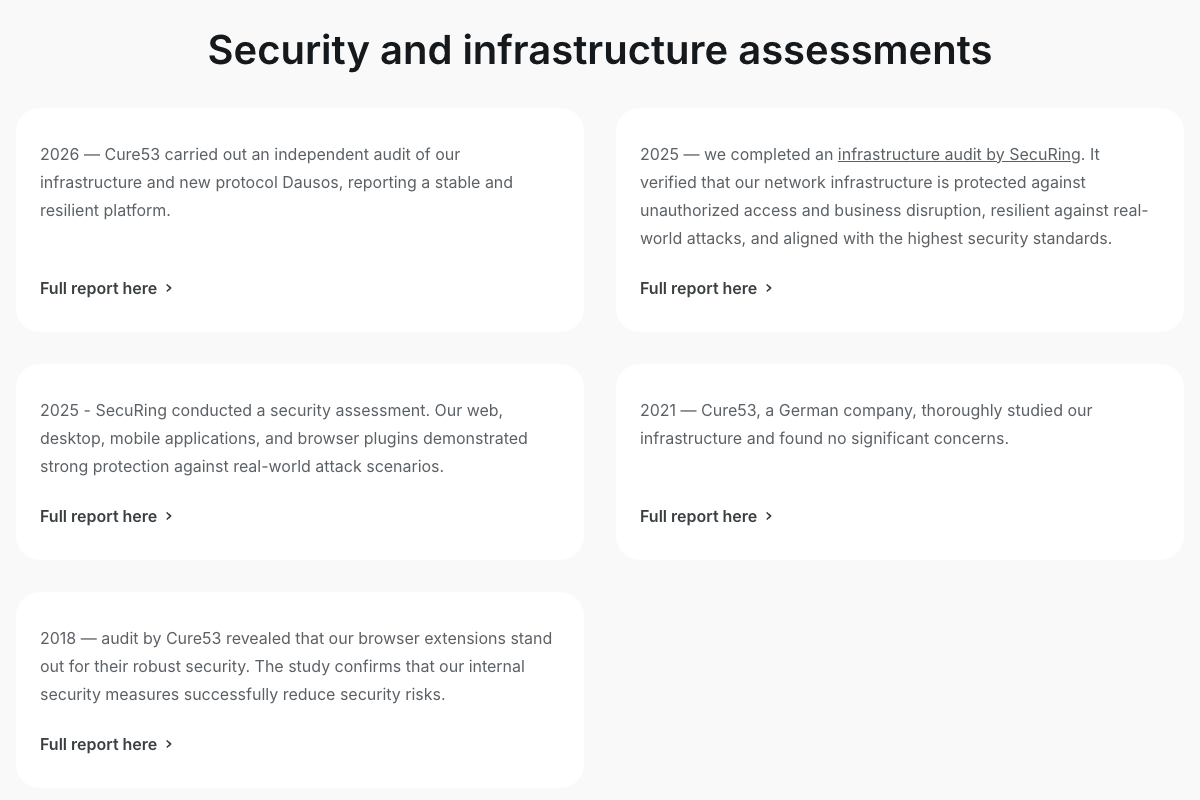
- Security audits. Cure53 tested Surfshark’s browser extensions in 2018, its infrastructure in 2021, and its infrastructure and the Dausos protocol in 2026; SecuRing assessed its apps and its infrastructure in 2025.
- Ongoing checks. A third-party bug bounty, and a transparency report on the legal and government requests for user data it receives, updated every quarter.
The one caveat is jurisdiction: the Netherlands belongs to the 14 Eyes intelligence-sharing alliance. Surfshark’s Trust Center points out that Dutch law doesn’t oblige it to log or keep user data, and the audits back up that it doesn’t. Our guide to whether Surfshark is safe weighs all of it, and our Surfshark review covers speed, streaming and the apps.
Surfshark History in Brief
| Year | What happened |
|---|---|
| 2018 | Surfshark launches its VPN, starting with an iPhone app, and gets its first independent audit, by Cure53 |
| 2019 | Adds Surfshark Alert and Surfshark Search |
| 2020 | Moves every server to RAM and adds WireGuard |
| 2021 | Launches Surfshark Antivirus and Incogni |
| 2022 | Merges with Nord Security under one holding company and launches Nexus |
| 2023 | Deloitte confirms its no-logs policy; Dedicated IP and Alternative ID arrive |
| 2025 | Deloitte’s second no-logs audit; Everlink and FastTrack launch |
| 2026 | SmartDNS retired (2 February); Dovydas Godelis becomes CEO (March); the Dausos protocol arrives in beta |
Surfshark vs NordVPN
Surfshark and NordVPN are sister companies that still compete head-on: Surfshark costs less and covers unlimited devices, while NordVPN has the bigger network, the longer audit record and SmartDNS, which Surfshark dropped in February 2026.
| Surfshark | NordVPN | |
|---|---|---|
| 2-year price now | $2.49/mo ($67.23) | $3.49/mo ($94.23, Basic) |
| Then each year | $79 | $139.08 |
| Devices at once | Unlimited | 10 |
| Servers | 4,500+ in 100 countries | 7,000+ in 150 countries |
| No-logs audits | 2 (Deloitte, 2023 and 2025) | 6 (PwC 2018 and 2020, Deloitte 2022 to 2025) |
| Based in | The Netherlands | Panama |
| SmartDNS for TVs | Retired in February 2026 | Included |
Both prices are each company’s Black Friday price for 27 months, checked on 22 October 2026.
If you’re covering a big household, or price comes first, Surfshark is the better buy. For most people with a handful of devices, I’d still pick NordVPN: six no-logs audits against two, more than 7,000 servers in 150 countries, a home in Panama outside the 14 Eyes, and SmartDNS for TVs that can’t run a VPN app. See NordVPN’s Black Friday deal, or read our Surfshark vs NordVPN comparison round by round. Our What is NordVPN? guide explains the other side of the family.
Weighing up other VPNs? We’ve also compared Surfshark with ExpressVPN, Proton VPN, Private Internet Access and IPVanish.
How to Start Using Surfshark in 5 Steps
Setup takes a few minutes. These steps follow Surfshark’s Windows setup guide, and the other apps work the same way:
- Pick a plan. Open Surfshark’s deal page and choose the 24-month term and Starter, One or One+.
- Create your account and pay. Enter your email address and pay by card, PayPal, Google Pay, Apple Pay or cryptocurrency (crypto isn’t accepted on mobile).
- Install the app. Download Surfshark for your device from Surfshark’s website or your app store, open it and log in with the email and password you just set.
- Connect. Click Quick-connect for the fastest available location, or pick a country from the list.
- Switch on the Kill Switch. Go to Settings > VPN settings and toggle Kill Switch on, so nothing leaks if the connection drops.
To confirm it works, run the IP and DNS leak tests on Surfshark’s website while you’re connected.
All Our Surfshark Guides
Every Surfshark guide on vpnAlert, grouped by topic:
Deals, prices and plans (18)
- How to Get a Surfshark Free Trial? (2026)
- Surfshark Pricing & Plans 2026 – All You Need to Know
- Surfshark Coupon & Promo Codes October 2026: Up to 87% Off
- Surfshark One Review: Is Surfshark Antivirus Worth It? (2026)
- MSI × Surfshark Deal: What MSI Owners Get and How It Compares (2026)
- How Many Devices Does Surfshark Allow? (2026)
- Surfshark 2-Year Plan 2026: 85% Off Deal
- What’s Surfshark Incogni? (Advantages, Drawbacks & Setup) (2026)
- The Greatest Surfshark Black Friday Deals (2026)
- Surfshark Student Discount 2026: Save Up to 85% + Bonus
- Does Surfshark Have a Family Plan? (2026)
- Surfshark Lifetime Subscription: Is It Possible or Scam? (2026)
- How to Get the Surfshark 3-Year Deal (36-Month Plan)?
- How to Get the Surfshark 4-Year Deal? (2026)
- How to Get the Surfshark 5-Year Plan? (2026)
- Does Surfshark Take Gift Cards? (2026)
- What Payment Methods Does Surfshark Accept? (2026)
- Does Surfshark Work With PayPal? (2026)
Apps and devices (19)
- Surfshark Chrome Extension (2026): How to Install and Use It
- Surfshark for Windows: Download, Setup and Fixes (2026)
- Surfshark for Mac: Setup, Settings and Which Version to Get (2026)
- Does Surfshark Work With Amazon Fire TV Stick? How To Install It?
- How to Quickly Set Up Surfshark on Samsung Smart TV?
- How to Set Up and Use Surfshark on Linux? (2026)
- How to Setup and Use Surfshark on Chromebook? (2026)
- How to Set Up Surfshark on Android? (Simple Guide)
- How to Set Up Surfshark on a Router? (2026)
- How to Setup & Use Surfshark on Apple TV? (2026)
- How to Set Up and Use Surfshark on Android TV? (2026)
- How to Set Up Surfshark on Roku? (2026)
- How to Install Surfshark on LG Smart TV? (2026)
- How to Set Up Surfshark on Ubuntu? (5 Unique Methods) (2026)
- How to Set Up and Use Surfshark on PS4?
- Can You Use Surfshark on Xbox? (2026)
- How to Setup and Use Surfshark on Chromecast? (2026)
- How to Set Up and Use Surfshark on NVIDIA Shield? (2026)
- How to Use Surfshark With xCloud? (2026)
Streaming (20)
- How To Watch Netflix With Surfshark? (2026)
- Does Surfshark Work With Twitch? (2026)
- Does Surfshark Work With DAZN? (2026)
- How to Set Up and Watch ABC iview With Surfshark? (2026)
- How to Watch Amazon Prime With Surfshark? (Simple Guide)
- How to Watch BBC iPlayer With Surfshark VPN?
- Does Surfshark Work With Bilibili? (2026)
- How to Watch CBC With Surfshark? (Outside Canada) (2026)
- How to Set Up and Watch CNN With Surfshark? (2026)
- Can You Use Surfshark With DirecTV? (2026)
- How to Watch France TV With Surfshark? (On Mobile, PC & TV) (2026)
- How to Stream Hulu With Surfshark? (2026)
- How to Install Surfshark on Kodi? (2026)
- How to Watch NBA League Pass With Surfshark? (2026)
- Surfshark Not Working With Hulu? Try These Easy Fixes
- Does Surfshark Work With Pandora? (2026)
- Does Surfshark Work With Plex? Tried & Tested Results! (2026)
- How to Access Qobuz With Surfshark? (2026)
- Does Surfshark Work With Sling TV? (2026)
- Does Surfshark Work With YouTube TV? (+ Unblocking Steps) (2026)
Gaming (16)
- Can You Play Lost Ark With Surfshark?
- How to Set Up Surfshark for Apex Legends? (2026)
- Can You Play Destiny 2 With Surfshark? (2026)
- Can You Play Elden Ring With Surfshark? (2026)
- Can You Play FFXIV Using Surfshark? (2026)
- Can You Play Fortnite With Surfshark? (2026)
- Is Surfshark Good for Gaming? (2026)
- How to Connect GTA 5 Online With Surfshark? (2026)
- Can You Play League of Legends With Surfshark? (2026)
- How to Use Surfshark With Minecraft? (2026)
- Does Surfshark Work With Overwatch? (2026)
- How to Play Roblox With Surfshark? (2026)
- Can You Play Rocket League With Surfshark? (2026)
- How to Play RuneScape With Surfshark? (2026)
- How to Setup & Use Surfshark for Warzone? (2026)
- Can You Play World of Warcraft With Surfshark? (2026)
Torrenting and P2P (9)
- Does Surfshark Support Port-Forwarding? (+Alternatives) (2026)
- How to Use Surfshark With BitTorrent? (2026)
- Is Surfshark Good for Torrenting?
- How to Set Up and Use Surfshark With qBittorrent?
- How to Use Surfshark With Deluge? (Fast & Secure) (2026)
- How to Use MEGA With Surfshark? (2026)
- Does Surfshark Work With Real Debrid? (2026)
- How to Quickly Set Up & Use Surfshark With uTorrent? (2026)
- Can You Use Surfshark With Vuze? (2026)
Features and servers (13)
- Surfshark CleanWeb: What Is It & How to Use It? (2026)
- Does Surfshark Have a Dedicated IP Address? (2026)
- Surfshark Servers List: Locations, States & Types (2026)
- Does Surfshark Use WireGuard? (+ Setup Guides) (2026)
- Does Surfshark Offer SOCKS5 Proxy? (2026)
- What Is NoBorders Mode by Surfshark VPN? How to Use It?
- What Is Bypasser on Surfshark?
- What Is Camouflage Mode on Surfshark?
- Does Surfshark Have DDoS Protection? (2026)
- Does Surfshark Work in Houston? (2026)
- Does Surfshark Have a Kill Switch? (2026)
- Does Surfshark Use RAM-Based Servers? (2026)
- Does Surfshark Work in Texas? (2026)
Safety and ownership (8)
- Is Surfshark Safe, Legit and Worth It in 2026?
- Who Owns Surfshark? Owners, Headquarters and NordVPN Ties (2026)
- Surfshark VPN Review (2026)
- Surfshark vs ExpressVPN: Which Is Better? (2026)
- Surfshark vs. IPVanish: Which VPN Wins? (2026)
- Surfshark vs. Private Internet Access: Which VPN Wins? (2026)
- Surfshark vs NordVPN Head-To-Head Comparison — Who Wins? (2026)
- Surfshark vs. ProtonVPN: Which Should You Choose? (2026)
Account and troubleshooting (1)
Countries and places (30)
- Does Surfshark Work in China? (2026)
- Does Surfshark Have Servers in Atlanta? (2026)
- Does Surfshark Work in Belgium? (Device Setup Guides) (2026)
- Does Surfshark Have Servers in California? (2026)
- How to Set Up and Use Surfshark in Canada? (2026)
- Does Surfshark Work in Croatia? (2026)
- Does Surfshark Work in Cuba? (2026)
- Does Surfshark Work in Cyprus? (2026)
- Surfshark Denmark: Get a Danish IP & Browse Safely (2026)
- Does Surfshark Work in Europe? (2026)
- Does Surfshark Work in Florida? (2026)
- Does Surfshark Have Servers in Georgia? (2026)
Show 18 more
- Does Surfshark Work in Germany? (2026)
- How to Use Surfshark in Greece? (2026)
- Does Surfshark Work in Iceland? (2026)
- Does Surfshark Have Servers in Illinois? (2026)
- Does Surfshark Work in Japan? (2026)
- How to Use Surfshark in the Middle East? (2026)
- Does Surfshark Have a New Jersey Server? (2026)
- Does Surfshark Work in New York? (2026)
- Does Surfshark Have Servers in Ohio? (2026)
- Does Surfshark Work in Pakistan? (2026)
- Does Surfshark Have Servers in Pennsylvania? (2026)
- Does Surfshark Work in the Philippines? (Performance & Servers)
- Does Surfshark Work in Russia? (2026)
- Does Surfshark Work in Serbia? (2026)
- Does Surfshark Work in South Africa in 2026?
- How to Use Surfshark in Thailand? (2026)
- Does Surfshark Work in Turkey? (2026)
- Does Surfshark Work in Venezuela? (2026)
Sites and apps (19)
- Does Surfshark Work With 4chan? (2026)
- How to Use Bet365 With Surfshark? (2026)
- How to Unblock Chaturbate With Surfshark? (2026)
- Does Surfshark Work With Craigslist? (2026)
- How to Access the Dark Web With Surfshark? (2026)
- How to Use Surfshark With Discord? (2026)
- Does Surfshark Work With DraftKings? (2026)
- Does Surfshark Work With GGPoker? (2026)
- Does Surfshark Work With Instagram? (2026)
- Does Surfshark VPN Work With Omegle? (2026)
- How to Connect Surfshark to OmeTV Chat?
- Does Surfshark Work With PokerStars? (2026)
- How to Watch Porn With Surfshark?
- How to Watch Pornhub With Surfshark? (2026)
- Does Surfshark Work With Roobet? (2026)
- How to Use Surfshark With Spectrum? (2026)
- Does Surfshark Work With T-Mobile? (+ Troubleshooting Guide) (2026)
- How to Use Surfshark With Telegram? (A Simple Guide) (2026)
- Does Surfshark Work With Virgin Media? (2026)
Creator deals (6)
- What VPN Does Joe Rogan Use? (2026)
- Surfshark JerryRigEverything Deal 2026: What You Actually Get
- Surfshark MrMobile Deal 2026: Is the Offer Worth It?
- Surfshark Mrwhosetheboss Deal 2026: Code vs Standard Offer
- Surfshark Sam Chui Deal 2026: What the Offer Includes
- Surfshark Yes Theory Deal 2026: Extra Months Explained
FAQ
Is Surfshark VPN Free to Use?
No. The Surfshark app is free to download, but it needs a paid plan to connect. New users can try it with the 7-day free trial on Surfshark’s website (12- and 24-month plans, paid by card, PayPal or Apple Pay, on up to 3 devices), and every plan bought there has a 30-day money-back guarantee.
Is Surfshark Considered a Good VPN?
Yes. It covers unlimited devices, Deloitte checked its no-logs policy in 2023 and 2025, every server runs from RAM, and it costs $2.49 a month on the 2-year plan. NordVPN has the bigger network and more no-logs audits, but it costs more.
How Much Does Surfshark VPN Cost?
During Surfshark’s Black Friday sale, Starter and One cost $2.49 a month on the 2-year plan ($67.23 for the first 27 months), and One+ costs $3.99 a month ($107.73). Month to month, the plans cost $18.95 to $22.85. After the first term they renew at $79, $99 and $119 a year (US prices, checked on 22 October 2026).
Is Surfshark Owned by NordVPN?
Not directly. Since early 2022, Surfshark and Nord Security, the company behind NordVPN, have shared a holding company, Cyberspace B.V. The two still run independently, with separate apps, servers and prices.
How Many Devices Can I Use Surfshark On?
As many as you like, at the same time, on every plan. The only limits are the free trial, which covers 3 devices, and Surfshark Antivirus, which covers up to 5.
Does Surfshark Keep Logs?
Not of what you do online. Surfshark says it doesn’t record your browsing, IP addresses or connection timestamps, Deloitte confirmed its no-logs policy in 2023 and 2025, and its servers run from RAM. It does keep your email address, an encrypted password and billing details for your account.
The Bottom Line
Surfshark is a VPN with a privacy suite attached, run from Amsterdam and part of the same group as NordVPN since 2022. It’s one of the cheapest ways to cover every device in a household with an audited no-logs VPN, and during the Black Friday sale One’s antivirus, leak alerts and private search cost nothing extra. If you only need a few devices, NordVPN, with six no-logs audits and the bigger network, is our top pick; if you want every device covered for less, pick Surfshark.
Get Surfshark for $2.49 a month – $67.23 for the first 27 months, with 30 days to change your mind.
Explore More
 How to Uninstall NordVPN Completely on Any Device (2026)
 Is Surfshark Safe, Legit and Worth It in 2026?
 MSI × Surfshark Deal: What MSI Owners Get and How It Compares (2026)
 5 Best NordVPN Alternatives in 2026 (Cheaper, Free and More Devices)
 Does NordVPN Work With HBO Max? Servers, Setup and Fixes (2026)
 How to Use NordVPN on Meta Quest 3, 3S and 2 (2026)

