
Yes, you can get a Surfshark free trial. Surfshark’s website offers a 7-day free trial on its 12-month and 24-month plans.
You pay $0.00 to start, and Surfshark only charges you for the plan you picked if you don’t cancel within 7 days.
There’s a second way to try it for free: buy a plan on Surfshark’s website and use its 30-day money-back guarantee.
Read below for step-by-step instructions (with pictures) on how to get a free Surfshark trial.
Is Surfshark Free?
No. Surfshark has no free plan. Every plan is paid, but you can try it without paying in two ways:
- The 7-day free trial on Surfshark’s website. It works with every 12-month and 24-month plan. You pay by credit card, PayPal or Apple Pay, but nothing is charged for 7 days. The trial covers up to 3 devices; a paid plan unlocks unlimited devices.
- The 30-day money-back guarantee. Buy a plan on Surfshark’s website and ask for a refund within 30 days. If you buy through an app store, the store handles the refund, not Surfshark.
If you don’t cancel the trial in time, Surfshark charges you for the plan you chose. Here’s what those plans cost (US dollars before tax, checked October 2026):
| Plan | 24 months + 3 free | 12 months + 3 free |
|---|---|---|
| Starter | $67.23 ($2.49/mo) | $50.85 ($3.39/mo) |
| One | $75.33 ($2.79/mo) | $53.85 ($3.59/mo) |
| One+ | $121.23 ($4.49/mo) | $112.35 ($7.49/mo) |
For other ways to pay less, see our Surfshark coupon codes.
How Do I Start My Surfshark Free Trial?
Starting a Surfshark free trial takes a few minutes: pick a plan on Surfshark’s website, enter your payment details, and download the app.
But if you want to tread cautiously – I get you! That’s why I’ve included some step-by-step assistance below.
How to Get a Surfshark 7-day Free Trial?

The 7-day trial starts on Surfshark’s website. Once it’s active, you can use the same account on up to 3 devices, regardless of the operating system.
Here’s how to claim your free trial:
- Go to Surfshark’s free-trial page and choose to start the trial.
- Pick a 12-month or 24-month plan: Starter, One or One+. The trial works with all of them.
- Enter your email address to create your Surfshark account.
- Pay with a credit card, PayPal or Apple Pay. Nothing is charged for 7 days.
- Download the Surfshark app on your device and log in.
- Connect to a server and test your Surfshark free VPN to the max!
If you don’t want to keep it, cancel before the 7 days are up. Otherwise, Surfshark charges you for the plan you chose.
How the app trial worked in my 2022 test: back then, I started a 7-day trial in the Surfshark app on my Android phone, through Google Play. The screenshots below are from that test, so the screens and plans may look different, and this in-app route may no longer be offered. Here’s what I did:
- I searched for “Surfshark” in the Google Play Store (the steps were similar on iOS).
- I browsed through the suggestions until I found the official Surfshark app. It looked like this:

- I tapped “Install.”
- When the installation was complete, I opened the app and entered my email address and a password to create a Surfshark VPN account.
- I read through the “Auto-renewal subscription info” – it had some important “cancellation” info. Next, I tapped “Start.”

- The next page asked for my card details. Once done, I clicked “Subscribe.” The app put me on the one-year plan automatically.

- That was it! I had a fully functional Surfshark subscription for seven days, completely free of charge.
How to Cancel Surfshark’s Free Trial?
If you started the trial on Surfshark’s website, you must remember to cancel before the 7 days are up.
Otherwise, Surfshark charges you for the plan you’ve chosen. Our guide on how to cancel Surfshark walks you through it.
In my 2022 app test, the app told me to cancel at least 24 hours before the trial expired.

There was no way to cancel that trial in my Surfshark account itself.
Because I’d subscribed in the app, I had to cancel the subscription via the Play Store (on iOS, it’s the App Store).
I still wanted to verify that no money would be taken off my card, so I used Surfshark’s Live Chat for confirmation.
This was the agent’s response:

With this feedback, I worked through the motions of canceling my Surfshark 7-day free trial using my Android device.
The steps were similar on iOS.
Here’s what I did:
- I opened my Play Store app and tapped on my profile icon (found on the top right).
- I selected “Payments and subscriptions.”

- Next, I tapped “Subscriptions.”

- Under “Subscriptions,” you’ll find your Surfshark app. Select “Cancel subscription.”
- A pop-up menu will appear, prompting a reason for cancellation. You can select “Cost-related reasons,” or you can “Decline to answer,” as I did. Tap “Continue.”

- A new screen will appear where you can finalize your Surfshark free trial cancellation. Tap “Cancel Subscription.”

- Your free trial will now be canceled, and your money will remain in your possession.
This method is quick and simple.
However, if you’re slightly skeptical like I am, you can temporarily remove your card details from the Google Play/Apple Store until a few days have elapsed.
Forgot to cancel? If you started the trial on Surfshark’s website and your card has been charged, contact Surfshark’s support straight away: purchases on its website come with a 30-day money-back guarantee.
If you subscribed through an app store, the store handles refunds, not Surfshark. For purchases via Amazon or with a prepaid/gift card, Surfshark’s Terms of Service state that these refunds are “out of their hands.”
You’ll need to contact your source for information on their refund policy and process.
How to Get a Surfshark 30-Day Free Trial?
If you feel seven days isn’t enough to get the gist of Surfshark’s VPN, you can always make use of this 30-Day money-back guarantee “hack.”
Basically, you’ll provide payment information and pay a fee for your chosen subscription, only to get it back when you ask for a refund.
This is how you get Surfshark for free for 30 days:
- Go to the official Surfshark website (still deciding? Read our Surfshark review first).
- Browse through the plan options and click on your preferred subscription to highlight it.
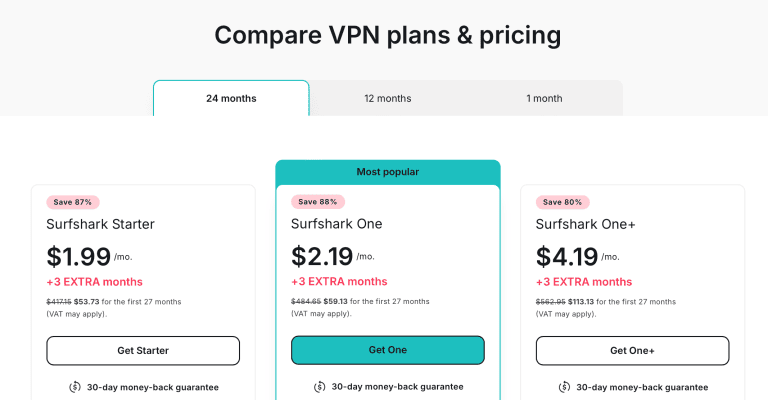
- Scroll down to choose your preferred payment method. I clicked on “Credit card.”

- Enter your payment details and your email address to create your account.
- You’ll be prompted to activate your account by following the instructions sent to your email. Remember to choose a strong password!
- If you’re using Windows, Linux, or macOS, you can download the applicable Surfshark software via your account. If you’re using a smartphone or tablet, then you can download the app from Google Play or the Apple Store.

- Log in to your app using your email and password.
- You can now click on the “Connect” button to connect to a server automatically. This is where you put the Surfshark VPN to the test!

Enjoy the service, and don’t forget to contact customer support to ask for a refund before your money-back guarantee period is over.
How to Get a Refund From Surfshark?
If you’re not happy with the Surfshark VPN and you bought it on Surfshark’s website less than 30 days ago, you’ll qualify for a refund.
According to the Surfshark website, you’re “guaranteed the right to claim a refund within 30 days following your purchase of our services.”
However, if you purchased your Surfshark VPN via an app store (such as Apple’s App Store), Amazon, or a prepaid card/gift card, you’ll need to request the refund from the store or payment source, not Surfshark.
To get your money back directly from Surfshark, you can follow these steps (the screenshots are from my 2022 test, so the support pages may look different):
- Head to the Surfshark website and click on the “Support” button in the bottom right corner. This will open a “Live Chat” box.

- Click on “Live Chat.”
- A pop-up form will appear. Fill in your name and email address (preferably the one linked to your Surfshark account), and make sure the “Surfshark VPN” department is selected under “Choose a department.”
- Compose your message. Send something like, “Hi. Please can you help to refund my money? It has been less than 30 days since my purchase. Thank you.”

- Click on “Start chat.”
- Wait for an agent to respond and guide you through the cancellation and refund process. Your account and payment information may be requested (so have these details on hand).

- Once you’ve received confirmation from your agent that your refund is processed, you can exit the chat. As a rule of thumb, hold onto the chat history sent to you via email in case you need proof to argue a case.
- Check whether you’ve received a refund in the next 7-10 business days.
With Surfshark, you don’t have to give a reason for canceling – although your agent may prompt for one.
If they ask, say, “I don’t want to give a reason,” – they’ll accept this response.

Remember, you must be within a 30-day window to get a refund.
If your account is older than 30 days, then there is no guarantee that you’ll get your money back.
According to Surfshark’s refund policy, the provider will consider refunding a user whose purchase is older than 30 days in exceptional cases only.
What Can You Do With a Surfshark Free Trial?
Unlike many other free VPN trials or free VPNs that limit bandwidth and features, Surfshark offers free-trial users all the premium features.
Basically, you get to try the paid version without spending a cent. The one limit is devices: the trial covers up to 3, and a paid plan unlocks unlimited devices.
In a nutshell, you get access to all of Surfshark’s secured VPN servers PLUS useful app settings such as kill switch and Bypasser (split tunneling) functionality.
Other Surfshark VPN features include:
- An easy-to-use app interface
- An audited no-logging policy
- 4,500+ servers in 100 countries
- P2P servers
- Limitless bandwidth
- Unlimited simultaneous connections once you pay (up to 3 devices during the trial)
- Military-grade encryption
For a detailed features list, including pros and cons, read this detailed Surfshark review.
Surfshark 7-Day Free Trial vs. 30-Day Money-Back Guarantee: Which Is Better?
Both Surfshark free trial options allow you to put the VPN (all features included) to the test.
However, the 7-day trial limits you to 7 days and up to 3 devices, and you must cancel before it ends or Surfshark charges you for the plan you picked.
The advantage is that you pay $0.00 up front, so nothing leaves your card or PayPal account if you cancel in time.
This is great if you have no cash to spare at the time.
The 30-day trial, on the other hand, means paying up front, but it gives you a full 30 days and unlimited devices to test the VPN to the max.
You can take your time unblocking streaming sites to watch your favorite series, and you can really stretch Surfshark’s capabilities.
I’m not one to rush my research, so I prefer the 30-day money-back guarantee method.
Surfshark’s 7-Day Free Trial Pros and Cons
Pros
- You pay $0.00 for the first 7 days
- You’ll have access to all Surfshark’s premium paid-for features
- You won’t have to request a refund if you cancel in time
- You can use it on up to 3 devices at once
Cons
- You only have 7 days to test the VPN
- It covers 3 devices, not unlimited
- Only 12-month and 24-month plans come with the trial
- Your card/account will be charged if you don’t cancel your trial in time
Surfshark’s 30-Day Free Trial Pros and Cons
Pros
- You’ll have access to all Surfshark’s premium paid-for features
- You’ll be able to use your Surfshark VPN for a full month (no rush)
- Unlimited devices from day one
- Your money will be refunded to you – no questions asked
- The refund process is relatively quick
Cons
- You’ll have to pay a refundable subscription fee
- Refunds take a few business days to reach you
- App-store purchases are refunded by the store, not Surfshark
Peruse the pros and cons above to see which free trial from Surfshark will work best for you.
Surfshark Free Trial Customer Reviews
Many potential VPN customers are skeptical about refund policies.
There’s also often a hesitation to share credit card details.
To ease your mind, I took the time to search for Surfshark refund reviews and general feedback.
I used Trustpilot to do my bidding.
When I checked, the VPN provider had a 4.2-star rating overall – good!
The feedback on refunds was all excellent – I found no complaints, except from those who forgot to cancel before the 30-day money-back guarantee period lapsed.


Even Alex was happy after he was unexpectedly charged but didn’t have to jump through hoops to get his money back:

The feedback on the Google Play Store was mixed. There were many “thumbs up” but several disappointed users, too. However, most negative reviews came from users who failed to read the 7-day free trial small print and didn’t unsubscribe before their cards were debited!
How Does the Surfshark Free Trial Offer Compare With Other VPNs With Free Trials?
Any authoritative Surfshark review will tell you that this provider offers an affordable VPN service with higher-tier features.
But as affordable and promising as this VPN sounds, I understand you don’t want to run the risk of wasting time on a product you don’t like.
If you’re not sure that Surfshark is the way to go, even with a free trial, then other quality VPNs offer free trials, too.
You can compare them with Surfshark below:
| VPN | Trial Duration | Which Mobile Apps Does the Trial Work On? | Do You Need to Provide Card/Account Details? | Money-back Guarantee |
|---|---|---|---|---|
| Surfshark | 7 days | All: start it on Surfshark’s website (up to 3 devices) | Yes (card, PayPal or Apple Pay) | 30-days |
| NordVPN | 7 days | None: sign up on its website (3-day trial on Google Play) | Yes | 30-days |
| ExpressVPN | 7 days | Android, iOS | Yes | 30-days |
| PrivateVPN | 7 days | Android, iOS | No | 30-days |
| IPVanish | 7 days | iOS | No | 30-days |
You’ll see that most VPNs offer a similar free trial service, all with a 30-day money-back guarantee.
Choose one of these VPN trial options or start your Surfshark free trial now!
FAQ
Is Surfshark's Free Trial Safe?
Surfshark’s free trial gives users access to all the VPN’s premium security features, thus making it safe to use.
Included in the deal, you’ll receive AES-256-GCM military-grade encryption, WireGuard and OpenVPN protocols, a kill switch, and Surfshark’s own CleanWeb and Camouflage Mode feature.
All these qualities are what make Surfshark VPN a safe industry leader.
Each subscription plan, including the 7-day free trial, also promises a strict no-logs policy.
This ensures that your online activity is kept private and safe.
Is There a Surfshark Free Trial for Windows?
Yes, there are two ways to get a Surfshark free trial for Windows.
You can start the 7-day free trial on Surfshark’s website (12- or 24-month plan, paid by card, PayPal or Apple Pay) and then log in to the Windows app with the same account. The trial covers up to 3 devices.
Or you can subscribe to a plan using your Windows device and then claim your 30-day money-back guarantee.
Either way, you can test Surfshark’s features before you commit.
Can I Pay for a Surfshark 30-Day Trial Using Cryptocurrency?
You can use a cryptocurrency to pay for your Surfshark 30-day trial (the money-back route).
When we last checked, Surfshark accepted several cryptocurrencies, including Bitcoin, Bitcoin Cash, Ethereum, and Litecoin, processed through CoinGate and CoinPayments.
The 7-day free trial is different: it takes a credit card, PayPal or Apple Pay, not crypto.
Conveniently, Surfshark also claims to refund payments made in cryptocurrency (based on the US dollar rate of exchange at the time of the refund).
But keep in mind that there must be a clear transaction path for the refund to be successful.
If either party makes a mistake with the crypto transaction, it might be impossible to reverse the funds.
Signing Out…
Getting a Surfshark free trial is easy, and the refund process is straightforward.
Activate your Surfshark free trial now!
Just remember, it’s essential to cancel before the 7-day trial ends, or to ask for your refund before the 30-day money-back guarantee runs out.
Otherwise, you’ll pay for the plan with no promise of getting your money back.
But Surfshark is an excellent VPN, so the reasons not to continue with a subscription are few and far between.
Read here to discover more free VPN trial options and VPN deals.
Explore More
 Who Owns Surfshark? Owners, Headquarters and NordVPN Ties (2026)
 Surfshark Coupon & Promo Codes October 2026: Up to 85% Off
 Is NordVPN Good, Safe and Worth It in 2026?
 Who Owns NordVPN? Owners, Investors and Where It’s Based (2026)
 NordVPN Coupon & Promo Codes October 2026: Up to 75% Off
 NordVPN Anfield Wrap Deal – Up to 75% Off for TAW Listeners

