
 4.9 / 5
 - Far cheaper on long-term plans
- Unlimited simultaneous connections
- 4,500+ servers in 100 countries
- MultiHop, CleanWeb & antivirus extras
 4.7 / 5
 - Faster than Surfshark in all 18 of my speed tests
- Unblocks streaming services, including Netflix US & UK
- 3,000+ servers in 113 countries
- Premium security suite
Surfshark and ExpressVPN are two of the most reliable VPNs I’ve tested, with plenty in common: audited no-logs policies, RAM-only servers, obfuscation, and SmartDNS.
But how different are they when it comes down to the wire?
Surfshark is my overall winner. It costs far less on a long-term plan, covers every device you own with unlimited simultaneous connections (ExpressVPN’s Basic plan stops at 10), and packs extras ExpressVPN doesn’t offer, such as MultiHop and a built-in antivirus.
ExpressVPN fights back where raw performance counts: it was faster in every one of my 18 speed tests, finished the same torrent in half the time, and dropped far fewer packets while gaming.
This guide answers everything!
I’ll compare Surfshark and ExpressVPN regarding server locations, their presence (or lack thereof) in China, streaming capabilities, torrenting, user privacy, security, and value.
If you’re undecided on which VPN to lean towards, I’ll help you decide.
Read this to the end to find out more about ExpressVPN vs. Surfshark.
Surfshark vs. ExpressVPN (Overview Table)
| Surfshark | ExpressVPN | |
|---|---|---|
| Servers: | 4,500+ servers in 100 countries | 3,000+ servers in 113 countries |
| Speed: | 6.5 Mbps drop | 0 Mbps drop |
| Protocols: | WireGuard, OpenVPN, IKEv2 | Lightway, OpenVPN, IKEv2 |
| Streaming: | Hulu, Amazon Prime, NRK, France.TV, BBC iPlayer | Netflix, Hulu, Disney+, NRK, France.TV, BBC iPlayer |
| Torrenting: | On all servers, but no seeding | On all servers but seeding on compatible routers only |
| Gaming: | 23.50 ms ping + 10.7 % packet loss | 30.38 ms ping + 0.7 % packet loss |
| Logs: | Verified no-logs policy | Verified no-logs policy |
| Security: | Multihop, Obfuscation, Wi-Fi protection, IP Leak protection, AES 256-bit Encryption. | Automatic Obfuscation, Wi-Fi Protection, IP Leak protection, AES 256-bit Encryption |
| Devices: | Windows, macOS, iOS, Android, Linux, Smart TVs, routers, Edge, Chrome, FireTV | Windows, macOS, iOS, Android, Linux, Smart TVs, routers, Kindle Fire, Amazon Fire TV, Chromebook |
| Simultaneous Connections: | Unlimited | 10 (Basic plan) |
| Price & Value: | Far cheaper 2-year plan, unlimited devices | Pricier tiers; 10 devices on Basic |
| Customer Support: | 24/7 live chat | 24/7 live chat |
| Best Deal: | Surfshark | ExpressVPN |
 GET DISCOUNT NOW
Server Locations
Surfshark has 4,500+ servers in 100 countries, while ExpressVPN spreads 3,000+ servers across 113 countries. On paper, ExpressVPN reaches more places and Surfshark fields more machines, so the two look evenly matched. However, things are a little different when you dig deeper.
For example, Surfshark has a superior US server network with over 600 servers compared to ExpressVPN, which only has 25. So you’ll have an easier time unblocking US-only content like Sling TV or Peacock TV with Surfshark.

The chances of ending up in a crowded US server on Surfshark are also significantly lower than ExpressVPN.
Moreover, Surfshark also offers 6 African servers in Algeria, Egypt, Ghana, Morocco, Nigeria, and South Africa, while ExpressVPN has 4 in Algeria, Egypt, Kenya, and South Africa.

Both VPNs also run on RAM-only servers, so nothing survives a reboot. ExpressVPN achieves this through its proprietary TrustedServer Technology, which KPMG and Cure53 have audited, while Surfshark’s server configuration and deployment processes were covered by Deloitte’s 2025 no-logs assessment. Neither has the edge here.
China
Neither Surfshark nor ExpressVPN has servers in mainland China.
The closest locations to China from both VPNs are Hong Kong, Taiwan, and Macau.
The good news is that both VPNs have robust obfuscation, allowing you to bypass the heavy censorship and access foreign content within China.
I’ll expand more on obfuscation in another section.
EXPERT SUMMARYExpressVPN now covers more countries (113 to Surfshark’s 100), but Surfshark runs the bigger fleet at 4,500+ servers, and its far denser US network means you’re less likely to land on a crowded server. Neither has servers in China, and both offer vital obfuscation.
Depth beats breadth for everyday use, so Surfshark wins the round.
Is Surfshark Faster Than ExpressVPN?
ExpressVPN is faster than Surfshark VPN. Based on the 18 tests I performed across three protocols and servers for each VPN, I wouldn’t even consider this a contest.
I used the following servers and protocols on my Macbook to ensure standardized results:
- Lightway UDP (ExpressVPN) vs. WireGuard (Surfshark)
- IKEv2 for both VPNs
- OpenVPN UDP for both VPNS
As for the servers, I chose one closest to me, one in the middle, and the furthest.
This included:
- South Africa (Closest)
- United States
- Australia (Furthest)
Here’s a screenshot of the fastest Surfshark test.

And here’s the fastest ExpressVPN server.

Overall, the results were within my expectations. For instance, the best-performing servers for both VPNs were in South Africa, while Australia and the United States registered the slowest speeds. This proves that servers closest to your location are likely the fastest.
The stellar performance from ExpressVPN’s Lightway Protocol wasn’t surprising, either. However, Surshark’s WireGuard results were slightly below what I projected based on my past interactions.
Furthermore, the difference in the average speeds between ExpressVPN and Surfshark was 11.27 Mbps. That’s wider than the partition that Moses pulled on the Red Sea.
There wasn’t any point across the 18 tests where Surfshark was faster than ExpressVPN.
Speed & Performance Tests
Here’s a more detailed breakdown of how the tests panned out.
| US Server | South Africa Server | Australia Server | |
|---|---|---|---|
| Surfshark (WireGuard) | 8.25 Mbps drop | 6.5 Mbps drop | 9.09 Mbps drop |
| ExpressVPN (Lightway UDP) | 1.81 Mbps drop | 0 Mbps drop | 8.56 Mbps drop |
| Surfshark (IKEv2) | 26.76 Mbps drop | 14.12 Mbps drop | 13.98 Mbps drop |
| ExpressVPN (IKEv2) | 5.78 Mbps drop | 0 Mbps drop | 4.72 Mbps drop |
| Surfshark (OpenVPN UDP) | 22.7 Mbps drop | 13.79 Mbps drop | 21.2 Mbps drop |
| ExpressVPN (OpenVPN UDP) | 10.51 Mbps drop | 0.91 Mbps drop | 3.05 Mbps drop |
| Average Surfshark Speeds | 14.87 Mbps | ||
| Average ExpressVPN Speeds | 26.14 Mbps | ||
ExpressVPN was superior to Surfshark, no matter the protocol or the distance of the server from my physical location. It was incredibly faster when combining the Lightway Protocol with a South African server. So ExpressVPN wins this round.
Streaming
Surfshark and ExpressVPN unblocked five geo-restricted streaming services from 5 regions without issues. I ran tests on Hulu, BBC iPlayer, Disney+, NRK, and France.TV.
Here’s the breakdown of the tests:
| Streaming Service | Surfshark | ExpressVPN |
|---|---|---|
| Hulu | Yes | Yes |
| BBC iPlayer | Yes | Yes |
| Disney+ | No | Yes |
| NRK | Yes | Yes |
| France.TV | Yes | Yes |
Regarding NRK, both VPNs have Norway servers that allowed me to access content exclusive to the Scandinavian nation. Thanks to their quick search function, finding the server wasn’t hard on either VPN.
The same was true for France.TV. Furthermore, I didn’t have to hop from one server to another; all streaming platforms were unblocked on the first attempt.
Streaming 4K content was smooth on ExpressVPN (Lightway UDP), and I didn’t experience any buffering across the tests I ran on my macOS, Windows, and Android devices. But there was some buffering with Surfshark (WireGuard).
For smart TVs that don’t support native VPN apps, ExpressVPN also offers SmartDNS, which Surfshark no longer does.
I will dive into this in a later section.
Netflix Tests
With Netflix having a bigger global coverage, I wanted to see if Surfshark and ExpressVPN can unblock specific geo-locked Netflix libraries.
I tested Netflix US, Netflix UK, Netflix Japan, Netflix Netherlands, and Netflix France, and both VPNs unblocked all of these libraries.
This gave me access to fantastic entertainment options I’ve never seen in the Netflix version of my country.
| Unblocks: | Netflix US? | Netflix UK? | Other Netflix Libraries? |
|---|---|---|---|
| Surfshark | Yes | Yes | Netflix NL, JP, FR |
| ExpressVPN | Yes | Yes | Netflix NL, JP, FR |
For the test, I successfully unblocked Team America: World Police using a US VPN server.


I achieved the same for the UK (The Blair Witch Project), Japan (The Promised Neverland), France (Merci Pour Le Chocolat), and the Netherlands (Gomorrah).
This was a tie. Surfshark and ExpressVPN unblocked all the streaming sites I tested, including fringe platforms like NRK and exclusive Netflix libraries from the US, Japan, France, the UK, and the Netherlands, without any buffering.
Torrenting
Surfshark and ExpressVPN offer P2P support, but Surfshark is the only one with dedicated P2P servers. These P2P servers are easy to find and optimized for speeds. But that doesn’t mean ExpressVPN slacks – it packs amazing download speeds with its regular servers.
Furthermore, ExpressVPN is the only VPN that allows port forwarding on routers. Therefore, ExpressVPN is the better option to seed your torrents – especially useful if you want to join private torrenting sites. Surfshark doesn’t offer port forwarding due to security reasons.
Additionally, Surfshark explicitly states in its Terms of Service that the use of its services is governed by and subject to all the laws that protect copyright ownership and intellectual property. Here’s Surfshark’s statement:

Meanwhile, ExpressVPN also forbids the use of its services in uploading, downloading, posting, reproducing, or distributing any copyright-protected content. Here’s the screenshot of their policy:

P2P Tests
To confirm the ability of these two VPNs to handle torrenting, I downloaded a copyright-free 460 MB file to see how fast both were using the Free Download Manager torrenting client. To get the best results, these are the parameters I used:
- The WireGuard protocol plus a South African server for Surfshark.
- The Lightway UDP protocol plus a South African server for ExpressVPN.
Here are my results:
| Average Download Speed | Max Download Speed | Download Completion Time | |
|---|---|---|---|
| Surfshark | 295 KB/s | 358 KB/s | 21 minutes, 21 seconds |
| ExpressVPN | 416 KB/s | 763 KB/s | 10 minutes, 02 seconds |
ExpressVPN was faster than Surfshark, completing the same download in half the time.


Surfshark and ExpressVPN have P2P support. Surfshark may have servers dedicated to P2P, but ExpressVPN is faster at torrenting files and allows port forwarding via routers.
So ExpressVPN wins this round.
Gaming
ExpressVPN is better at gaming than Surfshark. To start, I ran ping and packet loss tests:
| Server | Protocol | Ping | Packet Loss | |
|---|---|---|---|---|
| Surfshark | South Africa | WireGuard | 23.50 ms | 10.7% |
| ExpressVPN | South Africa | Lightway UDP | 30.38 ms | 0.7 % |
I picked one macOS-compatible light game, Asphalt 9: Legends, for this test, then repeated the test with a heavier game, Fortnite.
ExpressVPN had the most negligible packet loss in the test, with just 0.7%.
With this, I barely noticed any lag when playing both games.
In comparison, Surfshark had a packet data loss of 10.7%, which was noticeable, especially when playing Fortnite. I experienced freezing and lags that gave my opponents a considerable advantage.
Here’s the test result for Surfshark:

And here’s what I got with ExpressVPN:

ExpressVPN was better at gaming than Surfshark. It had the least packet loss of 0.7% compared to the 10.7% registered by Surfshark. I didn’t experience much lag or freezes with ExpressVPN, giving it the win.
Privacy
Surfshark and ExpressVPN adhere to a strict no-logs policy.
I looked at the privacy policies of both VPNs on their website, and there were interesting bits worth your attention.
For example, both VPNs store email addresses and payment info to ensure the services work as intended. The email address is the official communication channel, while payment details can be used to process refunds. Other than that, no user data is saved.
However, ExpressVPN’s stored payment data depends on the user’s payment option. For example, they may share user data with third-party payment processors like PayPal, BitPay, or Stripe.
If you’re uncomfortable sharing this information, both VPNs offer cryptocurrency payment options that minimize the amount of personal data you share.
More on payment options in the price and value section.
Moving on, ExpressVPN is based in the British Virgin Islands, which isn’t part of any surveillance alliances. Comparatively, Surfshark is based in the Netherlands, part of the 9 Eyes.
The downside is that there’s very little Surfshark can do if any government bodies in the Nine-Eyes Alliance demand logs. However, Surfshark has a verified and audited no-logs policy, so they would have nothing to give.
Furthermore, Surfshark’s Warrant Canary, that’s publicly available, also reinforces its commitment to full transparency. So you’re in safe hands.

(Unfortunately, ExpressVPN doesn’t have a Warrant Canary.)
Let’s further break down the logging policies in the next section.
Logging Policies
Here’s a quick breakdown of Surfshark and ExpressVPN’s logging policies:
| Traffic Logs? | Connection Logs? | IP Address? | Server Location? | |
|---|---|---|---|---|
| Surfshark | No | No | No | No |
| ExpressVPN | No | No | No | No |
Additionally, Surfshark and ExpressVPN have undergone audits.
ExpressVPN’s TrustedServer technology and no-logs policy were audited by KPMG and Cure53 in 2022.
ExpressVPN has passed all the audits so far, with nothing out of place detected.
Surfshark has also had its fair share of rigorous audits, with the most notable one conducted by Deloitte in January 2023 to check if Surfshark complies with its no-logs policy. Surfshark passed the audit.
Deloitte came back in June 2025 and verified the no-logs policy again under the ISAE 3000 standard, this time assessing standard, static, and multiport servers along with the configuration and deployment processes behind them. Surfshark passed again.
Finally, ExpressVPN’s Lightway Protocol is open-source; anyone can see everything that went into Lightway’s core code and even adopt it.
ExpressVPN also published the source code for its browser extensions in 2019.
I didn’t see anything to indicate that Surfshark is open-source.
Surfshark and ExpressVPN both run strict, independently verified no-logs policies on RAM-only servers, and both have passed every audit so far. ExpressVPN has the friendlier jurisdiction and an open-source protocol; Surfshark answers with a public Warrant Canary and a second Deloitte verification. I can’t separate them on privacy, so this round is a draw.
Security
Surfshark and ExpressVPN excel in the security department.
Both VPNs offer AES 256-bit encryption across all their apps, protocols, and servers.
I ran each VPN through the Wireshark app using South African servers, and the results confirmed that encryption is alive and kicking.


Furthermore, Surfshark and ExpressVPN offer kill switches for IP leak protection. Surfshark has two kill switches on the Android platform.
ExpressVPN maintains a single kill switch for each platform, giving Surfshark the lead.
Below are the results of the WebRTC, IP, and DNS leak tests I conducted for the two VPNs.
WebRTC Leak Test
As you can see from the screenshots below, the IP addresses shown correspond to the virtual IPs provided by the VPN. That’s proof that there were no leaks in the VPN connection.


IP and DNS Leak Test
ExpressVPN and Surfshark have their own IP and DNS leak tests, and I took advantage of them to see if their claims were valid. Here are the results.


DDoS Protection
Surfshark and ExpressVPN also offer DDoS protection. Other gamers won’t be able to bombard your system with requests that slow down your speeds because they only see the virtual IP addresses you connect through.
You can also switch to a new server when you notice suspicious activity.
This offering is equal across both VPNs.
Public Wi-Fi Protection
Through military-grade encryption, Surfshark and ExpressVPN protect your system against Man-in-the-Middle attacks and Wi-Fi sniffing when you switch to public hotspots.
I grabbed my Macbook and checked into my favorite Starbucks to test both VPNs using the cafe’s Wi-Fi. Both VPNs passed the test again!
Obfuscation
Surfshark has an obfuscation feature called Camouflage Mode that’s automatically activated when you switch to the OpenVPN protocol.
Meanwhile, ExpressVPN has automatic obfuscation that works across all protocols and servers. ExpressVPN’s automatic obfuscation is one of the fastest around, unlike Surfshark, where you’re limited to using slow protocols.
Malware Protection
Surfshark has a CleanWeb feature that doubles as an ad and malware blocker.
The feature is available across all platforms and is activated from the settings.

Meanwhile, ExpressVPN has a Threat Manager feature that deals with malware and stops trackers from sharing your information with third-party advertisers.
Like CleanWeb, you must activate this feature in settings to use it.

However, Threat Manager doesn’t block ads, making CleanWeb the better option.
Extra Security Features
There are unique security features in each of these VPNs not found in the other.
Surfshark has an in-built antivirus that scans your device for viruses and gives you real-time protection, perfect for people who love visiting risky sites like Pirate Bay.
You can either conduct a full or a quick scan.

Furthermore, Surfshark is the only one that offers Dedicated IP addresses.
It works with all connection protocols and protects your devices through the same virtual IP address. However, it comes at an extra cost. I’ll cover that in a bit.
There’s also the NoBorders feature that automatically activates when Surfshark detects network restrictions in some regions.
Finally, Surfshark offers 12 MultiHop servers, which route your VPN connection through two servers for double the security. This feature is missing in ExpressVPN.
EXPERT SUMMARYYou get military-grade encryption, IP and DNS leak protection on both VPNs, DDoS protection, public WIFI protection, obfuscation, and malware protection.
However, Surfshark goes further by providing an ad blocker, MultiHop, and antivirus.
So Surfshark wins this round.
Devices & Connections
Surfshark and ExpressVPN are compatible with various devices like smartphones, tablets, routers, smart TVs, etc.
You can run Surfshark directly on macOS, Windows, Linux, iOS, Android, FireTV, Chrome, Firefox, Edge, Xbox, PlayStation, and select router brands.
Meanwhile, ExpressVPN works on macOS, Windows, Linux, smart TVs, iOS, media consoles, Android, Chromebook, Amazon Fire, and many routers.
Surfshark has a slight edge over ExpressVPN, as it works on more Smart TVs.
Moving on, you can connect an unlimited number of devices simultaneously on Surfshark. ExpressVPN allows 10 simultaneous connections on its Basic plan (12 on Advanced and 14 on Pro), making Surfshark the better option for large households.
Below is the complete breakdown of device support:
| Surfshark | ExpressVPN | |
|---|---|---|
| Compatible OS? | Windows, macOS, iOS, Android, Linux, Smart TVs, routers, Edge, Chrome, Firefox, FireTV, gaming consoles, etc. | Windows, macOS, iOS, Android, Linux, Smart TVs, routers, Kindle Fire, Amazon Fire TV, Chromebook, gaming consoles, etc. |
| Smart TVs? | Android TV, Apple TV, Roku, Google TV, Chromecast, LG TV, Nvidia Shield, FireTV (Roku and LG via a router). | Android TV, FireTV, Apple TV, Roku, Google Chromecast, NVIDIA Shield, Mi Box, SmartDNS. |
| Router Support? | Yes (manual + app) | Yes (manual + app) |
| Browser Extensions? | Chrome, Firefox, Edge | Chrome, Firefox, Edge |
SmartDNS
Additionally, ExpressVPN has SmartDNS that allows you to stream content on devices that don’t support VPN apps, such as smart TVs and game consoles.
Surfshark ended its SmartDNS service in February 2026. On those devices, you now set Surfshark up on your router or share it from a Windows PC’s Wi-Fi hotspot using the OpenVPN protocol.
Its native apps still cover Android TV, Google TV, Fire TV and Apple TV (tvOS 17 or later), so those need no workaround.
ExpressVPN’s SmartDNS requires you to manually register your IP address first.
For ExpressVPN, the SmartDNS feature is called MediaStreamer, and it works on Samsung and LG smart TVs. MediaStreamer also works for UK content.
EXPERT SUMMARYBoth VPNs have high device compatibility, and ExpressVPN still provides Smart DNS for smart TVs that don’t work with VPN apps. But Surfshark holds an advantage over ExpressVPN by providing more smart TV support and unlimited simultaneous connections. So Surfshark wins this round.
Split Tunneling
Surfshark and ExpressVPN provide a split tunneling feature, but the availability varies from one platform to another.
Surfshark’s split tunneling feature is Bypasser and available only on Windows and Android, while for ExpressVPN, the split tunneling feature is available for Windows, iOS, Android, and macOS 11 and below.

On Android and Windows, you can use the Bypasser in two ways.
You can use the Bypass VPN option, where the apps you choose use the internet without the VPN. Alternatively, you can use the Route via VPN, where only the apps you choose go through the VPN.

On ExpressVPN, there are three options:
- Force all mobile apps to use the VPN.
- Exclude some apps from using the VPN.
- Only allow a few apps to use the VPN.
ExpressVPN’s split tunneling feature is available on more devices than Surfshark, giving it the edge.
EXPERT SUMMARYBoth VPNs are equipped with split tunneling, and the feature isn’t available on some apps for both VPNs. Using this feature is also straightforward on both VPNs, with easy-to-follow actionable buttons. But since ExpressVPN offers the feature across all its devices, bar macOS versions above 11, it wins this round.
Customer Support
ExpressVPN and Surfshark provide Live Chat, direct email, FAQs, and support guides.
Responses through the Live Chat options were instant on both VPNs, and all my queries were answered promptly and accurately.
I was also happy to find that both VPNs allow people to email themselves the entire transcript of the Live Chat, which is helpful if you want to preserve the valuable tips from customer support.
But Surfshark slightly edges ExpressVPN in this section, as it has a more detailed help section that tackles every common problem users may encounter.
Both VPNs have amazing blogs that address and troubleshoot general issues that users may encounter when using the services.
EXPERT SUMMARYOverall, both VPNs take customer support very seriously and are always on hand to answer any question you may throw at them at any given time.
But Surfshark’s help guide section is more extensive than ExpressVPN, so it wins this round.
Usability
I used macOS, Windows, and Android for this comparison review.
Surfshark and ExpressVPN have put much effort into making their apps user-friendly and easy to navigate. However, there are some differences across compatible platforms.
Take split tunneling, for instance; it’s missing on the macOS versions of Surfshark and ExpressVPN but very efficient on Android and Windows for both.
ExpressVPN’s settings on Windows have extra options, like starting ExpressVPN as a minimized window when you launch your computer.
But the same Windows app lacks the Threat Manager option, which is also unavailable on Android.
ExpressVPN for Android also has an extra button for privacy and security tools that allows you to run DNS and WebRTC leaks from within the app.

Surfshark for Android and Windows comes with extra features like Invisible LAN, with the Android version going an extra step with a feature called Override GPS Location on top of two kill switches.

Furthermore, when I first ran these tests, Surfshark for macOS listed only two protocols, IKEv2 and WireGuard, while the Android and Windows versions also had OpenVPN. Surfshark for Windows is the only app with an inbuilt speed test feature.

That macOS gap mattered because no OpenVPN meant no Camouflage Mode on a Mac. Surfshark has since added OpenVPN (UDP and TCP) to its macOS app, so obfuscation is no longer a Windows-and-Android-only affair.
Overall, these slight differences don’t impact how the different apps perform. Each app has a couple of extras the other lacks, and neither ever got in my way.
Both apps are polished and easy to navigate on macOS, Windows, and Android, and each has a few extras the other lacks: ExpressVPN’s in-app leak tests and startup options versus Surfshark’s Invisible on LAN, GPS override, and built-in speed test. With OpenVPN now on Surfshark’s Mac app, my one real gripe is gone, so this round is a draw.
Price & Value
Surfshark is significantly cheaper than ExpressVPN, and the gap is widest exactly where most people buy: the long-term plan. Surfshark offers three price plans, all bundled with a 30-day money-back guarantee.
I recommend the 24-month subscription, which has the biggest discount and throws in 3 extra months on top. Every Surfshark plan includes unlimited simultaneous connections, so there’s no per-device math to do.
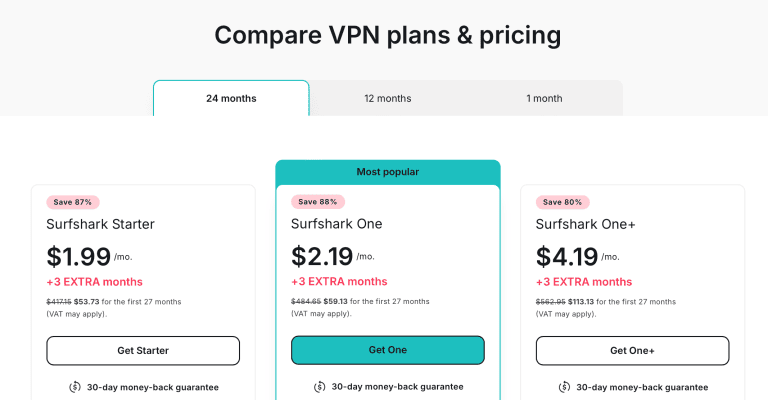
However, you must pay extra for the Dedicated IP Address add-on.
Meanwhile, ExpressVPN now sells three tiers – Basic, Advanced, and Pro – as monthly, 12-month, or 2-year plans, all with a 30-day money-back guarantee.
The catch is that the 2-year price is an introductory offer that renews annually, and even the cheapest tier costs more per month than Surfshark: Basic launched at $3.49/month on the 2-year plan, with Advanced and Pro priced higher again. Basic also caps you at 10 simultaneous connections; you have to step up to Advanced or Pro for 12 or 14.

When it comes to payment options, Surfshark and ExpressVPN are stacked with a rich array of alternatives.
ExpressVPN offers card payments with VISA, MasterCard, American Express, Discover, and JCB support. Surfshark, on the other hand, has VISA, MasterCard, American Express, and Discover.
Both VPNs have PayPal and cryptocurrency, but Surfshark has more in the form of Bitcoin, Ethereum, and XRP, while ExpressVPN only offers Bitcoin.
Surfshark has Google Pay and Amazon Pay options, while ExpressVPN counters that with 12 Paymentwall options like Union Pay, Sofort, and GiroPay.
EXPERT SUMMARYBoth VPNs have paid special attention to the needs of clients from as many regions as possible, and ExpressVPN’s longer list of payment options is a nice touch. But value is about what you get for your money: Surfshark’s long-term plan costs far less, includes unlimited connections where ExpressVPN’s Basic tier stops at 10, and still bundles MultiHop and CleanWeb. Surfshark wins this round comfortably.
Surfshark vs. ExpressVPN (Overview Table)
| Surfshark | ExpressVPN | Winner | |
|---|---|---|---|
| Servers: | 4,500+ servers in 100 countries | 3,000+ servers in 113 countries | Surfshark |
| Speed: | 6.5 Mbps drop | 0 Mbps drop | ExpressVPN |
| Protocols: | WireGuard, OpenVPN, IKEv2 | Lightway, OpenVPN, IKEv2 | Tie |
| Streaming: | Netflix, Hulu, Disney+, NRK, France.TV, BBC iPlayer, etc | Netflix, Hulu, Disney+, NRK, France.TV, BBC iPlayer, etc | Tie |
| Torrenting: | On all servers, but no seeding | On all servers with seeding on compatible routers only | ExpressVPN |
| Gaming: | 23.50 ms ping + 10.7 % packet loss | 30.38 ms ping + 0.7 % packet loss | ExpressVPN |
| Logs: | Verified no-logs policy (Deloitte, 2023 & 2025) | Verified no-logs policy (KPMG & Cure53) | Tie |
| Security: | Multihop, Obfuscation, Wi-Fi protection, IP Leak protection, AES 256-bit Encryption. | Automatic Obfuscation, Wi-Fi Protection, IP Leak protection, AES 256-bit Encryption | Surfshark |
| Devices: | Windows, macOS, iOS, Android, Linux, Smart TVs, routers, Edge, Chrome, FireTV | Windows, macOS, iOS, Android, Linux, Smart TVs, routers, Kindle Fire, Amazon Fire TV, Chromebook | Surfshark |
| Simultaneous Connections: | Unlimited | 10 (Basic plan) | Surfshark |
| Price & Value: | Far cheaper 2-year plan, unlimited devices | Pricier tiers; 10 devices on Basic | Surfshark |
| Customer Support: | 24/7 live chat | 24/7 live chat | Surfshark |
| Best Deal: | Surfshark | ExpressVPN |
The Home Run: Who Takes It?
It may look like a tough choice, but with all the cards on the table, the scoreboard settles it. Surfshark took five rounds (server locations, security, devices and connections, customer support, and price and value), ExpressVPN took four (speed, torrenting, gaming, and split tunneling), and streaming, privacy, and usability ended level.
What tips it for me are the two things that decide most VPN purchases: value and devices. Surfshark’s long-term plan costs far less, and it covers every device in the house with unlimited simultaneous connections, where ExpressVPN’s Basic plan stops at 10. Throw in MultiHop and CleanWeb, and you simply get more VPN for less money.
That said, ExpressVPN earned its wins honestly. If raw speed is your priority – buffer-free 4K, lag-free gaming, or the quickest downloads with port forwarding on a router – ExpressVPN is still the one I’d point you to.
For everyone else, Surfshark is the better buy. Grab your Surfshark subscription and enjoy our exclusive deal before the offer runs out, or pick up ExpressVPN if performance is all that matters to you.
Protect private web traffic from snooping, interference, and censorship. All plans are covered by a no-hassle 100% money-back guarantee for your first 30 days of service.
Explore More
 Surfshark vs. ProtonVPN: Which Should You Choose? (2026)
 TunnelBear vs. ExpressVPN: Which VPN Wins? (2026)
 CyberGhost vs. ExpressVPN: An In-Depth Comparison (2026)
 Surfshark vs. Private Internet Access: Which VPN Wins? (2026)
 Surfshark vs. IPVanish: Which VPN Wins? (2026)
 Private Internet Access vs. PureVPN Comparison (2026)

