
Not many VPNs work with Disney Plus, which has highly rigorous anti-VPN systems.
Luckily, NordVPN won’t let you down – it’s the best VPN for Disney Plus.
NordVPN has 7,000+ servers in 150 countries (2,500+ of them across 55 US cities), fast NordLynx speeds, and native apps for most devices that stream Disney Plus, Apple TV and Fire TV included (a Roku needs your router). On top of that, you get ten simultaneous connections.
My guide will also introduce you to Surfshark (the fastest in my tests, on unlimited devices), PrivateVPN (static and dedicated IPs that sidestep Disney+’s blacklists), ExpressVPN, and CyberGhost.
Let’s jump right in!
Top 3 VPNs for Disney Plus

Surfshark
Best for 4K Disney Plus streams
- Fastest speeds in my tests
- Unlimited simultaneous connections
- Apps for Fire TV, Apple TV, Android TV

NordVPN
Best for Disney Plus overall
- 7,000+ servers in 150 countries
- 2,500+ US servers in 55 cities
- Apps for Apple TV and Fire TV

PrivateVPN
Best for a static Disney+ IP
- Static shared IP on every location
- Dynamic dedicated IPs over OpenVPN
- Ten connections on a budget plan
Unless you’re in a country where Disney Plus is available, the only way to access the streaming service is with a VPN. The same applies to those traveling to countries where Disney Plus isn’t yet present.
A VPN will help you obtain another country’s IP address, hiding your actual location. However, you need a VPN with solid protocols and high-end encryption.
That’s because using a different IP address isn’t enough to fool Disney Plus into granting you access.
That’s why I produced this guide.
After months of testing, I found 5 of the best VPNs for Disney Plus that work with the streaming service across all its supported platforms. They also bring vast server networks, fast and stable performance, and let you access other streaming platforms.
Ready to learn more?
Keep reading to find the best VPN for watching Disney Plus anywhere!
Want to Start Streaming the Mandalorian ASAP? These Are the Best Disney Plus VPNs!
Can’t wait to dive into Marvel, Star Wars, Pixar, and Disney movies and TV shows?
If so, I present the 5 best VPNs for Disney Plus:
- NordVPN – Best VPN Overall for Disney Plus With 7,000+ Servers
- Surfshark – Fastest Disney Plus Streaming on Unlimited Devices
- PrivateVPN – Static & Dedicated IPs for Streaming Disney Plus
- ExpressVPN – Best All-In-One VPN for Streaming Disney Plus
- CyberGhost – Giant Server Network + Dedicated Disney Plus Servers
You won’t make a mistake no matter which VPN you pick.
However, if you spend a bit of time learning about each, your decision will be more sound.
Let’s keep going, shall we?
The Best VPNs to Watch Disney Plus From Anywhere – In-Depth Look!
I’ll tell you more about the best Disney Plus VPNs by walking you through their features, showing you what to expect, and presenting the results of my hands-on tests.
Let’s see what makes each VPN unique.
1. NordVPN – Best VPN Overall for Disney Plus With 7,000+ Servers

NordVPN takes the top spot for Disney Plus on sheer coverage: more countries than anything else here, plus 7,000+ servers (2,500+ of them across 55 US cities), which is the antidote to a service that blacklists VPN addresses as aggressively as Disney+ does. It streams The Mandalorian, Marvel Hero Project, Pixar in Real Life, and other Disney Plus exclusives from anywhere, so let’s discuss everything this VPN offers to make that happen.
Platform Compatibility & Simultaneous Connections
NordVPN’s easy-to-use PC and mobile apps make it ideal for streaming Disney Plus content on your Windows, Mac, Linux, Chromebook, Android, and iOS devices. It also has native apps for Apple TV (tvOS 17 and later), Fire TV, and Android TV, so the living-room devices Disney+ lives on don’t need a workaround.
Meanwhile, the NordVPN router app makes it easier to set up and connect multiple devices to the same account, streaming different shows on Disney+ simultaneously. Without the router, one subscription still allows 10 simultaneous connections, matching ExpressVPN and PrivateVPN; only Surfshark offers more.
VPN Server Fleet
NordVPN boasts a massive 7,000+ servers in 150 countries, but I’m more interested in the 2,500+ US servers spread across 55 cities, with all 50 states covered since its 2026 expansion.
Such reach and coverage ensures:
- US residents can choose closer servers to encrypt their online traffic and stream Disney+ faster.
- US residents can choose closer servers to bypass network firewalls (at school or work) to stream Disney+ without lag.
- Non-US residents have multiple server options to stream Disney+.
- You never have to worry about Disney+ blocking any server since there’s more to choose.

You can select the general US region to automatically get the fastest server in the fastest city. Or, you can dig deeper and choose a preferred US city or another country, like Italy, to unblock and stream Disney+. With 150 countries on the list, the UK, Canadian, Australian, and Italian Disney+ libraries are all a click away.
Speed & Performance
I tested NordVPN’s speeds over US servers using the in-house NordLynx protocol, which unblocked Disney+ in HD. Surfshark and ExpressVPN posted the higher numbers in this round of tests, so I can’t hand NordVPN the speed crown; what it never did was buffer.

However, this isn’t a dealbreaker, given that most streaming devices don’t have 4K-streaming capabilities.
The best part of the speed tests is that NordVPN sometimes gets faster than my benchmark values. In other words, it bypasses ISP throttling to stream Forky Asks a Question or the High School Musical series without missing a beat.
Media Streaming Experience

NordVPN packs a SmartPlay feature automatically enabled once you start streaming content. This allows for the best balance of speed and security, ensuring faster streams without exposing your online traffic.

Its exclusive NordLynx protocol is also worthy of mention for a smooth streaming experience. This protocol retains all the protection of the alternative WireGuard protocol, combines that with better compatibility, and delivers stellar streaming speeds.
NordVPN also has a SmartDNS feature included with every plan. However, I couldn’t get it to work reliably with Disney Plus.
Out of all the tests I performed, it worked only three times on my PS4. On Apple TV and Fire TV, the native apps make SmartDNS unnecessary anyway, and NordVPN’s router support covers consoles and older smart TVs.
Where NordVPN pulls ahead is what happens when Disney+ blacklists an address: with 2,500+ US servers to rotate through, a blocked IP costs you a reconnect, not an evening. I keep a full NordVPN Disney Plus guide for the snags.
Plans & Pricing
NordVPN is highly affordable on its 2-year plans, which start at about the same price as ExpressVPN’s, and every plan carries a 30-day money-back guarantee.

Even so, use these NordVPN discounts to save more on your purchase.
Pros
- Unblocks Disney Plus on the Web and via dedicated Disney+ apps in HD
- 7,000+ servers in 150 countries, with 2,500+ US servers in 55 cities to outrun blacklisted IPs
- Native apps for Apple TV, Fire TV, and Android TV
- In-house NordLynx protocol for better streaming speeds
- 10 simultaneous connections
- SmartPlay for better content streaming optimizations
Cons
- SmartDNS was hit-and-miss on my PS4; use the native TV apps or router instead
- Not as fast as Surfshark and ExpressVPN in my tests
2. Surfshark – Fastest Disney Plus Streaming on Unlimited Devices

Surfshark is my runner-up for Disney Plus, and on raw streaming pleasure it’s still the one I reach for first: it posted the fastest speeds of the five, its apps run on Fire TV, Apple TV, and Android TV boxes, and it doesn’t count devices. It also unblocks various Disney Plus libraries and a whole slate of other streaming platforms.
Platform Compatibility & Simultaneous Connections
Disney Plus works on various devices via its Web interface.
That’s how you can stream it on a computer.
However, it also has apps for phones and tablets (iOS, iPadOS, Android), streaming devices (Fire OS, Apple TV, Android TV), game consoles (PlayStation, Xbox), and smart TVs (LG, Samsung, Sony, Panasonic, LG, and Hisense).
Surfshark works on all those platforms, but there’s a catch.
To unblock Disney Plus, you must use one of Surfshark’s apps.
Those are available for computers, smartphones, tablets, and media streaming units.

Game consoles and many smart TVs are the gap. Surfshark discontinued its SmartDNS feature in February 2026, and it has no app for Samsung’s Tizen TVs, PlayStation, or Xbox.
For those, put Surfshark on a router or share a hotspot from a Windows PC with the app switched to OpenVPN, as Surfshark’s guide asks (a PlayStation can also take the connection from a Mac over an Ethernet cable).
You can also cast or mirror Disney Plus from your computer, phone, or tablet to access the streaming service on your TV or game console.
On top of that, Surfshark brings unlimited simultaneous connections.
That means you can install its apps on as many devices as possible.
Also, you can connect to an unlimited number of servers.
Compared to my other recommendations, that feature isn’t found elsewhere.
VPN Server Fleet
Surfshark brings 4,500+ servers in 100 countries. NordVPN and CyberGhost run bigger fleets, but it’s well ahead of PrivateVPN.
That gap is also why NordVPN sits above it on this page: Disney+ blacklists VPN addresses in bulk, and NordVPN’s 2,500+ US servers give you four times as many addresses to fall back on as Surfshark’s 600+.

As for country coverage – if you want to unblock Disney Plus libraries in the US, Canada, the UK, Australia, Brazil, and more – Surfshark has servers in all those countries. It even allows you to unblock the Indian version of Disney+ (an independent and separate version that brings Bollywood movies, many of which are free).

Speed & Performance
Any VPN will slow you down. However, the best VPNs won’t prevent you from streaming in HD or 4K. Surfshark is an example of that.
As you’re about to see, Surfshark performs great even when using a highly remote server. I did a round of speed tests to prove that, so check my baseline stats below.

Here are the numbers Surfshark gave me once I connected to a US server.

You can see a very slight drop. However, my Web connection remained capable of streaming Disney Plus in HD and even 4K.
In fact, Surfshark is the only VPN besides ExpressVPN that has achieved 4K-ready speeds. The other VPNs didn’t come close, no matter how many servers (nearby and remote) I tested.
However, ExpressVPN followed Surfshark’s lead (by a noticeable margin). Meanwhile, NordVPN and CyberGhost came in third and fourth.
That makes Surfshark the fastest VPN for streaming Disney Plus.
As such, it’s beneficial if you have slow baseline speeds.
Media Streaming Experience

Streaming Disney Plus with Surfshark is a piece of cake.
You just need to connect to a server in a country where the streaming platform operates – and that’s it. Surfshark unblocks Disney Plus in a couple of seconds.
However, this VPN supports other streaming services as well.
Based on my tests, you can use it with Netflix, Hulu, Prime Video, HBO Max, BBC iPlayer, DAZN, Hotstar, and more. You’ll have difficulty finding a streaming service that can’t be unblocked with this VPN.
Surfshark is the smoothest streamer of the five. In that aspect, ExpressVPN and CyberGhost also unblock any platform, but their performance is slower. NordVPN focuses on major streaming platforms, as does PrivateVPN.
Plans & Pricing
Compared to other VPNs mentioned in this guide, Surfshark brings a competitive price, undercutting NordVPN and ExpressVPN on a long-term subscription.
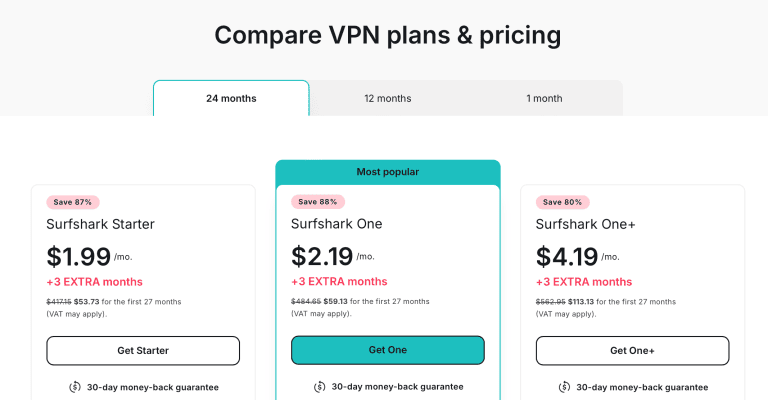
Aside from that, Surfshark has a 30-day money-back guarantee, which applies to all its plans.
Get the lowest price by clicking here!
Pros
- Unblocks Disney Plus on the Web and via dedicated Disney+ apps
- Fastest performance
- Unlimited simultaneous connections
- Native apps for Fire TV, Apple TV, and Android TV
- BONUS: Unblocks other media streaming services
Cons
- Fewer servers and countries than NordVPN
- 600+ US servers, a quarter of NordVPN’s fleet
- SmartDNS discontinued in February 2026; consoles need a router
3. PrivateVPN – Static & Dedicated IPs for Streaming Disney Plus

PrivateVPN has the smallest server count on this list, and it still climbs to third for a reason Disney+ makes painfully relevant: it puts you on IP addresses the blacklists haven’t seen.
Let’s get into some of the reasons why this may be your preferred VPN.
Platform Compatibility & Simultaneous Connections
PrivateVPN is easy to set up on all the same devices, which the other listed VPNs support. So, you can binge WandaVision, Hawkeye, Moon Knight, and other original titles on Disney Plus across your PCs and mobile devices.

You can also unblock and stream Disney+ content on your smart TVs and gaming consoles that can’t download the native VPN app.
However, the only option you have here is setting up a router with the VPN and broadcasting a US IP to them all.
Thus, PrivateVPN falls behind NordVPN and ExpressVPN here, which both offer SmartDNS (albeit NordVPN’s was unreliable for Disney Plus on my PS4). Surfshark is in the same spot since it discontinued its own in February 2026.
VPN Server Fleet
A server count of just 200+ means PrivateVPN pales compared to other tested and listed providers. Despite that, it passed my tests for its spread of 12 server locations in the US, tested and trusted to gain access to Disney’s servers from anywhere.

Those 200+ servers are spread over 63 countries, and PrivateVPN does two things with IP addresses that the others don’t bundle: every location hands out a shared static IP (the same address every time you connect), and selected locations, the US included, run dynamic dedicated IP servers over OpenVPN that put you on an address nobody else is using at that moment.
This makes it easier to avoid server blacklisting if Disney+ blocks other VPN-assigned IP addresses.
Speed & Performance
Unfortunately, PrivateVPN was the slowest VPN on my list.
Here are my speeds:

On top of that, I was disconnected a couple of times while streaming Disney Plus. That, plus the missing SmartDNS, is why third is as high as it goes here. But, on the bright side, you can still stream Disney Plus in HD!
Media Streaming Experience

PrivateVPN worked great for streaming Disney+ on PC and mobile.
However, it doesn’t have a SmartDNS service, and neither does Surfshark since it discontinued its own in February 2026. So, choose ExpressVPN and its MediaStreamer to set up your gaming consoles, non-Android smart TVs, or streaming devices to watch Disney+ where it’s already available (MediaStreamer can’t change your location, so it won’t unlock another country’s library).
However, it makes up for that with router support.
Thus, you can choose a US IP address on the router and broadcast to your devices that can’t download a VPN. Still, it only allows you to add a PrivateVPN certificate to your router rather than a full-fledged router app like ExpressVPN offers.
Plans & Pricing
The 36-month plan works out to $2.00 a month (billed $72 a year after the first term), cheaper than NordVPN and ExpressVPN, with a 30-day money-back guarantee behind it.

Thankfully, this PrivateVPN discount deal brings down the price to an almost steal!
Pros
- Unblocks Disney Plus on the Web and via dedicated Disney+ apps
- Shared static IP on every location plus dynamic dedicated IP servers over OpenVPN to sidestep blacklisted addresses
- 10 simultaneous connections
- Decent speeds for HD streams of Disney+
- Router support to stream Disney+ on gaming consoles & smart TV sets
Cons
- Doesn’t offer Smart DNS
- Slowest VPN on my list
- Smallest server network on my list
4. ExpressVPN – Best All-In-One VPN for Streaming Disney Plus

ExpressVPN is a VPN known for its website-unblocking capabilities.
It’s one of the few VPNs that unblock Disney+ consistently across various platforms and devices.
Let’s see what you can expect.
Platform Compatibility & Simultaneous Connections
If you need a VPN that unblocks Disney Plus on practically any device imaginable, ExpressVPN is your best bet. It’s the only VPN that matches Disney Plus’s list of supported devices.

In other words, it brings native applications for computers (Windows, macOS, Linux), phones (iOS, Android), tablets (iPadOS, Android), media streaming devices (Fire OS, Android TV), and routers (including custom and stock firmware types).
However, ExpressVPN goes beyond that.
Its SmartDNS feature, “MediaStreamer,” allows you to use its DNS servers for streaming apps on devices that don’t support VPNs, though it can’t change your location, so it won’t unblock another country’s Disney+ library.
That’s a great option for devices like Xbox and PlayStation consoles, Apple TV, and Smart TVs made by Samsung, LG, Sony, and more.

NordVPN offers SmartDNS too, but it was hit-and-miss for Disney Plus on my PS4. Surfshark’s version matched MediaStreamer in my tests before Surfshark discontinued it in February 2026, which leaves ExpressVPN as the reliable DNS option here, as long as Disney+ is already available where you are (MediaStreamer can’t change your location).
On the other hand, ExpressVPN’s Basic plan offers 10 simultaneous connections, level with NordVPN and PrivateVPN and ahead of CyberGhost’s 7; only Surfshark, with unlimited connections, is more generous.
VPN Server Fleet
ExpressVPN gives access to servers in 113 countries.
It no longer publishes a server count, and NordVPN now covers more countries.
However, ExpressVPN’s spread is still wider than Surfshark’s or CyberGhost’s.
This means ExpressVPN has servers in most countries where Disney Plus has already launched. That includes the United States, Canada, the United Kingdom, Germany, Italy, Spain, France, and plenty more.

If you’re after Disney+ Hotstar, ExpressVPN is also excellent for that.
I’ve been using this VPN to watch free content on the original (Indian) version of Disney+ Hotstar for a while now.
Speed & Performance
Based on my hands-on tests, ExpressVPN comes second after Surfshark.
So, it’s faster than the rest of my recommendations.
Here are the numbers ExpressVPN gave me after connecting to its US server.

Even though my speed went down, ExpressVPN provided me with a pleasurable streaming experience. After some tweaking, those numbers went up, allowing me to stream Disney Plus in 4K.
I tested ExpressVPN’s speed using its Lightway protocol.
Lightway is close-to-identical to OpenVPN in terms of encryption and data handling, which means it’s highly secure. However, it’s much faster than OpenVPN, making it a better option for streaming.

Media Streaming Experience

Regarding streaming Disney Plus, ExpressVPN is among the most polished VPNs. All it takes to unblock Disney Plus and a whole slate of other streaming platforms is to connect to a server. You don’t have to optimize or tinker with the VPN’s settings.
As mentioned earlier, ExpressVPN’s “MediaStreamer” lets you watch Disney Plus on your game console, dedicated streaming device, or TV, in the library available where you are.
Routing your traffic through a special DNS server means no encryption is involved, which translates to ultra-fast streaming speeds.
Aside from Disney Plus, I’ve used ExpressVPN to stream Netflix, Hulu, Disney+, HBO Max, Amazon Prime Video, BBC iPlayer, DAZN, and plenty more platforms.
Plans & Pricing
There’s no denying that ExpressVPN isn’t the cheapest VPN on this list: Surfshark, PrivateVPN, and CyberGhost all cost less, and on a page where NordVPN offers a bigger network for about the same price and PrivateVPN a static IP for less, that’s what drops it to fourth.
However, it brings plenty of value overall. I recommend checking ExpressVPN’s annual plan, which comes with hefty savings.

There are 30-day money-back guarantees that apply to all its plans.
Secure the lowest price possible by clicking here!
Pros
- Unblocks Disney Plus on the Web and via dedicated Disney+ apps
- SmartDNS for game consoles, streaming devices, and TVs
- Very fast performance
- Servers in 113 countries
- BONUS: Unblocks other media streaming services
Cons
- Pricier than Surfshark, PrivateVPN, and CyberGhost
- Surfshark brings faster performance
5. CyberGhost – Dedicated Disney Plus Servers

CyberGhost is among the best VPNs for watching Disney Plus abroad because it brings VPN servers optimized for that specific streaming service. However, there are more reasons why I recommend this VPN, so let’s take a closer look.
Platform Compatibility & Simultaneous Connections
CyberGhost has been serving its users since 2004, making it the oldest VPN in this guide. Therefore, it’s no surprise CyberGhost developed apps for an extra-wide range of devices.
This includes computers (Windows, macOS, Linux), phones (iOS, Android), tablets (iPadOS, Android), streaming devices (Fire OS, Android TV), and routers.

So, if you plan to stream Disney Plus via its website or apps for phones, tablets, or streaming devices, CyberGhost has you covered.
However, if you use Disney Plus’s apps for Xbox, PlayStation, or Smart TVs, don’t count on CyberGhost.
CyberGhost still has a SmartDNS feature, but its own help center now says it no longer works with streaming services. It did work a couple of times – but that’s not enough for me to reliably recommend it for devices that don’t support VPNs. This is similar to NordVPN.
So, you’ll have to use its router setup to watch Disney Plus on devices that don’t support VPNs.

On the plus side, CyberGhost offers 7 simultaneous connections, though NordVPN, ExpressVPN, and PrivateVPN allow 10 and Surfshark sets no limit.
VPN Server Fleet
If you care about having access to a vast server network, CyberGhost won’t disappoint. It currently has 9,000+ servers in 100 countries and 125 locations. That puts CyberGhost above NordVPN’s 7,000+ and well above the rest.

I mentioned earlier that CyberGhost gets you specialized servers for Disney+. Those are available in the United States and Italy.

However, you don’t have to rely on those only.
I managed to use “standard” servers to unblock other versions of Disney Plus. More precisely, servers in the United Kingdom, Germany, and Australia worked just fine.
On top of that, CyberGhost supports Disney+ Hotstar using its Indian servers.
Compared to my other VPN recommendations, CyberGhost works with more Disney+ libraries than NordVPN, Surfshark, and PrivateVPN.
Speed & Performance
Regarding speed and performance, CyberGhost is an excellent option if you don’t connect to overly remote servers. To show you why – let’s check the results of my tests (using its Disney Plus server).

I’ll add that I’m in Europe. So, a connection to a US-based server is a very remote connection in my case. And we can see that CyberGhost nearly cut my download speed in half.
In practice, that means I struggled to stream Disney Plus in 4K without buffering. However, HD streaming worked well.
That said, I recommend checking for the nearest CyberGhost server before subscribing to this VPN. Ensure there’s a server not too far from your physical location in a country where Disney Plus works.
I’ll also remind you that Surfshark, ExpressVPN, and NordVPN performed faster overall. However, unless you have a very slow connection, CyberGhost shouldn’t noticeably limit your Disney Plus streaming (especially if you stream in HD).
Media Streaming Experience

For the most part, streaming Disney Plus via CyberGhost is a very pleasurable experience. This is the only VPN with a server optimized for that streaming service. So, you don’t have to try a bunch of servers manually.
However, CyberGhost sometimes took around 20 seconds to connect.
That happened when I used the OpenVPN protocol.
Things were better with WireGuard, but that protocol can’t always unblock Disney Plus in the case of CyberGhost.
On the plus side, CyberGhost’s connections were always stable.
You can expect the same from Surfshark, ExpressVPN, and NordVPN.
The only VPN that disconnected me on occasion was PrivateVPN.
Also, CyberGhost lets you unblock Netflix, Hulu, HBO Max, Prime Video, BBC iPlayer, and dozens of other mainstream and niche streaming platforms.
Plans & Pricing
CyberGhost’s monthly price is on par with most of my other recommendations. However, unlike those VPNs, CyberGhost adds a 6-month plan to its 2-year deal. This can save quite a lot.

Finally, CyberGhost is the only VPN on my list with a 45-day money-back guarantee. However, that offer applies to the VPN’s long-term plans only.
To secure the lowest price possible, use my sign-up link.
Pros
- Unblocks Disney Plus on the Web and via dedicated Disney+ apps
- Dedicated servers for Disney Plus
- 7 simultaneous connections
- 45-day money-back guarantee
- BONUS: Unblocks other media streaming services
Cons
- SmartDNS no longer works with streaming services
- Slower than Surfshark, ExpressVPN, and NordVPN
Can I Use a Free VPN With Disney+?
I don’t recommend using a free VPN for Disney Plus due to the lack of reliable encryption, slow servers, privacy invasion, and intrusive ads, ruining your Disney+ streaming experience. In fact, it’s unlikely a free VPN will even unblock Disney+ in the first place.

Thus, it’s best to choose an affordable premium VPN like NordVPN, or Surfshark if you need unlimited simultaneous connections.
How to Use a VPN to Watch Disney+ Outside the US?
You should always enable the VPN kill switch, connect to a suitable protocol, and choose the correct VPN server to watch Disney+ outside the US.
I provide detailed instructions to get these done below.
Enable the Kill Switch
The VPN kill switch prevents IP or DNS leaks, so Disney Plus doesn’t see your actual IP address if the VPN connection ever drops.
Here’s how to toggle the kill switch on.
- Launch your preferred Disney+ VPN. I’ll use Surfshark for this example.
- Click on “Settings.”

- Select “VPN Settings.”

- Scroll down and toggle “Kill Switch.”

- Optional: Configure how the kill switch behaves from the options below.
Choose a Suitable Protocol
The best protocol for streaming content is WireGuard for its balance of speed and security. Some VPNs may not provide WireGuard. So, choose the nearest alternative.
For example, you’ll choose Lightway on ExpressVPN, NordLynx on NordVPN, and OpenVPN (UDP+1143) on PrivateVPN.
Connect to a US Server
US servers grant access to all Disney+ content and can ensure faster streaming speeds too. Thankfully, all of my top VPNs offer many US servers.
Here’s how to connect to one.
- Launch your VPN. I’ll use Surfshark for the screenshots; the steps are the same in NordVPN.
- Search for the United States.

- Click on a preferred city. I’ll use New York for this example.

- Wait for the connection confirmation.
- Test for leaks.

How Do I Change My Region on Disney Plus?
You can change your Disney+ region by connecting to a preferred supported remote location via a reliable VPN like NordVPN, Surfshark, or ExpressVPN.
Fortunately, these VPN providers offer servers in Disney+ supported regions such as:
- North America
- Latin America
- Asia Pacific
- Europe
- Some parts of Africa
However, not all regions with Disney+ access also get Disney Star.
Thus, ensure you pick the correct region (like the US) to get the main Disney+ library, exclusive content library, and Disney Star.
How to Sign Up for Disney+ From Outside the US?
You can sign up and pay for Disney+ from outside the US by connecting to a US VPN server and accessing the Disney+ website.
However, you may face payment issues if Disney+ isn’t accepting cards issued outside the US, of which there’s a viable solution.
Follow the steps below to sign up and pay for a Disney+ account outside the US:
- Launch your preferred VPN. I’ll use Surfshark for this example.
- Connect to a US server.
- Open your browser in Incognito Mode.
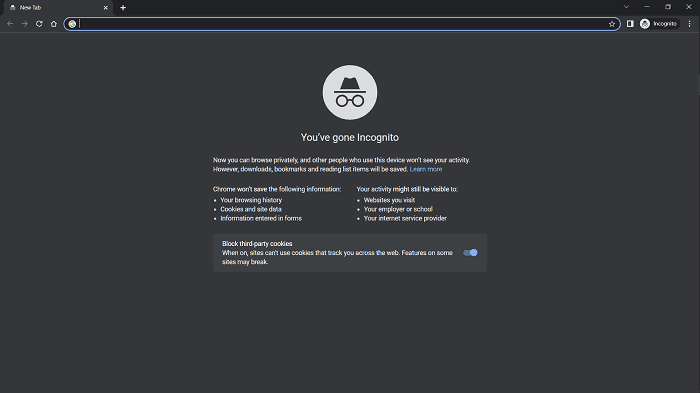
- Go to the Disney+ website.

- Click “View Other Plan Options” to see your choices.

- Select a preferred plan.

- Enter your email address and password when prompted.
- Enter your credit card details.
- OR enter your PayPal details if Disney+ doesn’t accept your credit card details.

- Start streaming content.
Disney Plus Not Working With a VPN? (Troubleshooting Guide)
Don’t fret if your VPN doesn’t access Disney+ content fast enough, stops unblocking Disney+ after you’ve had a good run, or develops a series of other issues.
Try these troubleshooting tips to fix the issue:
- Get a reliable VPN. Otherwise, you’ll be grasping at straws with other fixes here. If in doubt, go with NordVPN.
- Update the VPN app. An app update might fix bugs in the VPN system preventing it from connecting, unblocking content, or working correctly.
- Switch servers. Thankfully, you have a selection of US servers on my top VPNs.
- Restart the VPN. In some cases, simply restarting the VPN gets the job done.
- Reinstall the VPN configuration. This is rarely the case, but it doesn’t hurt to try if all else fails.
- Clear browser cache and cookies. Otherwise, they may interfere with the content unblocking process and leak your actual IP address.
- Use incognito mode. Suppose you’re watching Disney+ on PC or via your browser. In that case, you won’t get cache/cookie interference over Incognito Mode/private browsing mode.
- Speak with the VPN customer support. Luckily, you can always contact customer support on my top providers 24/7 to troubleshoot any issues.
FAQ
Which Countries Is Disney+ Available In?
Disney+ is available in countries in North America, Latin America, Europe, Asia Pacific, and Africa. However, the platform is unavailable to all countries in these regions as it slowly expands into more areas.
Likewise, not all Disney+ content is available in the countries where you can stream it. Thus, you need a VPN to connect to prime locations (like the US) where you get all Disney+ content, including the elusive Disney Star channels.
What Devices Does Disney+ Support?
Disney+ supports streaming over PCs, mobile devices, gaming consoles, and smart TVs. There’s no native app for PCs yet. Hence, streamers must watch Disney+ over their Google Chrome, Safari, Firefox, or other preferred browsers.
However, you can choose to download the Disney+ app for your mobile devices, supported smart TVs, PlayStation 4 & 5, and Xbox consoles.
What Can I Watch on Disney+?
Disney+ offers thousands of titles spanning shows, movies, series, and documentaries for kids, adults, and all audience types.
The streaming platform also shows sports content via its ESPN+ channels, provides a no-ads Hulu streaming experience, and exclusive, original content like WandaVision, Hawkeye, and Ms. Marvel.
Does Disney Plus Have a Free Trial?
Disney Plus stopped its free trial service in the US in 2020 and doesn’t have the plan running in any region. Thus, you’ll have to choose between any available pricing plans or bundles to start streaming Disney+ on up to four devices simultaneously.
Can I Watch Disney Plus in HD With a VPN?
Unblock and watch Disney Plus in HD with NordVPN, Surfshark, and ExpressVPN. These VPNs are optimized for ultra-fast speeds and can even unblock Disney+ in 4K quality on supported devices.
Does Disney+ Block VPNs?
Disney+ blocks some VPN access to comply with local licensing and regulations around shows, movies, and other content. However, its systems can’t always detect and block robust VPNs like NordVPN, Surfshark, and ExpressVPN, so you’ll always bypass these blocks.
In the case of severe VPN blocks, ExpressVPN’s fast obfuscation on all servers keeps streaming Disney+ content in 4K while disguising your VPN traffic as regular traffic.
Will I Get in Trouble for Using a VPN to Watch Disney+?
You can’t get in trouble for streaming Disney+ over a VPN.
Most streaming platforms like Disney+ know that users from out-of-market regions stream their content.
However, they try to implement blocks to comply with regulations, not necessarily keep streamers out. Thus, they won’t ask if you don’t tell them that you’re streaming with a VPN, as long as you’re paying.
What’s the Best VPN for Disney+ in the Philippines?
NordVPN is the best VPN for Disney+ in the Philippines, given its collection of 2,500+ fast US servers to stream shows, movies, sports, and other content on the platform. The VPN is compatible with Android and iOS devices, PC units, Apple TV, Fire TV, and Android TV, over which you can stream Disney+.
NordVPN is also an affordable VPN for Philippine residents and Filipinos, providing the best balance of speed, security, and reliable unblocking without breaking the bank.
What’s the Best VPN to Watch Disney Plus in South Africa?
Watch Hawkeye, Ms. Marvel, other Disney+ shows, and sports content on ESPN+ or Hulu in South Africa with NordVPN.
While South Africa enjoys local access to Disney+ and Disney Star, some shows and movies available in the US market can’t be found in the region.
Thus, South African residents and dwellers should connect to a US server over NordVPN and get access to an unlimited Disney+ library.
What’s the Best VPN Location for Disney Plus?
The USA is the best VPN location for Disney Plus for its access to all shows, movies, and Hulu’s services with no ads and ESPN+ content without any licensing restrictions. The US server location also offers Disney Star’s entire library while getting the fastest speeds for being the closest to Disney’s servers.
That’s a Wrap!
Connecting to a US server to unblock Disney+, get exclusive Disney Star access, stream select ESPN+ channels and watch Hulu with no ads is possible over my top VPNs.
NordVPN is the most preferable of these VPNs for its 7,000+ servers (2,500+ of them in the US), NordLynx speeds, native apps on most Disney+ devices, and ten simultaneous connections.
Get started by picking up these NordVPN discounts to stream Disney+ from anywhere.





