
After testing several VPNs, I found NordVPN to be the best overall VPN for Hypixel.
NordVPN features incredible speeds, a vast server network for bypassing restrictions, P2P support on all its standard servers, and robust security features. I tested it with several Hypixel modes like SkyWars and got incredible speeds with zero lag.
Other impressive VPN alternatives for Hypixel from my tests are Surfshark, ExpressVPN, Private Internet Access (PIA), and PrivateVPN.
Top 3 VPNs for Hypixel

Surfshark
Best for affordable Hypixel access
- Unlimited device connections
- 4,500+ servers
- Servers in 100 countries

NordVPN
Best for lag-free Hypixel gaming
- DDoS protection
- Low-latency gaming
- Up to ten connections

ExpressVPN
Best for private Hypixel gaming
- Low-latency connections
- 256-bit encryption
- Kill switch protection
Hypixel can be an excellent alternative for Minecraft fans. However, it’s prone to DDoS attacks. For instance, in 2018, Hypixel experienced several bot attacks but had Cloudflare Spectrum control the issue.
However, instead of constantly worrying about these attacks, you can use a VPN to fight them. In this guide, you’ll find the five best VPN providers for Hypixel with DDoS protection and much more.
Which Is the Best VPN Provider for Hypixel? Try These VPNs
Using a VPN for Hypixel is an excellent choice whether you want to hide your IP address, improve gaming speeds, or protect yourself from cyber-attacks.
Here are the best VPN services I recommend for Hypixel:
- NordVPN – Best Overall Hypixel VPN With Powerful Security Features
- Surfshark – Budget-Friendly Hypixel VPN With Unlimited Simultaneous Connections
- ExpressVPN – Low-Latency Obfuscated Servers for Superfast Hypixel Gaming Speeds
- PIA – Wide Server Network to Bypass IP Blocks on Hypixel
- PrivateVPN – Stealth VPN and Dedicated IPs to Get Past Hypixel’s VPN Detection
The above list is a quick mention of the best VPNs for Minecraft-based Hypixel.
Get a complete insight below.
Best VPNs for Hypixel: Mini Reviews and Comparisons
Although I’ve only listed five Virtual Private Networks (VPNs), I tested 12 more services I didn’t mention here on speed, extensive server network, the ability to bypass Hypixel’s VPN measures, and DDoS protection.
This section will discuss the top VPNs and why they’re best for Hypixel.
NordVPN - Best Overall Hypixel VPN With Powerful Security Features

NordVPN is the best overall VPN for Hypixel, given its robust security features for an optimal Hypixel gaming experience.
NordVPN provides an extensive server network of 7,000+ ultra-fast servers in 150 countries to access Hypixel everywhere. I connected to one of its numerous United States server locations to play Bed Wars and seamlessly defended my bed. I even destroyed the other team’s bed without experiencing any throttling or buffering.
Moreover, with its broad server list, you can unblock different Hypixel mini-games from anywhere and gain early access to them!
Plus, none of the other listed VPNs has servers in as many countries, which means access to more content in other locations.
NordVPN also supports ten simultaneous connections.
Most Hypixel games, such as Bed Wars, require a team of up to four players. Therefore, you can connect to NordVPN with your friends and enjoy playing without buying a new VPN plan for each person.
If you wish to beat Hypixel’s VPN detection, NordVPN’s obfuscation servers will help you achieve that. But there’s a drawback. You’ll be limited to the OpenVPN protocol, one of the slowest, to use this obfuscation.
Therefore, you’ll miss out on the faster speeds from the NordLynx protocol.
On top of that, NordVPN was slightly slower than ExpressVPN and Surfshark in my tests. However, it’s not so slow that it gives you rubber-banding issues while playing.
NordVPN also offers DDoS protection, which helps prevent losers or hackers from disrupting your gameplay.

That said, NordVPN and ExpressVPN start at about the same price on their 2-year plans.
And with these fantastic discounts, you can get a 30-day money-back guarantee.
Pros
- 7,000+ servers in 150 countries to unblock Hypixel games from anywhere
- DDoS protection to protect your gaming sessions from bot attacks
- Obfuscation feature to bypass Hypixel VPN detection measures
- Low ping and latency when gaming
- Ten simultaneous connections
Cons
- Obfuscation is only available through OpenVPN
- Slow speeds when connected to the OpenVPN protocol
Surfshark - Budget-Friendly Hypixel VPN With Unlimited Simultaneous Connections

Surfshark offers affordable top-tier security features and unlimited simultaneous connections to securely play Minecraft-based Hypixel games with family and friends across multiple devices.
With one subscription, you get 4,500+ servers in 100 countries.
That may be lesser servers than NordVPN offers, but it’s still plenty of locations to connect to local gaming peers and access early releases faster.
Likewise, Surfshark’s VPN server speeds are excellent, thanks to the WireGuard protocol. I tried playing SkyWars, another Hypixel game, from the US New York server, and Surfshark kept my latency low. So, I wasn’t at a disadvantage from poor connection speeds.
Speaking of speeds, Surfshark kept my internet service provider (ISP) from throttling my data via its data encryption techniques. So, I got a better ping, experienced unlimited bandwidth, and improved my gameplay overall.
Additionally, Surfshark protects gamers from DDoS attacks.
So, trolls and cheaters can’t intentionally disrupt your gameplay or steal your hard-earned loot when playing.
Besides, Surfshark is compatible with multiple devices.
So, you can enjoy Hypixel games such as Bed Wars and SkyWars with total protection on your laptop and mobile.

Grab these Surfshark exclusive deals with a 30-day money-back guarantee to escape bandwidth throttling and DDoS attacks on Hypixel.
Pros
- 4,500+ servers in 100 countries for bypassing Hypixel geo-restrictions
- Better ping, and lower latency
- More affordable Hypixel VPN than NordVPN and ExpressVPN
- Unlimited simultaneous connections
- DDoS Protection
- Camouflage mode to hide your internet traffic from trolls
Cons
- Has lesser servers than NordVPN
- Doesn’t have an in-house protocol like NordVPN
ExpressVPN - Low-Latency Obfuscated Servers for Superfast Hypixel Gaming Speeds

Next on the list is ExpressVPN, a Hypixel VPN with low latency, obfuscated servers, and blazing-fast speeds.
ExpressVPN boasts obfuscated servers in 113 countries to bypass Hypixel’s VPN detection methods, avoid firewall blocks to Hypixel, and circumvent harsh censorship around the game.
ExpressVPN shines the most on Hypixel with its low latency.
I got fast speeds (almost as fast as Surfshark) and no delay issues during my tests, even though its automatic obfuscation was enabled.
This time, I tried Murder Mystery, and even though I didn’t survive the game, ExpressVPN kept up its privacy and security end of the bargain.
Moreover, ExpressVPN features an exclusive Lightway protocol that improved my gameplay speeds. Like all its other protocols, it offered ExpressVPN’s signature automatic obfuscation.
That was unlike Surfshark and NordVPN, which could only offer (slow) obfuscation on their OpenVPN protocols.
ExpressVPN also has excellent DDoS protection against bot attacks, sore losers, and game mods interrupting your game. Additionally, it negates ISP bandwidth throttling to ensure unlimited bandwidth, low ping, and no lags.
But while ExpressVPN also supports multiple devices, you’re limited to 10 to 14 simultaneous connections depending on the plan, while Surfshark doesn’t cap them at all.
On top of that, ExpressVPN costs more than Surfshark and PIA.

However, you can use our fantastic discounts with a 30-day money-back guarantee to save more on your next purchase.
Pros
- Ultra-fast obfuscation on every server to bypass Hypixel’s VPN detection measures
- Protection against DDoS attacks
- Lightway protocol for blazing-fast speeds
- Unlimited bandwidth and protection from ISP throttling
- Low latency VPN servers to minimize ping
Cons
- More expensive than Surfshark and PIA
- Fewer simultaneous connections than Surfshark
PIA - Wide Server Network to Bypass IP Blocks on Hypixel

Private Internet Access (PIA) is well-known for its vast server network in 91 countries to bypass IP blocks.
But PIA is slightly slower than Surfshark or NordVPN. However, during my tests, I experienced smooth Hypixel gaming with minimal lag, especially over the TNT Games.
If you’re a core Hypixel gamer, I suggest PIA’s dedicated IP addresses to boost your speeds since you’ll have the server to yourself.
The dedicated server is also an excellent option to avoid IP bans since you’re not sharing it with other players who may cause issues on the same IP address.
PIA isn’t alone here, though: NordVPN, Surfshark, and ExpressVPN also sell dedicated IPs as add-ons, and PrivateVPN offers dynamic dedicated IPs on selected locations.
That said, Private Internet Access guarantees DDoS protection on all its servers, protecting you from cyber criminals and losers who want to destroy your gameplay on Hypixel.
You’ll get all these on PIA’s unlimited simultaneous connections, allowing you and your friends to catch up on a game of Hypixel while protected by one account. Plus, PIA is a cheaper alternative to ExpressVPN and NordVPN.

If PIA sounds like the best Hypixel VPN for you, don’t miss out on our exclusive deals to get even more discounts.
Pros
- Servers in 91 countries to bypass Hypixel’s VPN detection measures
- Protection against DDoS attacks
- Cheaper than ExpressVPN and NordVPN
- Unlimited simultaneous connections
- Dedicated IP addresses to boost speeds and avoid IP bans
- Offers smooth gaming experience with minimal lags
Cons
- Slower than ExpressVPN and Surfshark
PrivateVPN - Stealth VPN and Dedicated IPs to Get Past Hypixel’s VPN Detection

PrivateVPN is a small provider next to the others here, with 200+ servers in 63 countries, but it brings two tools worth having for Hypixel: one for networks that block VPNs, and one for Hypixel’s own VPN detection measures.
The first is Stealth VPN. It makes your VPN traffic look like ordinary browsing, so network admins and ISPs struggle to tell you’re using a VPN at all – handy on school or office Wi-Fi that blocks Minecraft servers.

The second is its IP setup. PrivateVPN uses shared static IPs everywhere, but on selected locations you can switch to a dynamic dedicated IP over OpenVPN, so nobody else is on that address while you play. That cuts the odds of inheriting an IP another player already got banned.
When I wrote my PrivateVPN Minecraft guide, I played Minecraft over its South Africa server with a stable connection. It sat out my Hypixel speed tests, though, so I can’t rank it against Surfshark or ExpressVPN on raw speed.
You can protect up to 10 devices at once, so you and your Bed Wars teammates can share one account.
On price, PrivateVPN is cheaper than NordVPN and ExpressVPN, at $2.00 a month on its 36-month deal ($72 upfront).

Check out this PrivateVPN deal, which comes with a 30-day money-back guarantee.
Pros
- Stealth VPN to hide your VPN traffic from network filters
- Dynamic dedicated IPs on selected locations to avoid shared-IP bans
- Cheaper than NordVPN and ExpressVPN
- Up to 10 simultaneous connections
- 30-day money-back guarantee
Cons
- Smallest server network on this list
- Not part of my Hypixel speed tests
How to Set up a VPN for Hypixel?
Select your preferred VPN for Hypixel, then follow the steps below to set it up on your device. I’ll use my top recommendation, NordVPN, for Hypixel on Windows.
- Subscribe to a NordVPN plan.
- Download and install the NordVPN app for your Windows device.

- Launch NordVPN and log into your account.

- Head to Settings, then Kill Switch. Toggle the Internet Kill Switch to protect your data if the VPN connection drops unexpectedly.
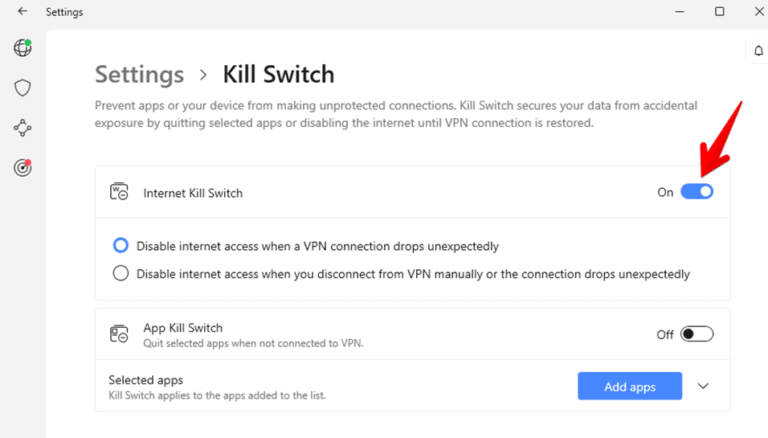
- Connect to the recommended server location. OR click the three dots icon to choose a location from the list.

- Finally, open Hypixel and enjoy games like The Walls or Mega Walls with no lags.

FAQs
Why Is My VPN Not Working With Hypixel?
The most common reason your VPN isn’t working with Hypixel is that you’re using an unreliable or free VPN service. Likewise, you may have connected to a server far away, causing slow speeds and connection issues.
Finally, you may be connected to a banned server or IP address, which prevents you from accessing the Hypixel server.
Will You Get Banned for Using a VPN on Hypixel?
You will unlikely get banned from Hypixel for using a VPN, even though it tries to stop users from using one. However, you’ll get banned if you’re found harassing other players or refusing to adhere to the rules, whether you use a VPN or not.
Get Your Game on With the Best Hypixel VPN!
Bypass Minecraft’s IP ban and boost your gaming speeds with the best Hypixel VPN.
I chose NordVPN as the best overall VPN for Hypixel since it can help you overcome VPN detections, improve your speeds, minimize latency, and generally protect your gameplay.
The best part is that you can try the VPN for 30 days and claim your money back if it doesn’t suit your needs. If that sounds good, then grab these NordVPN discounts and save more.





