
NordVPN is the best VPN for Pinterest, and the gap widens the harder your network tries to keep you off it.
Its obfuscated servers disguise VPN traffic as ordinary browsing, which is what gets you onto Pinterest from a school, an office, or a country that filters it. Threat Protection blocks the malicious links and trackers that hide among pins, and NordLynx kept 27 of my 30 Mbps for quick image and video loading. It also passed my Wireshark encryption test, and one plan covers ten devices.
Other VPNs that passed the test include Surfshark (best for multiple Pinterest accounts), CyberGhost (largest server network), and PureVPN (affordable price plans).
Keep reading if you love using Pinterest like me but can’t access it due to firewalls or geo-blocks.
Top 3 VPNs for Accessing Pinterest Anywhere

Surfshark
Best for shared Pinterest accounts
- Unlimited device connections
- 28 Mbps in my tests
- Camouflage Mode obfuscation

NordVPN
Best for blocked Pinterest access
- Obfuscated servers beat firewalls
- Threat Protection blocks bad links
- 27 Mbps over NordLynx

CyberGhost
Best for simple network blocks
- 9,000+ global servers
- Streaming-optimized servers
- Kill switch and encryption
Pinterest and other social media sites were blocked in China in 2017.
The only way to bypass Pinterest in such countries is to use a VPN.
Specifically, I recommend VPNs with obfuscation to stop your VPN activity from being tracked.
Other places you may have trouble accessing Pinterest include school or work. Fortunately, a VPN can also get you past this easily. Learn how below!
Use These VPNs to Bypass Network Firewalls and Access Pinterest
Want to discreetly access Pinterest without getting in trouble? Here’s a quick breakdown of the 5 Pinterest VPNs you can use.
- NordVPN – Best Overall for Unblocking Pinterest Anywhere
- Surfshark – Best for Multiple Pinterest Accounts
- CyberGhost – Largest Server Network for Pinterest
- PureVPN – Budget-Friendly Pinterest VPN
- PrivateVPN – Low-Cost Pinterest Unblocking on 10 Devices
I used base internet speeds of 30 Mbps for the speed tests, which was enough for the VPN services to handle the quick loading of images and videos.
5 Best VPNs for Unblocking Pinterest
By the end of this, you’ll know which VPN excels at bypassing Pinterest firewalls and protecting you on public networks. You’ll also know how they compare to one another so you can choose the right VPN for your Pinterest needs.
NordVPN - Best Overall for Unblocking Pinterest Anywhere

| Location | Servers | Connections | Average Speeds | Best Deal |
|---|---|---|---|---|
| Panama | 8400+ | 10 | 27 Mbps | Show Offer |
Most places that block Pinterest don’t stop at the site; they watch for VPN traffic too. That is the problem NordVPN handles better than anything else on this list, because it’s the only Pinterest VPN here with specialty servers dedicated to security and privacy. Its obfuscated servers dress your connection up as ordinary browsing so a campus firewall or a national filter sees nothing worth blocking, and its Double VPN servers encrypt your Pinterest traffic twice. The only drawback is your speeds will drop on those servers.
I tested NordVPN’s Pinterest unblocking ability on my local library’s network, which blocks social media sites (the same one I put CyberGhost through below). Using one of NordVPN’s 8,400+ servers, I unblocked Pinterest immediately and searched for my next tattoo design. (I haven’t settled on one, though).
Privacy is NordVPN’s other big flex. So you can download and upload Pinterest images, and no one would see what you’re up to. Like CyberGhost, NordVPN passed my WireShark test, so it’s not just talk.
Meanwhile, a solid kill switch prevents accidental leaks of your IP address anytime the VPN connection drops. This is handy if you’re grabbing coffee at a Starbucks while using public WIFI to watch video shorts on Pinterest.
Pinterest also has its share of booby-trapped links (I once clicked an IP grabber disguised as a pin), which is why I keep Threat Protection switched on. It blocks malicious domains, trackers, and ads before they load, and the Pro version (higher-tier plans) keeps working even when you’re not connected to a server.
Speed was never a worry. Over the NordLynx protocol, NordVPN held 27 of my 30 Mbps, a single megabit behind Surfshark and one ahead of CyberGhost, which is plenty for full-resolution pins and video shorts. I recommend the P2P servers if you want the fastest connections for bulk-saving boards.
NordVPN is also compatible with Android, iOS, macOS, Windows, and Linux.
So you can switch between devices and continue watching videos or curating Pinterest boards from where you left off. Plus, you can connect up to 10 devices simultaneously, three more than CyberGhost allows.

It costs a little more than Surfshark and CyberGhost on long-term plans, so check out these fantastic deals, all backed by a 30-day money-back guarantee.
Pros
- 8,400+ servers in 167+ countries to unblock Pinterest anywhere
- Obfuscated and Double VPN specialty servers for networks that hunt for VPN traffic
- 27 Mbps over NordLynx for fast image and video loading
- Threat Protection blocks malicious links and trackers hidden among pins
- Encryption + kill switch, verified with Wireshark
- Ten simultaneous connections
Cons
- Speeds drop on obfuscated and Double VPN servers
- Costs a little more than Surfshark and CyberGhost
Surfshark - Best for Multiple Pinterest Accounts

| Location | Servers | Connections | Average Speeds | Best Deal |
|---|---|---|---|---|
| The Netherlands | 4500+ | Unlimited | 28 Mbps | Show Offer |
Besides the affordable prices, Surfshark is one of the most user-friendly VPNs, especially for Android and iOS, making it perfect for Pinterest.
First, you get 4,500+ servers in 100 countries granting you access to Pinterest when you use blocked networks or live in geo-blocked regions like China.
I tested Surfshark’s Pinterest unblocking capabilities by connecting my phone to a nearby restricted campus WIFI. I strolled past the firewalls like they didn’t exist.
Second, Surfshark is equipped with industry-standard encryption that prevents external parties like network admins and governments from being privy to your Pinterest activities. The Wireshark tests were successful.
Surfshark also has an obfuscation feature called Camouflage Mode that keeps you safe in highly censored places, especially campus and work networks.
However, expect your pinning activities to experience slow speeds since you’ll be on the OpenVPN protocol.
On a regular server, the VPN was the fastest in my tests at 28 Mbps. I watch many recipe videos on Pinterest because there are no ads, unlike YouTube, and Surfshark’s speeds were enough to handle this without buffering.
Surfshark is also compatible with all commonly used devices like smartphones and PCs. I particularly loved the Android version because it’s clean and intuitive for Pinterest. On top of this, you can connect an unlimited number of devices, perfect for a large group of people like students.
Surfshark sits just behind NordVPN on depth rather than speed. Camouflage Mode is its one answer to VPN-hunting firewalls, where NordVPN brings obfuscated and Double VPN server categories plus Threat Protection, and NordVPN’s network is close to twice the size. For a group of students splitting one subscription, though, Surfshark is the obvious buy.
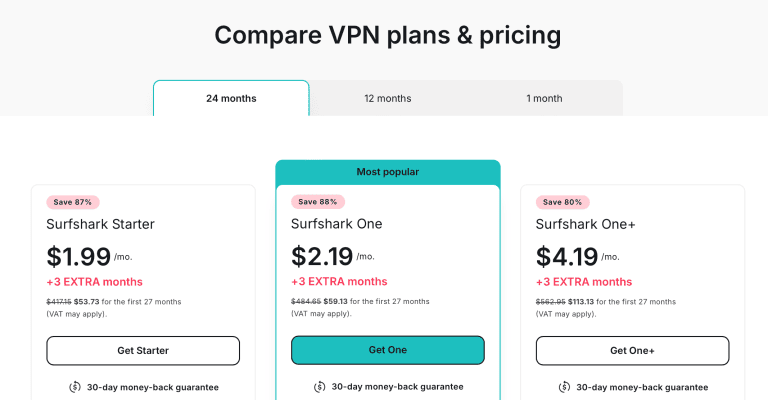
We have exclusive deals for you here, so hurry up before they run out.
Pros
- 4,500+ servers in 100 countries for unblocking Pinterest anywhere
- Fastest speeds in my tests for loading content on Pinterest
- Encryption + IP leak protection + obfuscation
- Unlimited simultaneous connections
- Works with multiple platforms
Cons
- Slow obfuscation
CyberGhost - Largest Server Network for Pinterest

| Location | Servers | Connections | Average Speeds | Best Deal |
|---|---|---|---|---|
| Romania | 9000+ | 7 | 26 Mbps | Show Offer |
CyberGhost’s server network size is impressive. 9000+ servers mean you won’t have to worry about overcrowding, giving you better performance.
To check how efficient CyberGhost is at unblocking Pinterest, I checked into my local library, which blocks social media sites. Using a random server, I bypassed the library network firewall through my Android device and accessed my Pinterest feed without hindrance.
You’ll find me checking out images and videos on tattoos, anime, or oil painting at any given moment. This needs consistent encryption, especially when using public hotspots. I ran the encrypted traffic through Wireshark with success.
Furthermore, if you experience an accidental VPN disconnection while browsing your favorite boards, the kill switch prevents your info from leaking. There’s no obfuscation, though, so be careful in places where VPN use is monitored.
That gap is what moved CyberGhost down my list. On a plain content filter like my library’s, it is superb. On a network that actively looks for VPN traffic, which describes plenty of schools and workplaces and all of China, NordVPN’s obfuscated servers get through where a standard CyberGhost connection can be spotted and dropped. It was also a megabit slower than NordVPN and two behind Surfshark in my tests.
Moving on, CyberGhost is one of the few VPNs on this list, with servers optimized for streaming and torrenting. This allowed me to watch short videos and GIFs on the Pinterest app without buffering.
CyberGhost VPN supports all Pinterest devices with native Android, iOS, Windows, macOS, and Linux apps. Furthermore, you can connect up to 7 devices simultaneously, enough for a small study group, though it’s the fewest on this list.

Take advantage of these fantastic discounts and grab your CyberGhost subscription today.
Pros
- 9000+ servers for unblocking Pinterest boards
- Fast and stable speeds for loading images and videos
- Encryption + IP leak protection
- Works with multiple platforms
Cons
- No obfuscation
- Slower than NordVPN and Surfshark in my tests
- Fewest simultaneous connections on the list
PureVPN - Budget-Friendly Pinterest VPN

| Location | Servers | Connections | Average Speeds | Best Deal |
|---|---|---|---|---|
| British Virgin Islands | 6000+ | 10 | 25 Mbps | Show Offer |
PureVPN has some of the most pocket-friendly prices on this list, which is good news for students on a budget. But on top of this, it comes with 6,000+ servers, the third-largest published network here after CyberGhost and NordVPN, so you won’t have problems beating Pinterest blocks.
For this, I tapped into my tech skills and created a content-filtering firewall on my router to block Pinterest. I connected to a random server, and voila! I could access Pinterest on my phone without issues.
In addition, PureVPN also has military-grade encryption that stops others from seeing what you’re doing, including your ISP and government agencies.
I tested PureVPN’s encryption, and Wireshark proved it works.
There’s also a kill switch for IP protection. So, your IP is protected when you use public hotspots to browse through Pinterest and your VPN connection drops. There’s also obfuscation to bypass VPN firewalls on school, library, or work networks. But like the other VPNs with a similar feature, expect a slight slowdown of your speeds.
Speaking of speeds, PureVPN averaged 25 Mbps. This gave me the freedom to go into those long and endless Pinterest rabbit holes where you end up browning through dragon boards despite starting with a chicken image search.
Finally, like NordVPN and CyberGhost, it has servers dedicated to torrenting, which I highly recommend for their superior speeds.

PureVPN comes with native Android, iOS, macOS, and Windows apps, and you can connect up to 10 devices simultaneously.
Remember to check our exclusive deals and grab them before the offer runs out.
Pros
- 6,000+ servers for unblocking Pinterest
- Stable connection speeds for loading content on Pinterest
- Encryption + IP leak protection + obfuscation
- Works with multiple platforms
Cons
- Slow obfuscation
PrivateVPN - Low-Cost Pinterest Unblocking on 10 Devices

| Location | Servers | Connections | Static IPs | Best Deal |
|---|---|---|---|---|
| Sweden | 200+ | 10 | Every location | Show Offer |
Rounding out the list is PrivateVPN, the budget option, and it comes with a trait that suits Pinterest well: a static shared IP on every location. Pinterest’s bot detection dislikes accounts that change country between sessions, and a fixed address keeps your login boring in the best possible way.
The network is the smallest here at 200+ servers in 63 countries, but for Pinterest that matters less than it sounds. All you need is an exit in a country where Pinterest is open, and PrivateVPN has those across the US, Europe, and Asia; connect to any of them and the app loads normally from a network that filters it.
For networks that actively hunt for VPN traffic, Stealth VPN in the advanced view wraps the connection in ordinary HTTPS. It is slower than a regular connection, like every obfuscation mode on this page, but it is the same class of tool as Surfshark’s Camouflage Mode, and it is something CyberGhost can’t offer for school and office use.
On speed, choose WireGuard over the older OpenVPN default. Pinterest is images and short clips rather than 4K video, and a WireGuard connection has bandwidth to spare for full-resolution boards; Stealth VPN is the only mode where you will notice a slowdown.
Privacy is why most people pin through a VPN in the first place, and PrivateVPN covers the basics: AES-256 encryption, a kill switch on every platform, and IPv6/DNS leak protection, so your ISP sees an encrypted tunnel rather than a list of your boards.
The no-logs policy hasn’t been independently audited, though, and the company is Swedish (a 14-Eyes country), so on paper it doesn’t match NordVPN’s audited policy. That, plus the small network, is why it sits fifth.
Apps cover Android, iOS, macOS, and Windows, Linux works through a manual setup, and one plan runs on ten devices, three more than CyberGhost and level with NordVPN and PureVPN, so a study group can split it without fighting over slots.

At $2.00 a month on the 36-month plan (it renews at $72 a year after the first term), it is priced neck and neck with PureVPN, and the 30-day money-back guarantee gives you a month to find out whether your campus firewall notices. Grab the current PrivateVPN discounts here.
Pros
- Fixed shared IP per location, so your Pinterest login never changes country
- Stealth VPN obfuscation for school and office networks that block VPNs
- AES-256 encryption, kill switch, and leak protection on every app
- Ten simultaneous connections
- $2.00/mo on the 36-month plan with a 30-day money-back guarantee
Cons
- Smallest server network on this list (200+)
- No-logs policy has not been independently audited
- Stealth VPN slows the connection noticeably
How to Unblock Pinterest With a VPN?
Setting up a VPN for Pinterest is very easy. Here are the steps.
- Download and install NordVPN on your preferred device. I’ll use my Android phone here.

- Log in and make sure NordLynx is selected under Settings > Connection (it’s the default on most devices).
- Connect to a VPN server of your choice. If your network hunts for VPN traffic, switch the protocol to OpenVPN and pick one from the Obfuscated servers category instead.

- Open Pinterest and enjoy scrolling through the images.

FAQ
Does Pinterest Block VPNs?
Pinterest doesn’t actively block VPNs because the service is only banned in some countries (like China). Therefore, using a VPN to unblock Pinterest is a preference when dealing with network firewalls or geo-blocks in some regions.
However, using a cheap and unreliable VPN may activate Pinterest’s bot detection, blocking your account.
What's the Best Free VPN for Pinterest?
I don’t recommend a free VPN for Pinterest. Free VPNs typically cap your data, run a handful of overcrowded servers, and skip obfuscation, so they’re the first thing a school or work firewall catches. Some also log and sell your browsing data, which defeats the point of pinning anonymously.
If you want to try a Pinterest VPN without committing, NordVPN’s 30-day money-back guarantee is the safer route.
Final Word
Pinterest is one of the few straightforward social media platforms, and it’s understandable why some people will do anything to maintain their access.
NordVPN is my best VPN for Pinterest.
Its obfuscated servers get you through the firewalls that block Pinterest in the first place, it’s fast enough to handle heavy Pinterest images and videos, Threat Protection keeps the dodgy links at bay, and it runs on every device you pin from.
So grab your NordVPN deal today while the offer still lasts.





