
No, there’s no NordVPN extension for Safari. NordVPN’s browser extension is made only for Chrome, Edge and Firefox, and Safari doesn’t give extensions the proxy controls that extension relies on. To use NordVPN in Safari, install the NordVPN app on your Mac, iPhone or iPad instead: it sends Safari’s traffic, and every other app’s, through the VPN. The current app needs macOS 14 Sonoma or later, or iOS 17 or later.
The one Nord product that does run inside Safari is the NordPass password manager, and only on a Mac. Below are the setup steps for each device, what NordVPN’s ad and malware blocking does in Safari, and how NordVPN fits with iCloud Private Relay, all checked on 22 October 2026. New to the service? Start with what NordVPN is and what it includes.
Get NordVPN – 78% Off + 3 Months
| The short answer | |
|---|---|
| Is there a NordVPN Safari extension? | No: NordVPN’s extension is for Chrome, Edge and Firefox only |
| How to use NordVPN with Safari | Install the NordVPN app; it covers Safari and every other app |
| Mac | NordVPN app from the App Store or nordvpn.com, macOS 14 or later |
| iPhone and iPad | NordVPN app from the App Store, iOS or iPadOS 17 or later |
| Ad and malware blocking in Safari | DNS filtering on every plan; Next-gen antivirus (Complete and Prime) only in the Mac app from nordvpn.com |
| The Nord extension that works in Safari | NordPass, the password manager (Mac only) |
| Price | From $3.49 a month on the 2-year plan, with a 30-day money-back guarantee |
Is There a NordVPN Extension for Safari?
No. NordVPN’s help center says a subscription gets you apps for Windows, Android, macOS, iOS and Linux, plus a “NordVPN proxy extension for your Chrome, Edge, and Firefox browsers”. Its download page lists the same three extensions, and a search of the Mac App Store turns up the NordVPN app but no Safari extension.
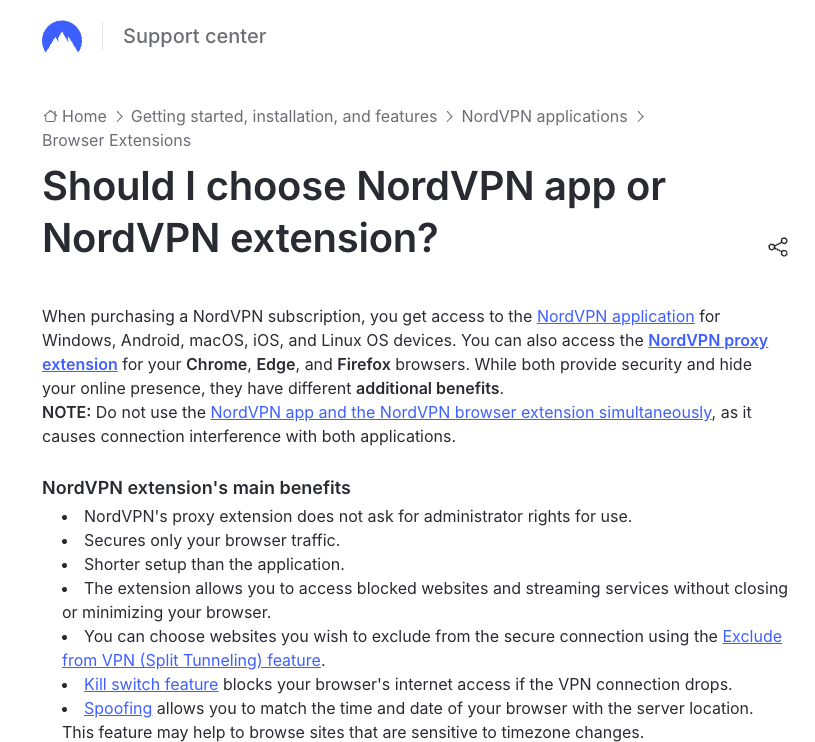
The reason is technical. NordVPN’s extensions are proxies: they reroute the browser’s own traffic using proxy controls that Chrome, Edge and Firefox give extensions, and MDN’s browser compatibility data lists no Safari support for that proxy permission. NordVPN’s guide to VPNs for Safari puts it plainly: “Since the Safari browser does not support VPN configurations, it has to be configured on your device.”
You don’t lose much. By NordVPN’s own comparison, the extension “secures only your browser traffic”, while the app protects the whole device and adds Double VPN, obfuscated servers, the NordLynx and NordWhisper protocols, Meshnet and Dark Web Monitor.
If you’ve come across NordVPN’s December 2020 post about “Presets”, that was a Mac app feature that paired saved connection settings with shortcuts to apps and websites, not a Safari extension. NordVPN’s help center had no article about it when we checked on 22 October 2026.
How to Use NordVPN With Safari on a Mac
Install the NordVPN app and Safari is covered automatically. These steps follow NordVPN’s Mac setup guides:
- Get NordVPN for Mac. Any plan works: the 2-year Basic plan costs $3.49 a month ($94.23 for the first 27 months), our NordVPN price guide compares the plans, and new customers in the US and 14 other countries can try it free for 7 days on NordVPN’s website.
- Install the app. In the Mac App Store, click Get. For the version from nordvpn.com, open the NordVPN.pkg file you downloaded, click Continue, then Install, and enter your Mac’s password or use Touch ID.
- Open NordVPN and log in. Press Command and Space, type NordVPN and press Return. Click Log In, sign in on the Nord Account page that opens in your browser, and allow it to open the app.
- Connect. Click “Secure my connection” for the fastest server, or search for a country.
- Browse in Safari as usual. Everything Safari loads now goes through NordVPN. To check, open NordVPN’s DNS leak test page and look for “Connected to NordVPN”.
Our full guide to NordVPN on a Mac covers the settings worth changing.
App Store or nordvpn.com: Which Mac Version Should You Use?
NordVPN makes two Mac apps, and both need macOS 14 Sonoma or later. They use the same servers and protocols, but the features differ:
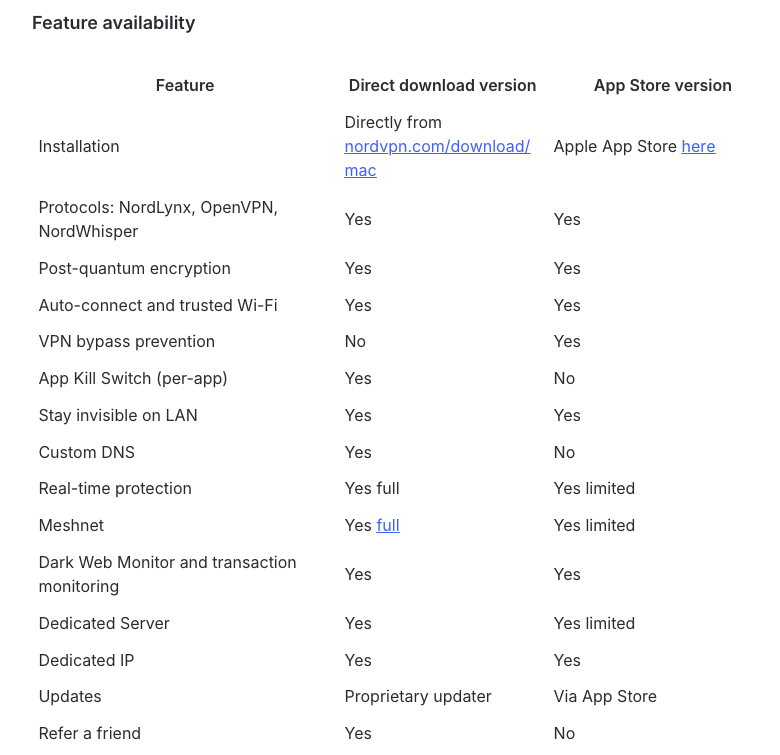
- App Store version: simpler installs and updates, billing through Apple, and VPN bypass prevention, which keeps all traffic inside the VPN tunnel even if the connection drops or your network changes.
- nordvpn.com version: full Real-time protection with local file scanning, an App Kill Switch, custom DNS and the full version of Meshnet. It’s also the only Mac version that runs Next-gen antivirus.
For Safari, either one works. I’d take the App Store version unless you pay for Complete or Prime and want the antivirus. Both have a form of kill switch, which our NordVPN kill switch guide explains. To switch versions, NordVPN says to move the App Store app to the Trash, restart your Mac and install the website version; our guide to uninstalling NordVPN has the details.
How to Use NordVPN With Safari on iPhone and iPad
On an iPhone or iPad, the NordVPN app covers Safari the same way. It needs iOS or iPadOS 17 or later.
- Download NordVPN from the App Store. Search for NordVPN and tap the download button.
- Open the app and log in. Choose your privacy and notification settings, then tap Log In, or Sign up if you’re new.
- Tap “Secure my connection”. To pick a country instead, tap All locations.
- Allow the VPN configuration. The first time, iOS asks to add NordVPN’s VPN configuration: tap Allow and confirm with your passcode, Touch ID or Face ID.
- Open Safari once the app says “Secured”. Your browsing now goes through NordVPN.
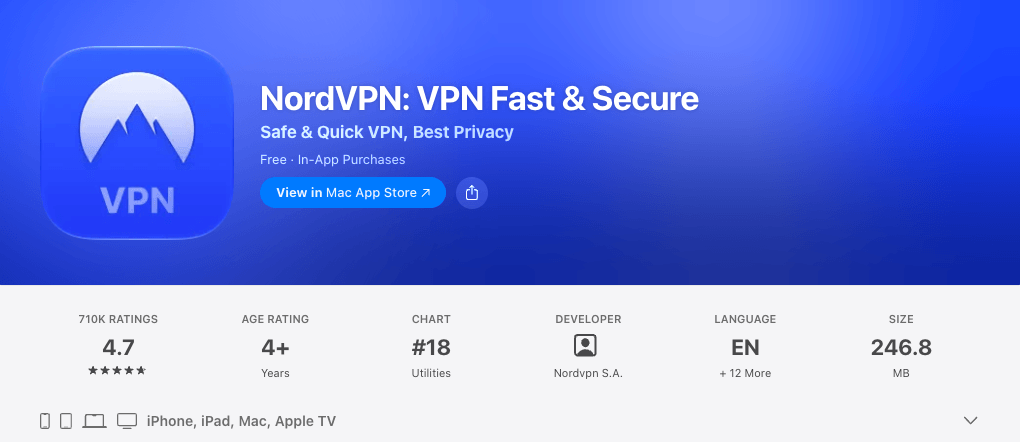
The same app covers iPhone, iPad, Mac and Apple TV, and on 22 October 2026 it had a 4.7-star rating from about 710,000 ratings on the US App Store. On iPhone and iPad, NordVPN’s answer to a kill switch is VPN bypass prevention, under Settings, VPN connection. Our NordVPN iPhone and iPad guide goes through the rest of the settings.
Get NordVPN for Mac and iPhone
Does NordVPN Block Ads and Malware in Safari?
Yes, but from the app rather than from inside Safari. What you get depends on your plan and device:
| Protection | Plans | Where it works |
|---|---|---|
| DNS filtering of ads, trackers and dangerous sites | Every plan | Mac, iPhone and iPad while the VPN is connected; on phones it can run with the VPN off |
| Next-gen antivirus: scam alerts, site blocking with the VPN off, ad, tracker and cookie banner blocking, download scanning | Complete and Prime | Only the Mac app from nordvpn.com, not the App Store version or iPhone and iPad |
The DNS filter works at the network level, so it covers Safari like any other app. Next-gen antivirus runs inside the NordVPN app (“at the application layer”, NordVPN says) rather than as a browser add-on, and NordVPN’s articles about it don’t limit it to particular browsers. In the app, both live under the shield icon.
If a site breaks in Safari, click the shield icon and pause protection for anywhere from 5 minutes to 24 hours, or click Unblock on NordVPN’s block page to allow just that site. NordVPN has renamed these features several times, so older articles may call them Threat Protection or Threat Protection Pro; our NordVPN Threat Protection guide covers what each one blocks.
NordPass: The Nord Extension That Works in Safari
NordPass, the password manager from the same company, does have a Safari extension, but only on a Mac. It fills in and saves passwords; it doesn’t hide your IP address or encrypt your traffic. NordPass comes with NordVPN’s Complete and Prime plans. To add it, following NordPass’s own guide:
- Install NordPass from the Mac App Store (click Get, then Install) and open it.
- Open Safari’s settings. In Safari, choose Safari, then Settings…, and click Extensions.
- Tick the box next to NordPass.
- Allow it on websites. Click Always Allow, then “Always Allow on Every Website”, or use Edit Websites… to choose specific sites.
- Log in with your Nord Account.
Buying NordPass on its own? Here’s whether NordPass has a free trial.
Do You Need NordVPN If You Use iCloud Private Relay?
They do different jobs. iCloud Private Relay, part of an iCloud+ subscription, protects your browsing in Safari by sending it through two relays, so that no single party, “not even Apple”, sees both who you are and which sites you visit. It can’t move you to another country, though: its only location settings are “Maintain General Location” and “Use Country and Time Zone”. NordVPN covers every app on the device and lets you choose servers in 150 countries.
Don’t plan on running both on a Mac. Apple says a VPN app can install settings that are incompatible with Private Relay, and that you may then see “Some of your system settings prevent Private Relay from working.” If that appears while NordVPN is on, nothing is broken: Safari’s traffic is going through NordVPN instead.
NordVPN Not Working With Safari? How to Fix It
If a site won’t load in Safari while NordVPN is connected, work through NordVPN’s own checklist:
- Pause the VPN and check whether the site loads without it.
- Run NordVPN’s DNS leak test. If it doesn’t say “Connected to NordVPN”, turn off Custom DNS in the app and on your router.
- Connect to a different server location.
- Turn off Real-time protection features one at a time (shield icon, then Advanced settings) to find the one blocking the site.
- Try another protocol, clear Safari’s cache or open a Private window, and try another browser to see if the problem follows you.
- Report the site to NordVPN through its support center so it can unblock it.
If NordVPN won’t connect at all, see our guide to fixing NordVPN when it’s not connecting. On an older Mac, check the version first: the current app needs macOS 14, and NordVPN only keeps older builds for macOS 10.15 to 13 (app version 10.8.1 for macOS 12 and 13).
Prefer a Browser Extension? Use Chrome, Firefox or Edge
If you only want your browser covered, use NordVPN’s extension in Chrome, Firefox or Edge on your Mac. NordVPN says it needs no administrator rights and takes less setup than the app. Just don’t run it at the same time as the app: according to NordVPN, that “causes connection interference with both applications”.
What About Surfshark?
Surfshark, the cheaper alternative at $2.49 a month on its 2-year plan, doesn’t make a Safari extension either: its extension is for Chrome, Edge and Firefox. Its Mac and iPhone apps cover Safari the same way NordVPN’s do, on unlimited devices, and its website offers a 7-day free trial on the 12- and 24-month plans.
For more choices, see our best VPNs for Safari.
FAQ
Does NordVPN Have a Safari Extension?
No. NordVPN’s browser extension is only for Chrome, Edge and Firefox. To use NordVPN with Safari, install the NordVPN app on your Mac, iPhone or iPad; it sends Safari’s traffic, and every other app’s, through the VPN.
Does NordVPN Work With Safari?
Yes, through the NordVPN app. Once the app is connected, everything Safari loads goes through NordVPN, along with the rest of your device’s traffic. The current app needs macOS 14 Sonoma or later on a Mac, and iOS or iPadOS 17 or later on an iPhone or iPad.
How Do I Use NordVPN on Other Devices?
One NordVPN account covers 10 devices at once. Install the app on Windows, Mac, Linux, iPhone, iPad, Android, Android TV, Fire TV or Apple TV and log in with the same Nord Account, or add NordVPN’s extension to Chrome, Firefox or Edge.
Why Won’t NordVPN Work on My Mac?
Check your macOS version first: the current app needs macOS 14 Sonoma or later. If NordVPN connects but sites won’t load, NordVPN suggests running its DNS leak test, turning off Custom DNS, switching servers and pausing Real-time protection features one at a time.
Can I Use NordVPN and iCloud Private Relay Together?
Usually not on a Mac. Apple says a VPN app can install settings that stop Private Relay from working, and macOS tells you so. While NordVPN is connected it covers Safari anyway, and unlike Private Relay it protects every app and lets you choose from 150 countries.
Does NordPass Work in Safari?
Yes, on a Mac. NordPass, the password manager included with NordVPN’s Complete and Prime plans, has a Safari extension that you install from the Mac App Store and switch on in Safari’s Settings, under Extensions. It manages passwords; it isn’t a VPN.
The Bottom Line
There’s no NordVPN Safari extension, and you don’t need one: the NordVPN app on your Mac, iPhone or iPad covers Safari and every other app, with device-wide protection and specialty servers an extension can’t offer. On a Mac, take the App Store version for simplicity, or the nordvpn.com version if you want Next-gen antivirus with Complete or Prime.
Get NordVPN’s Black Friday deal – up to 78% off the 2-year plan plus 3 extra months, with 30 days to change your mind.
More NordVPN guides
 NordVPN Price & Plans 2026: How Much Does It Cost?
 NordVPN Black Friday 2026: 78% Off + 3 Months, Live Now
 NordVPN for iPhone and iPad: How to Install and Set It Up (2026)
 NordVPN Chrome Extension (2026): How to Install, Use and Fix It
 How to Use NordVPN on Roku?
 How to Use NordVPN on Meta Quest 3, 3S and 2 (2026)

