
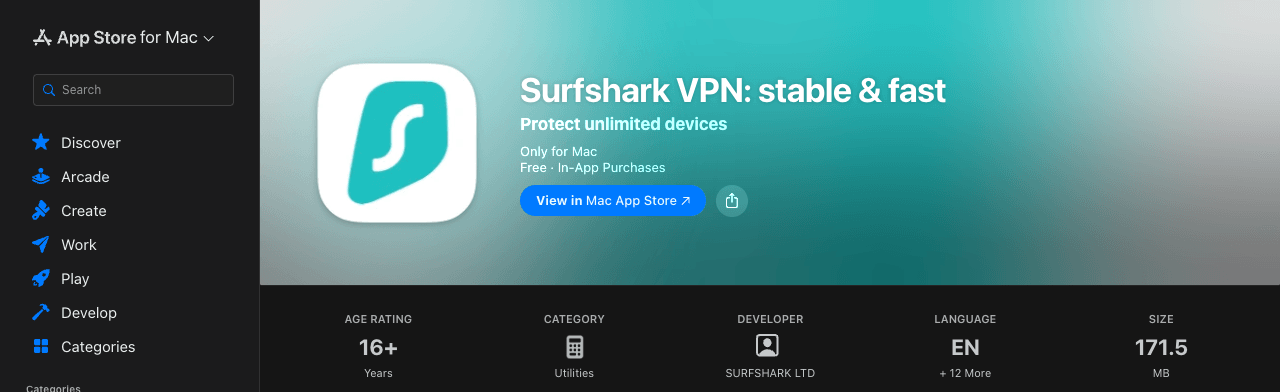
Yes, Surfshark has a native Mac app: it runs on macOS 12 Monterey or later, on Apple silicon and Intel Macs. It comes in two versions, the Mac App Store app and a .DMG installer from Surfshark’s website, and they differ in two ways: only the website version includes Surfshark Antivirus, and only the App Store version has Surfshark’s new Dausos protocol (checked on 22 October 2026).
Setup takes a few minutes: install the app, log in, click Connect and allow the VPN configuration when macOS asks. Buy the plan on Surfshark’s website rather than inside the app: the 2-year deal costs $2.49 a month during Black Friday, while the App Store lists $47.99 for a year.
Surfshark for Mac at a Glance
| Surfshark for Mac | |
|---|---|
| Works on | macOS 12 Monterey or later, on Apple silicon and Intel Macs |
| Older Macs | Older apps for macOS 10.12 to 11, no longer officially supported |
| Versions | Mac App Store (4.30.2, 171.5 MB) or a .DMG from Surfshark’s website |
| Protocols | WireGuard, OpenVPN and IKEv2, plus Dausos in the App Store version |
| Surfshark Antivirus | Website version only, with a One or One+ plan |
| Devices per plan | Unlimited |
| Price | $2.49/mo on the 2-year plan, plus a 7-day free trial on the website |
New to the service? What Surfshark is and how it works covers the basics.
App Store or Website Version: Which Should You Install?
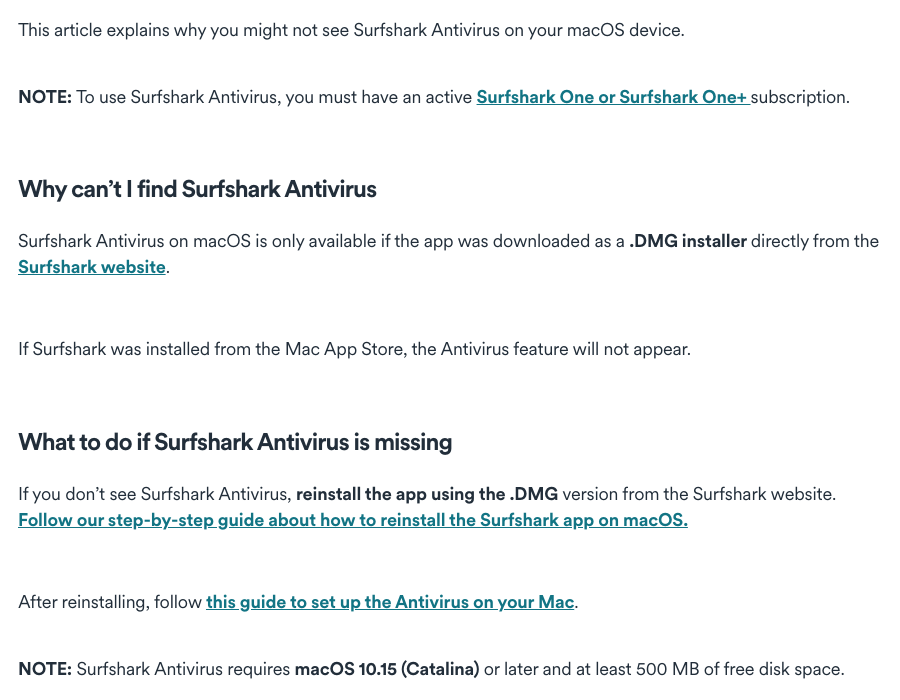
Install the website (.DMG) version if you pay for Surfshark One or One+ and want its antivirus on your Mac; otherwise the App Store version is the simpler choice, and the only one with Dausos. Surfshark’s help center documents the differences:
| Mac App Store version | Website (.DMG) version | |
|---|---|---|
| Surfshark Antivirus | Not available | Included with One or One+ |
| Dausos protocol | Yes (beta) | No |
| Download size | 171.5 MB | About 258 MB |
Two practical notes from Surfshark: if you switch from the website version to the App Store one, uninstall the .DMG version first to avoid conflicts, and if one version won’t connect, try the other.
How to Install Surfshark on a Mac
Surfshark’s macOS setup guide uses the App Store version:
- Buy a plan, or start the 7-day free trial, on Surfshark’s website.
- Open the App Store on your Mac and search for Surfshark. The app is listed as “Surfshark VPN: stable & fast” by SURFSHARK LTD.
- Click Get. The app downloads and installs by itself; click Open when it’s done.
- Choose your login method, or click Log in and enter your Surfshark email and password.
- Click Connect to join the fastest available server.
- When macOS asks you to enable protection, approve Surfshark’s extension and VPN configuration (the next section has the exact clicks for your macOS version).
- Run the IP and DNS leak tests on Surfshark’s website to check that your real address is hidden.
For the website version, download the .DMG from Surfshark’s macOS download page instead of steps 2 and 3, and make sure Surfshark ends up in your Applications folder: Surfshark’s permissions guide asks for the app to be there, not in Downloads or any other folder.
Once you’re connected, click Disconnect to stop or Pause to switch the VPN off for 5 minutes, 30 minutes or 2 hours. To change your default location, click Change next to Quick-connect.
How to Allow Surfshark’s VPN Configuration on macOS
macOS won’t let a VPN connect until you approve it, and without that permission Surfshark may fail to connect on WireGuard or Dausos. The first time you connect, follow the prompts for your macOS version:
macOS Tahoe
- Click Open Login Items & Extensions.
- Click the information button (ⓘ) next to Surfshark.
- Switch on Security Extension and click Done.
- Enter your Mac password or use Touch ID.
- Click Add VPN Configuration, then Allow.
macOS Sonoma or Sequoia
- Click Open System Settings in the pop-up.
- Where it says Surfshark was blocked from loading, click Allow.
- Enter your Mac password or use Touch ID.
- Click Add VPN Configuration, then Allow.
macOS Monterey
- Click Open Security Preferences.
- Click the lock icon, enter your password and click Unlock.
- Click Allow, then Allow again to add Surfshark’s VPN configurations.
The Surfshark Mac Settings Worth Changing
Click the cogwheel to open Settings, then VPN settings:
- Protocol. WireGuard, with Surfshark’s post-quantum layer, is the one I’d leave on (why WireGuard). The App Store version also offers Dausos, Surfshark’s own protocol, still in beta: Surfshark says it can be up to 30% faster than industry-standard protocols, and Cure53 has audited it. If it misbehaves, switch back to WireGuard or OpenVPN.
- KillSwitch. Cuts your internet if the VPN drops; switch it on (how Surfshark’s kill switch works).
- Auto-connect. Connects when the app launches or when you join an unsecured network.
- CleanWeb. Blocks ads, trackers, malware and phishing sites while you’re connected (what CleanWeb blocks).
- Bypasser. Lets chosen apps or websites skip the VPN: click Add app or Add website, then allow Surfshark’s system extension the first time (Bypasser explained).
- Rotating IP. Changes your IP address every 5 to 10 minutes without disconnecting.
- NoBorders. Under Advanced Settings; it helps on networks that restrict VPNs and usually switches on by itself.
Under App settings, you can make Surfshark launch at startup, update automatically and sit in the Dock or the status bar. The MultiHop tab above the server list routes you through two servers; pick a ready-made pair or click Create Connection to choose both.
Surfshark Not Working on Mac? Quick Fixes
Surfshark’s macOS troubleshooting steps, in order (check the connection after each one):
- Connect manually to a few different countries instead of using Quick-connect.
- Go to Settings > VPN Settings > Protocol and test each protocol.
- Disable your antivirus and remove other VPN apps, then restart the Mac.
- Update Surfshark. If the App Store version still fails, install the website version, and vice versa.
- Disable IPv6 in your Mac’s network settings: Surfshark doesn’t support it yet.
- Set a custom DNS server in your Mac’s network settings.
Antivirus missing? You’re on the App Store version, or on the Starter plan. Reinstall with the .DMG from Surfshark’s website; the antivirus needs a One or One+ plan, macOS 10.15 or later and 500 MB of free disk space.
How to uninstall or reinstall Surfshark on a Mac
- App Store version: drag Surfshark from your Applications to the Trash, click Delete, then empty the Trash.
- Website version: in Finder > Applications, right-click Surfshark, choose Move to Trash, click Continue at the system extensions warning, then empty the Trash.
Then install either version again. Removing the app doesn’t end your subscription: if you bought it in the App Store, cancel in your Apple account settings; if you bought it on Surfshark’s website, follow how to cancel Surfshark.
How Much Does Surfshark Cost for Mac?
The app is free; the subscription isn’t, and where you buy it changes the price. Surfshark’s website and the US Mac App Store on 22 October 2026, in US dollars before tax:
| Where you buy | Plan | Price |
|---|---|---|
| Surfshark’s website | 2-year Starter or One (Black Friday) | $67.23 for 27 months ($2.49/mo) |
| Surfshark’s website | 2-year One+ | $107.73 for 27 months ($3.99/mo) |
| Mac App Store | Annual VPN subscription | $47.99 |
| Mac App Store | 1 month | $10.99 |
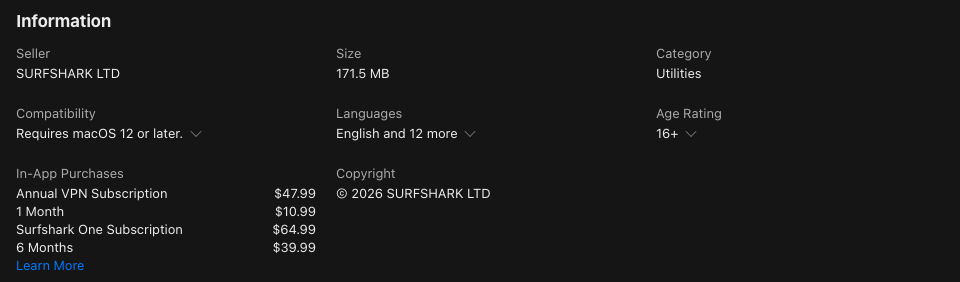
Buying on the website also gets you the 7-day free trial (on 12- and 24-month plans) and Surfshark’s own 30-day money-back guarantee. Subscribe inside the App Store version and Apple bills you, so cancellations and refund requests go through Apple, not Surfshark. Our Surfshark price guide compares every plan and length, and the Surfshark free trial guide walks through the trial.
Prefer NordVPN on Mac?
NordVPN, Surfshark’s sister company, has its own macOS app too. It covers 10 devices rather than unlimited, but it runs 7,000+ servers in 150 countries, and its Black Friday deal takes 2-year Basic to $3.49 a month ($94.23 for 27 months). Our NordVPN macOS guide has the setup steps, and the best VPNs for Mac compares the wider field.
Compare NordVPN – Up to 78% Off
FAQ
Does Surfshark Work on Mac?
Yes. Surfshark’s native Mac app runs on macOS 12 Monterey or later, on Apple silicon and Intel Macs. You can install it from the Mac App Store or as a .DMG from Surfshark’s website.
Does Surfshark Work on M1 and Newer MacBooks?
Yes. Surfshark’s Mac app runs natively on Apple silicon as well as on Intel-based Macs, as long as the Mac runs macOS 12 Monterey or later.
Should I Download Surfshark From the App Store or the Website?
Take the website (.DMG) version if you pay for Surfshark One or One+ and want Surfshark Antivirus on your Mac, because the App Store version doesn’t include it. Otherwise the App Store version is fine, and it’s the only one with Surfshark’s Dausos protocol.
Why Can’t I Find Surfshark Antivirus on My Mac?
Either you installed Surfshark from the Mac App Store, or your plan is Starter. The antivirus only appears in the .DMG version from Surfshark’s website, with a One or One+ plan, and it needs macOS 10.15 or later and 500 MB of free disk space.
Is Surfshark Free on Mac?
The app is free to download, but you need a subscription to connect. Surfshark’s website offers a 7-day free trial on its 12- and 24-month plans, and the 2-year plan costs $2.49 a month during its Black Friday sale.
What macOS Version Does Surfshark Need?
macOS 12 Monterey or later. Surfshark no longer officially supports older versions, but it still offers older apps for macOS 10.12 to 11, as well as manual WireGuard, OpenVPN and IKEv2 setups.
The Bottom Line
Surfshark runs natively on any Mac with macOS 12 Monterey or later. Take the website version if you want Surfshark Antivirus with One or One+, or the App Store version for Dausos, and buy the plan on Surfshark’s website either way: it costs less per month than the App Store and comes with the free trial and the 30-day money-back guarantee. Get Surfshark for $2.49 a month on the 2-year plan.
More Surfshark guides
 Surfshark Coupon & Promo Codes October 2026: Up to 87% Off
 How to Get a Surfshark Free Trial? (2026)
 Surfshark Chrome Extension (2026): How to Install and Use It
 Surfshark for Windows: Download, Setup and Fixes (2026)
 Does Surfshark Work With Amazon Fire TV Stick? How To Install It?
 How to Quickly Set Up Surfshark on Samsung Smart TV?

