
The Surfshark Chrome extension is free to install from the Chrome Web Store, but it only works with a Surfshark subscription or Surfshark’s 7-day free trial. It encrypts and reroutes Chrome’s traffic only, swaps your IP address for a Surfshark one, and adds an ad blocker, a cookie pop-up blocker and WebRTC leak protection. Everything outside Chrome keeps your normal connection.
Installing takes a minute: Add to Chrome, pin the icon, sign in, Connect. Below are the steps from Surfshark’s own guide, the settings worth switching on, when the full app is the better choice, and fixes for the usual problems.
Buying now? Surfshark’s Black Friday deal is live: see our Surfshark Black Friday guide for the current price, Surfshark One for $2.49 a month with 3 extra months.
Surfshark’s Chrome Extension at a Glance
| Answer | |
|---|---|
| What it is | A browser-only VPN proxy for Chrome, made by Surfshark B.V. |
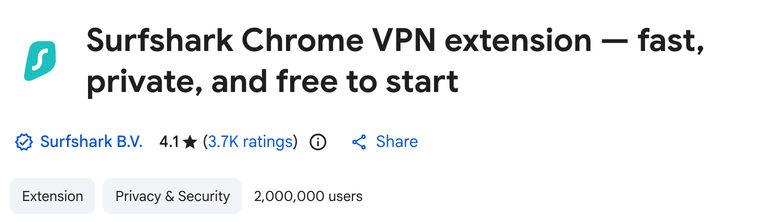
| Chrome Web Store rating | 4.1 stars from 3.7K ratings; 2,000,000 users |
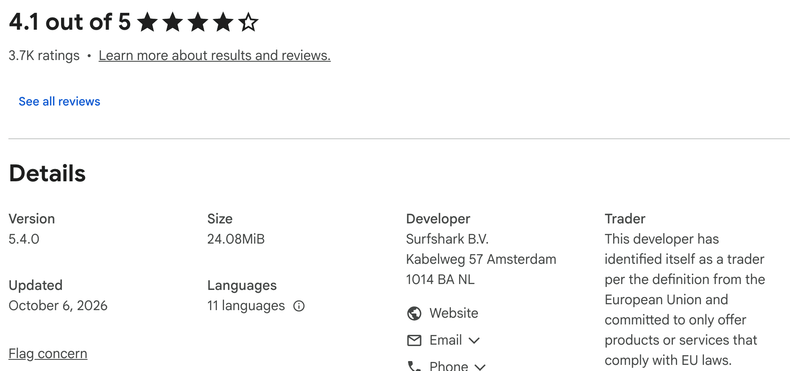
| Current version | 5.4.0, updated 6 October 2026 (24.08 MiB) |
| What you need | A Surfshark plan, from $2.49/mo on the 2-year deal |
| Built-in extras | Ad, tracker and cookie pop-up blocking, malicious-site blocking, breach warnings, WebRTC protection, geo-spoofing |
| Not included | A kill switch and whole-device protection (those are app features) |
| Other browsers | Edge and Firefox versions; Brave and Opera can use the Chrome one |
| Devices | Unlimited on one account (3 during the free trial) |
What the Surfshark Chrome Extension Does
Surfshark calls it a proxy extension. It sends Chrome’s traffic, including its DNS lookups, through an encrypted connection to a Surfshark server, so websites see a shared Surfshark IP address instead of yours. Nothing outside Chrome changes: your other apps and browsers keep your regular IP.
Beyond the new IP address, the extension carries most of Surfshark’s browser features:
- CleanWeb: blocks ads, trackers and cookie pop-ups, including video ads on popular streaming sites. Our Surfshark CleanWeb guide covers it in detail.
- Website safety: blocks malicious sites, warns you about breached ones and flags Google results linked to malware or data leaks before you click.
- WebRTC protection: stops websites from using WebRTC to find your real IP address.
- Geo-spoofing: hides your real location even from sites you’ve allowed to see it.
- Fixed IPs: static IP locations, plus your Surfshark dedicated IP if you’ve bought one.
- Email scam checker: checks emails you open in Gmail for phishing. It’s Chrome-only and needs Surfshark One or One+ (see what Surfshark One includes).
- Alternative ID autofill: fills sign-up forms with your Alternative ID details instead of your real ones.
How to Install and Use the Surfshark Chrome Extension
You need an active Surfshark subscription first. New users can start Surfshark’s 7-day free trial on its website with a 12- or 24-month plan; it covers up to 3 devices until the trial ends. Our Surfshark VPN promo codes page lists every other way to pay less that we could verify. Then follow Surfshark’s Chrome setup guide:
- Open the Surfshark extension in the Chrome Web Store and check that the developer is Surfshark B.V., then click Add to Chrome.
- In the pop-up, click Add extension.
- Click the puzzle-piece Extensions icon in the toolbar, then the pin next to Surfshark, so its icon stays in view.
- Click the Surfshark icon and sign in: Log in with your email and password, Continue with Google or Continue with Apple, or choose Logged in on another device? to use a login code.
- Click Connect to join the best-performing server, or open Locations (the icon next to Connect) to pick or search for a country. Static IP and Dedicated IP locations have their own tabs.
- When the status says Connected, check that it works with Surfshark’s IP leak and DNS leak tests.
To stop, click the disconnect icon, or Pause to switch the VPN off for a while.
Settings Worth Turning On
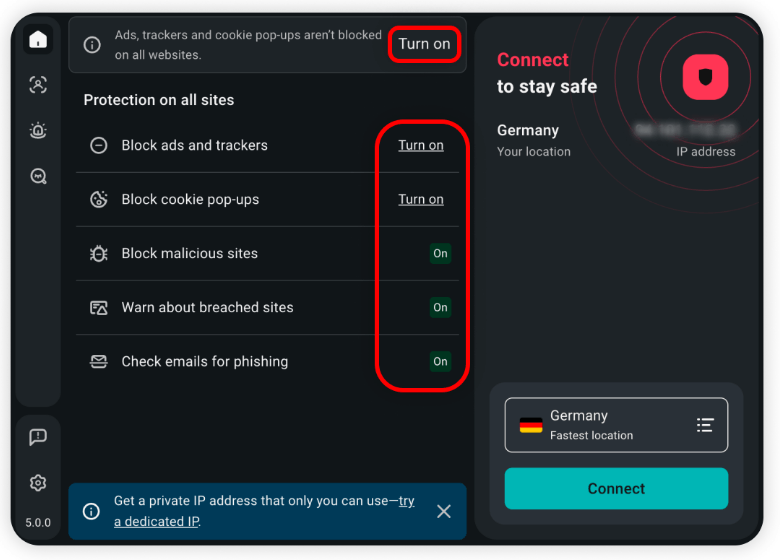
Surfshark’s own screenshot shows the ad and cookie blockers waiting for a Turn on click, so check those first:
- On the Home screen, under Protection on all sites, turn on Block ads and trackers and Block cookie pop-ups. Block malicious sites, Warn about breached sites and Check emails for phishing appear there too.
- Open Settings (the cog) and go to VPN settings. Pick a Default location, switch on Auto-connect to connect every time Chrome starts, keep WebRTC protection on, and turn on Geo-spoofing if you want sites to see the VPN location rather than your real one.
- Add sites that should skip the VPN or CleanWeb to the Bypass list, such as your bank or a work tool.
- For Incognito windows, open the Chrome menu (three dots) → Extensions → Manage Extensions, click Details under Surfshark and turn on Allow in Incognito.
Get Surfshark for Chrome – $2.49/mo
Surfshark Chrome Extension vs the Surfshark App
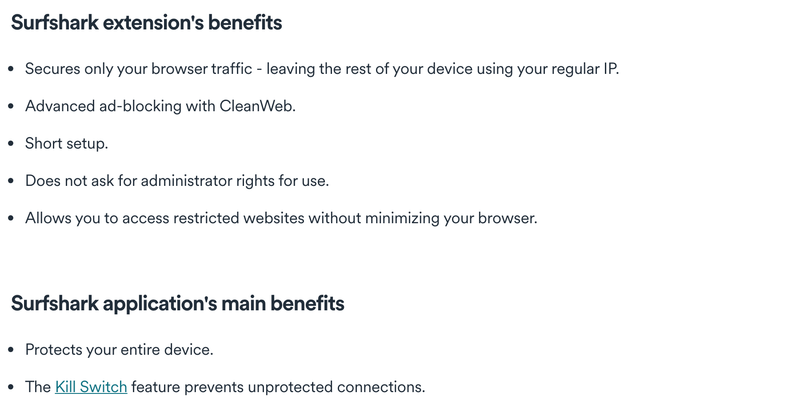
Surfshark’s own comparison is short: the extension secures only browser traffic, sets up quickly and needs no administrator rights, while the app protects the whole device and has a kill switch.
| Chrome extension | Surfshark app | |
|---|---|---|
| Protects | Chrome only | Every app on the device |
| Kill switch | No | Yes |
| Best for | Locked-down work or school computers, browser-only use | Your own devices and everything on them |
Don’t run both at once. Surfshark says connecting the extension and the app together can interfere with your traffic; if you want both, exclude Chrome from the app with Bypasser, its split-tunneling feature.
My advice: on your own computer, use the app, because the kill switch alone makes it the safer choice. Our setup guides cover Surfshark on Windows and Surfshark on a Mac. The extension earns its place on a work or school machine where you can’t install software, or when only Chrome should get a different IP. On a Chromebook, Surfshark’s guide uses its Android app from Google Play instead; see Surfshark on Chromebook. For our verdict on the apps themselves, read the Surfshark review.
Surfshark on Firefox, Edge, Brave and Opera
The same extension, version 5.4.0, is in each browser’s store. Here’s how the listings looked on 22 October 2026:
| Browser | Where to get it | Store rating |
|---|---|---|
| Chrome | Chrome Web Store | 4.1 from 3.7K ratings; 2,000,000 users |
| Edge | Microsoft Edge Add-ons | 3.7 from 275 ratings; about 466,000 users |
| Firefox | Firefox Add-ons | 3.6 from 1,249 ratings; about 115,000 daily users |
| Brave, Opera | The Chrome Web Store version | Same listing as Chrome |
Surfshark says any Chromium-based browser, such as Brave or Opera, can install the Chrome version. There’s no Safari extension (Surfshark lists Chrome, Edge and Firefox only), so on a Mac use the app.
Surfshark Chrome Extension Not Working?
Surfshark’s troubleshooting article suggests these fixes, in order:
- Disconnect the Surfshark desktop app if it’s running; the app and the extension shouldn’t both be connected.
- Try a few other server locations. If they work, the first one probably has a temporary problem.
- Turn off other VPN, ad-blocking or antivirus extensions, restart Chrome and try again.
- Switch off CleanWeb’s ad blocking: Settings → Ad blocker settings → turn Ads and trackers off.
- Try the extension in Edge or Firefox to see whether the problem is Chrome itself.
- Reinstall it: Chrome menu → Extensions → Manage Extensions → Remove under Surfshark, then add it again from the Chrome Web Store.
Still stuck? Surfshark’s live chat is open 24/7, and support@surfshark.com handles email.
Surfshark vs NordVPN Chrome Extension
NordVPN, Surfshark’s sister service, makes the more popular of the two extensions. The Chrome Web Store showed this on 22 October 2026:
| Surfshark | NordVPN | |
|---|---|---|
| Rating | 4.1 from 3.7K ratings | 4.4 from 9.1K ratings |
| Users | 2,000,000 | 15,000,000 |
| Devices per account | Unlimited | 10 |
| Cheapest 2-year price | $2.49/mo | $3.49/mo |
Both are proxy extensions that need a paid plan. Surfshark wins on price and device count; NordVPN’s extension is better rated and more widely used, and NordVPN’s network is bigger, at 7,000+ servers in 150 countries against 4,500+ in 100. Our NordVPN Chrome extension guide covers its setup, or see NordVPN’s current deal.
FAQ
Is Surfshark Chrome Extension Secure?
It comes from a well-audited provider. Deloitte checked Surfshark’s no-logs policy in 2023 and 2025, and Surfshark says SecuRing’s 2025 assessment confirmed the security of its browser extension and accounts. In the Chrome Web Store, Surfshark declares that the extension doesn’t collect or use your data. Keep in mind that it protects Chrome only.
Is the Surfshark Chrome Extension Free?
It’s free to install, but it only works with a paid Surfshark plan, from $2.49 a month on the 2-year deal. New users can try it with Surfshark’s 7-day free trial on its website, which covers up to 3 devices.
Does the Surfshark Extension Have a Kill Switch?
No. Surfshark lists the kill switch, which cuts your internet if the VPN connection drops, as a feature of its apps. Use the app if you need that protection.
Can I Use the Surfshark Extension and App at the Same Time?
Surfshark advises against connecting both at once, because the double connection can interfere with your traffic. If you want both, exclude Chrome from the app with Bypasser, Surfshark’s split-tunneling feature.
Does Surfshark Work in Chrome’s Incognito Mode?
Yes, once you allow it. Open the Chrome menu, go to Extensions, then Manage Extensions, click Details under Surfshark and turn on Allow in Incognito.
Does the Surfshark Extension Work on Firefox, Edge, Brave or Opera?
Yes. Surfshark makes its own extensions for Edge and Firefox, and Chromium-based browsers such as Brave and Opera can install the Chrome Web Store version. There’s no Safari extension.
Surfshark costs $2.49 a month on the 2-year plan; our Surfshark price guide compares every plan and renewal, and new customers can try Surfshark free for 7 days on its website before the first charge.
The Bottom Line
Surfshark’s Chrome extension is a quick way to give Chrome a different IP address with ads, cookie pop-ups and WebRTC leaks blocked, and it costs nothing extra if you already pay for Surfshark. It only covers the browser, though, so on your own computer the app is the better choice. Our guide to what Surfshark is explains everything else the subscription includes, and the Surfshark price guide compares the plans.
Get Surfshark’s 2-year deal – $2.49 a month, unlimited devices and 30 days to change your mind – or compare NordVPN’s.
More Surfshark guides
-
 Surfshark Price 2026: How Much It Costs, Plans From $2.49/mo
-
 Surfshark Black Friday 2026: One for $2.49/mo, 87% Off + 3 Months, Live Now
-
 Surfshark for Windows: Download, Setup and Fixes (2026)
-
 Surfshark for Mac: Setup, Settings and Which Version to Get (2026)
-
 Does Surfshark Work With Amazon Fire TV Stick? How To Install It?
-
 How to Quickly Set Up Surfshark on Samsung Smart TV?

