
Pakistan has blocked websites like Facebook, WhatsApp, and YouTube in the past – and they can do it again.
Luckily, the best VPN for Pakistan will help prepare you.
But finding a reliable VPN for Pakistan isn’t black and white.
Not only do you need obfuscated servers to get around current (and future) website blocks, but a VPN with Pakistan servers is also preferable, so you can access local Pakistan websites from abroad.
But don’t worry!
After thorough research and testing, I found NordVPN (Grab a sweet discount)!
NordVPN pairs obfuscated servers that slip past the PTA’s traffic filtering with a Double VPN, Threat Protection, and a kill switch – all in its standard plan – and it now lists Pakistan as a virtual location, so you keep a Pakistani IP address when you travel.
If it isn’t for you, ExpressVPN (obfuscation switched on automatically across every server), ProtonVPN, CyberGhost, and HMA also get the job done, and I cover all four below.
And that’s not all.
Keep reading to find out exactly why NordVPN is my top choice, plus four alternatives that will also get the job done!
Top 3 VPNs for Pakistan (September, 2026)

ExpressVPN
Best for hands-off obfuscation
- Obfuscation on every server
- RAM-only TrustedServer network
- Pakistan server access

NordVPN
Best for Pakistan
- Obfuscated servers beat DPI
- Double VPN and Threat Protection
- Virtual Pakistan location

ProtonVPN
Best for playing by local rules
- Alleged ISP registration
- Reliable no-logs service
- Keeps data from the PTA
There’s something I didn’t mention in the intro – in July 2020, Pakistan residents and VPN providers were forced to register their VPN service(s) with the Pakistan government.
This was one of many steps made by the Pakistan government to control its citizens since 2011.
In fact, some Pakistan users claim the government uses the same DPI technology implemented by the Great Firewall of China.
Thus, while I will discuss both registered and unregistered VPN options, this is also why it’s so essential to find a VPN for Pakistan with obfuscated servers – so your ISP and government won’t know you’re using a VPN in the first place.
Let’s get started!
Trying to Catch Up on Samaa TV News? Enjoy My Top 5 Picks With Your Morning Coffee
Here are my top five picks for the best VPNs for Pakistan so that you can enjoy your morning coffee and Samaa TV news routine in peace:
- NordVPN – Best Overall + Obfuscated Servers
- ExpressVPN – Automatic Obfuscation + Pakistan Server
- ProtonVPN – Reliable Service (Allegedly) Registered With Pakistan ISPs
- CyberGhost – 12 Pakistan Servers for Accessing Local Pakistan Content
- HideMyAss (HMA) – IP Shuffle Feature + 210 Countries (2 in Pakistan)
Detailed List of the 5 Best VPNs for Pakistan
Are you ready for the complete picture?
Join me below, where I discuss in-depth why each VPN is ideal for using in Pakistan – plus other important tidbits, like getting a Pakistan IP address and unblocking Netflix US!
1. NordVPN – Best Overall + Obfuscated Servers

Pakistan’s filtering has one job: spot VPN traffic and drop it. NordVPN gives you more ways to stop it from doing that job than any other VPN I tested, and it starts at about the same price as the other premium pick on this list.
Let’s start with the most important one: obfuscation.
NordVPN’s obfuscated servers wrap your VPN traffic so it passes as ordinary HTTPS – exactly what you need against the kind of deep packet inspection Pakistani users compare to China’s. You do have to switch them on once (set the protocol to OpenVPN, then flip the toggle under Advanced settings), but after that, they sit in the server list like any other category.
Here’s a screenshot that shows you how to enable it:

It was 100% effective in my tests, and there’s now a second route as well: NordVPN’s NordWhisper protocol, built to pass as ordinary web traffic on networks that block standard VPN protocols.
Either way, your ISP and the PTA see nothing that looks like a VPN – they won’t even know you’re using NordVPN at all.
But the security features don’t end with obfuscation.
To be completely honest, NordVPN has more security features than all the other VPNs on my list combined, which is perfect for Pakistan users who put security (and privacy) over everything else.
So, to give you the full picture, NordVPN’s other security features include:
- A Double VPN that routes you through two servers instead of one
- RAM-only servers
- A kill switch that cuts your internet the instant the tunnel drops
- DNS leak protection
- The most secure VPN protocols
- Military-grade encryption
- Threat Protection, which blocks malicious sites, trackers, and ads (and scans downloads for malware on the higher-tier plans)
- And the provider’s proprietary Onion Over VPN feature

Furthermore – consider that NordVPN is the only VPN on my list that offers all of these features in its standard package.
Backing them up is a no-logs policy that independent auditors have verified more than once, plus a home base in Panama, where no data-retention law can force NordVPN to keep anything on you.
Best of all, this suite of premium security features means you won’t struggle to keep your online activities invisible to everyone.
This includes using NordVPN to access freshly blocked websites like Facebook and YouTube (should Pakistan block them again).
For a long time, my one real complaint was that NordVPN had no Pakistani IP addresses, which made it a VPN for people living in or visiting Pakistan rather than for Pakistanis abroad.
That has changed: NordVPN now lists Pakistan as a virtual location. You get a Pakistani IP address for your e-banking app or PTV’s live stream while the hardware sits outside the country – which, in a country that makes VPN providers register with the PTA, is no bad thing.
Now for the trade-offs.
While NordVPN offers blazing fast speeds over its NordLynx protocol, you can expect a small decline when using its obfuscation feature (or its Double VPN and Onion Over VPN features), because those run over OpenVPN.
Here’s a quick comparison of NordVPN without obfuscation vs. with obfuscation:
| NordVPN (NordLynx Protocol) | NordVPN (OpenVPN TCP + Obfuscation) |
| 203.45 Mbps | 184.23 Mbps |
That’s a drop of under 10%, and 184 Mbps is still several times what a 4K stream needs, so I never noticed it outside of a speed test.
Speaking of streaming, NordVPN is an excellent option for unblocking geo-locked platforms like Netflix and BBC iPlayer from your home or hotel in Pakistan!

It also has apps for every platform you’re likely to own, and one subscription covers ten devices at once.
Plus, you can choose from several affordable pricing plans (all of which include a 30-day money-back guarantee) – and the long-term plans bring the monthly price down the most:

But for an EVEN BETTER deal, click here!
Pros
- Obfuscated servers and the NordWhisper protocol to hide VPN use from the PTA and your ISP
- Double VPN, Threat Protection, Onion Over VPN, and a kill switch in the standard plan + no logs policy (audited)
- Unblocks popular websites/apps like Facebook, WhatsApp, and YouTube
- Works with Netflix, Hulu, BBC iPlayer, and more
- Blazing fast NordLynx speeds
- 8,400+ RAM-only servers in 167+ countries worldwide
- Virtual Pakistan location for a Pakistani IP address abroad
- Ten simultaneous connections and affordable long-term plans
Cons
- Obfuscation must be switched on manually and only runs over OpenVPN
- Slight speed loss when using Obfuscation, Double VPN, and/or Onion Over VPN
- Pakistani IPs come from a virtual location, not servers inside Pakistan
2. ExpressVPN – Automatic Obfuscation + Pakistan Server
ExpressVPN is the one VPN on my list where you never have to think about obfuscation at all, thanks to its proprietary TrustedServer technology and RAM-only servers.
To put it in layman’s terms: all of the (lightning-fast) servers you connect to are automatically obfuscated for the utmost privacy.
This means, despite Pakistan’s ban on unregistered VPNs, the government and your ISP will be none the wiser to your VPN use.
No other VPN on my list offers such an overwhelmingly easy, automatic solution to obfuscation!
NordVPN’s obfuscated servers (above) need a one-time toggle and only run over OpenVPN. With ExpressVPN, you get obfuscation on all of its servers (with any protocol), and there’s no additional configuration required (like enabling a feature)!
But don’t just take my word on it.
I’m well aware of the misinformation about ExpressVPN’s obfuscated servers, so I also double-checked with the provider’s 24/7 chat support.
Here’s what Erika told me:

Additionally, cementing its dedication to user privacy and security is ExpressVPN’s strict no-logs policy, proven through independent audits.
This, combined with everything listed above, ensures your online activities always stay private.
Best of all, if Pakistan decides to block popular websites like Facebook and YouTube again, ExpressVPN ensures you’ll have no trouble unblocking them without being detected!
But the benefits don’t end there.
Thanks to ExpressVPN’s Pakistan server, you’ll also have no trouble accessing your e-banking account(s) while traveling abroad.
So, if your Pakistan bank requires a Pakistan IP address to log in, you’re in luck!

Likewise, you can use ExpressVPN’s Pakistan server to keep up with the news via Samaa TV or enjoy your favorite Pakistan TV networks – like PTV, Starz Play, or mjunoon.tv!

Not every VPN can say that, though NordVPN (through a virtual location) and ProtonVPN now offer Pakistani IP addresses too.
On a similar note, if you’re hoping for unlimited access to US Netflix while living in or visiting Pakistan, ExpressVPN is just as dependable!
In fact, you’ll have access to a myriad of streaming services, including Netflix, Hulu, BBC iPlayer, Disney+, and more!

Its compatibility with geo-locked streaming platforms is about as broad as it gets, and only NordVPN kept pace with it in my tests.
What it leaves out is the reason it misses first place.
As ExpressVPN is a premium VPN provider, it comes at a premium price – and for about the same money as NordVPN, you get no Double VPN, no Threat Protection, and no Onion Over VPN, all of which NordVPN includes as standard. Automatic obfuscation is also less of a differentiator than it used to be, now that NordVPN’s toggle takes thirty seconds and its NordWhisper protocol covers the same ground.
If you’d rather never touch a setting, though, ExpressVPN is worth every rupee.
You’ll still enjoy a 30-day money-back guarantee, but the subscription fees look something like this:

But if that price looks too steep, you can click here for a MASSIVE discount!
Pros
- Automatic Obfuscation (TrustedServer Technology) to hide VPN use
- Best security & privacy features + no logs policy (audited)
- Unblocks popular websites/apps like Facebook, WhatsApp, and YouTube
- Works with Netflix, Hulu, BBC iPlayer, Disney+, PTV, Samaa TV, iFlix, Starz Play, and mjunoon.tv
- Lightning-fast speeds
- RAM-only servers in 113 countries worldwide
- Server options in Pakistan
Cons
- Pricier than budget picks like CyberGhost
- No Double VPN, Threat Protection, or Onion Over VPN equivalents
3. ProtonVPN – Registered With Pakistan ISPs

However, to be transparent, I was unable to find any official list of registered Pakistan VPNs.
This Pakistani Reddit user is where the ProtonVPN claim came from:

I’m also currently waiting to hear back from ProtonVPN’s support team for further confirmation.
Thankfully, ProtonVPN’s registered status is just the beginning of its phenomenal service – and its users agree, as the VPN provider is one of the most recommended Pakistan VPNs when people ask on r/pakistan!
This is likely thanks to the VPN’s many security features, even rivaling my top pick, NordVPN.
Check out a quick comparison between the two VPNs here:

Of course, NordVPN still won (hence earning first place instead of third), but that’s not to say that ProtonVPN didn’t keep up!
In fact, thanks to its Secure Core architecture and features like Tor Over VPN, ProtonVPN just barely fell behind.
That said, one of the reasons the provider fell behind was its lack of an obfuscation feature.
When I first wrote this, ProtonVPN’s official Reddit support account would only say the feature was in the works:

It has since arrived as Proton’s Stealth protocol, which closes most of that gap – though it came years after NordVPN’s and ExpressVPN’s obfuscation.
Either way, Pakistan users are guaranteed high levels of anonymity with this VPN service.
And even if ProtonVPN is registered with Pakistan ISPs, you’ll still want a high level of anonymity to keep them from spying on you.
Plus, should Pakistan decide to place another ban on websites like Facebook, WhatsApp, and YouTube, ProtonVPN is more than capable of helping you unblock them!
What’s more, ProtonVPN’s server list now includes a Pakistan location.
So, if you’re looking for a VPN that offers Pakistan IP addresses, ProtonVPN is now an option as well.
But it is great for streaming geo-blocked platforms like Netflix, Roku, and Hulu!

And its long-term plans cost about the same as NordVPN’s (and include 30-day money-back guarantees):

But if you want to save some additional cash, check here for an exclusive discount!
Pros
- Secure Core Architecture + (allegedly) registered with Pakistan ISPs
- Premium suite of security features + no logs policy (audited)
- Unblocks popular websites/apps like Facebook, WhatsApp, and YouTube
- Works with Netflix, Hulu, BBC iPlayer, and more
- Blazing fast speeds
- 20,000+ servers in 140+ countries worldwide, including Pakistan
Cons
- No live chat support
- Stealth obfuscation arrived years after NordVPN’s and ExpressVPN’s
4. CyberGhost – Best for Pakistan Servers

CyberGhost is well-deserving of its place on my list, namely because it offers a whole 12 servers in Pakistan!
This is the highest number of Pakistani servers on my list, with CyberGhost beating out NordVPN and ExpressVPN (above) and HMA (below)!

In other words, if you’re looking for the ideal VPN for in and out of Pakistan, you’ve found it!
CyberGhost will not only help you access your Pakistan e-banking accounts from abroad, but it’ll also help you enjoy your favorite Pakistan TV networks (like PTV and iFlix) regardless of your location.
The same is true for popular streaming services like BBC iPlayer and Hulu.

However, the security side of CyberGhost is simultaneously impressive and disappointing – impressive because there are plenty of features, but disappointing because most of them come at an additional cost.
For example, CyberGhost’s NoSpy servers guarantee the Pakistan government and your ISP won’t see your online activities or your VPN use – but they cost extra and are only available with long-term subscriptions.

Likewise, CyberGhost’s Security Suite for Windows, which includes Intego Antivirus, Privacy Guard, and Security Updater, amplifies your overall security but costs extra.

This is even more disappointing when you consider that providers like NordVPN include all of their security features at no additional cost.
Here’s a quick comparison to slam home that point.
Still, you’ll get CyberGhost’s RAM-only servers, kill switch, military-grade encryption, and the best VPN protocols in its standard package.
And you won’t struggle to unblock websites and apps if the need arises!
Plus, impressively, on subscriptions that are six months or longer, you’ll get a 45-day money-back guarantee!
For reference, no other VPN on my list offers a money-back guarantee that’s longer than 30 days.
However, the downside to this is that CyberGhost’s monthly plan only comes with a 14-day money-back guarantee – and its monthly plan costs far more than its 2-year deal:

But if you want a discount, you can find a very tempting one here!
Pros
- NoSpy Servers
- Security Suite for Windows (add-on) + no logs policy
- Unblocks popular websites/apps like Facebook, WhatsApp, and YouTube
- Works with Netflix, BBC iPlayer, Disney+, PTV, Samaa TV, iFlix, and mjunoon.tv
- Fast speeds
- 9,000+ RAM-only servers in 100 countries worldwide
- 12 servers in Pakistan
Cons
- Speeds sometimes slower than other VPNs on this list
- Doesn’t work with Starz Play or Hulu (at the time of writing)
- NoSpy Servers + Security Suite cost extra
5. HideMyAss (HMA) – IP Shuffle Feature

Last but not the least, HideMyAss or HMA offers Pakistan users two unbeatable things: an IP Shuffle feature and two Pakistan servers.
First up, HMA’s IP Shuffle feature lets you shuffle your IP address periodically while using the service.
And it’s customizable!
You can set it to shuffle every 30 minutes, every hour, etc.
Just make sure you also have HMA’s kill switch enabled, so your connection stays private during the shuffle.
This feature is handy for Pakistan users who travel a lot, as it makes it harder for “hackers, trackers, and attackers” to see your real location.

As for the two Pakistan servers – no prize for guessing what those are good for!
AKA: yes, when you’re traveling abroad and need to access your Pakistan accounts with a Pakistan IP address, or you want to watch PTV’s live streams, HMA can help!

In fact, while two servers might not seem like a lot, it’s still one more than ExpressVPN lists!
Moving on, while HMA doesn’t offer a dedicated obfuscation feature, it does have military-grade encryption, the best VPN protocols, a kill switch, leak protection, DDoS protection, and a split tunneling feature.
HMA is also great for unblocking websites and geo-restricted streaming platforms!
This includes Facebook, YouTube, WhatsApp, Netflix US, and BBC iPlayer.

And the primary reason for this is because HMA offers servers in 210 countries.
Yes, you read that right!
210 countries!
This is more than any other VPN on my list, though NordVPN’s 167+ closes a good chunk of the gap.
Here’s a table to help you compare:
| VPN Provider | Number of Server Countries |
| NordVPN | 167+ |
| ExpressVPN | 113 |
| ProtonVPN | 140+ |
| CyberGhost | 100 |
| HMA VPN | 210 |
Now for the downside(s).
I placed HMA as number five on my list because, despite being a great service, you’ll pay the same (or less) for a better service, like the ones listed above.
HMA’s subscription fees are pretty costly:

Pros
- Basic security features + no logs policy (audited)
- Unblocks popular websites/apps like Facebook, WhatsApp, and YouTube
- Works with Netflix, BBC iPlayer, PTV, Samaa TV, iFlix, and mjunoon.tv
- Fast speeds
- 1070+ RAM-only servers in 210 countries worldwide
- 2 servers in Pakistan
Cons
- No extra security features like obfuscation, double VPN, etc.
- Expensive compared to other providers & their features
Buying Guide: How To Choose the Right Service Provider for Pakistan?
Before you start shopping for a VPN for Pakistan, check out my in-depth buying guide!
You’ll want to take everything listed here into heavy consideration before making any commitments (or purchases!)…
Not in a Rush? Make Sure Your VPN Checks These Boxes AT LEAST!
Don’t fall victim to an untrustworthy VPN service!
Instead, use this handy check-list when deciding on the best VPN for Pakistan:
Does It Offer the Best Security and Privacy Features?
Pakistan might not be as intrusive as The Great Firewall of China, but it’s certainly getting there.
After all, the government is making an effort to control its citizens by only allowing registered VPN use – something China is also known for.
Not to mention, the Pakistan government has blocked access to popular websites and apps before…so what’s stopping them from doing so again?
To beat these “what-ifs,” your VPN needs to have the best security features.
This means a (preferably proven) no logs policy, military-grade encryption, the best VPN protocols, DNS leak protection, and a kill switch.
Preferably, your VPN will also have obfuscated, RAM-only servers to keep you invisible to your government and ISP.
Will It Unblock Popular Websites and Apps?
Like I mentioned above – what’s stopping the Pakistan government from blocking websites and apps again?
There’s no guarantee it’ll happen, but if it does, you need to be prepared.
And the best way to be prepared is to have a trustworthy VPN for Pakistan that’s capable of unblocking popular websites and apps like Facebook, Instagram, WhatsApp, and YouTube.
Are There Servers in Pakistan?
This isn’t necessarily a deal-breaker, depending on the VPN’s other features.
However, if you’re traveling abroad and need a Pakistan IP address (for banking or access to local TV networks, etc.), you obviously need a VPN with servers in Pakistan.
However, not many VPNs offer servers in Pakistan, and some that do are unreliable.
For this reason, if Pakistan servers are a necessity for you, make certain the VPN you purchase is well-known and trustworthy.
Can It Unblock Streaming Services Like Netflix?
This is another optional but beneficial feature to look for in your VPN for Pakistan.
If your VPN can unblock streaming services like Netflix, chances are it’s a reliable, trustworthy VPN that puts a lot of work into its service.
And who’s complaining about getting to watch their favorite international shows from Pakistan?
Is It Fairly Priced?
Finally, make sure your VPN is fairly priced – you don’t want to pay more for a mediocre service when you could pay the same price for a phenomenal service.
To ensure your VPN is fairly priced, compare features and subscription plans with other VPNs before purchasing.
BONUS: Registering VPNs in Pakistan?
If you want the VPN you use to be a registered VPN with Pakistan, I recommend contacting that specific VPN’s support team and asking them directly before purchasing.
Just keep in mind, if your primary concern is security and/or privacy, you’re better off with an unregistered VPN, as (assumingly most) registered VPNs come with the risk of your government and ISP seeing your online activities.
Additionally, there might be further registration needed on your part to comply with the PTA’s requirements.
You can find more information here.
Can I Use a Free VPN in Pakistan?
I don’t typically recommend using free VPNs.
However, if you’re out of options and need a free VPN for Pakistan, I recommend using the free version of ProtonVPN.

It gives you servers in 10 countries, randomly selected, on one device.
And, best of all, there are no data caps, meaning you can use the free version of ProtonVPN as much as you want!
Of course, you won’t get blazing fast speeds or the provider’s full suite of features.
But it’s better than no VPN at all!
Still, because of the increasing severity of Pakistan’s disregard for online privacy, I recommend switching to the premium version of ProtonVPN ASAP – or jump straight to my number one choice, NordVPN!
(Here’s that discount I promised…)
How to Use Your VPN to Get a Pakistan IP Address?
If you’re sitting in another country, waiting patiently for instructions on how to use your VPN to get a Pakistan IP address, I’m here to deliver!
Just follow these steps:
Choose one of my recommended VPNs with Pakistan servers (or a VPN you found after thorough research) – here’s a table comparison to help you out:
| VPN Provider | Number of Pakistan Servers |
| NordVPN | Virtual location |
| ExpressVPN | 1 |
| ProtonVPN | 1 city |
| CyberGhost | 12 |
| HMA VPN | 2 |
- Download and install the VPN app on your device(s).

- Open the VPN app and sign in to your account.
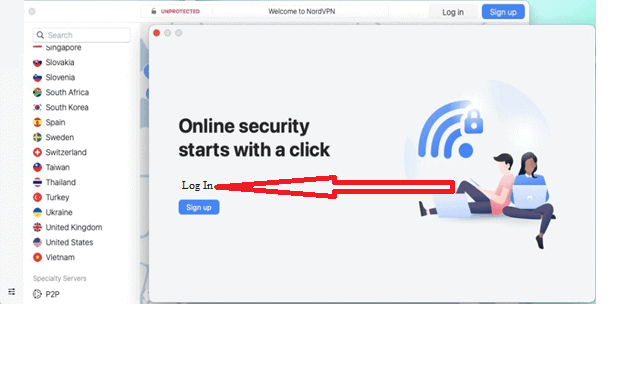
- Scroll the list of countries until you reach Pakistan or use the app’s search function.
- Connect to the server by hitting the button (or similar).
- Open your browser and check for IP, DNS, and WebRTC leaks.
- Enjoy accessing your bank account and/or local Pakistan TV networks!
How to Unblock Netflix US With a VPN for Pakistan?

Perhaps you’re lounging comfortably in your house or hotel in Pakistan, longing for your favorite US shows on Netflix?
If so, don’t sweat it!
Unblocking Netflix US with a VPN is as easy as following the above steps with minor changes. Here’s a quick rundown:- Choose one of my recommended VPNs that work with Netflix.
- Purchase a subscription, download the app, and sign in.
- Choose a US server (check if any are explicitly optimized for streaming or Netflix).
- Open your browser and check for IP, DNS, and WebRTC leaks.
- Navigate to the Netflix app or website.
- Enjoy streaming Netflix US!
FAQ
Are VPNs Legal in Pakistan?
While VPNs are legal in Pakistan, there are some complications surrounding their use.
As of July 31, 2020, users and VPN providers must register their VPN service with the Pakistan Telecommunication Authority.
If you attempt to use an unregistered VPN, there’s a chance the connection will be blocked.
However, if you use a registered VPN, you run the risk of your government and/or ISP spying on your online activities.
For this reason, if privacy and security are important to you, a reliable unregistered VPN is the best option.
Users reported the most success with the VPNs listed here.
What Websites Are Blocked in Pakistan?
At present, the Pakistan Telecommunication Authority blocks access to Rabwah Times (“blasphemous material”), some Reddit subs (“pornography”), DeviantArt (“pornography”), and Pastebin (no reason stated).
However, the PTA has blocked websites such as Facebook, Twitter, YouTube, WhatsApp, and Telegram in the past.
For this reason, you must prepare a reliable VPN capable of unblocking all of these sites and more.
Conclusion
How long until Pakistan follows in China’s footsteps with The Great Firewall?
Maybe it will never happen; maybe it’s just around the corner…
Either way, the country has already proven it can take away basic human rights (despite giving some back).
Don’t wait for it to happen again. Secure a reliable VPN ASAP, so you can fight for your right to online freedom and an uncensored internet right now – before it’s too late.Luckily, securing a reliable VPN is easier than ever.
Just click here to sign up for my number one recommended VPN, NordVPN – obfuscated servers, the full security suite, and a Pakistani IP for the road – and enjoy the enormous discount on us!





