
NordVPN’s customer service is 24/7 live chat and email, and there is no phone number: its help center says plainly that “NordVPN does not offer phone support.” The fastest way in is the Chat with support button at the bottom of any article on support.nordvpn.com, which opens an AI chatbot that hands you to a human agent when it can’t help. For email, write to support@nordvpn.com or use the Email us form next to the chat button.
Below is how each channel works, checked on 22 October 2026, what to send so you get a useful answer the first time, and how to tell real NordVPN staff from the scammers who copy them.
Get NordVPN – 78% Off + 3 Months
Before you write to support, check our how to use NordVPN guide: most first-week questions (connecting, changing country, the kill switch) are answered there.
NordVPN Support at a Glance
| Channel | How it works |
|---|---|
| Live chat | 24/7: an AI chatbot first, then a human agent, from the Chat with support button on support.nordvpn.com |
| support@nordvpn.com, or the Email us form; replies come to your inbox | |
| Phone | None. NordVPN doesn’t run a phone line |
| Help center | Searchable setup, billing and troubleshooting articles at support.nordvpn.com |
| Refunds | Through live chat: support sends a secure link with a Refund button |
| Account deletion | Self-service in Nord Account, or a request form answered within 24 hours |
| Social media | Official Facebook, X, LinkedIn, YouTube and Instagram accounts |
| Not a customer yet? | From $3.49/mo, with a 30-day money-back guarantee |
What’s the Best Way to Contact NordVPN?
Live chat. It’s open around the clock, NordVPN calls it “the fastest way to get help,” and it’s also the channel that starts a refund. Email suits longer problems where you want to attach screenshots or logs.
How to Use NordVPN’s 24/7 Live Chat
These steps come from NordVPN’s guide to reaching customer support:
- Open any article on support.nordvpn.com and scroll to the bottom, to Still having issues?
- Click Chat with support.
- Enter your name and the email address on your NordVPN account.
- Describe your problem. The AI chatbot answers first; if it can’t solve it, it transfers you to a NordVPN agent.
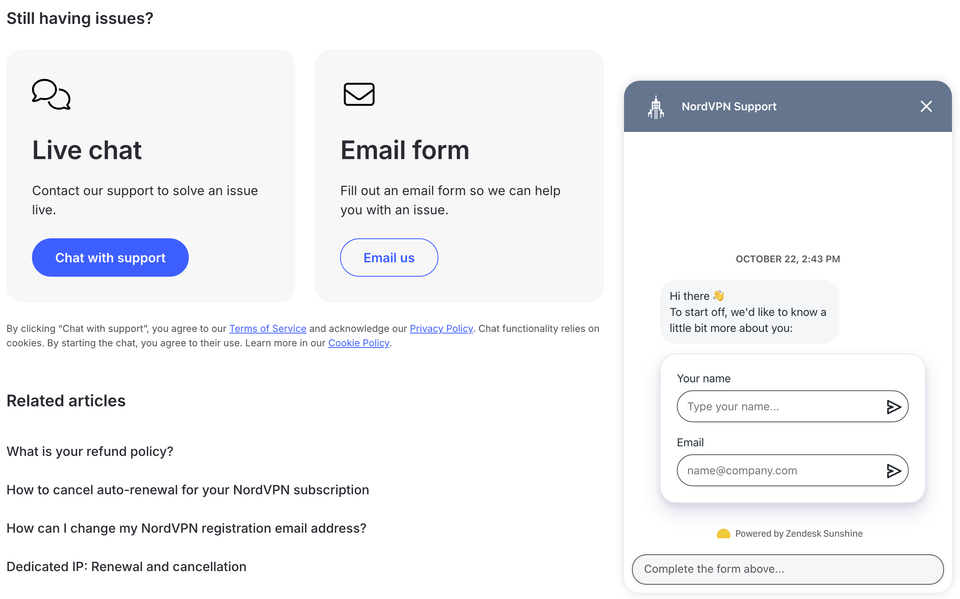
The note under the button says that starting a chat means accepting NordVPN’s terms and the chat’s cookies, and NordVPN warns that high traffic can occasionally delay replies.
NordVPN Support Email: support@nordvpn.com
There are two ways to email NordVPN:
- Write to support@nordvpn.com, the address NordVPN’s service terms give for questions about its VPN.
- Use the Email us form at the bottom of any help article: enter your email, describe the issue and click Submit. The answer arrives in your inbox.
Two other addresses exist for narrower jobs: support@nordaccount.com for questions about Nord’s general terms, and abuse@nordvpn.com for reporting abuse of the service. NordVPN doesn’t publish response times for email; the one deadline it states is for account deletion requests, which get a reply within 24 hours.
Does NordVPN Have a Phone Number?
No. NordVPN’s help center says it “does not offer phone support,” because it thinks problems are fixed more effectively through email and chat, where it can share visual guides.
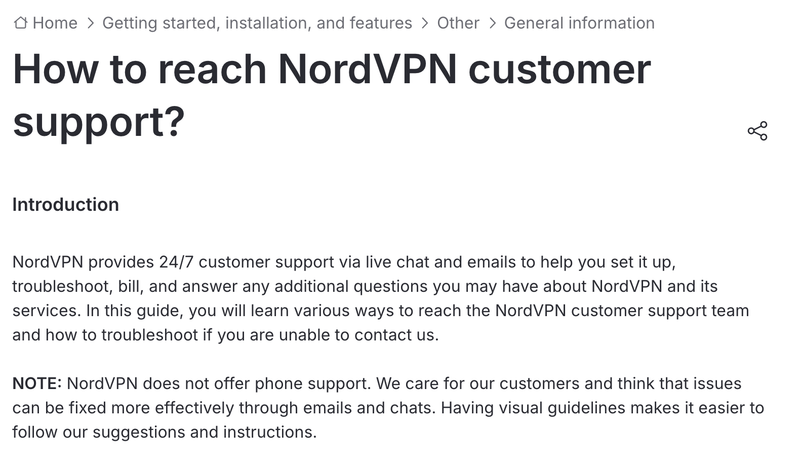
So any “NordVPN customer service number” in an ad, a search result or a forum post isn’t NordVPN’s. The only phone number in NordVPN’s legal terms belongs to its EU legal representative for Digital Services Act requests, and it isn’t a support line. If someone calls you claiming to be NordVPN, hang up and check through live chat. Its sister service Surfshark doesn’t offer phone support either.
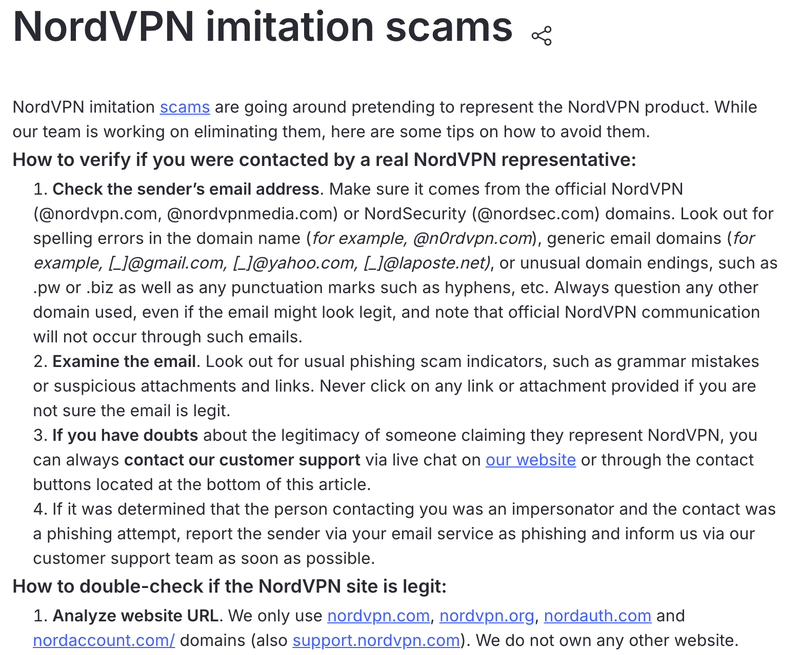
How to Spot Fake NordVPN Support
NordVPN keeps a page on imitation scams with the tells:
- Real emails come only from @nordvpn.com, @nordvpnmedia.com or @nordsec.com. Watch for look-alikes such as @n0rdvpn.com, and for Gmail or Yahoo addresses.
- Real websites are nordvpn.com, nordvpn.org, nordauth.com, nordaccount.com and support.nordvpn.com. NordVPN says it owns no other site.
- Real apps come from the App Store, Google Play or nordvpn.com. Fake copies do turn up in app stores, so pick the listing with the most reviews and downloads.
- If in doubt, ask live chat, and report phishing emails to your email provider and to NordVPN.
My own rule: never install software, read out a login code or share card details because someone contacted you first and said they were support.
What to Have Ready Before You Contact NordVPN
A few details save a round of back-and-forth:
- The email address on your NordVPN account. The chat asks for it, with your name, before anything else.
- For billing problems: the payment method, date and transaction ID of one of your older payments (not the latest), or a screenshot of it. NordVPN asks for exactly these when you’ve been charged twice.
- For app problems: which device you use and the app’s connection logs. NordVPN has guides to exporting logs on Windows, macOS, Android, iOS, Linux and its browser extension.
- What you’ve already tried, so the agent can skip it.
Several of NordVPN’s troubleshooting articles tell you to update or reinstall the app, so try that before you write: reinstall the current app from NordVPN’s website and see whether the problem survives.
Billing, Account and Connection Problems
Many common problems have a self-service fix or a guide of their own:
- Refunds and cancellations: auto-renewal is switched off in Nord Account under Billing, and refunds within 30 days go through live chat. Our guide on how to cancel NordVPN walks through both. If it’s the renewal price you object to, a new plan at NordVPN’s current deal costs less than renewing.
- Invoices and receipts: Nord Account → Billing → Billing history → Get invoice.
- Charged a different amount than expected: NordVPN’s list of common reasons includes the renewal price, sales tax, a different plan and a coupon that didn’t apply. Our NordVPN price guide lists the intro and renewal prices. If a code didn’t apply, our guide to NordVPN coupon codes explains the usual reasons.
- Can’t log in: see our fixes for the password verification error and for multi-factor authentication.
- “Session limit reached”: you’re over the 10-device limit or reconnected too often. NordVPN says to disconnect a device and wait 10 minutes before trying again; more in how many devices NordVPN allows.
- Won’t connect or keeps dropping: start with NordVPN not connecting and why NordVPN keeps disconnecting.
Other Ways to Get NordVPN Support
NordVPN Help Center
The help center has searchable articles on setup, billing, account settings and troubleshooting, most with screenshots. It’s also where the chat and email buttons live, so a quick search costs nothing. If you’re new to the service, our guide to what NordVPN is explains the apps, plans and features in one place.
NordVPN on Social Media
NordVPN lists its official accounts as Facebook, X, LinkedIn, YouTube and Instagram, and suggests them as a way to find its genuine website link. Never post your account email or payment details in a public reply.
When we messaged NordVPN on Facebook and Instagram in 2023, a reply took about 30 minutes during working hours, much slower than live chat:


NordVPN Live Chat Not Working?
NordVPN’s own checklist, in order:
- Check your internet connection.
- Turn off ad blockers and other extensions, then refresh the page.
- Clear your browser’s cache and cookies.
- Try a different browser.
- Try a different device.
- Send an email instead.
The chat relies on cookies, as the note under the button says, so a strict cookie blocker is a likely culprit when the window won’t open.
FAQ
Does NordVPN Have a Customer Service Phone Number?
No. NordVPN says it does not offer phone support; help comes through 24/7 live chat and email instead. Any number advertised as a NordVPN helpline isn’t NordVPN’s.
What Is NordVPN’s Support Email Address?
It’s support@nordvpn.com. You can also use the Email us form at the bottom of any article on support.nordvpn.com, and the reply goes to the address you enter.
Is NordVPN Live Chat Available 24/7?
Yes. Click Chat with support at the bottom of any help center article. An AI chatbot answers first and passes you to a human agent if it can’t solve the problem.
Can You Cancel Your NordVPN Subscription Using Live Chat?
Live chat handles refunds: within 30 days of your first purchase, an agent sends you a secure link where you click Refund. To simply stop auto-renewal you don’t need to chat; in Nord Account, go to Billing, click Cancel next to Auto-renewal and confirm.
How Long Does NordVPN Support Take to Reply?
The chatbot replies straight away. NordVPN doesn’t publish response times for its agents or for email, and says high traffic can occasionally cause delays. Account deletion requests are answered within 24 hours.
How Can I Tell If Someone Really Works for NordVPN?
Check the address. NordVPN staff email only from @nordvpn.com, @nordvpnmedia.com or @nordsec.com, and its only websites are nordvpn.com, nordvpn.org, nordauth.com, nordaccount.com and support.nordvpn.com. If you’re unsure, ask NordVPN’s live chat before you click anything.
The Bottom Line
For almost anything, open live chat from the bottom of any article on support.nordvpn.com: it’s 24/7, it starts refunds, and it hands you to a person when the bot is stuck. Use support@nordvpn.com when you need to attach files, and ignore any “NordVPN phone number,” because there isn’t one.
Not a customer yet? Read our NordVPN review, then get NordVPN’s Black Friday deal with 30 days to change your mind. If you’d rather pay less, Surfshark offers the same 24/7 chat-and-email support from $2.49 a month.
More NordVPN guides
-
 NordVPN Price 2026: How Much It Costs, Plans From $3.49/mo
-
 NordVPN Free Trial (2026): How to Get 7 Days Free, and Is NordVPN Free?
-
 How to Use NordVPN (2026): Setup, First Connection, Settings and Switching Locations
-
 How to Cancel NordVPN and Get a Refund (2026)
-
 NordVPN Not Connecting: All Quick Possible Solutions
-
 How to Uninstall NordVPN Completely on Any Device (2026)

