
IronMouse – in her channel’s own words, “that weird pink haired Puerto Rican demon vtuber” – streams games and chat to a big audience on Twitch and YouTube. NordVPN has worked with her on sponsored videos, whose descriptions carry a NordVPN link that adds 4 extra months when you commit to two years.
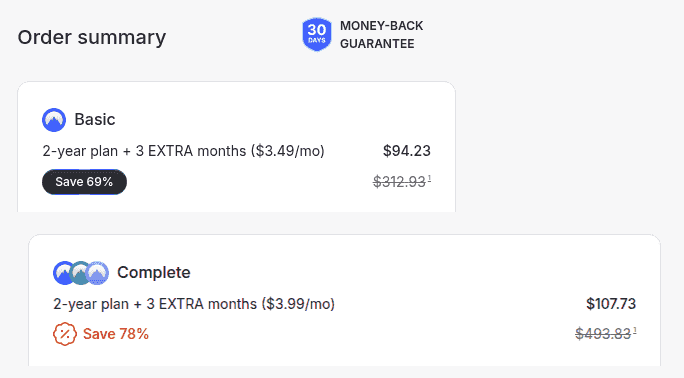
You can match her link’s price without it. NordVPN’s public deal knocks as much as 75% off, adds 3 months, and when we checked in September 2026, two years of Basic cost $94.23.
The IronMouse Offer in Five Points
- Where: the description of a NordVPN-sponsored IronMouse video
- Bonus: 4 extra months on 2-year plans
- Price: the same totals NordVPN charges on its public deal
- Code: none – just the link
- Refunds: 30 days, whichever route you buy through
Her Link vs NordVPN’s Public Deal
The figures in September 2026:
| IronMouse’s link | NordVPN’s public deal | |
|---|---|---|
| Basic – 2 years | $94.23 | $94.23 |
| Complete – 2 years | $107.73 | $107.73 |
| Prime – 2 years | $188.73 | $188.73 |
| Extra months | 4 | 3 |
| Access | A sponsored video’s description | One click here |
| Money-back guarantee | 30 days | 30 days |
Every plan comes out even.
Unlocking the Same Price, Step by Step
- Click through to NordVPN’s deal.
- Keep 2 years selected.
- Choose Basic to game and watch, Complete if you stream yourself.
- Pay by card, PayPal or cryptocurrency at checkout.
- Install it on your gaming PC, phone and laptop – 10 devices per account.
Streamers: Keep Your IP Address Off the Table
Streamers and the people who watch them share one weak spot: an IP address is enough to estimate where you live and to knock you offline with a DDoS attack mid-stream. It leaks in more ways than you’d think:
- IP-logging links. A shortened link dropped in chat can record the IP address of everyone who clicks it.
- Peer-to-peer game lobbies. Some games connect players directly, which exposes addresses to everyone in the match.
- Servers someone else runs. Joining a community game server hands its owner your address.
- Your own screen. A network settings window or speed-test result caught on camera can show your IP address to everyone watching.
With NordVPN connected, each of those sees a NordVPN server’s address instead of your home connection. Pair it with a few habits: don’t click unknown links on stream, keep location details out of your overlays, and switch on two-factor authentication for Twitch and YouTube. There’s more in our guides to NordVPN’s DDoS protection and whether streamers need a VPN.
Going Live Through a VPN: Split Tunnelling for Your Setup
A VPN protects you, but pushing a high-bitrate stream through an extra server isn’t always ideal. NordVPN’s split tunnelling, in its Windows and Android apps, lets you decide what goes where:
- Keep inside the VPN: your browser, chat apps and anything you open from chat.
- Let it skip the VPN: your streaming software, if uploads stutter through the tunnel.
- Test before you go live. Run a private test stream on a nearby NordVPN server first – with NordLynx, you may find you don’t need split tunnelling at all. If the stream still drops frames, lower the bitrate a notch before blaming the VPN; upload bandwidth is usually the bottleneck.
Our guide to using NordVPN with Twitch covers the viewing side.
Which Plan Fits Your Setup?
| Plan | 2-year price | Who it suits |
|---|---|---|
| Basic | $94.23 ($3.49/month) | Viewers and players: the VPN, NordLynx, Meshnet and split tunnelling |
| Complete | $107.73 ($3.99/month) | Streamers: adds a password manager for all those accounts, 1 TB of cloud storage, anti-malware with browsing protection, an ad and tracker blocker, monitoring of your personal details and call and message protection |
| Prime | $188.73 ($6.99/month) | Public figures: everything in Complete, plus identity theft insurance of up to $1 million (Incogni, which asks data brokers to delete your details, is a $4.49-a-month add-on on any plan) |
If you’re watching and playing, Basic covers you. If you stream, Complete earns its place – above all for the password manager.
On Every Plan, No Matter the Tier
- 7,000+ servers in 150 countries
- NordLynx for fast connections
- Meshnet, for private co-op sessions over encrypted links
- A kill switch, Double VPN and obfuscated servers
- An audited no-logs policy
- 10 devices and a 30-day refund window
Is NordVPN Worth It for IronMouse Fans?
For viewers who game and fans thinking about streaming, yes. It keeps your IP address away from chat links and game lobbies, it’s quick enough for live content, and Complete adds the account protection a channel needs. If you only watch, Basic is plenty.
Pros
- IronMouse’s prices without the video
- Hides your IP from chat links and game lobbies
- Split tunnelling on Windows for streaming setups
- A password manager on Complete for all your accounts
Cons
- Streaming through the tunnel can take some tuning
- Any VPN adds a little latency to live streams
Surfshark: More Devices, Smaller Price
Surfshark costs less and has no device cap – handy for a streaming PC, a gaming PC and every phone in the house. Its 2-year Starter plan is down to $2.49 a month – $67.23 across 27 months – with up to 85% off and 3 months added, and Bypasser, its split-tunnelling tool, can let your streaming software skip the VPN too.
FAQs
Is There an IronMouse NordVPN Coupon Code?
You won’t need one. The NordVPN link under her sponsored videos carries the offer and applies it when the page opens, and there’s no code to find for NordVPN’s public deal either.
How Much Is NordVPN Through IronMouse’s Link?
Identical to the public deal. Our October 2026 comparison found the same three 2-year totals on both: $94.23 (Basic), $107.73 (Complete) and $188.73 (Prime).
Can I Get a Refund After Using the NordVPN IronMouse Discount?
Yes, within 30 days of buying. NordVPN’s money-back guarantee covers purchases through her link and through the public deal, and live chat is the quickest way to ask.
Can a VPN Protect Streamers From DDoS Attacks?
It makes you a harder target. A DDoS attack needs your IP address, and with NordVPN connected, games, sites and links only see the VPN server’s address. Keep it on whenever you play online or click links from chat.
Will a VPN Slow Down My Twitch Stream?
It can add a little latency, since your stream takes an extra hop. Use a nearby server, or on Windows use split tunnelling to let your streaming software bypass the tunnel while everything else stays encrypted.
End of Stream
Her link and NordVPN’s public deal carry identical 2-year prices across the board. Get NordVPN at that price here, keep your IP address out of chat’s reach, and use the 30-day guarantee if it doesn’t fit your setup.
More NordVPN guides
-
 NordVPN Coupons, Promo Codes & Deals November 2026: Up to 78% Off
-
 NordVPN Free Trial (2026): How to Get 7 Days Free, and Is NordVPN Free?
-
 NordVPN Influencer Codes 2026: YouTuber Deals
-
 NordVPN Pierogi Deal: Scammer Payback Offer (2026)
-
 NordVPN Internet Historian Deal & Code (2026)
-
 NordVPN Jacksepticeye Deal: Price & Bonus Months (2026)

