
Nakkida streams on Twitch, where she’s best known for GTA V roleplay, and NordVPN has sponsored her content. The offer she shares gives her community four extra months on a 2-year NordVPN plan, and her link applies it automatically.
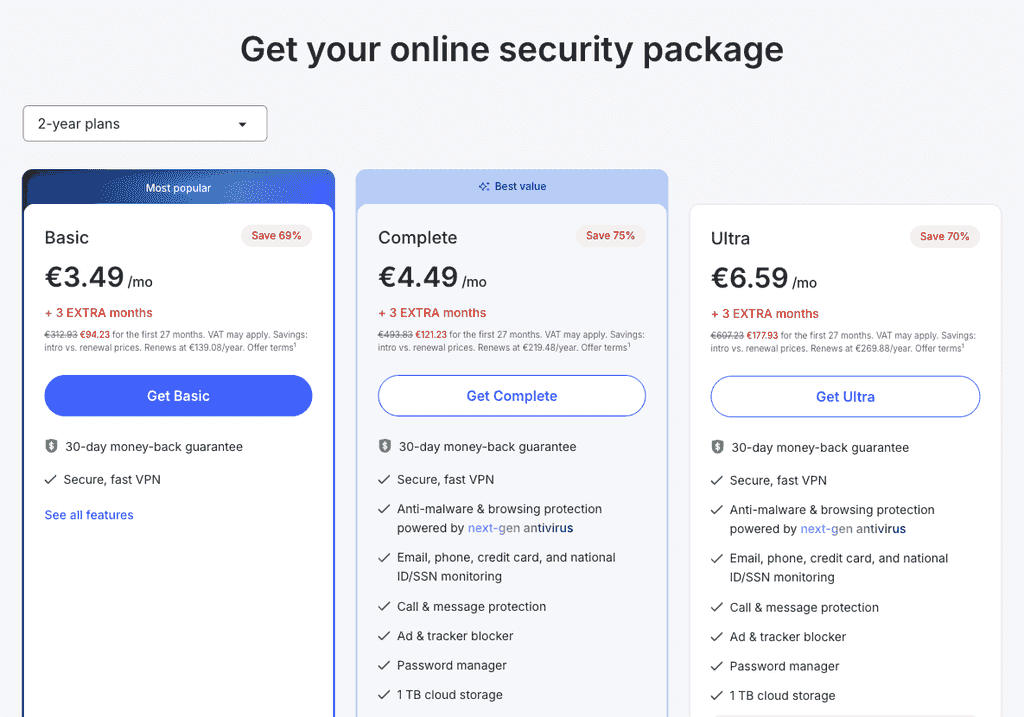
Her viewers aren’t the only ones who can pay that price. The discount NordVPN offers everyone (up to 75% off, and a bonus of 3 months) matches her price on every 2-year plan; on 28 September 2026 Basic stood at $94.23. One click below opens it.
The Nakkida Offer in Four Points
Nakkida’s NordVPN link opens NordVPN’s “Exclusive deal” page. In short:
- 4 extra months, added to whichever 2-year plan you choose
- Applied automatically – the link loads the offer, so there’s no code to copy
- Unchanged 2-year prices – Basic is still $94.23
- A 30-day money-back guarantee, as with every NordVPN plan
Price Check: Nakkida’s Link and the Public Deal
Checked side by side on 28 September 2026:
| Nakkida’s link | NordVPN’s public deal | |
|---|---|---|
| Basic (2 years) | $94.23 | $94.23 |
| Complete (2 years) | $121.23 | $121.23 |
| Ultra (2 years) | $177.93 | $177.93 |
| Extra months | 4 | 3 |
| How you get it | The link in Nakkida’s sponsored content | One click from this page |
| Refund window | 30 days | 30 days |
Every plan lands on the same total either way, shown in your local currency before you pay.
Five Steps to Checkout
- Open NordVPN’s deal page – no stream archive or panel to dig through.
- Make sure 2 years is the selected term.
- Pick a plan – the next section explains which suits a streamer.
- Add your email address, then choose how to pay (card, PayPal or crypto).
- Set up your streaming PC first, then your phone: one account covers 10 devices.
Basic, Complete or Ultra for a Streamer?
Basic costs $3.49 a month – $94.23 in total – and covers the VPN side of streaming: every server, NordLynx, Meshnet, split tunnelling and the kill switch.
Complete ($4.49 a month) is the one we’d choose if you stream yourself. Chat is full of links, and Complete’s browsing protection blocks many known malicious sites before they open. It also brings a password manager for the pile of accounts a streamer juggles, plus a heads-up when your email, phone, card or ID details surface in a breach.
Ultra, at $6.59 a month, brings Incogni, which chases data brokers to erase what they hold on you – worth a look for anyone with a public profile.
Going Live Without Giving Away Your Address
Streamers are targets in a way viewers rarely are. Your home IP address gives away roughly where you live and who your provider is, and it’s the handle someone needs to knock your connection offline mid-stream. NordVPN swaps it for a server’s address:
- Links in chat and DMs. “IP grabber” links record the address of whoever clicks. With NordVPN connected, what they log belongs to a NordVPN server rather than your home.
- Peer-to-peer game sessions. Some games connect players directly to one another. Behind NordVPN, a lobby only ever sees the VPN address – the idea behind NordVPN’s DDoS protection.
- Your broadcast software. If OBS or your encoder behaves better on your normal line, split tunnelling on Windows lets you pick the apps that skip the VPN while everything else stays covered.
A VPN can’t hide what the camera sees, though. Keep the usual streamer habits: no street view through the window, and no parcels with your address in shot.
Playing on Far-Away Roleplay Servers
Roleplay communities usually host their servers in one place, while players join from everywhere. A VPN can’t shorten that distance – it adds a stop along the way – so don’t expect it to cut your ping on its own. It can still help in a few situations:
- Bad routing. Internet providers sometimes send game traffic the long way round. A NordVPN server close to the game server can give it a straighter path, so test with and without the VPN. Our guide to VPNs and ping explains when it works.
- Busy-hour slowdowns. Some providers throttle gaming or streaming traffic in the evening peak. Encrypted VPN traffic is much harder for them to single out.
- Choosing the right location. Pick the NordVPN server nearest the game’s host, not the one nearest you, and stay on NordLynx, which adds little overhead. Our GTA 5 guide covers the game itself.
Baked Into Every NordVPN Plan
- NordLynx, built on WireGuard to keep latency low
- 7,000+ servers in 150 countries – there’s one near most game hosts
- Split tunnelling for Windows and Android users
- Meshnet, for reaching your own PC or streaming box remotely
- An internet kill switch and obfuscated servers as standard
- A no-logs promise tested by independent auditors, 10 devices per account and 30 days’ refund cover
Is NordVPN Worth It for Streamers?
If you stream, yes. Keeping your home IP out of chat traps and game lobbies is the most useful thing a VPN does for you, and NordLynx keeps the speed cost small. Viewers who only watch get less from it and can start with Basic. Full test results are in the NordVPN review.
Pros
- Same 2-year prices as Nakkida’s offer
- Keeps your home IP out of chat traps and lobbies
- Split tunnelling for broadcast software on Windows
- Ultra’s Incogni tackles data broker listings
Cons
- Can’t shorten the trip to a distant game server
- Malicious-link blocking needs Complete or Ultra
Lots of Gear to Cover? Surfshark
Surfshark suits a setup with more gadgets than NordVPN’s 10-device limit allows, because it has no cap at all. Its deal right now: up to 85% off, 3 bonus months on 2-year plans, and Starter billed at $67.23 – that’s $2.49 a month over 27 months – CleanWeb ad blocker included.
Check Surfshark’s Up to 85% Off Deal
FAQ
Does Nakkida Have a NordVPN Code?
Nakkida’s offer runs through her link, which switches the discount on the moment NordVPN’s page opens – no code involved. NordVPN’s public deal works the same way.
How Much Does NordVPN Cost With Nakkida’s Deal?
Nothing more than NordVPN’s public deal asks: $94.23 buys two years of Basic; Complete costs $121.23 and Ultra $177.93 (prices checked 28 September 2026).
Can I Stream on Twitch With NordVPN Turned On?
Yes. Connect to a nearby server and stay on NordLynx to keep your upload speed up. If your streaming software struggles, split tunnelling on Windows lets it use your normal connection while the rest of your PC stays on the VPN.
Will NordVPN Lower My Ping in GTA V?
Not by itself – a VPN adds a stop between you and the game server. It can help when your provider routes game traffic badly or slows it down, so compare a NordVPN server near the game server with your normal connection.
How Many Devices Can I Use NordVPN On?
Up to 10 at once on one account – a streaming PC, a laptop, phones and a tablet fit easily. A router running NordVPN counts as one device and covers everything connected to it.
Before You Go Live
Nakkida’s link and NordVPN’s public deal arrive at the same 2-year prices. Skip the search for her link: go straight to NordVPN’s discount, set it up before your next stream and take 30 days to decide.
Explore More
 Proton VPN Black Friday 2026: Up to 70% Off + When It Starts
 Who Owns Surfshark? Owners, Headquarters and NordVPN Ties (2026)
 Surfshark Coupon & Promo Codes October 2026: Up to 85% Off
 Is NordVPN Good, Safe and Worth It in 2026?
 Who Owns NordVPN? Owners, Investors and Where It’s Based (2026)
 NordVPN Coupon & Promo Codes October 2026: Up to 75% Off

