
Apple TVs are among the best in the market, and there’s a lot of good content on their corresponding Apple TV+ channel. But to truly unlock the full potential of your Apple TV, NordVPN is the best.
Why NordVPN? It packs incredible streaming speeds (27Mbps on my 30Mbps line), a native tvOS app for newer Apple TVs, Smart DNS and router support for older ones, and it was faster than ExpressVPN in my tests. But there’s more. If not NordVPN, try Surfshark for unlimited devices at the lowest price, ExpressVPN for the easiest Smart DNS setup, CyberGhost for its streaming-dedicated servers, and IPVanish for pre-configured routers.
So, if you just got an Apple TV or subscribed to Apple TV+ and want to get the most out of it, you’re in the right place.
Top 3 VPNs for Apple TV (July , 2026)

Surfshark
Best for Apple households
- Unlimited device connections
- Fastest speeds in my tests
- Most affordable option

NordVPN
Best for Apple TV
- Native tvOS app
- Smart DNS and router support
- 27Mbps NordLynx speeds

ExpressVPN
Best for easy MediaStreamer setup
- Simple MediaStreamer setup
- Beginner-friendly device apps
- Pre-installed router options
By the end, you’ll know how to set up VPN routers or use AirPlay to stream on your Apple TV. So drop everything you’re doing, get comfortable, and read this to the end to find out more.
Trouble Streaming on Apple TV? Here Are the 5 Best VPNs
Are you watching something captivating and in a rush to get back to it? Here is a quick look at the best VPNs to boost your Apple TV performance.
- NordVPN – Best Overall Apple TV VPN With a Native tvOS App
- Surfshark – Unlimited Device Connections + Most Affordable
- ExpressVPN – Easiest Smart DNS Plus Apple System Integration
- CyberGhost – Streaming Dedicated Servers + Large Server Network
- IPVanish – Great Router Compatibility + Easy Setup
Now, despite all these being premium VPNs, they also all bring something unique to my list. It’s time to find out how they hold up to the litmus test.
The Best VPNs for Apple TV
And now to the meat of the matter.
The tests for this roundup were thorough, so all Apple TV users are guaranteed to get the best VPN recommendations.
Note: For all my speed tests, I used base internet speeds of 30Mbps.
Let’s roll!
NordVPN - Best Overall Apple TV VPN With a Native tvOS App

NordVPN is the best VPN for Apple TV I tested. It was the second-fastest VPN in my speed tests (and faster than ExpressVPN), it’s effortless on a newer Apple TV thanks to its native tvOS app, and it still has Smart DNS and router support for older boxes. Here’s how it fared in the tests
Apple System Integration

Like ExpressVPN, NordVPN is compatible with all portable Apple devices. You can therefore use AirPlay to mirror content from any of your encrypted devices to the Apple TV.
Additionally, NordVPN allows 10 simultaneous connections, the same as ExpressVPN’s Basic plan and three more than CyberGhost. This pales compared to Surfshark’s unlimited slots, but you can still get a lot done with ten.
NordVPN is also compatible with Apple’s M-series chips.
So if you own any latest Apple device running on these, NordVPN is a perfect fit.
Availability of Smart DNS

Before we get to Smart DNS, the big news: NordVPN now has a native tvOS app. On an Apple TV HD or 4K running tvOS 17 or later, you install it from the App Store, hit Quick Connect, and the whole box is protected over NordLynx, no workaround required.
For older Apple TVs, NordVPN has a Smart DNS feature for US services like Netflix Originals, Prime Video, Disney Plus, and Max. Using NordVPN’s Smart DNS feature sends your DNS requests through NordVPN’s DNS servers, which convinces streaming apps you’re in the right region. This allows you to watch what you want directly on your Apple TV.
However, understand that Smart DNS doesn’t protect you from snooping like a VPN. But you’ll get better speeds and the ability to bypass restrictions without the heavy lifting of a full-fledged VPN.
My NordVPN Apple TV guide covers the Smart DNS, router, and hotspot routes step by step.
Alternatively, just like ExpressVPN, you can skip using Smart DNS by choosing AirPlay.
Router Compatibility

If setting up Smart DNS or using AirPlay isn’t your style, try a VPN router. NordVPN is compatible with Asus, Netgear, Linksys, D-Link, etc.
They come with NordVPN already installed, saving you the hassle and time.
However, NordVPN dropped support for PPTP and L2TP/IPsec connections in 2018. Therefore, many routers that used to work with NordVPN may not function properly. So, before making any NordVPN router purchase, ask first.
Streaming Speeds

NordVPN is a fast VPN, but I didn’t expect it to edge out ExpressVPN.
The difference wasn’t big, though, as I registered average speeds of 27Mbps.
For the speed test, I used random servers while streaming the new alien thriller called Outer Range, starring Josh Brolin (whose last appearance on any TV show was in 2012). The streaming was smooth to the end.
One main reason for these fantastic speeds could be the NordLynx protocol. It’s significantly faster than all the other available NordVPN protocols while providing extra security.
Price

NordVPN costs about the same as ExpressVPN on a 2-year plan and isn’t the cheapest option here. Fortunately, you can get it at discounted rates through this link.
Pros
- Native tvOS app for Apple TV HD and 4K (tvOS 17 or later)
- Reliable Apple system integration
- Unblocks restricted content
- Blazing fast speeds (27Mbps, ahead of ExpressVPN)
- Has a Smart DNS
- Compatible with multiple routers
- 30-day money-back guarantee
Cons
- Ten simultaneous connections, not unlimited like Surfshark
- Some older routers no longer work with it
Surfshark - Unlimited Device Connections + Most Affordable

Surfshark is my best-value pick, and its most redeemable feature is unlimited simultaneous connections. I don’t need to tell you how convenient this is for something like AirPlay. Here’s how it fared in the tests.
Apple System Integration

Surfshark is compatible with all portable Apple devices.
This includes iPhones, iPads, and Macbooks. You can set up Surfshark on any of these devices and mirror what you need to watch on your Apple TV, or share an encrypted hotspot from a Windows PC (Surfshark needs the OpenVPN protocol for that).
Moreover, you can take advantage of the AirPlay feature by combining it with unlimited simultaneous connections.
This is the ideal VPN for people with lots of friends and family members. Everybody gets a piece of the action (provided the internet speeds can handle that many devices).
Native tvOS App

Surfshark ended its SmartDNS service in February 2026, so its native tvOS app is now the way to run it on your Apple TV. On an Apple TV HD or 4K with tvOS 17 or later, you download it from the App Store, sign in, and connect, just as with NordVPN’s app.
Unlike the old DNS setup, the app encrypts your traffic and changes your IP address, and you can pick servers in 100 countries rather than just the US.
Boxes that can’t run tvOS 17 still work with Surfshark through AirPlay or a router. If you’d rather change a DNS setting than run an app, NordVPN still offers SmartDNS for US services such as Netflix Originals, Prime Video, and Disney Plus (steps below).
Router Compatibility

If your Apple TV is too old for the app and AirPlay doesn’t cut it, how about a Surfshark-compatible router? Some common routers work very well with Surfshark, including Asus, DD-WRT, and Tomato routers.
However, as much as this provides blanket encryption for everything under your roof, the installation process is a little more involving.
Unless you’re good with networking, you’ll need the services of an expert to get things properly configured.
Streaming Speeds

Surfshark posted the fastest speeds on this list. The margin wasn’t huge compared to NordVPN and ExpressVPN, but I averaged speeds of about 28Mbps. This was impressive but not surprising. Streaming HD content was as easy as ABC.
And speaking of ABC, I had no idea it was available as a channel on Apple TV+. I streamed a bit of Grey’s Anatomy for the test, and everything worked fine. But I got to ask, will this show ever end?
Price
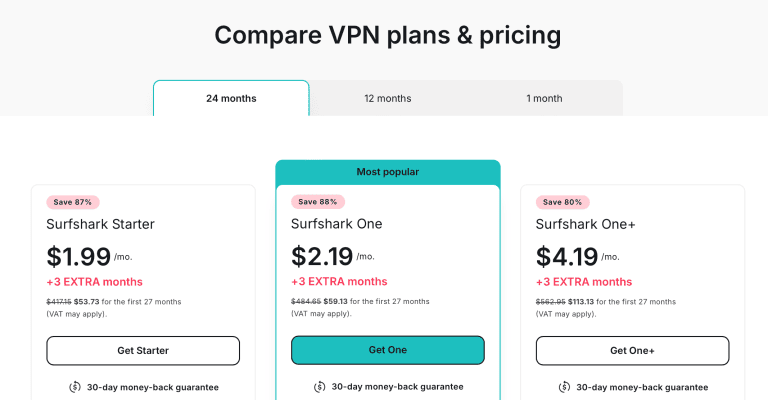
Surfshark is the most affordable VPN on this list.
On Apple TV, convenience and scale swing it to NordVPN: both now have tvOS apps, but Surfshark’s router setup is more involved than NordVPN’s, and its 4,500+ servers are a fair bit fewer. If you have a house full of Apple devices and don’t mind a little configuration, though, it’s the smartest buy here.
But you can still get it cheaper by taking advantage of these fantastic discounts.
Pros
- Reliable Apple system integration
- Unlimited simultaneous device connections
- Blazing fast speeds
- Native tvOS app (tvOS 17 or later)
- Compatible with multiple routers
Cons
- Could do with more servers
- Router setup is more involved than NordVPN’s
ExpressVPN - Easiest Smart DNS Plus Apple System Integration

As I already expressed, ExpressVPN has the easiest Smart DNS setup of any Apple TV VPN I tested, and it does most other things well too.
But how did it perform in the tests? Here’s a detailed breakdown.
Apple System Integration

Did you know you can use your Apple TV with all your other Apple devices? This is why you need a VPN that works with iPhone, iPad, and Mac.
Luckily, ExpressVPN does!
These native apps ensure you can use AirPlay to mirror content directly from your VPN encrypted devices to your Apple TV.
It’s even compatible with Apple’s latest chips (M1 & M2).
Its Basic plan now covers ten simultaneous device connections, the same as NordVPN, though Surfshark and IPVanish still go further with unlimited slots.
This is fine for most homes.
However, a big family that wants to watch Apple TV+ on their own devices may still prefer one of the unlimited options.
Availability of Smart DNS

Apple TV only gained native VPN apps with tvOS 17 (ExpressVPN has a tvOS app for those), so on older boxes you still can’t install a VPN directly. ExpressVPN’s SmartDNS feature, MediaStreamer, works on those boxes, but ExpressVPN says you can’t change locations with it, so it won’t unlock another country’s catalogue.
Compared to NordVPN’s and CyberGhost’s SmartDNS features, MediaStreamer is still the easiest to set up, but for region-locked shows you’ll want the tvOS app or a router. ExpressVPN keeps its podium spot on those and on speed, where it beat CyberGhost and IPVanish in my tests.
My ExpressVPN Apple TV guide walks through the MediaStreamer setup step by step.
Router Compatibility

The final way to bypass content blocks on your Apple TV is to get an ExpressVPN-compatible router.
Fortunately, ExpressVPN works with many routers, including Netgear, Linksys, and Asus. The best part? Some routers come with ExpressVPN pre-installed. You can find the complete list of ExpressVPN routers here.
Streaming Speeds

ExpressVPN is fast. I registered an average speed of 26Mbps, coming a close third to Surfshark and NordVPN. I watched See on my Apple TV using the highest quality possible. The quality was sharp, and no buffering or stuttering was registered.
Additionally, you’re not just limited to Apple TV+ content.
You can stream HBO Max, Paramount Plus, Disney Plus, BBC iPlayer, and even music sites like Qobuz and Pandora Radio.
Price

The downside – ExpressVPN costs more than Surfshark, CyberGhost, and IPVanish, and with NordVPN edging it on speed at about the same price, there was no case for putting it any higher than third. However, use these fantastic discounts to get a premium subscription at a lower price.
Pros
- Great Apple system integration
- Fast speeds (26Mbps in my tests)
- Unblocks restricted content
- The easiest Smart DNS setup (MediaStreamer)
- Compatible with multiple devices, including routers
Cons
- Pricier than budget picks like Surfshark and CyberGhost
- A close third on speed behind Surfshark and NordVPN
CyberGhost - Streaming Dedicated Servers + Large Server Network

CyberGhost isn’t known for overwhelming speeds (don’t get me wrong, it gets the job done). Still, it has one thing few rivals here can match: a large network of over 9,000 servers.
Let’s have a quick look at how it performed in the tests.
Apple System Integration

Like other alternatives on this list, CyberGhost is compatible with iPhones, iPads, and Macs. With this level of integration, you can AirPlay content directly from your devices to your Apple TV.
Furthermore, CyberGhost allows up to 7 device connections, a little fewer than NordVPN (ten) and ExpressVPN (ten to 14, depending on the plan). That should still serve your needs if you have company around.
Availability of Smart DNS

CyberGhost still has Smart DNS, but its own help center now says the feature no longer works with streaming services, so I wouldn’t count on it to unblock shows on your Apple TV.
A Smart DNS also doesn’t offer encryption, so you’d want the VPN’s protection anyway. Good thing it comes bundled up with the VPN itself.
For Apple TV streaming, AirPlay from a protected iPhone or Mac, or one of the routers below, is the dependable route.
Router Compatibility

CyberGhost is compatible with DD-WRT routers, Netgear, Linksys, Asus, and Tomato routers. They all come with CyberGhost installed already, so it’s a matter of plug and play.
The biggest benefit you’ll get from this is the blanket coverage of all your devices, including Apple TV. This effectively eliminates the need for Smart DNS or AirPlay.
Streaming Speeds

As I said at the beginning, CyberGhost isn’t a speed powerhouse like Surfshark, ExpressVPN, or NordVPN. I averaged speeds of about 23Mbps, which isn’t far from the more prominent players.
The good news is that you’ll probably score higher if you have faster base internet speeds.
I watched The Outlaws for the speed test, and the experience was smooth.
I used different servers to ensure it wasn’t a fluke – it wasn’t.
CyberGhost gets the job done.
In addition, CyberGhost is the only one on this list with streaming dedicated servers. You don’t have to waste time finding the best server for your Apple TV+ streaming. So give it a try and see how things play out for you!
Price

CyberGhost is relatively cheap and shouldn’t dent your pocket.
You can use this link to get your hands on juicy discounts before the offer runs out.
Pros
- Great Apple system integration
- Relatively fast speeds
- Streaming-dedicated servers
- Compatible with multiple routers
Cons
- The speeds need improvements
- Only allows up to 7 device connections
IPVanish - Great Router Compatibility + Easy Setup

IPVanish has the best score in router compatibility, but that isn’t the only area where it excelled. This is how it performed in the tests.
Apple System Integration

IPVanish works with all mobile Apple devices and Mac.
The installation process is straightforward. With this, you can use AirPlay to mirror everything you need onto your Apple TV for that crisp and clear viewing. You can get around any censorship with this without having to turn into a software developer overnight.
Furthermore, like Surfshark, IPVanish has no limit on the number of devices you can hook up on the same account.
So, you get more wiggling room when mirroring content on your Apple TV. Yet another perfect match for users who want to set up Apple TV connections for multiple people.
Availability of Smart DNS

IPVanish doesn’t offer Smart DNS. I verified this by asking technical support about the feature, and they confirmed it.
Now, this isn’t a big blow to how you can use Apple TV.
After all, you still have AirPlay. But it’s always nice to have that Smart DNS option just in case other methods fail.
Router Compatibility

With Smart DNS out of the way, the good news is that IPVanish is compatible with multiple routers. Based on the information I gleaned from their website, IPVanish partnered explicitly with FlashRouters to design highly optimized routers for IPVanish.
They come pre-installed and pre-configured, so all you need is to get your hands on a router, and you’re set.
Streaming Speeds

Of all the options on this list, IPVanish was the slowest.
I averaged speeds of about 14Mbps, which was far from what I managed with the other four options. However, 14Mbps is still plenty to get things rolling. There also wasn’t any buffering.
Changing servers didn’t yield a big difference, but the critical bit is that this didn’t affect the performance of the Apple TV in a significant way. So don’t let the low speeds put you off.
Pricing

IPVanish is also among the cheapest VPNs, boding well for anyone looking for a cheap and convenient option. As usual, we also offer you great discounts through this link.
Pros
- Great Apple system integration
- Great user interface
- Unlimited simultaneous connections
- Has pre-configured routers
Cons
- The speeds need improvements
- No Smart DNS
Choosing a VPN for Apple TV: Tips to Consider
Now, how do you make the final decision on what VPN to go with? Here are the factors you should keep in mind.
- Apple System Integration: You won’t just be dealing with your Apple TV alone. As much as they’re among the top TVs in the market, only models running tvOS 17 or later can install a native VPN app. On anything older, you need other methods of getting the best out of your TV, so look for a VPN that works with iPhones, iPads, Macs, and other Apple devices. Fortunately, all the VPNs reviewed here will get you this.
- Availability of Smart DNS: A Smart DNS isn’t a make or break feature, but it sure helps if it’s available. Besides a native tvOS app, you have three main ways of accessing restricted content through your Apple TV: AirPlay, VPN router, or Smart DNS. Having the freedom to switch to any of the three when one doesn’t work is a factor you should pay attention to. So go for a VPN that has Smart DNS.
- Router Compatibility: Not many routers are VPN compatible, but a significant number of reputable router brands allow direct VPN installation. These usually come pre-configured to give all your devices an encrypted connection.
- Streaming Speeds: Streaming speeds are significant where Apple TV is concerned. Since it supports 4K content, you need a service that grants you the fastest speeds without buffering or lags. Surfshark, NordVPN, and ExpressVPN are the fastest for this.
- Simultaneous Device Connections: The ability to connect to as many devices as possible will make using options like AirPlay Additionally, more device connections mean more flexibility when you have friends and families who need a VPN for their Apple TV.
How to Set up a VPN on a Router?

Some routers come with the VPN services installed and configured.
But there are others where you may have to fold up your sleeves and handle on your own. Here’s a NordVPN router setup guide for Asus (Netgear and other brands are covered in my NordVPN router guide).
- Turn on your Asus router and connect it to your device. A computer is recommended.
- Open your browser and type 192.168.1.1 into the address bar, then sign in to the router dashboard with your admin username and password.
- Go to the VPN tab, open VPN Client, and select Add profile.
- Pick the OpenVPN tab, enter a description of your choice, and fill in your NordVPN service credentials (you’ll find them in your Nord Account dashboard under NordVPN > Manual setup).
- Download the .ovpn configuration file for your preferred server from NordVPN’s server recommendation page.
- Back in the router dashboard, click Choose File, select the .ovpn file you just downloaded, and hit Upload, then OK.
- Open the WAN tab, set Connect to DNS Server automatically to No, enter NordVPN’s DNS addresses (103.86.96.100 and 103.86.99.100), and click Apply.
- Return to the VPN Client tab, find your new profile, and hit Activate. A blue checkmark means your router is now configured with NordVPN, and your Apple TV is covered as soon as it joins the network.
How to Configure SmartDNS for Apple TV
NordVPN’s Smart DNS is included with every plan, and it’s the quickest way to unblock US streaming apps on an Apple TV that can’t run the native app. You need at least a 4th generation Apple TV and an active NordVPN subscription.
- With your VPN disconnected, log in to your Nord Account, open the NordVPN section, and enable SmartDNS (it registers your home IP address).
- Note the two SmartDNS addresses NordVPN shows you.
- On your Apple TV, go to Settings > Network > Wi-Fi, select your network, and choose Configure DNS > Manual.
- Enter the NordVPN SmartDNS addresses and confirm.
- Restart your Apple TV and start streaming. For screenshots of every step, follow my NordVPN Apple TV guide or the broader NordVPN SmartDNS guide.
How to Configure and Use Airplay With Apple TV

And now, for the final part, setting up AirPlay on Apple TV.
Here are the steps to follow.
- Start by connecting your device (iPhone, iPad, or Mac) to the same network as your Apple TV.
- Search for the content you want to stream, a video of anything.
- Now tap the AirPlay button and choose your Apple TV from the available devices.
Summary
| VPN Router | Smart DNS | AirPlay | |
|---|---|---|---|
| Setup Difficulty | Hard | Easy | Easy |
| US Netflix | Yes | Yes | No |
| Speed | Fast | Extremely Fast | Fast |
| Streaming Apps | Many | Few | Several |
| Additional Costs | Yes | No | No |
| Hide IP Address | Yes | No | No |
Where Is Apple TV Available?
Apple TV is available in the following countries. (Although the content may vary from one country to another.)
Anguilla, Antigua and Barbuda, Argentina, Armenia, Australia, Austria, Azerbaijan, Bahamas, Bahrain, Belarus, Belgium, Belize, Bermuda, Bolivia, Botswana, Brazil, British Virgin Islands, Bulgaria, Cambodia, Canada, Cape Verde, Cayman Islands, Chile, Colombia, Costa Rica, Cyprus, Czech Republic, Denmark, Dominica, Dominican Republic, Ecuador, Egypt, El Salvador, Estonia, Eswatini, Fiji, Finland, France, Gambia, Germany, Ghana, Greece, Grenada, Guatemala, Guinea-Bissau, Honduras, Hong Kong, Hungary, India, Indonesia, Ireland, Israel, Italy, Japan, Jordan, Laos, Latvia, Lebanon, Luxembourg, Macau, Malaysia, Malta, Mauritius, Mexico, Micronesia, Moldova, Mongolia, Mozambique, Namibia, Netherlands, New Zealand, Nicaragua, Niger, Norway, Oman, Panama, Paraguay, Peru, Philippines, Poland, Portugal, Qatar, Russia, Saudi Arabia, Singapore, Slovakia, Slovenia, South Africa, Spain, Sri Lanka, St. Kitts and Nevis, Sweden, Switzerland, Taiwan, Tajikistan, Thailand, Trinidad and Tobago, Turkmenistan, Uganda, Ukraine, United Arab Emirates, United Kingdom, USA, Venezuela, Vietnam, Zimbabwe
FAQ
Is Using a VPN for Apple TV Illegal?
Using a VPN for Apple TV isn’t illegal. You’re simply routing your internet connection through a VPN server in another country to access geo-blocked content.
However, some countries have strict laws on VPN use.
Check with a local attorney before using a VPN if you’re in one of these countries. Additionally, some streaming platforms (such as Netflix) are cracking down on users accessing content via a VPN. So while it isn’t illegal to use a VPN for Apple TV, you might have difficulty accessing some services with a VPN.
Is Apple TV+ the Same as Apple TV?
Apple TV+ is a streaming service from Apple that offers original programming, including original shows, movies, and documentaries from big-name Hollywood stars. Meanwhile, Apple TV is a hardware device that allows you to watch various streaming services, like Netflix, Hulu, and Amazon Prime.
Does NordVPN Work With Apple TV?
NordVPN is the best VPN I tested for Apple TV.
First, NordVPN has a native tvOS app for Apple TV HD and 4K models on tvOS 17 or later, plus Smart DNS for older boxes, allowing your Apple TV to stream censored content directly. Second, NordVPN offers blazing fast streaming speeds.
You won’t deal with buffering, and it can comfortably handle 4K streaming with ease.
Third, NordVPN is compatible with other Apple devices, allowing up to 10 simultaneous connections. You can use this to mirror Apple TV+ shows like Severance and Ted Lasso from any NordVPN compatible iPhone/iPad/Mac to your Apple TV.
Does Surfshark Work With Apple TV?
Surfshark is a popular VPN service that works with Apple TV.
Surfshark offers fast speeds, unlimited bandwidth, and access to a global network of servers. With Surfshark, you can unblock geo-restricted content from around the world, including popular streaming services like Netflix, Hulu, and BBC iPlayer.
What’s the Best Free VPN for Apple TV?
Free VPNs can work with Apple TV, but it’s never a good idea to use them due to their limited features and dodgy security and privacy.
A premium VPN like NordVPN would be the best choice for Apple TV.
It’s fast, secure, has a native tvOS app, and is compatible with other Apple devices.
The best part, it offers a 30-day money-back guarantee which means you can try it out risk-free.
What’s the Best VPN for Apple TV 4K?
NordVPN is the best VPN for Apple TV 4K. It averaged 27Mbps on my 30Mbps line, ideal for handling 4K shows and movies, and it’s highly secure and easy to set up.
Plus, it’s compatible with routers and other Apple devices, making it easy to use features like AirPlay. Top of all, it has a native tvOS app for Apple TV 4K (tvOS 17 or later) and a Smart DNS feature for streaming US apps directly on older boxes.
What’s the Best VPN for Netflix on Apple TV?
NordVPN is the best VPN for Netflix on Apple TV.
It can unblock the streaming service from anywhere, all thanks to its 8,400+ servers in 167+ countries, and is extremely fast. It’s also equipped with a native tvOS app and a Smart DNS feature. With either, you don’t need an intermediary device to stream shows on your Apple TV.
Conclusion
Every VPN on my list is reliable for Apple TV and Apple TV+.
However, NordVPN is the best. It edged out ExpressVPN in my speed tests and covers every Apple TV generation: a native tvOS app for the newer boxes, Smart DNS and routers for the older ones.
Think of the impressive speeds, the reliable Apple integration, and the availability of Smart DNS and router compatibility. These should unlock the full potential of your Apple TV.
As I let you get back to binge-watching your favorite Apple TV+ shows, don’t forget to grab my huge discount on NordVPN before it’s too late!





