
Samsung smart TVs run on a proprietary OS called Tizen TV, which isn’t compatible with most VPNs. Fortunately, NordVPN offers SmartDNS and router support, which makes it the best VPN for Samsung Smart TV.
NordVPN’s SmartDNS helps unblock restricted content anywhere and fast enough to handle 4K streaming.
But NordVPN isn’t the only reliable VPN service that works with Samsung Smart TVs.
There’s Surfshark with a budget price and unlimited connections (over a router or hotspot, since it retired its SmartDNS), ExpressVPN with MediaStreamer, CyberGhost with the largest server network, and Private Internet Access with the easiest SmartDNS setup.
Top 3 VPNs for Samsung TV (October, 2026)

Surfshark
Best for budget Samsung TV use
- Unlimited device connections
- Router and hotspot setups
- Buffer-free 4K streaming

NordVPN
Best for secure Samsung streaming
- Samsung-compatible SmartDNS
- 7,000+ unblocking servers
- Fast 4K streaming

ExpressVPN
Best for fast Samsung TV streams
- Fastest listed streaming speeds
- MediaStreamer support
- Unblocking servers in 113 countries
There are several ways to use a VPN on your Samsung Smart TV. You can install the VPN directly on a supported router, ensuring that the internet used on the smart TV is encrypted.
You can also set up an encrypted hotspot by sharing the internet from a VPN-compatible device like a smartphone and PC. Likewise, the Smart DNS feature allows you to whitelist your IP address on your network and then use that connection on your Samsung Smart TV.
You Can Stream on Your Samsung TV Securely With These 5 VPNs
Take advantage of any of these VPN services to unblock restricted content on your Samsung smart TV directly:
- NordVPN – Best Overall With Reliable SmartDNS
- Surfshark – Budget-Friendly VPN for Samsung Smart TVs
- ExpressVPN – Fastest Samsung Smart TV VPN With MediaStreamer
- CyberGhost – Best for Unblocking Content on Samsung Smart TVs
- Private Internet Access – Easiest Smart DNS Setup for Samsung Smart TVs
For all the speed tests, I used a base internet connection of 30 Mbps which is enough to handle 4K streaming. I’ll discuss how these VPNs fared in my tests below.
5 Best VPNs for Samsung Smart TVs
This section covers how each VPN works on Samsung Smart TVs, the specific streaming sites that work with Smart DNS, and a detailed guide on setting up SmartDNS.
NordVPN - Best Overall With Reliable SmartDNS

| Location | Smart DNS | Connections | Average Speeds | Best Deal |
|---|---|---|---|---|
| Panama | Available | 10 | 27 Mbps | Show Offer |
NordVPN offers SmartDNS, integrated into the NordVPN SmartPlay feature, to ensure faster and smoother content unblocking and streaming.
Like every SmartDNS service, this one doesn’t provide encryption, which might be a privacy blow but ensures faster streaming.
I conducted speed tests and averaged 27 Mbps, a megabit behind Surfshark and two behind ExpressVPN, and comfortably above the 25 Mbps that 4K needs. Thus, streaming the latest Barry episodes on HBO Max was buttery-smooth.
Currently, NordVPN SmartDNS-supported streaming services include the following:
- Amazon Prime Video (US region)
- Disney Plus (US region)
- Fox Now / Fox News (US region)
- Max (US region)
- Netflix Originals
- Paramount+
- Peacock TV
- Fubo TV
NordVPN is also compatible with several routers like Ubiquiti, Netduma, Netgear, MikroTik, and Peplink if Smart DNS doesn’t work for you.
So, you can install NordVPN on these routers and encrypt your entire internet connection or unblock content on the connected devices, like your smart TV set.
The advantage of the router method over SmartDNS is that you’re no longer restricted to unblocking US-only content and can now take advantage of other NordVPN servers.
Either way, one subscription covers ten devices alongside the TV, and the combination of a working SmartDNS, 7,000+ servers in 150 countries, and Threat Protection on the phones and laptops in the same house is why NordVPN sits ahead of Surfshark here.

NordVPN may not be as cheap as Surfshark, but you can get it cheaper through our amazing discounts before the offers run out.
Pros
- Offers SmartDNS that comes integrated with the SmartPlay feature
- Compatible with a select choice of routers
- 27 Mbps, which is enough to handle 4K streaming
- 7,000+ servers in 150 countries to unblock streaming services
Cons
- SmartDNS doesn’t offer encryption
Surfshark - Budget-Friendly VPN for Samsung Smart TVs
| Location | Smart DNS | Connections | Average Speeds | Best Deal |
|---|---|---|---|---|
| The Netherlands | Discontinued (router or hotspot) | Unlimited | 28 Mbps | Show Offer |
Surfshark is my runner-up for Samsung TVs, with 4,500+ servers in 100 countries and unlimited simultaneous connections on even its cheapest plan. So, unblocking restricted content wasn’t a problem for me.
I even streamed Peacock TV content, which is only available in the US, from my outside-the-US location without issues.
One correction before anything else: Surfshark has retired its SmartDNS feature. Its help center notice says SmartDNS stopped being supported on February 2, 2026, and its smart TV page confirms there’s no Surfshark app for Samsung’s Tizen, so the vendor’s own answer is to run Surfshark on a compatible router or share a mobile hotspot from a Windows PC and connect the TV to that. Surfshark supports hotspot sharing from Windows only, and you have to switch the app to OpenVPN first.
Surfshark’s smart TV page sends Tizen owners to the router, and that route has a real upside over any DNS-only setup: the TV’s traffic is encrypted, and you can pick any of the 100 countries instead of being limited to US catalogs. Surfshark is compatible with routers like Asus, NetDuma, and InvizBox, among many others. However, it lacks a router app for easy setup and usage like ExpressVPN, preferring a manual setup instead. My Surfshark Samsung TV guide covers the router and virtual-router setups.
Speed was never the problem. In my tests, Surfshark averaged 28 Mbps, the second fastest after ExpressVPN, so 4K streams on the TV had headroom to spare.
NordVPN edges it for Samsung specifically because its SmartDNS still works when you don’t want to touch the router; on price and device count, Surfshark is the better deal.
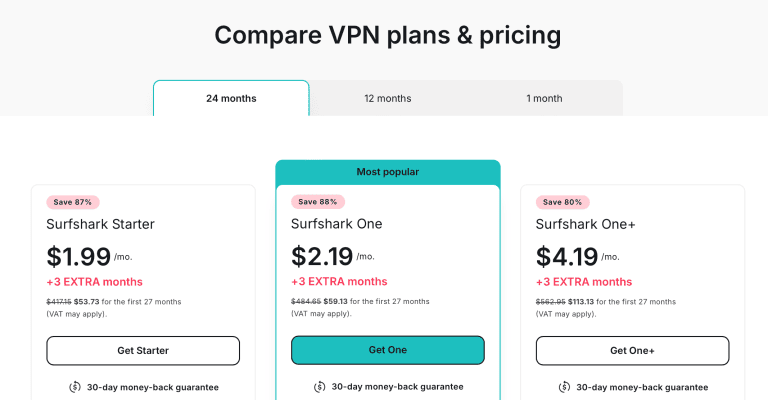
This VPN provider is one of the cheapest on this list, with a 30-day money-back guarantee. Combine that with our exclusive discounts, and you’ll save a tidy sum in the long run.
Pros
- Budget-friendly plans with unlimited connections
- Compatible with multiple routers
- 28 Mbps capable of buffer-free 4K streaming
- 4,500+ servers in 100 countries to unblock restricted content
Cons
- SmartDNS has been discontinued, so a router or hotspot is required
- Doesn’t offer a router app for easier setup
ExpressVPN - Fastest Samsung Smart TV VPN With MediaStreamer

| Location | Smart DNS | Connections | Average Test Speeds | Best Deal |
|---|---|---|---|---|
| British Virgin Islands | Available | 10 | 29 Mbps | Show Offer |
Like NordVPN, ExpressVPN has a SmartDNS feature called MediaStreamer.
I set it up on my Samsung TV since ExpressVPN doesn’t have a native app for Samsung smart TVs. All I needed to do was register my IP address on the official ExpressVPN website to use MediaStreamer.
On its own, ExpressVPN is one of the fastest VPNs in the market, but when combined with the SmartDNS feature, the speeds went through the roof.
For example, I got 29 Mbps, faster than all the rest on this list, to stream live NBA games on my Samsung Smart TV without buffering.
Alternatively, this reliable VPN service is compatible with various Asus, Linksys, and Netgear routers. The best part is that ExpressVPN provides a router app, something missing from the other providers, to ensure a faster VPN-router setup and seamless usage.
Most importantly, ExpressVPN’s router setup lets you pick a server location to bypass region-locked content, which MediaStreamer can’t do.
ExpressVPN’s own setup guide now says MediaStreamer isn’t a VPN and can’t change your location, so it won’t unblock another country’s streaming library.
That’s a shame, since PIA’s Smart DNS at least lets you pick other locations (CyberGhost’s no longer works with streaming services).

The only major drawback is that ExpressVPN costs more than Surfshark, CyberGhost, and PIA, and its Basic plan stops at ten devices where Surfshark’s cheaper plan has no limit, which is why it now sits third. You can still offset that price tag by taking advantage of our fantastic discounts.
Pros
- Offers Smart DNS service through a feature called MediaStreamer
- Compatible with several routers
- Offers a router app for easier setup and usage
- Fastest VPN with 29 Mbps for 4K streaming
- Servers in 113 countries to unblock streaming platforms
Cons
- MediaStreamer can’t change your location or encrypt traffic
- Expensive price plans, and the Basic plan stops at ten devices
CyberGhost - Best for Unblocking Content on Samsung Smart TVs

| Location | Smart DNS | Connections | Average Speeds | Best Deal |
|---|---|---|---|---|
| Romania | Not for streaming | 7 | 26 Mbps | Show Offer |
CyberGhost edges all the other VPNs on this list in one main area: the server network size. With 9,000+ servers, you get more unblocking options and don’t have to worry about running into overcrowded servers if you use the router option to connect your Samsung Smart TV.
CyberGhost still offers a Smart DNS feature, configured manually through the official CyberGhost website. It used to list 3 streaming DNS servers:
- Netflix US
- Netflix UK
- Hulu US
But its help center now says the feature is no longer compatible with streaming services, so it won’t unblock these; it only works for general DNS purposes and doesn’t offer extra security.
To stream, switch to a router compatible with CyberGhost, including brands like Netgear, Asus, and Linksys. Additionally, like other alternatives, you can create a hotspot through a CyberGhost Windows VPN app to share with your smart TV.
Since I don’t have a VPN-compatible router, I tested the SmartDNS option back when it still supported streaming, averaging 26 Mbps to stream the new Bridgerton season in 4K without buffering.

The VPN is priced reasonably and is the only one on this list with a 45-day money-back guarantee on its bigger plans. Furthermore, we have amazing deals to help you save more on this already-affordable provider.
Pros
- Windows hotspot sharing for smart TVs
- Compatible with multiple routers
- 26 Mbps capable of 4K streaming
- Largest server network to unblock restricted content
- 45-day money-back guarantee on longer plans
Cons
- SmartDNS no longer works with streaming services
- SmartDNS doesn’t offer encryption
Private Internet Access - Easiest Smart DNS Setup for Samsung Smart TVs

| Location | Smart DNS | Connections | Average Test Speeds | Best Deal |
|---|---|---|---|---|
| The US | Available | Unlimited | 26 Mbps | Show Offer |
Setting up the Smart DNS feature provided by Private Internet Access was the easiest on this list. All it took was adding a device through the Client Control Panel on the website and choosing my Samsung Smart TV, and that was that.
Unlike CyberGhost’s, PIA’s Smart DNS still offers a server in the UK.
Other locations include Japan, Germany, the Netherlands, and the United States. Furthermore, the Smart DNS doesn’t offer encryption, but the upside to this is getting better speeds.
Too much work? Don’t pull out your hair because PIA is compatible with routers like Asus, Merlin, and DD-WRT.
Like CyberGhost, I averaged 26 Mbps with PIA, enough to get me through the door regarding streaming 4K content. Catching up on season two of From was so smooth I forgot I was layering my connection over a VPN.

You can get your Private Internet Access subscription through our fantastic deals to enjoy secured connections on your Samsung smart TV.
Pros
- Offers SmartDNS that’s easy to set up
- It can be installed on some routers
- 26 Mbps capable of 4K streaming
- Unblocks geo-blocked content with ease
- Offers 5 Smart DNS servers, including non-US ones
Cons
- SmartDNS doesn’t offer encryption
- Slower than ExpressVPN
How to Set Up Smart DNS for Samsung TV via NordVPN?
Smart DNS has to be manually configured on the VPNs that still offer it. Here’s a detailed step-by-step guide to set it up on your Samsung smart TV through NordVPN:
- Subscribe to NordVPN.
- Open the NordVPN website, log in to your Nord account area, and go to the Nord Account Dashboard.

- Under Additional Features, click “SmartDNS” and register your IP address. The purpose of this is to whitelist the new IP address.

- Once you get the Smart DNS addresses, switch on your Samsung TV. Go to “Network,” then “Network Status.”

- Allow the TV some time to detect and verify the connection. Once that’s done, select IP Settings.
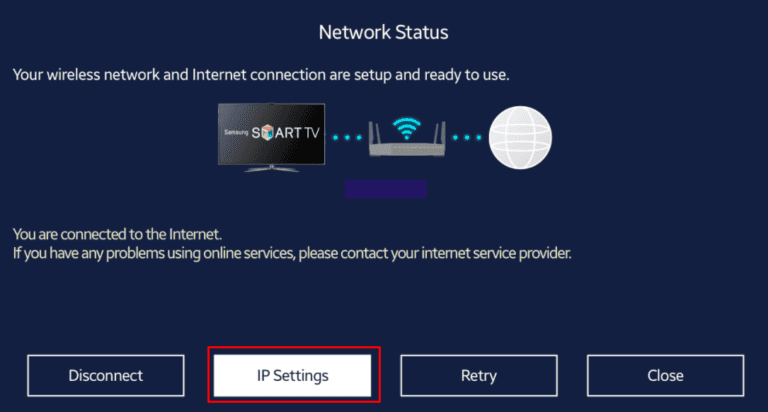
- Click “DNS Settings” and select “Enter manually.”

- Enter the NordVPN SmartDNS server addresses from earlier. They can be accessed from the Dashboard and are labeled Primary and Secondary DNS.

- Press Enter to save the new DNS settings and enjoy your streaming.
FAQs
Can a Free VPN Work on Samsung Smart TV?
A free VPN can’t work on Samsung Smart TVs. Free VPNs usually do not offer a Smart DNS feature and are generally incompatible with routers. Thus, it is best to use an affordable premium VPN like Surfshark, which supports router and hotspot setups and doesn’t break the bank, or NordVPN if you want SmartDNS.
Will a VPN Slow Down Internet Speeds on Samsung Smart TV?
A VPN might slow the internet speeds on your Samsung Smart TV if connected via a router or WiFi hotspots. However, you can bypass the encryption burden, which causes slow speeds, by only using the SmartDNS from your VPN service provider.
Ready to Test Run Your Samsung Smart TV?
The Smart DNS configuration process may look intimidating, but fortunately, it’s not the only way to secure your Samsung Smart TV connection. You can go the router way (ExpressVPN’s router app makes that the easiest, and it is the route Surfshark now recommends) or connect your smart TV via a VPN-encrypted Windows device hotspot.
NordVPN remains my top recommendation because it has the speed, security, and server network to unblock Netflix, YouTube, BBC iPlayer, Amazon Prime, and other Samsung smart TV content. So, grab these exclusive discounts and enjoy seamless streaming on your Samsung smart TV.





