
NordVPN is arguably the #1 VPN in the world right now.
It offers fast speeds, impenetrable security, and works incredibly well against internet restrictions.
And that’s not the only good thing NordVPN has going on.
After previously discontinuing their popular 7-day free trial due to misuse, the provider has now brought it back.
Additionally, NordVPN offers a 3-day trial on Android and a 30-day money-back guarantee, so there are a few ways to test its full feature suite without losing money.
In this guide, I’ll show you how to get the NordVPN free trial.
It’s all quite easy and risk-free!
Would you rather pay less than try it for free? Our NordVPN coupon codes page lists every NordVPN discount we’ve verified.
| 30-Day | Money-back guarantee (not a trial) |
| 14-Day | Not available |
| 7-Day | Activate NordVPN free trial |
| 3-Day | Android only (Google Play) |
| 1-Day | Not available |
Is NordVPN Free?
No – NordVPN has no free plan, and the free “NordVPN accounts” shared online are usually stolen ones that get locked. But you can use it without paying for a while:
- A 7-day free trial on NordVPN’s website for new customers in 15 countries, including the US, UK, Canada and Australia (1- or 2-year plan, card or PayPal).
- A 3-day free trial for new Android users who install the app from Google Play.
- A 30-day money-back guarantee everywhere else: you pay first and can ask for a full refund within 30 days.
Get NordVPN Free Trial Quickly: The Only Working Methods
NordVPN has provided some exciting free versions over the past few years.
While several are no longer available, you can obtain a decent free trial, if you know where to look.
After a thorough review, I was impressed to find out that the NordVPN free trial is not only safe, but also, it’s not limited in any way.
It works fine with Netflix and P2P traffic, which makes it ideal for both streaming and torrenting.
Simply put, with the risk-free option you get the same features and functionality as you would get with a paid subscription.

The catch is that the 7-day trial is only offered in 15 countries: France, the US, the UK, Canada, Australia, Japan, the Netherlands, Germany, Denmark, Finland, Norway, Sweden, Spain, Italy, and Poland.
But I’m guessing, the biggest question on your mind right now is, “how do I find their free trial”?
Currently, there are three working methods – a 7-day trial, a 3-day Android trial, and the 30-day money-back guarantee.
The 7-day trial is website-only, the 3-day trial is for new Android users on Google Play, and the money-back guarantee isn’t a trial at all: you pay up front and can ask for a refund.
It only takes a matter of minutes to get and activate a free trial of NordVPN.
However, once you get started, you should make sure you cancel before the trial ends if you don’t want to pay. But more on this later.
How to Claim NordVPN’s 30-Day Money-Back Guarantee?
NordVPN’s 30-day money-back guarantee lets you test the service for one month to make sure it meets all your needs.
It isn’t a free trial: you pay up front, and if NordVPN isn’t the right choice for you, you ask customer support for a refund within 30 days. It’s also quite easy to cancel.
Here is a quick walkthrough on how to buy NordVPN with the 30-day money-back guarantee:
1. Visit this hidden NordVPN page.

2. Click the ‘Start Now’ button and select your preferred plan.

3. Click on the ‘Continue to Payment’ button, enter your email to create an account.
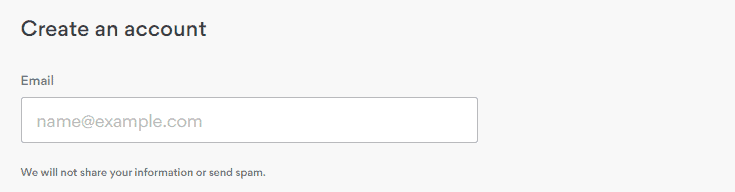
4. Next, choose your payment method.

NordVPN lets you pay by credit or debit card, PayPal, Google Pay, and cryptocurrencies, among others.
All of them are safe, but if you want added privacy, I suggest using Bitcoin or another cryptocurrency.
5. Once you’ve entered your payment details, click the button near the bottom to complete your purchase.

That’s it.
You’re now covered by the 30-day money-back guarantee.
You should receive a welcome email from NordVPN confirming your subscription.
How to Claim NordVPN’s 7-Day Trial? (Website Only)
Besides the money-back guarantee, NordVPN offers a completely free 7-day trial for new customers in the 15 countries above. You can only start it on NordVPN’s website, not through the Apple App Store or the Google Play Store.
You will still need to provide your payment details, but worry not, you won’t be charged during the 7 days.
Here are the steps you should follow to get the NordVPN 7-day free trial:
1. Go to NordVPN’s website (the ‘Activate NordVPN Free Trial’ button at the top of this page) and pick a 1-year or 2-year plan.
2. Enter your email, then pay by credit card or PayPal. Google Pay, UnionPay, Sofort, and crypto grey the trial out.

3. Download the NordVPN app for your device and log in. You now have full access to every feature and server for 7 days.
4. If you don’t want to keep NordVPN, cancel before the 7 days are up: in your Nord Account, open ‘Billing’ and click ‘Cancel’ next to ‘Free trial’ under ‘Subscriptions’.
Android users have one more option: a separate 3-day free trial for first-time users who install NordVPN from Google Play (not offered in Bangladesh, India, South Korea, or Sri Lanka). Google Play manages it, so you cancel it there.
Free Trial vs Paying Version
Many of the VPN providers in the market impose restrictions on their trial versions, which may range from data limits to the number of simultaneous connections.
And while these limitations are meant to encourage users to upgrade to a paid subscription, they can significantly affect performance.
Luckily, NordVPN does not impose any limitations on its 7-day trial.
When it comes to the nitty-gritty, the free option and the premium version are basically the same. With both, you get similar features and the same level of performance.
Likewise, the 30-day money-back guarantee gives you a normal paid plan with no limitations.
There is no data cap whatsoever, and you can use it on up to 10 devices at once, including your iPad, Chromebook, and Amazon Fire Stick.
How to Cancel NordVPN and Get Your Money Back Within 30 Days?
As mentioned, NordVPN offers an easy-to-cancel 30-day money-back guarantee.
As long as you ask for a refund within 30 days of your first purchase, you’ll get your money back (App Store purchases are refunded by Apple). On the 7-day trial, you haven’t paid yet, so just cancel.
NordVPN does not have a ‘Cancel my subscription’ button, and as such, you’ll need to instead turn off auto-renewal and contact customer support for a refund.
The process is straight forward, and it shouldn’t take more than a few minutes of your time.
Below is the step by step guide on how to cancel and get your money back:
1. On the NordVPN website, click on the ‘Log In’ button on the top-right corner.

2. Next, enter your NordVPN login credentials to sign in to your account.

3. Open ‘Billing’ in the left-hand menu and click ‘Cancel’ next to auto-renewal (or next to ‘Free trial’ during the trial).

4. Confirm by selecting ‘Cancel auto-renewal’. Your auto-renewal status changes to off, and NordVPN emails you a confirmation.
This stops NordVPN from charging you again when your plan renews.
So far, so good. But if you stop here, you won’t get your refund.
To get your money back, you’ll need to contact customer service.
Start a live chat with NordVPN’s support team and ask for a refund. They send you a link to your Nord Account, where you click ‘Refund’ next to your payment, pick a reason, and confirm.

NordVPN usually processes the request within a few hours, but depending on your payment method, the money can take up to 10 business days to reach your account.
What About 1, 5, 7, 14, 60 Days or 3 Months Trial?
Wouldn’t it be great if NordVPN also offered 2-months or even a 3-month free version?
Absolutely!
Unfortunately, in this realm, that would be highly unsustainable.
For now, you have to make do with the 7-day trial, the 3-day Android trial, and the 30-day money-back guarantee.
Previously, they did offer a superb, no credit card-needed 3-day free trial.
But that version ended; today’s 3-day trial is Android-only and needs a payment method in Google Play. Likewise, the provider does not have a 1-day, 5-day, or two weeks free version.
If you need to test the service, you can either opt for the 7-day trial or the 30-day money-back guarantee. Pick the trial if you’re eligible; if not, the money-back guarantee is your risk-free option.
NordVPN Used to Have a No-Card 7-Day Trial for PC
Up until 2019, NordVPN used to offer a 7-day trial for Windows.
Unlike today’s trials, the Windows free trial didn’t require credit card details or any other payment information.
Despite its massive popularity, NordVPN eventually removed the 1-week trial due to scammers using it to game the system.
Today’s 7-day trial works on PC too, since it covers your whole plan, and you can quickly obtain it using the steps that I illustrated earlier (check available coupons).
When signing up for the NordVPN trial, sometimes you may encounter the following error:
“Something went wrong. This could be caused by incorrectly entered information, a processing network issue or an exceeded spending limit.”
If this happens, just recheck your information to make sure everything is correct.
Otherwise, you should contact NordVPN to make sure their payment gateway is running as it should.
FAQ
How Long Is the NordVPN Free Trial?
The NordVPN free trial lasts 7 days. It comes with 1-year or 2-year plans bought on NordVPN’s website in 15 countries, including the US, the UK, Canada and Australia.
However, to avoid paying, you need to cancel your subscription before the trial period expires.
New Android users can also get a separate 3-day trial through Google Play. The 30-day money-back guarantee is a refund, not a trial.
Will You Be Charged If You Cancel Before the Trial Is Over?
You will not be charged a dime if you cancel your subscription before the trial is over. In fact, you should do so if you want to avoid getting charged. NordVPN will auto-charge you as soon as the trial period expires.
Keep in mind that the trial is only for first-time customers, so you can’t reset your account and get the free trial again.
How to Get NordVPN Free Trial Version Without a Credit Card?
I’m going to tell it to you straight. There’s no NordVPN trial without payment details: the 7-day trial needs a credit card or PayPal, and the 3-day Android trial bills through Google Play.
Is There a Trial of Dedicated IP With NordVPN?
No, NordVPN does not offer a trial of Dedicated IP. The provider provides dedicated IPs separately, and they are not a part of either the free or the paid version.
To get a dedicated IP, you need to buy it as an add-on, at checkout or later from your Nord Account dashboard.

Can I Use a Hacked NordVPN Account?
Basically, you can, but NordVPN takes strong measures against the abuse of its service. They actively monitor account dumps and block any publicly listed accounts. So, you shouldn’t allow yourself to be tricked into purchasing a hacked NordVPN account.
Do I Need to Pay NordVPN to Get a 30-Day Free Trial?
Yes. NordVPN’s 30-day option is a money-back guarantee, not a free trial.
This means you’ll initially need to pay NordVPN for your plan.
However, as a first-time customer, you get your money back if you ask support for a refund within 30 days.
NordVPN Free Trial Doesn’t Work
If your free trial isn’t working, you should start by checking your app configuration and network settings to make sure everything is set up correctly.
If the free-trial option is greyed out at checkout, switch to a 1-year or 2-year plan and pay by credit card or PayPal.
Additionally, you should confirm that your router is functioning correctly.
Slow internet speed can significantly affect the performance and even cause your VPN to stop working.
Lastly, you should check your account status. Make sure your trial package is still active or if your last subscription was successfully updated.
For instance, if you bought a plan and it still shows a ‘trial package’, this can prevent you from using your paid plan.
The Bottom Line
NordVPN is quite popular and comes with a robust feature suite that is sure to impress most VPN users.
But as the saying goes, “different strokes for different folks.”
While NordVPN is well-liked, the only way to know if the service ticks all the right boxes for you is to test it.
With the 7-day free trial, you can try NordVPN for one week without having to pay a single cent, as long as you cancel in time.
If the trial isn’t offered in your country, or you’d rather pay up front, the 30-day money-back guarantee lets you test the service risk-free instead.
Explore More
 Proton VPN Black Friday 2026: Up to 70% Off + When It Starts
 Who Owns Surfshark? Owners, Headquarters and NordVPN Ties (2026)
 Surfshark Coupon & Promo Codes October 2026: Up to 85% Off
 Is NordVPN Good, Safe and Worth It in 2026?
 Who Owns NordVPN? Owners, Investors and Where It’s Based (2026)
 NordVPN Coupon & Promo Codes October 2026: Up to 75% Off

