
Binging every episode of Frayed from outside Australia is easy with Surfshark since it’s the best VPN for ABC iview!
Simply connect to one of its 91 Australian servers and enjoy. Every AU city I tried unblocked iview on the first attempt – something no other VPN with a server pool this size managed.
It’s also the second-fastest VPN for iview, a mere 0.58 Mbps behind the leader, so you can watch every episode of Frayed in HD (720p) without buffering. And with unlimited simultaneous connections, the whole household can watch at once on a single plan.
There’s still more, but I’ll discuss everything in my complete guide (including alternative VPNs like ExpressVPN and PrivateVPN).
So, keep reading!
Top 3 VPNs for ABC iview

ExpressVPN
Best for speed and router setups
- Smallest speed drop in my tests
- All five AU servers work
- Dedicated router app

Surfshark
Best for ABC iview
- 91 AU servers in five cities
- Buffer-free 720p streams
- Unlimited simultaneous connections

PrivateVPN
Best for unshared Australian IPs
- Dynamic dedicated IPs
- Fresh unshared AU addresses
- Other AU servers unblock
ABC iview is as anti-VPN as Netflix – if not more so!
It even states in its VPN FAQ: “Major websites and products that stream media all blacklist VPNs to honour contracts with distribution companies or independent content creators.”
I get the reasoning. But that doesn’t make it any less frustrating, especially if you’re an Aussie traveling abroad.
Luckily, there are still VPNs that can bypass ABC iview’s VPN block.
I’ll discuss the best ones in this guide, so stay tuned!
Eager to Watch Frayed? Grab One of My Top VPNs for ABC iview and Get Started! (Spoiler Alert)
I’m obsessed! Sammy’s life is the perfect blend of comedy and drama.
So, if you want to watch Frayed ASAP, here’s a sneak peek at my top VPNs for ABC iview:
- Surfshark – Best VPN for ABC iview With Unlimited Connections (91 AU servers)
- ExpressVPN – Fastest VPN for Watching ABC iview Anywhere (5 AU servers)
- PrivateVPN – Private Dynamic Servers for Easy iview Streaming (4 AU servers)
- IPVanish – Watch ABC iview in HD Anywhere, Anytime (50+ AU servers)
- CyberGhost – Most AU Servers for Streaming ABC iview (150+ AU servers)
But after your binge session, revisit my guide to ensure you have the best VPN for your needs!
All the VPNs on my list have money-back guarantees, so you can easily switch if another catches your eye.
What Are the Best VPNs for ABC iview?
It’s time to dive into my detailed reviews of the most reliable VPNs for ABC iview!
You’ll discover what each VPN boasts and where they shine brighter than the others.
I also put every VPN through a speed test, so you can see firsthand what their AU servers offer.
Let’s get started!
Surfshark – Best VPN for ABC iview With Unlimited Connections (91 AU servers)

| Number of AU Servers: | 91 |
| Best Server for ABC iview: | Any AU city |
| Speed Drop: | 13.03 Mbps |
Surfshark is my top VPN for ABC iview, and my testing notes explain why: five Australian cities, five first-try unblocks, and a speed result within a whisker of the fastest VPN on this list.
I tried every Australian city Surfshark offers – Perth, Adelaide, Melbourne, Sydney, and Brisbane – at least once, and each one unblocked ABC iview on the first attempt.
No black screens, no reconnecting, no trial and error. That’s a big deal for a platform that blacklists VPNs as aggressively as iview does.

Those five cities share 91 AU servers between them – the second-largest Australian pool on my list – so I never ran into a congested one either.
Speed is the other half of the story. Surfshark placed second in my speed tests with a drop of just 13.03 Mbps, a mere 0.58 Mbps behind ExpressVPN.
My third-place contender, PrivateVPN, was a full 2.26 Mbps behind Surfshark (a pretty big distance).
So, it’s no surprise I enjoyed watching Sammy lament about her childhood in 720p HD with zero buffering.

It only gets better. Surfshark is one of two VPNs on my list with unlimited simultaneous connections (the other is IPVanish).
This means you, your friends, and your family can watch ABC iview on different devices at the same time, whenever you want.
Here’s a look at how Surfshark’s connections limit compares to the others on my list:
| VPN Provider: | Simultaneous Connections: |
|---|---|
| Surfshark | Unlimited |
| ExpressVPN | 10–14 |
| PrivateVPN | 10 |
| IPVanish | Unlimited |
| CyberGhost | 7 |
Moving on, Surfshark covers every ABC iview device – and with fewer workarounds than most.
There are apps for PC (Windows, macOS, and Linux) and mobile (Android and iOS), plus native apps for Apple TV, Android TV, and Fire TV, so the big screen no longer needs a router detour.
Surfshark ended its SmartDNS service in February 2026, so for Samsung, LG, and Hisense TVs or a PlayStation, you’ll use a manual router setup or a Windows PC hotspot set to OpenVPN – I walk through both in my Surfshark ABC iview guide.

The one thing Surfshark lacks is a dedicated router app like ExpressVPN’s. If a router is your only route onto the TV, ExpressVPN’s setup is genuinely easier. With the tvOS and Android TV apps in play, though, most people won’t need one.
Want a permanent, unshared Australian address on top? Surfshark sells a Dedicated IP add-on with a Sydney location (from $3.75/month), so iview can never lump you in with other VPN users.
Outside iview, Surfshark also unblocks Hulu, BBC iPlayer, Netflix, and Disney Plus, and its CleanWeb feature strips the ads and trackers off any free catch-up site you visit along the way.
Surfshark is also very affordable if you opt for a long-term plan, and every plan comes with a 30-day money-back guarantee.
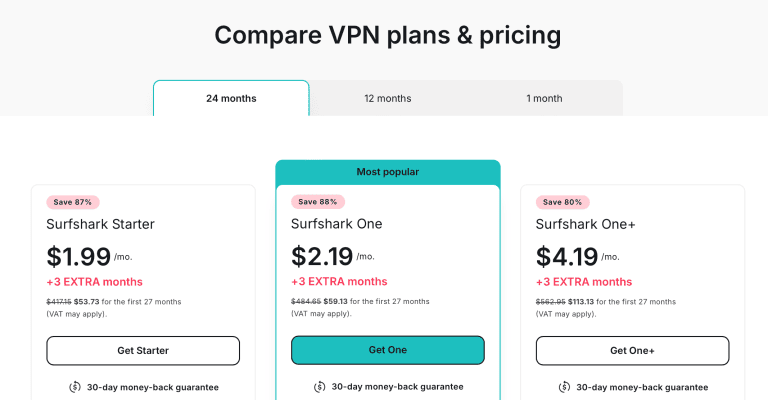
And don’t forget this HUGE discount!
Pros
- Unblocked ABC iview on every AU city I tested, first try every time
- 91 AU servers across five cities with HD streaming speeds (second-fastest VPN for iview)
- Unlimited simultaneous connections for the whole household
- Native Apple TV, Android TV, and Fire TV apps, plus router and Windows hotspot setups for the rest
- Sydney Dedicated IP add-on available
- Unblocks other streaming services like Disney Plus, Hulu, and BBC iPlayer
Cons
- No dedicated router app
- 0.58 Mbps behind ExpressVPN in my speed test
ExpressVPN – Fastest VPN for Watching ABC iview Anywhere (5 AU servers)

| Number of AU Servers: | 5 |
| Best Server for ABC iview: | All of them |
| Speed Drop: | 12.45 Mbps |
ExpressVPN is the fastest VPN I tested for ABC iview – and a unique pick in more ways than one.
It has the second-lowest number of AU servers (though you might consider it the lowest, thanks to PrivateVPN’s private dynamic servers).
But I don’t consider this a downside. Why?
Because when I tested ExpressVPN with the streaming platform, all five Australian servers let me stream ABC iview on the first try (and every try after).

This is really impressive, as some VPNs on my list require trial and error to get binging, like CyberGhost and IPVanish.
Meanwhile, ExpressVPN’s limited AU server selection means it’s easy to find a server that works, so you can start binging ASAP.
So, whether you’re an Australian traveling abroad or someone living outside Australia longing to binge Aussie classics, ExpressVPN will deliver.

The good news doesn’t end there.
I put all the VPNs on my list through a speed test to gauge the performance of their AU servers, and ExpressVPN placed first!
Before discussing the results, note that I’m in Slovakia – quite the distance from Australia.
My base speed was 93.87 Mbps. ExpressVPN gave me a mere speed drop of 12.45 Mbps.
The only VPN with a comparable speed was Surfshark, with a 13.03 Mbps drop – a gap of barely half a megabit that I never once noticed on screen.

In other words, I had no trouble streaming Killing Eve in HD on my PC and Smart TV (the app only has 720p as the highest quality)!
The picture was crystal clear and buffer-free.
Speaking of ABC iview devices, ExpressVPN has apps for most of them!
This includes PC (Windows, macOS, and Linux), mobile (Android and iOS), and some Smart TVs.
But where ExpressVPN doesn’t have apps, it has easy setups.
Plus, if you want to watch ABC iview on your PlayStation or a Smart TV without VPN support, you can use ExpressVPN’s router setup and app.

This is actually a crazy advantage. I can’t think of a single other VPN on or off my list with a dedicated router app.
Most require manual configuration.
Prefer a permanent, unshared Australian address? ExpressVPN sells a Dedicated IP add-on with a Sydney location (it’s bundled into the Pro plan), which is the surest way to stop ABC iview from ever blacklisting your connection.
Surfshark and CyberGhost sell one too, while PrivateVPN has a comparable feature – dynamic dedicated IPs – that also gets the job done. More on that later.
ExpressVPN does have a downside, though, and it comes down to what you get for the money.
Its Basic plan stops at ten simultaneous connections and gives you five AU servers to share between them. For the same money or less on a long-term plan, Surfshark matched it on unblocking in my tests, finished 0.58 Mbps behind on speed, covers every device in the house, and adds 91 AU servers plus CleanWeb. That’s what separates my top two. If the router app is a must for your setup, ExpressVPN is still money well spent.
To end on a good note, ExpressVPN is excellent at unblocking more than just ABC iview.
You can access all major streaming platforms, including Netflix, Hulu, BBC iPlayer, Disney Plus, and more.
And if speed and the router app top your wish list, ExpressVPN is worth the price.

But to help you save a little, here’s an exclusive discount!
Pros
- Unblocks ABC iview worldwide on every AU server
- 5 AU servers with HD streaming speeds (fastest VPN for iview)
- Compatible with all ABC iview devices: PC, mobile, Smart TVs, and PlayStation
- App for routers for easy streaming on devices that don’t support VPN apps
- Sydney Dedicated IP available as an add-on (or bundled with Pro)
- Unblocks other streaming services like Netflix, Hulu, and BBC iPlayer
Cons
- Ten simultaneous connections on the Basic plan (Surfshark has no limit)
- Second-smallest AU server pool on my list
PrivateVPN – Private Dynamic Servers for Easy iview Streaming (4 AU servers)

| Number of AU Servers: | 4 + Dedicated AU IP(s) |
| Best Server for ABC iview: | Dedicated AU IP(s) |
| Speed Drop: | 15.29 Mbps |
Are you wondering why the VPNs with the fewest AU servers are in second and third?
Like ExpressVPN, PrivateVPN is a unique entry.
Yes, it only has 4 AU servers. But there’s a catch.
PrivateVPN is the only VPN on my list that offers private dynamic servers (its dynamic dedicated IPs) on selected locations.

These are sort of like Dedicated IPs, except they change every time you reconnect.
For some activities, this is a burden. But for unblocking ABC iview?
It’s the ultimate way to gain access to your favorite Australian shows from anywhere in the world.
Think about it! You get a brand new, private IP every time you connect to Private VPN’s “Dedicated” AU server.
This means no one has ever used it before – so ABC iview can’t have it blacklisted. And every time you reconnect, you’ll get another new, unused IP.
I used this method numerous times to unblock iview, and it never failed.

This means watching Hard Quiz is as easy as opening the PrivateVPN app and connecting to the single “Dedicated IP” AU server.
That’s easier than ExpressVPN!
Plus, if you want to get technical, PrivateVPN has unlimited AU servers thanks to this feature, putting it ahead of even CyberGhost, which has 150+ AU servers.
But if you do run into issues with the “Dedicated IPs,” PrivateVPN’s other 4 AU servers also get the job done.
The only one I struggled with was “Australia – Perth,” though it worked the second time around.

Moving on, PrivateVPN is compatible with all ABC iview devices: PC, mobile, Smart TVs, and PlayStation.
The downside is that it doesn’t offer a dedicated router app, so you’re stuck with its manual router setups.
This is PrivateVPN’s first shortcoming.
It’s minor, as you can still watch Frayed on the big screen with extra effort. But considering how easy ExpressVPN makes it, it is disappointing.
Luckily, PrivateVPN’s second shortcoming is easy to overlook. It scored third in my speed tests, with a drop of 15.29 Mbps.
That might look like a colossal drop, but, as I said, I’m a ways away from Australia.

Overall, PrivateVPN was fast enough to watch ABC iview in HD without buffering.
It’s not as fast as ExpressVPN or Surfshark, but high-quality streaming is enough for me!
Lastly, PrivateVPN is another VPN that excels at unblocking other streaming platforms.
If you need a break from ABC iview, you can switch to BBC iPlayer, Netflix, etc.
It’s also one of the most affordable VPNs on my list!

Throw in this MAJOR discount, and you’ll save even more!
Pros
- Unblocks ABC iview worldwide on most AU servers (and all “Dedicated IP” servers)
- Unlimited “Dedicated IP” AU servers (new IP every time you reconnect)
- 4 AU servers with HD streaming speeds
- Compatible with all ABC iview devices: PC, mobile, Smart TVs, and PlayStation
- Unblocks other streaming services like Netflix and Hulu
Cons
- No router app
- Slower than ExpressVPN and Surfshark
IPVanish – Watch ABC iview in HD Anywhere, Anytime (50+ AU servers)

| Number of AU Servers: | 50+ |
| Best Server for ABC iview: | Any Sydney server |
| Speed Drop: | 15.78 Mbps |
IPVanish is another excellent VPN service for ABC iview, thanks to its 50+ AU servers and fast streaming speeds.
Let’s discuss those more.
First, while you can’t select individual servers, IPVanish lists its Australian cities – Adelaide, Brisbane, Melbourne, Perth, and Sydney – and the corresponding ping in its app, allowing you to choose the best connection for watching ABC iview.

Plus, that’s more servers than ExpressVPN and PrivateVPN (not counting the latter’s private dynamic servers). But, as always, there’s a catch.
One reason IPVanish sits in fourth is that not every AU server unblocked iview in my tests.
The city I struggled with most was Brisbane, while I had the most luck with Sydney. But that’s the good news!
Whenever I connected to a Sydney server, I was binging Starstruck in seconds flat.

I also had intermittent luck with the other cities, though I recommend just opting for a Sydney server if you want to avoid trial and error.
As for speed, IPVanish placed fourth in my speed tests – but still let me stream my favorite ABC iview shows in HD.
This isn’t a huge shock, as you don’t need a super-fast connection to watch videos in 720p (the highest quality iview offers).
Still, IPVanish only gave me a 15.78 Mbps drop. That’s far better than CyberGhost, with its 19.50 Mbps drop!

Let’s get the rest of the bad news out of the way.
First, IPVanish doesn’t have a Dedicated IP add-on or alternative feature.
It claims this is to keep its users’ privacy intact.
But having the option, especially for streaming geo-locked content like ABC iview, would be nice.

Finally, IPVanish isn’t as adept at unblocking content as the others on my list, even CyberGhost (which also lacks compared to my top three VPNs).
This means trial and (a lot of) error is necessary for unblocking services like Netflix (US, especially), Hulu, and Disney Plus.
But let’s end with good news! IPVanish supports all your ABC iview devices, from PC and mobile to Smart TVs and PlayStation.
Though, of course, the latter two are mostly restricted to support via router setups.
And, like the others (except ExpressVPN), there is no dedicated router app.
Still, it’s possible to watch Rose Matafeo kill it as Jessie on the big screen.

Next, IPVanish is the only other VPN on my list to offer unlimited simultaneous connections (as shown above).
So, if you and your friends want to have a Starstruck marathon from different locations using the same IPVanish account, you can do so!
(I may have found a new show to binge while writing this article…)
And lastly, IPVanish is a very affordable VPN!

Throw in this MAJOR discount, and you’ll save tons!
Pros
- Unblocks ABC iview worldwide on every AU, Sydney server I tested
- 50+ AU servers with HD streaming speeds
- Compatible with all ABC iview devices: PC, mobile, Smart TVs, and PlayStation
- Unblocks other streaming services like Hulu and BBC iPlayer, with trial and error
- Unlimited simultaneous connections
Cons
- No Dedicated IP add-on
- Slower than top three VPNs
- Not all AU servers unblock ABC iview
- Other streaming services require trial and error
CyberGhost – Most AU Servers for Streaming ABC iview (150+ AU servers)

| Number of AU Servers: | 150+ |
| Best Server for ABC iview: | No best server – trial and error required |
| Speed Drop: | 19.50 Mbps |
CyberGhost is the final VPN worth considering if you want to unblock ABC iview – and it has over 150 Australian servers!
That’s 3x what IPVanish offers and 50+ more than Surfshark, earning CyberGhost the title of “most AU servers.”
So, you might be wondering why the VPN is placed last? The biggest reason is that not every AU server unblocks ABC iview.
And as there are so many of them, it can take a minute to find a working one.

On top of that, you can only select from two Australian locations, meaning there’s a chance you get reconnected to the same server(s).
This is extremely frustrating when you’re trying to watch your favorite shows, especially on a time crunch.

That said, CyberGhost still unblocks ABC iview. It wouldn’t be here otherwise!
Specifically, of all the times I tested the VPN with iview, it took between 3 and 10 tries to find a working server.
There’s also a saving grace: a Dedicated IP add-on.
In other words, you can purchase a permanent, unshared Australian IP (in Sydney) that’s more likely to work with ABC iview all of the time.
And it’s affordable!

You can choose a 1 month, 1 year, 2 years, or 3 years subscription, with major savings on longer plans.
But even monthly, it’s only an additional $5!
CyberGhost’s Dedicated IP might also help with speed – another reason the VPN sits so low on my list.
It placed last in my tests, with a drop of 19.50 Mbps.

Luckily, that’s still fast enough to watch ABC iview in HD.
But if you decide to watch other streaming platforms that support 1080p and/or 4K, you might notice a tiny bit of buffering.
Speaking of other streaming platforms, CyberGhost is better at unblocking them than IPVanish.
But, again, its giant server network works against it – and its dedicated streaming servers don’t always fill the gaps.
Still, you can unblock Netflix, Hulu, Disney Plus, BBC iPlayer, and more after a few attempts.
Back on topic, CyberGhost supports all ABC iview devices: PC, mobile, Smart TVs, and PlayStation.
And though it doesn’t have a dedicated router app for devices that don’t support VPNs, its setups are super easy to follow.
Plus, you’ll appreciate CyberGhost’s affordable prices:

But you’ll appreciate this HUGE discount more!
Pros
- Unblocks ABC iview worldwide on some AU servers (trial and error required)
- 150+ AU servers with HD streaming speeds
- Compatible with all ABC iview devices: PC, mobile, Smart TVs, and PlayStation
- Unblocks other streaming services like Hulu and BBC iPlayer, with trial and error
- Affordable Dedicated IP add-on
Cons
- Speeds slower than other VPNs on this list
- Not every AU server unblocks ABC iview
- No way to select specific AU servers
What’s the Best VPN for ABC iview? (How to Decide)
ABC iview is a force to be reckoned with regarding VPNs. It’s as anti-VPN as major streaming services like Netflix and Hulu.
So, it makes sense that finding the best VPN for ABC iview is a challenge.
Not many VPN services unblock the streaming platform at all, let alone reliably. But the journey doesn’t have to be stressful.
If you’re struggling to make your final decision, this section is for you. Keep reading!
Before Binging Bliss, Ensure Your VPN Meets the Criteria in This Checklist!
The first step is taking a break from your VPN shopping spree and reviewing this checklist.
I filled it with must-have features that your ABC iview VPN needs to have. Take a look!
Reliably Unblocks ABC iview
Seems like a given, right? Well, it’s not.
Many VPNs will claim to unblock any streaming service, including ABC iview. But some are lying.
Don’t worry, though.
Confirming that your preferred VPN unblocks ABC iview is easy.
Just follow these instructions:
- Double-check that your VPN has a money-back guarantee. If it doesn’t, find a new one. VPNs without money-back guarantees are untrustworthy.
- Double-check that your VPN has Australian servers. You’ll need an AU server to access ABC iview at all.
- If everything checks out, purchase a subscription.
- Download, install and open your VPN app.
- Connect to an AU server and navigate to the ABC iview website or app.
- Create a free ABC iview account if you haven’t already. You’ll need an AU postal code.
- Start watching your favorite Aussie shows.
- If you get any error, a black screen, or somehow can’t access the site, your VPN isn’t reliable enough to unblock ABC iview. Ask for a refund.
Australian Servers
As mentioned above, your VPN needs to have Australian servers if you want to unblock ABC iview. Most of the time, the more AU servers, the better.
However, there are some cases, like ExpressVPN, where minimal AU servers play in its favor.
Namely, if your VPN is super-adept at unblocking iview, a lower number of servers means nothing.
Or, if it’s a VPN like PrivateVPN that offers dynamic “Dedicated IPs,” server count won’t matter because, technically, you’ll have infinite AU “Dedicated IPs.”
Here’s a refresher of the VPNs on my list and their AU server counts:
| VPN Provider: | AU Servers: | Best Server for ABC iview: |
|---|---|---|
| Surfshark | 91 | Any AU city |
| ExpressVPN | 5 | All of them |
| PrivateVPN | 4 + Dedicated AU IP(s) | Dedicated AU IP(s) |
| IPVanish | 50+ | Any Sydney server |
| CyberGhost | 150+ | Trial and error required |
Fast Streaming Speeds (HD)
Finding VPNs with fast enough speeds for ABC iview isn’t difficult, considering the streaming platform only supports 720p or lower quality.
But it’s worth aiming for VPNs that can support 1080p and/or 4K, just in case. You never know when iview might update its quality!
The best way to do this is to follow the same steps under “Reliably Unblocks ABC iview.”
However, this time, put your VPN through speed tests. It’s worth trying multiple AU servers and VPN protocols, as well.
Here’s an overview of how the VPNs on my list performed:
| VPN Provider: | Speed Drop: | Protocol: |
|---|---|---|
| Surfshark | 13.03 Mbps | WireGuard |
| ExpressVPN | 12.45 Mbps | Lightway UDP |
| PrivateVPN | 15.29 Mbps | OpenVPN UDP |
| IPVanish | 15.78 Mbps | OpenVPN UDP |
| CyberGhost | 19.50 Mbps | WireGuard |
Compatible With ABC iview Devices
ABC iview is available on numerous devices, including PC, mobile, Smart TVs, and PlayStation. So, ensure your VPN supports the device(s) you use to binge your favorite Aussie content.
Remember – PlayStations and some Smart TVs don’t support VPNs. If these fall under your preferred device(s), you need a VPN that supports routers.
There’s also a chance a SmartDNS feature will do the trick, but finding one that supports an Australian IP address is challenging.
If you want the easiest solution, grab this discount on my top VPN for ABC iview right now! Surfshark’s native Apple TV, Android TV, and Fire TV apps skip the router step entirely, and my Surfshark ABC iview guide covers the router and Windows hotspot setups for everything else.
BONUS: AU Dedicated IP
A bonus feature to consider is an AU Dedicated IP.
This is a permanent, unshared server that only you have access to.
In other words, it’s more likely to reliably unblock ABC iview, as the platform can’t associate it with other VPN users.
The downside is that Dedicated IP add-ons cost extra. Three VPNs on my list – Surfshark, ExpressVPN, and CyberGhost – sell a Sydney Dedicated IP this way.
An even better solution is to use a VPN like PrivateVPN with dynamic Dedicated IP servers. These change on every connection but stay unshared.
And in the case of unblocking content, dynamic IPs work more in your favor, as you’ll get a brand new IP every time you reconnect.
Will a Free VPN Unblock ABC iview?
A free VPN won’t unblock ABC iview. It’s rare to find a premium VPN that unblocks the streaming platform, let alone a free one.
On top of that, free VPNs are unlikely to have AU servers or adequate speeds to stream in 720p.
And that’s not even considering that many free VPNs are untrustworthy and possibly malware.
Stick to a reliable premium VPN for ABC iview if you want unlimited access anywhere, anytime.
How to Watch ABC iview Outside Australia?
It’s easy to watch ABC iview outside Australia with the right VPN! Here’s how:
- Choose one of my recommended VPNs (or a VPN you found after thorough research) with AU servers and purchase a subscription.
- Download and install the VPN app on your ABC iview device(s).
- Open the VPN app and sign in to your account.
- Navigate to the server list and search for Australian servers. Connect to one.
- Open your browser and check for IP, DNS, and WebRTC leaks.
- Open the ABC iview website or app.
- If you haven’t already, create a free account. Use Google to find an AU postal code.
- Start browsing the platform and choose a show to watch! I recommend Frayed (surprise!).
What Shows Are on ABC iview?
There are many shows on ABC iview – too many to list them all.
But to give you an idea, here are some popular ones:
- Starstruck
- Frayed
- Hard Quiz
- Shaun Micallef’s MAS AS HELL
- Troppo
- Killing Eve
- Van der Valk
- The Heights
- The Larkins
- Bliss
- Traces
- Annika
- The Last Panthers
- Doctor Who
- Born To Spy
- The PM’s Daughter
- Good Game Spawn Point
- Odd Squad
- And more!
ABC iview VPN Not Working? (Troubleshooting)
If ABC iview isn’t working with your VPN, several troubleshooting steps might fix the problem. In no particular order:
-
- Do the basics – restart your router, VPN, device, etc. Try a different VPN protocol. Connect to a new AU server.
- Try another VPN to ensure your current VPN reliably unblocks ABC iview. The platform is strict with VPN use. Not many VPNs can bypass its anti-VPN measures.
- Open Incognito Mode in your browser and try accessing the ABC iview website. If it works, your device or browser needs its cookies deleted, and cache cleared.
- If you’re using a device that tracks your location, disable it in your settings and try reloading the ABC iview app/website.
- Contact your VPN’s support team for further troubleshooting steps if all else fails.
FAQ
Is ABC iview Free?
ABC iview is free. However, as of March 2022, users need to create a free account to watch content.
This requires an AU postal code, but using any from Google should work. After you create a free account, you can watch as you please.
What Devices Does ABC iview Support?
You can watch ABC iview on PC (web browser), iPad, iPhone, Android, Samsung TV, Hisense TV, LG TV, Apple TV, Android TV, Telstra TV, and PlayStation.
However, note that only specific years and models are supported in some cases.
Is ExpressVPN Good for ABC iview?
ExpressVPN is good for ABC iview. It reliably unblocks the streaming platform on all five of its AU servers, and it was the fastest VPN in my tests, streaming in 720p without buffering.
Its dedicated router app also makes it easy to watch iview on devices that don’t support VPNs.
Still, Surfshark is my top pick: it unblocked iview on every AU city I tried, finished just 0.58 Mbps behind ExpressVPN, and covers unlimited simultaneous connections instead of ten.
Conclusion
ABC iview might be picky about VPN use, but you can still bypass that pickiness with the right VPN! Specifically, I recommend Surfshark.
Every Australian city I tested unblocked iview on the first attempt, its speeds land just shy of the fastest VPN on my list, and unlimited simultaneous connections mean the whole household can binge at once.
Plus, it’s easy to watch everything on the big screen, thanks to Surfshark’s native Apple TV, Android TV, and Fire TV apps!
Ready to start binging? Grab my exclusive Surfshark discount ASAP!





