
NordVPN is the best VPN for South Korea, whether you only want a South Korean IP address or want to unblock content from anywhere. Its Seoul servers unblocked KakaoTV for me, its NordLynx protocol held 33Mbps of my 45Mbps line, and its 8,400+ servers in 167+ countries cover more of the map than any other provider here, backed by top-notch encryption, two kill switches, and an audited no-logs policy to keep you safe/anonymous online.
Thankfully, NordVPN wasn’t alone in the league of VPNs that excelled during my South Korea tests. Alternatively, you can choose Surfshark (the fastest here, on unlimited devices), ExpressVPN (automatic obfuscation), and CyberGhost (the most Seoul servers).
If you’re wondering which is the better bet, I recommend you continue reading the rest of this guide.
Top 3 VPNs for South Korea

Surfshark
Best for speed and value
- 39Mbps on a 45Mbps line
- Seoul servers
- Unlimited device connections

NordVPN
Best for South Korea
- 60 servers in Seoul
- 8,400+ servers in 167+ countries
- Audited no-logs policy in Panama

ExpressVPN
Best for bypassing censorship
- Automatic obfuscation
- Seoul servers
- Servers in 113 countries
South Korea’s democracy is marred by brazen instances of content censorship, internet user arrests, and clampdowns on social media platforms.
Not even KakaoTalk is safe, as the country’s authorities regularly bear down on the service to provide user details.
Likewise, the South Korean space is home to a lot of BTS content, and K-dramas are starting to catch on in the rest of the world. But without being in the country, you may not get access to the best of this content.
Fortunately, my top VPNs can hit two birds with one stone.
On the one hand, they’ll keep you safe from the government’s invasive data collection and online surveillance tactics. On the other hand, they’ll help you unblock content in South Korea and abroad, even if you aren’t there.
Sounds fun, right? Get started by reading the summaries of my best VPNs for South Korea to help you make a choice faster.
Unblock K-Dramas From Abroad and Access Geo-Restricted Sites With My Top South Korea VPNs

It’s time to make ISP surveillance, South Korean government monitoring, and geo-blocking a thing of the past. Here’s a sneak peek at what you get on my VPNs.
- NordVPN – Unblock content anywhere, bypass censorship, and stay private online over 60 Seoul servers and 8400+ servers in 167+ countries.
- Surfshark – Connect all your smartphones, PCs, smart TVs, and routers to the same Surfshark account to enjoy premium security and privacy with unlimited bandwidth and the fastest speeds I measured.
- ExpressVPN – Avoid VPN traffic detection over servers in 113 countries with ExpressVPN’s fast and reliable obfuscation technology.
- CyberGhost – Enjoy 80+ South Korean servers in Seoul, 9000+ global servers to unblock content anywhere, and specialized servers for torrenting, gaming, and streaming.
- PrivateVPN – Get a Seoul server, Stealth VPN obfuscation, and ten simultaneous connections at $2.00/mo on the 36-month plan.
If you’re still torn between a few choices, sharing the details of my tests on these VPNs will help you compare better. So, keep reading to find out how these providers stand out in South Korea and where they fall short.
Tests and Comparisons of My Top South Korea VPNs
Want to know how my top VPNs performed on speed, security, privacy, content unblocking, and encryption in South Korea? Find out below.
NordVPN – Best Overall With Seoul Servers, 8400+ Global Servers & Top-Notch Privacy

KakaoTV wouldn’t play a thing for me from outside the country. One click on a Seoul server in NordVPN, and it did—which is the shortest version of why it leads this roundup.

NordVPN has 60 servers in South Korea, and they’re all housed in the capital city of Seoul. I would have loved to have these servers spread around more cities, but the Seoul servers proved just as capable: they unblocked KakaoTV, didn’t leak IP/DNS requests, and anonymized me whenever I connected to them.
Thankfully, this treatment isn’t limited to South Korean servers only.
NordVPN still packs 8400+ other servers in 167+ countries to unblock an array of content unavailable in South Korea. That country count beats every other provider I tested, well ahead of ExpressVPN’s 113 and Surfshark’s 100.
Suppose you’re living in South Korea and want to connect to gaming peers outside your region. In that case, you’ll appreciate NordVPN’s gaming support. It even has DDoS protection to secure your gaming sessions better, like the other VPNs here.
There are three ways I’d recommend to unblock and play games with NordVPN from South Korea:
- Install the VPN app to unblock and play your games on mobile devices and PC
- Use NordVPN’s Smart DNS service to unblock US-based titles on your Xbox and PlayStation consoles
- Setup NordVPN’s router software to connect to gaming peers in specific regions (for gaming consoles)

This unblocking ability isn’t limited to games alone.
You can also connect to any of these servers to access websites, stream content, and bypass geo-restrictions in South Korea or anywhere else.
I had a swell time unblocking BBC iPlayer, Hulu, Amazon Prime Video, Netflix Japan, and some other streaming channels from South Korea, and I didn’t get any lags or buffering across all the content I unblocked.
I tested it on the same connection as the others and got 33Mbps on my 45Mbps line.

That puts it a few megabits behind Surfshark, CyberGhost, and ExpressVPN, and I won’t pretend otherwise. But it’s still 8Mbps clear of the 4K threshold, and the ultra-fast NordLynx protocol that generated these speeds is good enough to bypass most of the geo-restrictions in South Korea anyway.

Where ExpressVPN keeps an edge is obfuscation. NordVPN’s obfuscated servers run over OpenVPN, so they lose more speed than ExpressVPN’s automatic version (here’s the full comparison). In South Korea, where VPN use itself isn’t blocked, that’s a switch you’ll rarely need to flip.
Blog owners, social media users, and journalists also get AES 256-bit encryption to stay anonymous online over NordVPN’s servers, and Threat Protection blocks malicious sites and trackers before they load, which is handy on the free Wi-Fi at any Seoul café.
NordVPN has two kill switches to prevent accidental IP and data leaks if your VPN connection drops randomly. In contrast, the other VPNs listed have only one – but that’s capable enough too.
None of these security and privacy features would matter if NordVPN could hand over your data to the South Korean authorities.
Thankfully, it’s based in Panama, where it doesn’t have to worry about conforming to South Korean laws.

Even if South Korean authorities reach out to ask the VPN provider for data on what you do on its servers, a no-logs policy means it won’t have any data to share.
This no-logs claim has been independently verified more than once, first by PwC, so you can take that to the bank.
NordVPN also starts at about the same price as ExpressVPN while matching its ten simultaneous connections, and its Smart DNS and router support cover the consoles and smart TVs that can’t run the app.

If NordVPN sounds like your preferred provider, grab these NordVPN deals before they expire.
Pros
- 60 servers in Seoul, South Korea
- 8400+ servers in 167+ countries, more than any other VPN here
- 33Mbps on 45Mbps speeds, well above the 4K threshold
- AES 256-bit encryption, Threat Protection, and two kill switches
- Audited, no logs VPN provider in Panama
- Compatible with mobile units, PCs, smart TVs, and routers on 10 simultaneous connections
Cons
- Obfuscated servers run on OpenVPN only and are slower than ExpressVPN’s
- A few Mbps behind Surfshark, CyberGhost, and ExpressVPN in my speed test
Surfshark – Seoul Servers & 4500+ Secure Global Servers on Unlimited Devices

Surfshark excels in speed, security, privacy, and coverage – and we’ll touch on all that soon.
For starters, it also packs a South Korean server location in Seoul.
However, I discovered that there are multiple servers in this location.
When I connect to the server on various days for multiple tests, I get different shared IP addresses.
This makes more sense than a single IP address that can trace the server’s users along the line.
Like I did with the others, I ensured Korea Telecom, LG Powercomm, or other ISPs you prefer can’t track your internet activity or see what you’re doing online over Surfshark. Surfshark showed the strength of its AES 256-bit encryption for these leak tests by not leaking any requests.

On top of that, I enjoyed some on-demand videos over JTBC without issues.
I even streamed the live videos, which are known to be unforgiving of poor internet connections, and got a buffer-less experience too.
The better news is that I retained access to JTBC, Kai TV, and other South Korean streaming channels I fell in love with after leaving the region.
I tested how fast Surfshark is before going to the international server tests.
It got a whopping 39Mbps on the 45Mbps connection, the fastest on the list.

Of course, this speed drops below ExpressVPN’s scores when you enable Camouflage Mode – Surfshark’s obfuscation feature over the OpenVPN protocols. But it’s impressive that it gets such speeds on WireGuard.
Speaking of the WireGuard protocol, I would have loved it if Surfshark also offered an in-house protocol, as you see with ExpressVPN and NordVPN.
Since it’s fast on WireGuard, I don’t mind that it sticks to the stock protocol.

But WireGuard on Surfshark has some connectivity issues on Windows PC these days that may mar the experience. Thus, you’ll have to reconnect to the VPN multiple times to get it to work with WireGuard sometimes.
If you’re willing to look past that, you’re in luck with Surfshark’s country coverage. Standing at 100 countries, it trails only NordVPN’s 167+ and ExpressVPN’s 113 among the providers I tested and listed here. Its 4500+ servers are a solid count, though NordVPN and CyberGhost run roughly double that.

Fortunately, that doesn’t affect its quality of unblocking.
After all, I seamlessly unblocked Netflix US, Netflix Australia, BBC iPlayer, Amazon Prime Video, and Hulu content over the VPN.
You already know how fast this VPN can be, so watching 4K streams wasn’t a hassle either.
But things get interesting when it comes to the privacy front.
Surfshark is based in the Netherlands, a country that’s a known part of the 14 Eyes alliance. That should have made me doubt its privacy focus, but the provider reinforces trust with its audited no-logs policy.
It even has a warrant canary updated daily to let users know it hasn’t been served with court orders to divulge data or any gag orders.
Luckily, even if it’s asked to reveal information about what you’re doing on its servers, the no-logs service makes that impossible.
That Dutch address, together with the WireGuard hiccups on Windows and a network that stops 67 countries short of NordVPN’s, is what keeps Surfshark in second place rather than first. On value, though, nothing here touches it.

The only other drawback with Surfshark is that it doesn’t have the same robust router support that ExpressVPN offers. So, it’s a lot technical and not as flexible. Barring that, the provider offers easy-to-setup and easily navigable apps for PCs and mobile devices.
The best part is that Surfshark is one of the cheapest VPN providers I reviewed. And it offers unlimited simultaneous connections, where NordVPN, ExpressVPN, and CyberGhost cap you at ten, ten, and seven.
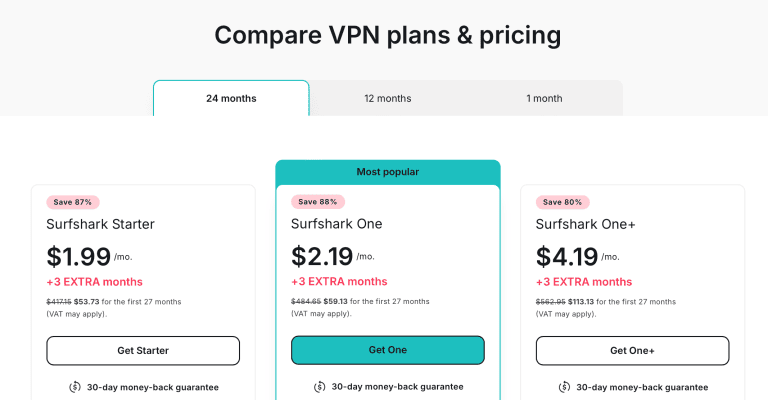
Want more savings with Surfshark? Grab our exclusive discount deals before they expire.
Pros
- South Korean servers in Seoul
- 4500+ servers in 100 countries
- Fastest VPN: 39Mbps speed on a 45Mbps connection
- Reliable AES 256-bit encryption for online privacy and zero leaks
- Audited, no logs provider in the Netherlands
- Unlimited simultaneous device connections
Cons
- Router app is challenging to set up
- WireGuard protocol is shaky on Windows PC
- Based in the Netherlands, a 14 Eyes member
ExpressVPN – Fast Obfuscation, South Korean Servers & Secure Servers in 113 Countries

ExpressVPN carries global servers in 113 countries, one of which is South Korea. I connected to the South Korean server a few times to stream Transit Love, Rose Mansion, and Yonder on TVING without issue.
Even after leaving Seoul and traveling out of South Korea, I still connect to the server to unblock this content. So, I have no concerns about the capability of its local server in the region.
You can also connect to this server to unblock games and other South Korea-restricted content, especially from regions like India.
Fortunately, ExpressVPN has router VPN software to choose the specific server library you want your gaming consoles to connect to.

Besides the local server, ExpressVPN is no slouch on its global servers.
At a reach of 113 countries, it’s second only to NordVPN.
Thus, you can unblock content from almost anywhere if you’re traveling to South Korea or a resident/citizen who likes to unblock content elsewhere.
For example, I successfully unblocked
- BBC iPlayer via the UK servers
- Crave TV via the Canada servers
- Hulu, Amazon Prime US, and Netflix US via the extensive USA servers
- Voot over the Indian servers
Connecting to ExpressVPN’s servers does more than unblock content.
It also ensures your internet activity is encrypted from the government and ISPs like Korea Telecom, LG UPlus, and SK Broadband.
Thus, these ISPs can’t
- Collect your internet activity data and report it to the government
- Block the websites you’re visiting since they don’t even see them in the first place
- Report you to copyright trolls for downloading torrent files
- Determine who you are since you’re not using its IP address anymore

The last point is essential if you operate an anonymous blog, a private Twitter/social media account, or speak with journalistic sources that you’d rather the government not know about. After all, the South Korean government doesn’t hide its arrest of anyone who as much as retweets/shares content it deems critical.
Its AES 256-bit encryption is also a lifesaver if you’re connected to the public Wi-Fi networks at Holly’s Coffee, The Shilla Seoul, café913, or any other free Wi-Fi hotspot in the country. Otherwise, you risk getting caught up in public Wi-Fi attacks that could lead to identity theft and substantial financial losses.
On top of ExpressVPN’s reliable encryption to keep you safe, it also uses fast & automatic obfuscation on all servers and protocols.
Thus, your ISP can’t tell you’re using a VPN, and you’ll have better chances of bypassing firewalls and harsher censorship.

The best part of this is ExpressVPN’s obfuscation speeds, knowing that every other provider suffers a massive speed drop when obfuscation is enabled.
For context, I tested ExpressVPN’s speeds over my 45Mbps connection.
The result was almost 35Mbps! In fact, it’s the third fastest VPN on this list – but the overall fastest if we level the playing field by enabling obfuscation on the others.

You’ll get the best streaming, gaming, and download speeds on ExpressVPN over its Lightway – UDP protocol. You should try the slightly less fast Lightway – TCP protocol for unstable connections instead.
Another thing I looked at is that ExpressVPN isn’t affiliated with the South Korean government or based in the country. After all, South Korea has a habit of imposing on local ISPs to block content and internal social media platforms like KakaoTalk to spy on users/collect user data for it.
Fortunately, ExpressVPN is based in the British Virgin Islands.
That’s outside the reach of South Korea and a privacy-friendly country. Furthermore, ExpressVPN’s no-logs policy has been independently audited, showing it never collects data about what you do online. Thus, it won’t have such data to share if asked.

Remember when I mentioned that you can use ExpressVPN with your gaming consoles and even install it on your router? Well, that’s not all.
It also has native support for mobile devices (iOS and Android), PCs (Mac, Windows, Linux, and Chromebook), and some smart TVs.
Its Basic plan covers ten simultaneous device connections, the same as NordVPN, and you can stretch that further by setting up the router (which counts as one device) to broadcast a secure connection to unlimited devices.
That leaves value as the sticking point. ExpressVPN costs more than Surfshark, CyberGhost, and PrivateVPN, and NordVPN matched it on Seoul servers, beat it on country count, and finished within a couple of megabits of it at about the same price. If obfuscation you never have to think about matters most to you, it still deserves its place on this list.

Despite that, use these ExpressVPN discounts to save more before they expire.
Pros
- South Korean servers in Seoul
- Servers in 113 countries
- Fastest obfuscation: 34Mbps on a 45Mbps connection
- AES 256-bit encryption to secure your internet connection
- Audited no-logs provider in the BVI
- Works on mobile, PCs, smart TVs, and routers
Cons
- Expensive VPN provider
- Fewer countries than NordVPN
CyberGhost – 80+ Seoul Servers and 9000+ Global Servers for Online Privacy

CyberGhost features the largest server count on this list.
Thus, it’s little surprise that it also houses 80+ South Korean servers in Seoul, the largest on this list.
But what’s the largest server count if it doesn’t work? Nothing!
So, I quickly checked for leaks on the CyberGhost South Korean server and didn’t get any. I continued with a streaming test of Chosun TV, watched a live show on the site, and didn’t get any lags. If there’s one thing I came back with from that TV Chosun show, it’s that Koreans can sing!

Afterward, I tried Rai TV, KBS2, SBS TV, and other channels, which unblocked quickly. I also got extra clear image quality and zero lags, so CyberGhost must be doing something right in the speed department.
On testing, I found that it holds a steady 37Mbps on the 45Mbps connection. That’s just a fraction less than what Surfshark offers, making it the second-fastest provider.

CyberGhost and Surfshark rely on the WireGuard protocol for such speeds. I’ve also discovered that CyberGhost’s IKEv2 protocol is fast on mobile devices. However, don’t use it for security-sensitive tasks; only those where you need a little more speed.
Unfortunately, I couldn’t test CyberGhost’s obfuscation speeds against ExpressVPN. After all, it doesn’t have this feature yet.
Luckily, you’ll rarely need obfuscation in South Korea, although it’s nice to have it on ExpressVPN.

Now that I was satisfied with the local content unblocking, how about the international content unavailable in South Korea?
A quick glance at the left-hand dashboard on this VPN shows that it has servers dedicated to streaming, torrenting, and gaming.
In other words, there’s rarely any of these activities you want from anywhere that CyberGhost won’t unblock.
It builds on that promise with 9000+ servers in 100 countries – the most massive server library on this list. Only NordVPN’s 8400+ comes close; everyone else is well behind.

Testing some of these optimized servers, I unblocked and privately downloaded some torrent files on The Pirate Bay.
It even has a torrent-optimized server in South Korea to encrypt your internet traffic, get the least ping and ensure the fastest download speeds.
That’s because your torrent traffic doesn’t have to travel to a farther server.
I also tested streams on Netflix US/Australia/Japan, BBC iPlayer, Hulu, Amazon Prime Video, and France TV. I can assure you that CyberGhost will unblock virtually anything you want to watch from South Korea if it has the relevant servers.
Unlike Surfshark, though, CyberGhost ticks all the privacy boxes.
So, it has that audited no-logs promise, and it’s based in Romania, a data privacy-friendly country. It also recently got its no-logs audit, so you know it’s currently up to speed with industry best practices.

However, it mimics Surfshark’s technical router setup, lacking an easy setup like you get in the ExpressVPN app.
If you’re willing to look past that, you’ll get native CyberGhost app support with the same devices as ExpressVPN. You’ll have to make do with seven simultaneous connections, though, three fewer than NordVPN and ExpressVPN allow.
Here’s the best part: CyberGhost is one of the cheapest VPN providers here.

That doesn’t mean you don’t qualify for these exclusive deals and discounts, though.
Pros
- 80+ servers in Seoul, South Korea
- 9000+ servers in 100 countries
- Second fastest VPN: 37Mbps speeds on 45Mbps connection
- Server and data encryption against leaks
- Audited, no logs provider in Romania
- Torrent, gaming, and streaming-optimized servers
Cons
- Router setup is technical
- Doesn’t offer obfuscation
PrivateVPN – Seoul Server, Stealth VPN Obfuscation & Ten Connections on a Budget

PrivateVPN is the budget option on this list, and it earns the slot with a Seoul server on a network of just 200+ servers in 63 countries. Small, yes, but South Korea made the cut, which isn’t something every mid-sized provider can claim.
That Seoul server gives you the South Korean IP address Naver TV, Wavve, and TVING check for, so your K-dramas survive the flight home, and it lets you log in to KakaoBank or Shinhan from abroad without the foreign-IP warnings. In Seoul itself, it encrypts everything between you and KT, SK Broadband, or LG U+, which is the point on a network where ISPs are expected to cooperate with the authorities.
PrivateVPN also has an answer to ExpressVPN’s obfuscation: a Stealth VPN mode that runs over OpenVPN and disguises the tunnel as regular web traffic. It’s a manual switch rather than always-on, and it slows things down the way every OpenVPN-based obfuscation does, but it’s there if a campus or office firewall in Korea starts dropping VPN connections.
The kill switch covers the whole system, with a separate Application Guard if you only want specific apps cut off, so a dropped Seoul connection on café Wi-Fi doesn’t quietly hand your real IP to whoever runs the network.

For gaming, the Seoul server is a local route to Korean game servers if you’re connecting from Japan or Southeast Asia, and the app’s search box gets you there in a second.
Everything South Korea doesn’t get is handled by the rest of the list: US, UK, Japanese, and Canadian servers are all there for Hulu, BBC iPlayer, Netflix Japan, and Crave TV, and PrivateVPN names the US, UK, and Australia among the Netflix regions it supports.
Speed is the first trade-off. The apps default to OpenVPN, a protocol that trails NordLynx and WireGuard on speed, so flip to WireGuard in the Windows, macOS, Android, or iOS app before you stream in HD.
The second is trust. PrivateVPN promises zero logs from Sweden, but that promise has never been independently audited, something every other provider on this page has done, and Sweden is a 14 Eyes member like the Netherlands. Journalists and anonymous bloggers should stick with the audited providers above.
It runs on ten devices at once, the same as NordVPN and ExpressVPN, and the 36-month plan comes to $2.00 a month (billed $72 a year afterwards) with a 30-day money-back guarantee.

Use these PrivateVPN discounts to get the Seoul server at that price.
Pros
- Seoul server for a South Korean IP address
- Stealth VPN obfuscation over OpenVPN to disguise VPN traffic
- AES 256-bit encryption with a system-level kill switch and Application Guard
- Ten simultaneous connections, matching NordVPN and ExpressVPN
- $2.00/mo on the 36-month plan with a 30-day money-back guarantee
Cons
- Smallest network here: 200+ servers in 63 countries
- No-logs claim has never been independently audited
- Obfuscation is a manual OpenVPN-only mode, unlike ExpressVPN’s automatic version
The State of the Internet in South Korea
The South Korean government is notorious for censoring web content, arresting online figures, and requesting identity verification of online users.
This isn’t going to stop, even as the government moves towards establishing itself as having a free internet space.
So, if you’re traveling to South Korea or already there, you need a VPN more than you know.
Severe Internet Censorship
The South Korean government hides under three laws to censor the web and what citizens/residents can post online. These are the:
- Nation Security Law (1948): Designed to regulate what the press and media bodies can post online. This has since extended to private journalists and bloggers.
- Basic Press Act (1980): Informs on how information should be edited before presentation to the public. In other words, encouraging self-censorship.
- Article 21: Implying that citizens have freedom of speech but maybe not against the government.
Considering this, South Korean Twitter users have been arrested for random, everyday tweets against the government.
In 2007, some bloggers were even arrested for seemingly supporting some presidential candidates over others. In the same breath, others were arrested in the same year for being critical of the government or some choice presidential candidates.
Five years later, a South Korean activist was arrested for retweeting a message from a North Korean page.
It’s gotten so bad that the management of KakaoTalk revealed multiple attempts by the government to extract its users’ data. That would have helped the government see what the platform’s users are discussing, step up its privacy invasion, and make even more arrests.
It needs no telling that online privacy and anonymity are critical here.
Since ISPs can see what users are doing online under S’Korean law, they can help the government facilitate these user tracking and arrests.
Thus, a VPN is needed to encrypt your internet activity and improve anonymity.
Content Geo-Blocking and Restrictions
Content geo-blocking isn’t a unique issue in South Korea, but that doesn’t make it less of a problem. After all, it suffers restrictions from many web content compared to areas like the USA, UK, and Canada.

This is incredibly frustrating for students, tourists, expats, and other travelers to South Korea who find out that they can’t access the content they had at home anymore.
For example, travelers from the UK lose access to BBC iPlayer, those from Canada can’t get Crave TV anymore, and French tourists must do without their France TV.
Fortunately, you can correct that with a VPN that carries relevant servers.
That’s why I’ve chosen those VPNs with an extensive country reach, improving your chances of unblocking anything anywhere.
How to Setup a VPN in South Korea?
Set up your VPN in South Korea by enabling the kill switch to prevent leaks, choose a suitable protocol, and connect to a preferred server.
I’ll show you how I’ll set up a VPN in South Korea using my preferred VPN, NordVPN.
- Purchase a VPN subscription. I recommend NordVPN for South Korea.
- Download the VPN app for your device. I’ll use Windows PC for this example.

- Log in with your NordVPN account credentials.
- Enable the VPN kill switch. Go to Settings (gear icon) > Kill Switch > toggle “Internet Kill Switch.”

- Choose a suitable protocol. I recommend NordLynx for the fastest speeds; switch to OpenVPN (TCP) only if you need the obfuscated servers.
- On the VPN home screen, select “Quick Connect” to automatically get the best/fastest server.
- OR scroll the country list on the left of the map.
- Search for a preferred country/city. Click the server once you see it.
- Wait for the connection confirmation. Then test for leaks (I use www.ipleak.net).
- Start browsing the web securely.
How to Get a South Korean IP Address?
You can get a South Korean IP address by searching for the South Korean server and connecting to it on a supported VPN. Fortunately, my top VPN (NordVPN) has 60 servers in Seoul, South Korea.
Here’s a stepwise guide to getting your South Korea IP address:
- Get a VPN with South Korean servers. I recommend NordVPN.
- Follow steps 2-5 from above.
- Type “South Korea” into the search bar above the country list.

- Click on the server once you see it.
- Wait for the connection confirmation and test for leaks.
- Start browsing the web from your South Korean IP address.
Can You Use a Free VPN in South Korea?
You can use a free VPN in South Korea. Still, you won’t get reliable unblocking, fast streaming speeds, or trustworthy data encryption. In fact, some free VPN providers collect your connection logs and internet data to sell to third parties, thereby funding your free usage.

Instead, it’s best to get an affordable VPN provider like NordVPN or Surfshark with a proven no-logs policy, reliable encryption, premium unblocking, fast speeds, and servers in Seoul!
Frequently Asked Questions
Are VPNs Allowed in South Korea?
VPNs are allowed in South Korea. So, you can connect to a VPN server to unblock content, encrypt your internet connection, bypass censorship, and stay private online without legal repercussions.
However, it’s illegal to commit cybercrimes in South Korea, even with a VPN.
Thus, always use your VPN legally, and you won’t have any issues with the government or your VPN provider.
Which Server Is Best for K-Drama?
South Korean servers are the best for K-Dramas. However, there are some US-exclusive K-drama titles on platforms like Netflix and Hulu, so it’s best to connect to US servers to get those.
Summarily, the best server for K-drama content depends on what platforms the content is hosted on and where it’s available. Thus, get a VPN like NordVPN with a large country reach (167+ countries) to unblock K-drama videos available anywhere.
Which Free VPN Has South Korea Server?
Reliable free VPNs don’t have South Korean servers as it’s one of the niche servers. Thus, it’s best to pay for a South Korean server from a reliable provider like NordVPN, which offers 60 servers in Seoul plus 8,400+ other servers in 167+ countries.
Surfshark is another affordable option with Seoul servers and unlimited simultaneous connections.
The best way to watch Naver TV outside Korea is to connect to a South Korean server on a reliable VPN like NordVPN. Its Seoul servers give you the South Korean IP address Naver TV checks for, its NordLynx protocol has the speed for lag-free streaming in up to 4K quality, and you can run it on ten devices at once.
Take Back Your Online Privacy
My top VPNs are reliable enough to unblock content anywhere, but I’m glad they do more than that. They’re also great at keeping your online activities private and away from the prying eyes of Korean ISPs/government.
Ready to start enjoying these benefits?
NordVPN is my top choice, with Seoul servers that unblocked KakaoTV, a country list no other pick here matches, and tough-to-crack encryption backed by an audited no-logs policy in Panama.
Its 2-year plan also starts at about the same price as ExpressVPN’s. So, grab these NordVPN discounts to save more and enjoy a 30-day money-back guarantee.





