
Whether you want to get an Uruguayan IP address, watch Teledoce abroad, or unblock Netflix US at home, NordVPN is the best VPN for Uruguay. It lists Uruguay among its virtual locations, its 8,400+ servers reach 167+ countries, and its Threat Protection suite and automatic public Wi-Fi protection cover you on a Montevideo café hotspot as well as at home.
But it’s not alone, sharing the company of impressive VPNs like Surfshark, which pairs a virtual Uruguayan server with automatic public Wi-Fi protection against hackers on unlimited devices.
And if you’re still shopping for options, you might love ExpressVPN for its fast, always-on obfuscation, PureVPN for its new Montevideo location, or CyberGhost for its dedicated streaming and torrenting servers.
Top 3 VPNs for Uruguay (September, 2026)

Surfshark
Best for budget Uruguay access
- Virtual Uruguay server
- Unlimited device access
- Automatic Wi-Fi protection

NordVPN
Best for Uruguay
- Virtual Uruguay location
- 8,400+ servers in 167+ countries
- Threat Protection suite

ExpressVPN
Best for obfuscated speed
- Obfuscated Uruguay server
- Fastest with obfuscation on
- Servers in 113 countries
While Uruguay’s internet space is censorship-free, content creators and platforms like Hulu, Peacock TV, CNN Go, and others aren’t available in the region.
And if you’re traveling outside Uruguay, you may no longer get access to Vera TV, Teledoce, and other local content.
That’s where these top five VPNs step in to save the day!
Unblock Hulu US, Netflix US, and More From Uruguay With These VPNs!
Say goodbye to forgoing online content because it’s unavailable in your region.
Here’s what these impressive VPNs for Uruguay promise:
- NordVPN – Best Overall With an Uruguayan IP and Servers in 167+ Countries
- Surfshark – Get Uruguayan and 4500+ Servers on Unlimited Devices
- ExpressVPN – Fast Obfuscation + Uruguayan Server to Unblock Local Content Anywhere
- PureVPN – New Montevideo Location + 6,000+ Global Servers
- CyberGhost – Optimized Servers for Streaming, Gaming, and Torrenting in Uruguay
If that excites you, wait until you see how these VPNs performed in real-life tests in Uruguay!
Best VPNs for Uruguay: 6 Tests & Comparisons
Discover why these five VPNs made my list over 21+ other providers I compared on speed, local servers, global servers, quality content unblocking, reliable privacy, and online security.
NordVPN - Best Overall With an Uruguayan IP and Servers in 167+ Countries

The question I get most about Uruguay is whether one VPN can do both jobs: hand you an Uruguayan IP address for Teledoce and your bank while you’re abroad, and take you overseas for Hulu or Netflix US while you’re home. NordVPN is the provider I’d pick for that double duty.
It lists Uruguay among its virtual locations, so the hardware sits outside the country, but the IP address you get is Uruguayan, which is exactly how Surfshark handles it too. That’s enough for local streaming and for logging into services that get twitchy about foreign IPs.
Going the other way, 8,400+ servers in 167+ countries covers more of the globe than any other VPN here, so there’s little chance of server overcrowding when unblocking content. I enjoyed the latest on CNN Go (US servers), caught up on BBC iPlayer (UK servers), rewatched The Terminal List on Amazon Prime US like I was in the States, and streamed the Saudi Arabian Grand Prix over a US server without a hiccup.
Like ExpressVPN, NordVPN also uses an in-house protocol (called NordLynx) to beef up its speed and security.
On the security side, where it shines the brightest in Uruguay, NordVPN offers a Threat Protection suite that includes:
- An adblocker that I used against malicious ads on torrent websites and intrusive ads on some manga sites.
- A dark web monitor, which I set up to see if my data has been leaked anywhere.
- A malware scanner that kept me safe from malware downloads.
Besides that, you also get automatic public Wi-Fi protection, as Surfshark offers, so the app connects itself the moment you join the hotspot at Café Bacacay.
NordVPN’s AES 256-bit encryption does the trick here, only spitting out gibberish output when I tested my live VPN connection with Wireshark.
That means anyone (such as Wi-Fi network admins) trying to snoop in on what you’re doing (such as checking your bank account) won’t get any intelligible data.
It starts at about the same price as ExpressVPN, and it covers ten simultaneous connections, level with ExpressVPN, though Surfshark’s unlimited allowance still wins for a big household.

Interested? Here are the best NordVPN deals to test the provider risk-free for 30 days.
Pros
- Virtual Uruguay location for an Uruguayan IP address to reach Teledoce, Vera TV, and local banking from abroad
- 8,400+ servers in 167+ countries, the widest coverage on this list
- Packs an ultra-fast and equally secure in-house protocol called NordLynx
- Offers Threat Protection against data leaks, malware, and intrusive ads
- Automatic public Wi-Fi protection on connected devices
- Ten simultaneous connections per subscription
Cons
- The Uruguayan IP comes from a virtual location rather than a server on Uruguayan soil
- Not as many simultaneous connections as Surfshark
Surfshark - Get Uruguayan and 4500+ Servers on Unlimited Devices

Surfshark doesn’t hide that it uses a virtual Uruguayan VPN server instead of a physical one, most likely because it worked like a charm!
I connected to it to watch a few episodes of 100 Uruguayans Dicen on Teledoce, and it was a lag-free experience! On top of that, it provides you with 4,500+ servers in 100 countries to unblock other content.
As before, I tested a few of these servers to unblock and stream BBC iPlayer (UK servers), YouTube TV (US servers), and Netflix Japan (Japan servers) seamlessly. The only concern is that Surfshark didn’t unblock one of my favorite YouTube channels (the Formula 1 channel), even though ExpressVPN did.
However, Surfshark also gains a leg over ExpressVPN with its automatic public Wi-Fi protection feature. Once enabled, Surfshark ALWAYS protects my internet connection the instant I connect to an untrusted Wi-Fi network.
Before I forget, Surfshark managed 39Mbps on Claro’s 45Mbps network that I tested with. That showed a lesser speed drop than ExpressVPN, tested on a 100Mbps network. But with obfuscation enabled (via OpenVPN on Surfshark), ExpressVPN came out on top of the speed charts!
The most appealing thing about Surfshark is its combination of affordable pricing on unlimited simultaneous connections. So, you can use a single VPN plan for all your mobile, PC, gaming, smart TV, and other supported devices!
Its two shortcomings against NordVPN are reach and toolkit: 100 countries against NordVPN’s 167+, and CleanWeb’s ad and malware blocking doesn’t stretch to a dark web monitor like NordVPN’s. If you’re covering a whole family on one plan, though, Surfshark is the smarter buy.
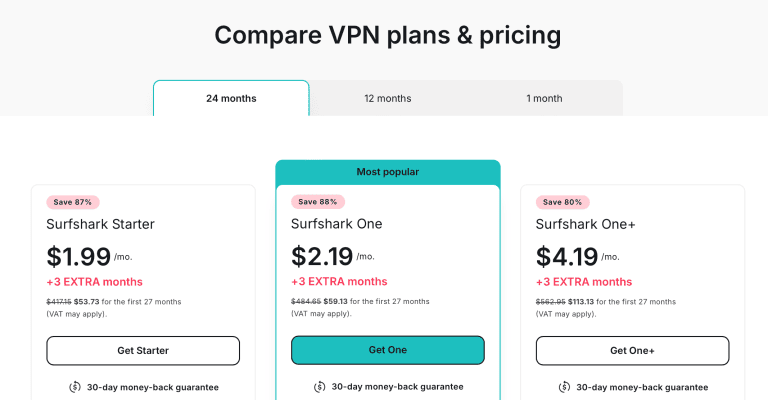
In fact, you can get Surfshark cheaper with these one-time discounts.
Pros
- Virtual server in Uruguay to unblock Teledoce, Vera TV, and other local content
- 4,500+ servers to access content libraries in 100 countries
- Unlimited simultaneous connections across mobile, PC, gaming units, smart TVs, and other devices
- Fast VPN offering 39Mbps speeds on a 45Mbps connection
- Affordable VPN provider with premium features
Cons
- Not as fast as ExpressVPN on obfuscation
- Uruguayan servers are virtual servers that may sometimes be unreliable
- Doesn’t unblock all YouTube channels and may not work for a few content
ExpressVPN - Fast Obfuscation + Uruguayan Server to Unblock Local Content Anywhere

ExpressVPN features an Uruguay server that unblocked everything on my first try. I watched RunFit and La Mascara on the Teledoce website and found fantastic recipes there. I didn’t have access to this platform since I was outside Uruguay.
On top of that, ExpressVPN’s global server network reaches 113 countries, behind only NordVPN’s 167+ on this list. So, whether you’re in Uruguay or traveling the world, you can access content almost everywhere!
I tested this claim by streaming YouTube TV via the New York – US server, grabbed BBC iPlayer on the UK server, and watched a few free Crave TV trailers on the Canadian server. All without lag!
Speaking of lag, ExpressVPN’s Lightway – UDP protocol performed best in my speed tests, averaging 33Mbps on a 100Mbps connection.
That’s extra impressive, considering that the VPN has obfuscation automatically enabled. This obfuscation (usually slowing VPN speeds) bypasses geo-blocks in restrictive regions (like China) and internet service provider (ISP) censorship.
Don’t forget to fire up ExpressVPN when connected to the public Wi-Fi hotspots at the Café Bacacay, The Shannon Irish Pub, or anywhere else you visit in Uruguay/abroad.
However, ExpressVPN can’t be set up to automatically encrypt your internet service when connected to public Wi-Fi. That’s unlike the other listed providers.
Coverage is what tips the balance toward NordVPN. ExpressVPN costs about the same, and NordVPN matches its ten simultaneous connections, reaches more countries, and hands you an Uruguayan IP too. ExpressVPN is the one to pick if you need obfuscation switched on at all times without paying for it in speed.

Thankfully, you can save some more with these ExpressVPN deals.
Pros
- Uruguayan server capable of unblocking Vera TV, Teledoce, and other local content
- Ultra-fast servers in 113 countries to bypass geo-blocks from Uruguay or elsewhere
- In-house Lightway protocol is optimized for speeds (33Mbps on a 100Mbps network)
- Public Wi-Fi protection at pubs, bars, airports, or anywhere else
- Fast and automatic obfuscation to defeat firewalls and harsh censorship
Cons
- Pricier than Surfshark, PureVPN, and CyberGhost
- Reaches fewer countries than NordVPN
PureVPN - New Montevideo Location + 6,000+ Global Servers
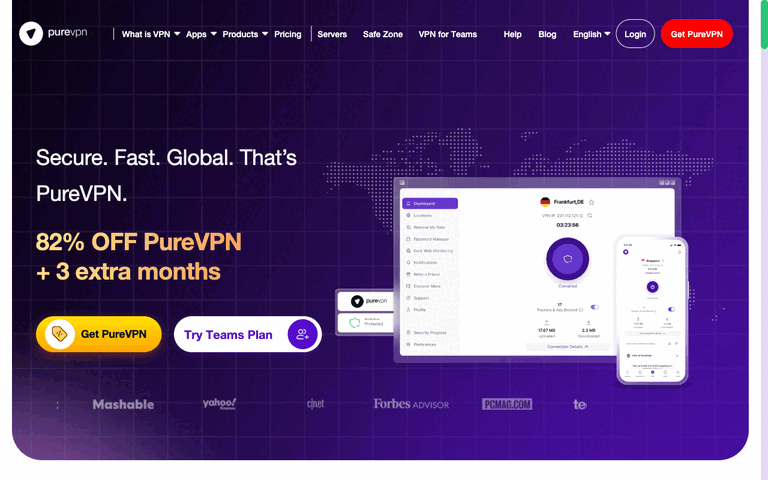
PureVPN added a Montevideo location in 2026 as part of its Latin American expansion, so you can get an Uruguayan IP address when you’re abroad.
Beyond Uruguay, its network spans 6,000+ servers in 65+ countries, with plenty of US and European locations for the libraries you can’t reach from Montevideo.
However, PureVPN wasn’t part of my Uruguay tests, so I can’t vouch for its speeds or its unblocking of local channels from my own results.
On the privacy side, PureVPN is based in the British Virgin Islands, and you can add a dedicated IP – or the Dedicated IP + Port Forwarding add-on – if you want an address that’s yours alone.
One subscription covers up to 10 devices, and there are browser extensions for Chrome, Firefox, and Edge if you only need to protect your browser on a café hotspot.
Price-wise, it’s one of the cheaper options here: the 2-year Standard plan (plus 3 extra months) costs $2.15 a month, backed by a 31-day money-back guarantee.

Grab these PureVPN discounts and try it risk-free for 31 days.
Pros
- Montevideo location for an Uruguayan IP address
- 6,000+ servers in 65+ countries
- Dedicated IP and port forwarding add-ons
- Up to 10 simultaneous connections
- $2.15 a month on the 2-year Standard plan
Cons
- Not part of my Uruguay tests
- Dedicated IPs and port forwarding cost extra
CyberGhost - Optimized Servers for Streaming, Gaming, and Torrenting in Uruguay

CyberGhost now lists a Montevideo location too, so you can get an Uruguayan IP address with it, although I haven’t tested that location with La Celeste matches or Canal 4 myself.
Beyond Uruguay, it has a massive 9000+ server fleet in 100 countries to unblock content and download torrents securely without VPN server congestion.
I tested CyberGhost’s servers for the following:
- Streaming Platforms – Netflix US, Hulu, BBC iPlayer, and Amazon Prime Video.
- Gaming – League of Legends, Destiny 2, and Apex Legends.
- Torrenting – Unblocked the Pirate Bay and RARBG everywhere I went.
The best part is that CyberGhost already indicates servers optimized for these tasks on its mobile and PC apps. So, you don’t have to start testing to find the best one for your preferred internet needs.
Furthermore, CyberGhost managed 38Mbps in my speed tests.
This result was evident in the crystal clear 1080p HD stream I got when streaming The Borgias, a Netflix US exclusive, from Uruguay.
Moving on, I found its automatic public Wi-Fi protection the easiest to use and set up. Backed by an AES 256-bit encryption, I never feared getting deanonymized online by ISPs, public Wi-Fi operators, or data packet sniffers.
CyberGhost also stands out for affordability, though its seven simultaneous connections trail the ten you get from NordVPN and ExpressVPN.

If you see what you like here, grab these CyberGhost discounts for a 45-day money-back guarantee.
Pros
- 9000+ servers to unblock content in 100 countries from Uruguay
- Servers optimized for streaming content, unblocking games, and downloading torrents safely
- Easy-to-use automatic public Wi-Fi protection technology
- 38Mbps speed to unblock Netflix, Hulu, Amazon Prime, etc., in 4K quality
- AES 256-bit encryption for online privacy against ISPs, public Wi-Fi admins, and hackers
Cons
- Montevideo location not part of my tests
- Fewer simultaneous connections than the other four VPNs
How to Set up a VPN for Uruguay?
You can set up a VPN for Uruguay, even if it’s your first time, in these 10 simple steps:
- Subscribe to a reliable VPN for Uruguay. I’ll use my top recommendation, NordVPN, for this example.
- Download the VPN app for your preferred device. NordVPN has apps for mobile and PC devices; I’ll demonstrate with the desktop option.

- Launch the app and log in with your account credentials. This is the username and password created in step #1.
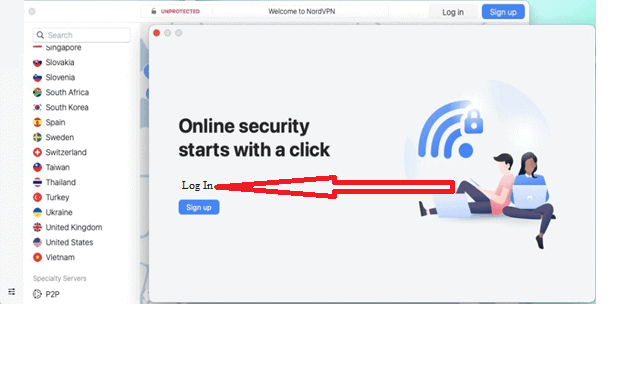
- Choose a reliable connection protocol. I recommend NordVPN’s NordLynx for the best balance of speed and security in Uruguay.

- Enable the VPN kill switch. You’ll find it under Settings > Kill Switch on NordVPN.

- Search for a preferred NordVPN server (to get a choice IP address or unblock content somewhere). I’ll use the USA for this example.

- Click the location to connect. Then, wait for the connection confirmation.
- OR hit “Quick Connect” to automatically connect to the fastest available server. This is best if you want the VPN’s encryption.
- Test for leaks. I recommend www.ipleak.net to ensure your device transmits the VPN IP address, not your IP.

- You can now unblock any content from Uruguay and stay private online!

How to Get an Uruguayan IP Address?
You can get an Uruguayan IP address to watch Teledoce, connect with gaming peers there, or for other reasons, with a VPN. Follow these steps:
- Subscribe to a VPN that offers Uruguay servers. I recommend NordVPN (get discounts here).
- Follow steps 2-5 from above.
- Search for “Uruguay.” It’s listed as a virtual location, which just means the server hands you an Uruguayan IP address from hardware hosted nearby.
- Continue with steps 7-10 from above.
Frequently Asked Questions (FAQs)
Are VPNs Legal in Uruguay?
VPN services are legal in Uruguay as there are no government laws or local legislation against their usage. However, Uruguay isn’t tolerant of cybercrime, so never use a VPN to commit one since that would be illegal.
Instead, using a VPN to bypass censorship, stay private online, and securely access remote files is legal in Uruguay.
Can You Use a Free VPN in Uruguay?
You can use a free VPN in Uruguay, but it would never unblock content seamlessly, ensure your online privacy or provide you with a local IP address to stream Uruguayan content. Furthermore, free VPNs are often malicious and may snoop on your internet traffic, collect sensitive data to sell for a profit, or even introduce malware to your device.
Enhance Your Uruguayan Experience
Uruguay has a free internet regime, but you still won’t get access to all the best internet content due to geo-blocking. With a VPN, that changes.
That’s the case with NordVPN, my top pick for Uruguay: an Uruguayan IP address when you’re away, and CNN Go, BBC iPlayer, Amazon Prime US, and more over its 8,400+ servers in 167+ countries when you’re home.
In fact, you can grab these fantastic deals right now to test it risk-free for 30 days or get a refund if you’re not satisfied!





