
The best way to install Surfshark on Kodi is to subscribe to the VPN, download the VPN app, and connect to a server to enjoy Kodi unblocking and streaming.
Alternatively, you can set up Surfshark on your router to unblock the Kodi add-on on your gaming console or smart TV, which can’t download a native VPN app.
I’ll help you set up Kodi on your preferred device(s) with simple, stepwise guides in the rest of this piece.
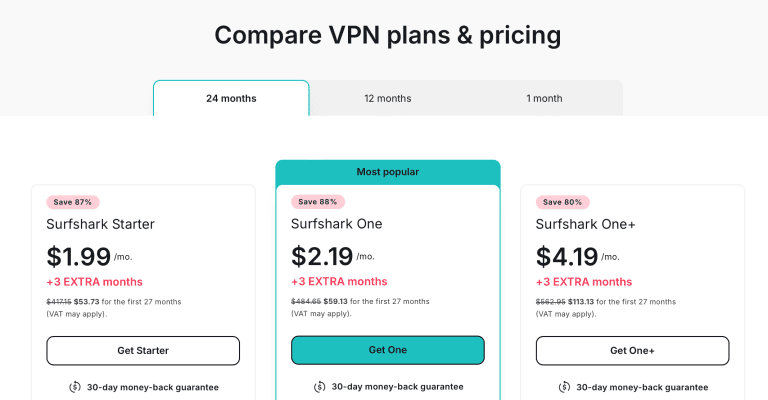
Surfshark’s Black Friday sale is on: Surfshark One costs the Starter price, $2.49 a month on the 2-year plan with 3 months free.
How to Set Up Surfshark on Kodi?
There are two ways you can set up Surfshark on Kodi:
- Set up the Surfshark app on a supported Kodi device.
- Set up Surfshark on a supported router.
Method 1: Set Up the Surfshark VPN App on a Supported Kodi Device
This setup method works for devices that can download a VPN app, like PCs, smartphones, and Android TVs. Here’s how to get it done:
- Subscribe to Surfshark. Get Surfshark’s current deal.
- Download and install the Surfshark VPN app on your device.

- Log into your Surfshark account.

- Connect to a Surfshark server. Alternatively, hit Quick Connect to connect to the fastest server instantly.

- Minimize the Surfshark VPN app and open Kodi.

- Select your favorite show and start streaming.

Method 2: Set Up Surfshark on a Supported Router
This method is best for Kodi users with devices without VPN application support. These include Xbox consoles and Apple TVs.
Follow these steps:
- Get a Surfshark subscription (discounts here).
- Install Surfshark on your router. Follow this Surfshark-router setup guide to do so.
- Connect your gaming console, smart TV, or streaming device to the router network.
- Launch Kodi to unblock content and stream safely from anywhere.
How to Change Server Locations on Surfshark for Kodi?
Always exit Kodi before you change a VPN server. It’s critical, as changing servers while watching a stream on Kodi can create an IP conflict.
In short, follow the following steps:
- Exit Kodi.

- Disconnect from your current Surfshark server and click a new one to connect.

- Wait until Surfshark confirms that the new VPN connection is successful.

- Restart Kodi and continue streaming.

Before you buy, check Surfshark’s prices and renewal rates, and remember the website offers a free 7-day trial on the 1- and 2-year plans.
Enjoy Secure Kodi Streaming With Surfshark
Kodi is an excellent open-source software enabling uninterrupted buffer-free streaming. Unfortunately, just like any other open-source software, using Kodi without a VPN can expose you to certain security risks or keep you from accessing some add-ons.
Thankfully, the Surfshark-Kodi combination lets you enjoy strong security, malware protection, and anonymous content unblocking.
If you’d like to enjoy secure Kodi streaming with Surfshark, try this time-limited Surfshark deal. Found a code elsewhere? Our Surfshark promo code guide explains why it might fail at checkout.
More Surfshark guides
-
 Surfshark Promo Codes, Coupons & Discounts November 2026: Up to 87% Off
-
 Surfshark Free Trial (2026): 7 Days Free on the Website, Then a 30-Day Refund
-
 How To Watch Netflix With Surfshark? (2026)
-
 Does Surfshark Work With Twitch? (2026)
-
 How to Watch NBA League Pass With Surfshark? (2026)
-
 Surfshark Not Working With Hulu? Try These Easy Fixes

