
NordVPN promises robust security, speed, and privacy against T-Mobile’s speed throttling, invasive data collection, and data breaches that may leak your user data.
Also, Surfshark (unlimited devices for a whole family plan) and PrivateVPN (a budget pick with a kill switch in its mobile apps) are well suited for iOS and Android devices on the Un-carrier network.
I researched other secure VPNs that work well over T-Mobile and rounded up the list with ExpressVPN and PureVPN.
So, if you want to stream MLB without blackouts, surf the internet without T-Mobile throttling, and download files without nasty copyright letters from T-Mobile, continue reading.
Top 3 VPNs for T-Mobile (September, 2026)

Surfshark
Best for T-Mobile family plans
- Unlimited connections
- Servers in 24 US cities
- CleanWeb blocks data-hungry ads

NordVPN
Best for T-Mobile local access
- 2,800+ US servers in all 50 states
- NordWhisper beats VPN blocks
- 8,400+ servers in 167+ countries

PrivateVPN
Best for T-Mobile on a budget
- Kill switch in iOS and Android apps
- Stealth VPN for blocked connections
- Servers in 12 US cities
T-Mobile’s privacy policy page shows it collects data, such as:
- What device you use
- What you purchase online
- Your IP address
- Your MAC address
- Your current location
- Unique device data such as battery level, serial number, and device type
- The websites you visit and what you do on them
As if that’s not enough, the provider also shares that data with third-party vendors and advertisers.
Even more, it tries to regulate your internet usage by blocking access to some sites via its Web Guard internet filtering platform. The issue is that many users report the tool filtering their web results even if they don’t have it enabled.
On top of that, T-Mobile is notorious for bandwidth throttling, so you never get the best of the mobile plan you paid for. That’s a less than ideal way to treat a customer.
All that, and I haven’t mentioned that T-Mobile had its fair share of hacking and data leaks over the years. So, the data it collects on you may land in some scammer’s hands.

Enough with the horror show.
That’s why I chose VPNs engineered with improved encryption, preventing T-Mobile or hackers from seeing your internet activity anymore. With these VPNs, collecting any of the usual data to sell to third-party vendors is also impossible.
Likewise, I know T-Mobile can be touchy and block VPN traffic, so I chose providers with an answer to that.
So, how about we get right to them?
Download Files Securely & Bypass T-Mobile’s Throttling With My Top VPNs

Worried about getting caught downloading files on T-Mobile? Tired of getting low internet speeds when you need (and deserve) more?
Here are my top VPNs to solve those problems (and more):
- NordVPN: Continue surfing the local US web without speed throttling from 2,800+ fast US servers in all 50 states. Thanks to a reliable AES 256-bit encryption, T-Mobile never sees your internet activity.
- Surfshark: Protect unlimited devices under a single Surfshark account without bandwidth throttling. Likewise, enjoy 600+ US servers to stream MLB without blackouts and 4,500+ global servers in 100 countries.
- PrivateVPN: A kill switch in its iOS and Android apps catches every dropped cellular connection, and Stealth VPN disguises the tunnel when T-Mobile gets touchy – for $2.08/month on the 36-month plan.
- ExpressVPN: With obfuscation on all 3000+ servers, T-Mobile can’t block your VPN traffic since it doesn’t know you’re using one. Also, download and seed torrents securely without getting nasty complaints from T-Mobile.
- PureVPN: Get an American IP address to stream NFL, MLB, and other sports content over T-Mobile without blackouts or throttling. Also, you get quantum-resistant servers to prevent decryption of your live traffic.
You’re a step closer to using the internet freely without having Big Brother (T-Mobile) intrude on your privacy with these VPNs.
Depending on what you do on your T-Mobile mobile network, let’s discuss how these VPNs compare so you choose the best fit.
Reviews and Comparisons of My Top VPNs for T-Mobile
After reviewing and testing 20+ VPN providers for T-Mobile, the five VPNs below made the list.
Find out how they compare against one another, what makes them great for T-Mobile, and exclusive discounts to save on each one.
NordVPN – Enjoy T-Mobile Across 2,800+ US Servers


NordVPN boasts the largest US server count on this list: 2,800+ servers in 55 cities, covering all 50 states (I checked NordVPN’s server list in September 2026).

The VPN provider also allows P2P traffic on all of its standard servers, US ones included, and every supported protocol works on them.
Thus, you can keep browsing the local US internet without losing access to geo-restricted content like NFL streams while encrypting your data from T-Mobile.
In fact, you’ll appreciate having NordVPN to stream blacked-out MLB games. Simply connect to another US server location showing the game, and you’ll have access.

On top of that, NordVPN is fast enough to give you HD streams across your iOS and Android devices.
Of course, there’s usually a network drop with VPN providers.
Still, NordVPN will get around T-Mobile throttling, so you’ll get better speeds anyway. Though, ExpressVPN slightly edges it out on mobile speed.
For T-Mobile users who want to unblock content unavailable in the US, NordVPN’s network of 8,400+ global servers in 167+ countries comes in handy.
So, you can:
- Stream Crave TV from the US
- Watch Voot without restrictions from the US
- Unblock BBC iPlayer content from the US
- Enjoy Netflix libraries in other countries
You can also play mobile games like Mobile Legends (Bang Bang) in other regions by connecting to the preferred server location.
Fortunately, NordVPN features an easy-to-use app on Android and iOS. Also, you can connect up to ten devices to the same NordVPN account.

Likewise, you get the mobile-friendly IKEv2 protocol when T-Mobile starts messing with other VPN protocol traffic.

Sadly, you only get UDP and TCP configurations on its OpenVPN protocol. That would have been handy when T-Mobile blocks UDP traffic, or your devices can’t keep steady connections on the UDP network.
In contrast, you can choose UDP & TCP connections on ExpressVPN’s ultra-fast Lightway protocol.
When T-Mobile blocks VPN traffic outright, though, NordVPN now has an answer of its own: NordWhisper, a protocol in its iOS, Android, and desktop apps that dresses VPN traffic up as ordinary web browsing. It’s slower than NordLynx, so I only switch to it when nothing else will connect.
On top of that, OpenVPN will significantly impact your network speeds and consume more data than NordLynx or IKEv2.
Still, you’ll feel safer with NordVPN’s 256-bit encryption, given that T-Mobile was the target of a few successful hacks. This encryption tunnels your data so that no one – not your ISP, the government, or advertisers – can see your data.
Thus, they can’t record what they don’t see, and it won’t fall into the wrong hands during a breach. Also, T-Mobile can’t sell your private data to advertisers anymore.
NordVPN backs that with an audited no-logs policy from its base in Panama, far from T-Mobile’s data-sharing deals. Given all that, it’s interesting that NordVPN is an affordable pick.

Still, grab these NordVPN discounts to save more and enjoy a 30-day risk-free money-back guarantee.
Pros
- 2,800+ US servers in all 50 states to keep local content access
- 8,400+ servers in 167+ countries to unblock international content
- P2P allowed on all standard servers for secure file-sharing and downloads
- Mobile-friendly IKEv2 protocol plus NordWhisper for networks that block VPNs
- Ten simultaneous device connections
- 256-bit encryption for data privacy and security
Cons
- Doesn’t offer UDP/TCP choice on faster protocols
Surfshark – Enjoy Privacy on T-Mobile Across Unlimited Mobile Devices

Surfshark is my runner-up for T-Mobile because it fixes the problem most T-Mobile households actually have: more phones than a VPN plan usually allows. Its unlimited simultaneous connections cover every line on a family plan, plus the tablet and the laptop you tether, on one subscription.
Behind that sit 600+ US servers across 24 cities and 4,500+ servers in 100 countries. It doesn’t match ExpressVPN’s always-on obfuscation or its raw mobile speed, but it has its own answer to VPN blocking (more on that below).

That device count is a real difference on a family plan: NordVPN, PrivateVPN, PureVPN, and ExpressVPN’s Basic tier all stop at ten.
But you can’t get TCP connections over WireGuard, the fastest protocol for mobile on Surfshark. Fortunately, you get the mobile-friendly IKEv2 protocol instead.

Both protocols are relatively lightweight compared to OpenVPN, so they won’t consume too much of your data plan for encryption.
However, the base WireGuard will still consume more (negligible) data than ExpressVPN’s Lightway or NordVPN’s NordLynx, so that’s worth considering.
Now for a catch.
Surfshark is based in the Netherlands, a data-sharing member of the Fourteen Eyes alliance. However, Surfshark underwent extensive audits from Cure53 to show it doesn’t collect user data or log connection activity.
That combines with AES 256-bit encryption to keep all of your data safe from T-Mobile’s intrusion. Furthermore, you’re better protected in data breaches since T-Mobile won’t have many secondary data on you.
On top of that, Surfshark’s mobile app is easy-to-use.

Like NordVPN and ExpressVPN, a quick connect button assigns you the best protocol over the best server in the fastest location.
However, this quick connect feature might not recognize limitations over the T-Mobile network. So, I recommend tweaking the protocol settings if you’re having internet connection issues over your VPN using T-Mobile.
On a better note, mobile gamers using Surfshark will love the novel rotating IPs setting. This feature allows you to stay connected to a single server location while regularly changing your IP.

So, no one has a lock on your IP address long enough to monitor your data, DDoS you, or collect any data about you.
Gamers and non-gamers can also get shared Static IP addresses, which function as dedicated IPs so you can always browse the web like you’re from one location.

This feature is important against sensitive platforms (banking platforms, some game servers, etc.) that may restrict your account if you hop around too many servers/IP addresses.
When T-Mobile gets difficult with VPN traffic, Camouflage Mode (automatic on OpenVPN) hides the fact that you’re using a VPN, and NoBorders switches on by itself on networks that restrict VPNs. CleanWeb blocks ads and trackers before they load, which spares a little of your data allowance, and Bypasser lets a banking or carrier app skip the tunnel entirely.
For a VPN that offers all these features with unlimited simultaneous connections and unlimited bandwidth, you’d think Surfshark was expensive.
But it’s one of the most affordable providers I reviewed.
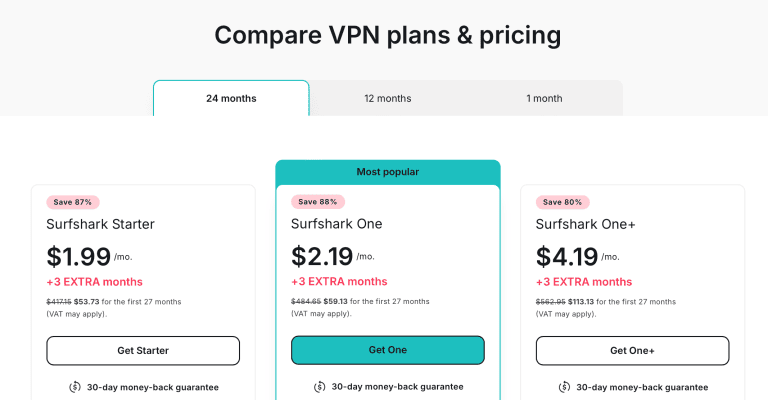
Don’t forget these Surfshark discounts bundled with a 30-day money-back guarantee.
Pros
- 600+ US servers in 24 cities
- 4,500+ global servers in 100 countries
- P2P support on all servers
- Offers IKEv2 protocol for mobile connections
- Features unlimited simultaneous device connections
- CleanWeb, Bypasser, Camouflage Mode, and NoBorders included
Cons
- Not as fast as ExpressVPN or NordVPN
- No TCP mode on WireGuard
- Based in a 14 Eyes country
PrivateVPN – Mobile Kill Switch and Stealth VPN for T-Mobile Data

PrivateVPN is one of the cheapest ways I know to take T-Mobile out of the loop on your phone, and it holds third place because it gets the mobile basics right at a fraction of ExpressVPN’s price.
Start with the kill switch. Cellular connections drop constantly – in elevators, on trains, every time your phone hops from 5G to LTE – and each drop is a moment your traffic could slip out unencrypted. PrivateVPN’s full-system kill switch works in its iOS and Android apps as well as on Windows, macOS, and Linux, and it holds everything back until the tunnel returns.
On throttling, let me be straight with you. Encryption hides what you’re doing, so T-Mobile can’t single out your video streams or torrents for special treatment. It won’t lift a hotspot cap or the deprioritization some T-Mobile plans get when a tower is congested.
When T-Mobile gets touchy with VPN traffic itself, PrivateVPN has Stealth VPN, which disguises the tunnel as ordinary HTTPS. It runs over OpenVPN and costs you speed, so save it for the days a normal connection won’t hold. Its OpenVPN servers also listen on TCP port 443, handy when T-Mobile blocks UDP (more on that below). Day to day, IKEv2 and WireGuard are the lighter options for a data plan.
You get servers in 12 US cities – New York, Chicago, Dallas, Los Angeles, Miami, Seattle, and six more – for local content and blacked-out games, out of 200+ servers in 63 countries overall. That’s the smallest network here by far, so if you live far from those cities, NordVPN’s 55 US locations will serve you better.
One plan covers ten devices, which helps if you share your T-Mobile hotspot: install the app on the laptop you tether as well. My PrivateVPN T-Mobile guide walks through the setup.
The trade-offs: no split tunneling (your banking app has to share the tunnel), no ad blocker, and a no-logs claim from Sweden, a 14 Eyes country, that has never been independently audited. The 36-month deal costs $2.08/month (billed $75/year after that), with a 30-day money-back guarantee.

Grab this PrivateVPN deal and put it through a week on your own T-Mobile line inside the refund window.
Pros
- Full-system kill switch in the iOS and Android apps
- Stealth VPN for days T-Mobile interferes with VPN traffic
- OpenVPN over TCP port 443 when UDP gets blocked
- Servers in 12 US cities
- Ten simultaneous connections for $2.08/month on the 36-month plan
Cons
- Smallest network on this list (200+ servers in 63 countries)
- No split tunneling or ad blocker
- No-logs claim not independently audited; based in Sweden (14 Eyes)
ExpressVPN – Fast UDP and TCP Connections for Reliable T-Mobile Connections


ExpressVPN now covers all 50 US states, and its servers are all P2P-optimized and come obfuscation-ready.
This means T-Mobile can’t block your VPN traffic when connected to ExpressVPN, as it doesn’t see you’re using a VPN.
That’s a genuine edge on a network that sometimes blocks VPNs, and it works without you touching a setting.
Furthermore, the global server count stands at 3,000+ in 113 countries to access region-specific content on your T-Mobile network.

I’m also impressed by ExpressVPN’s mobile download and upload speeds to bypass T-Mobile’s throttling and stream content fast.
Speaking of streaming content, ExpressVPN performs excellently in all streaming tests I throw at it.
For example, you can:
- Retain the extensive US Netflix library on its US servers
- Unblock the rather tricky BBC iPlayer on UK servers
- Stream DAZN from a preferred supported region
- Unblock and stream Channel 4 over UK servers
You can also get a lower ping, faster gameplay speeds, and DDoS protection when playing mobile games over ExpressVPN with T-Mobile.
Some of the popular titles I play seamlessly with ExpressVPN include
- Fortnite
- Mobile Legends
- PUBG
- League of Legends
In fact, you can bypass MLB, NHL, and other game blackouts with ExpressVPN. For this, I recommend the Lightway protocol.
Fortunately, ExpressVPN allows you to choose between UDP and TCP connections on this fast Lightway protocol. That’s essential when T-Mobile blocks certain connections, so you’re not stuck without internet over a VPN.

You also get the mobile-friendly IKEv2. And no matter what protocol you connect to, you’ll enjoy the same AES 256-bit encryption across all servers.
Moving on, ExpressVPN’s mobile app was the easiest of all the VPNs I tested.
Not by a large margin, but it’s intuitive and clearly laid out, so you don’t miss anything. It even explains the protocols and other aspects of the app to ease the learning curve.

However, ExpressVPN is the costliest option here, and that’s why it sits fourth.
Its Basic plan now covers ten simultaneous connections, the same as NordVPN and PrivateVPN. But you’re already paying T-Mobile every month, and ExpressVPN’s best tricks – always-on obfuscation and a UDP/TCP switch on Lightway – mostly matter on the days T-Mobile blocks VPN traffic. NordVPN’s NordWhisper, Surfshark’s Camouflage Mode, and PrivateVPN’s Stealth VPN cover those days for less.

So, it’s best to grab these ExpressVPN discounts for a better deal.
Pros
- US servers in all 50 states
- 3000+ servers in 113 countries
- P2P support on all servers
- Supports Lightway and IKEv2 protocols for mobile
- Allows UDP and TCP connection choices for reliable connectivity
- Uses AES 256-bit encryption on all servers
Cons
- The most expensive VPN on this list
- Its headline obfuscation matters mainly when T-Mobile blocks VPNs
PureVPN – Quantum-Resistant Servers to Encrypt Data From T-Mobile


PureVPN claims to have pioneered quantum-resistant servers that protect your live internet traffic from getting decrypted by quantum computers.
While this isn’t yet available on its 6,000+ global server network, the 1800+ US servers in 13 cities are all quantum resistant.

This makes PureVPN the provider with the second-highest servers in the US, only behind NordVPN. Overall, only NordVPN runs a bigger network on this list.
On top of that is the industry-standard AES 256-bit encryption on all servers and protocols for good measure.

Thus, you can play mobile games securely, download/share files, unblock web content, and bypass local game blackouts without T-Mobile seeing your internet activity.

I also like the straightforward mobile app from PureVPN and its quick-connect feature. Although the protocols are left Automatic by default, you can switch between IPSec, IKEv2, and WireGuard to find the best fit for your T-Mobile network.

You’ll notice that this is the first VPN that provides IPSec as a standalone from IKEv2. It’s impressive because IPSec consumes even less data.
It’s also mobile-friendly but might not be as secure for high-end web operations.
Also, I’m impressed that you can choose between UDP and TCP connections in the PureVPN mobile app.
Unlike ExpressVPN, though, these UDP/TCP connections on PureVPN connect you through OpenVPN, massively impacting your internet connection speed.

Likewise, I don’t like that you can’t pick P2P-optimized servers on the iOS mobile app even though you get that option in the PureVPN PC app. NordVPN sidesteps the problem by allowing P2P on every standard server.
Barring that, though, you’ll find PureVPN affordable.
Plus, you can share a single PureVPN plan across ten devices simultaneously.

So, you’ll get even better value with these PureVPN discounts.
Pros
- 1800+ US servers in 13 cities
- 6,000+ servers in 65+ countries
- Offers IPSec for less data consumption
- Quantum resistant servers plus AES 256-bit encryption
- 10 simultaneous device connections
Cons
- P2P-supported servers not defined on mobile
- UDP/TCP only available over OpenVPN
Does T-Mobile Allow VPNs?
T-Mobile doesn’t explicitly ban VPNs. But it limits VPN usage by identifying and throttling VPN traffic, forcing VPNs to their IPv6 network modes (which may not work), or denying internet access over VPNs.

Unlike other providers, more T-Mobile customers complain of getting shut out of the internet once their VPNs are enabled.
It’s not unheard of that T-Mobile discourages VPN use to monitor its users’ internet activity and collect data to sell to third-party merchants.
Fortunately, you can get around these T-Mobile tricks by using a combination of
- The right VPN provider
- The right VPN protocols
- The right connection types

That’s why I focused on VPNs that bypass T-Mobile’s tricks on your mobile internet connection and give you access to the unfiltered internet.
How I Chose the Best VPNs for T-Mobile?
I started with 20+ VPN providers, but they didn’t all perform great with T-Mobile.
So, I ended with the five providers above for being the standout performers.
Below, I’ll detail the criteria for choosing suitable VPN providers for T-Mobile. However, you can save yourself the stress and select one of my recommended VPN services.
Speed
Consider the overall VPN speed to allow you to:
- Bypass T-Mobile’s throttling
- Get lesser connection speed drops over the VPN
- Stream MLB, NFL, US Netflix, Amazon Prime Video, and other streaming services
Besides the general VPN speed, ensure your choice T-Mobile VPN is fast across its mobile-friendly protocols.
Of all the VPNs I tested, ExpressVPN is the fastest, closely followed by NordVPN. PureVPN is also fast, getting close to ExpressVPN at points.
Surfshark also has its servers optimized for 1Gbps speeds at least, while PrivateVPN’s much smaller network makes picking a nearby city more important.
Server Locations
You need US server locations to access your
- Local banking apps
- US-locked services like CNN Go, MLB TV, NHL TV
- Massive US libraries on services like Netflix
Likewise, you need global servers to unblock content available in other countries but not in the US.

For example, students, expats, and other US travelers may want to unblock local TV channels back home or get into their banking apps. US residents may also want to connect to other gaming servers or unblock content in other regions.
Fortunately, my chosen VPN providers offer extensive servers in the US and beyond, as seen in the table below.
| VPN Provider | US Servers | US Server Locations | Global Servers | Global Coverage |
|---|---|---|---|---|
| NordVPN | 2800+ | 55 cities (all 50 states) | 8400+ | 167+ countries |
| Surfshark | 600+ | 24 cities | 4500+ | 100 countries |
| PrivateVPN | Undisclosed | 12 cities | 200+ | 63 countries |
| ExpressVPN | Undisclosed | All 50 states | 3000+ | 113 countries |
| PureVPN | 1800+ | 13 cities | 6000+ | 65+ countries |
Multiple Protocols
All VPN protocols work on mobile, but not all are suitable for T-Mobile.
Likewise, some VPN protocols offer better speeds and consume less data.
For example, it’s advisable to have IPSec and IKEv2 on mobile connections.
WireGuard is also great for speed/security plus less data consumption.
Still, I prefer in-house alternatives like NordLynx (NordVPN) and Lightway (ExpressVPN).
Furthermore, check that you can switch between UDP and TCP connections. Sometimes, T-Mobile may block UDP connections, so you’ll only have luck on the TCP connections.

So far, only ExpressVPN offers the option to switch between UDP and TCP on the faster Lightway protocol for Android and iOS devices. You also get the mobile-friendly IKEv2 protocol to fall back on if those don’t work.
P2P Support
With P2P support, you can share files securely without third-party interception from T-Mobile, your government, or hackers.
This is also important for sharing files when connected to T-Mobile hotspot networks on your Android or iOS devices, so hackers/scammers don’t hijack your files and session.
Also, stellar P2P support ensures faster speeds while encrypting your traffic, so T-Mobile never has a clue what you’re downloading/uploading.

NordVPN, Surfshark, and ExpressVPN allow P2P traffic on every standard server, so there’s no special list to hunt for. PrivateVPN adds port forwarding on selected locations, which helps torrents seed when you tether a laptop to your phone.
PureVPN also supports P2P connections, but its iOS app doesn’t flag which servers are optimized for it, so you may have to ask customer support.
Mobile Support
A good T-Mobile VPN should have:
- An easy-to-use mobile app for iOS and Android
- Multiple mobile-friendly protocols
- Equal, high-level protection across mobile servers

Overall, NordVPN’s mobile support is my favorite: an easy app, NordLynx and IKEv2 for everyday use, and NordWhisper for the days T-Mobile blocks VPN traffic. ExpressVPN deserves a mention for letting you pick UDP or TCP on Lightway. The rest of my top VPNs also offer mobile-friendly protocols like IKEv2, IPSec, and WireGuard (or its equivalent).
Note that you’ll get lesser data consumption with IPSec/IKEv2 than with other protocols. Still, they may not offer the best security/encryption.
Data Encryption
T-Mobile has been embroiled in at least four data breaches since 2018.
Thus, getting a VPN that encrypts your data is vital, so it doesn’t fall into the wrong hands.

Likewise, T-Mobile is notorious for collecting user data and doing everything possible to retain that power. After all, it’s one of the few providers that fought against iCloud Relay on iOS devices because it prevents the provider from accessing user data.

So, choose a VPN that puts your privacy back into your hands.
Fortunately, all my chosen VPNs use AES 256-bit data encryption technology on all protocols and servers. PureVPN has a quantum-resistant server feature, promising protection against decryption from next-gen quantum computers.
Can You Use a Free VPN Service With T-Mobile?
Free VPN services don’t encrypt your internet traffic enough to prevent detection from T-Mobile and aren’t fast enough to bypass the ISP’s throttling.
Furthermore, free VPNs collect your data and sell it to the highest bidder.
So, you’ve not regained your privacy from T-Mobile but lost it to the VPN company, which may be shady.
Thus, I recommend choosing affordable VPNs like Surfshark, ensuring privacy from T-Mobile on unlimited devices under one account, or PrivateVPN for $2.08/month on its 36-month plan.
How to Setup a VPN for T-Mobile on Android and iOS?
The guides below show you how to set up your VPN to work correctly with T-Mobile.
I used iOS as a base for this guide, but you can get the same setup running on your Android devices.
So, let’s get to it.
Choose the Right Protocol
The preferred mobile protocols for T-Mobile are IKEv2 and IPSec.
These protocols consume the least data, are lightweight enough for faster speeds, reliable with mobile connections, and balance security features quite nicely.

Always avoid obfuscation protocols when using a VPN with T-Mobile on your mobile device. If you must use obfuscation, choose ExpressVPN for its fast obfuscation on all protocols and servers
Enable the Kill Switch
Most VPNs offer a toggle-able kill switch in their Android apps but build it into the iOS app by default. Still, some (like PrivateVPN) have a kill switch inside the iOS app.
So, check that it’s on before you connect the VPN.
Connect to a Preferred Server
You can choose to connect to:
- The fastest server. You can get this by clicking the quick connect button most VPN providers offer.
- A US server. This is best to keep surfing the local web or unblock US sports content in other states with T-Mobile.
- International servers. To unblock content in another country, connect to a global gaming server, etc.
Here’s how to connect to your preferred server.
- Launch your preferred VPN mobile app and log in. I prefer NordVPN for iOS and Android.
- Tap the “Quick Connect” button to automatically get the best/fastest server location. OR

- Select the “Search” option.

- Search for a preferred country/city.
- Tap the preferred location once it appears.
- Wait for the connection confirmation.

- You can now surf the web securely on T-Mobile.
Troubleshooting Guide: Solve Possible Issues With T-Mobile and Your VPN
T-Mobile is notorious for impeding VPN traffic and other VPN setup issues.
Thus, I created a troubleshooting guide to go through (in no particular order) whenever you’re having problems connecting over T-Mobile.
- Choose a reliable VPN provider. This is the first step to any troubleshooting since a poor VPN provider won’t give you reliable encryption, speed, or online privacy over T-Mobile. When in doubt, choose NordVPN.
- Switch to IPv6. If your VPN provider supports IPv6 traffic, switch to this network protocol since T-Mobile sometimes forces all internet connectivity to this connection type.
- Switch protocols. Change protocols to IKEv2 or IPSec as they work best with T-Mobile. If your VPN is set to Automatic protocol selection, you should disable that and try connecting again.
- Create new Access Point Names (APNs). iOS devices don’t allow you to create APNs anymore. However, if your Android unit does, create an APN for IPv4 traffic, connecting your T-Mobile network to the VPN provider.
- Update your VPN apps. Sometimes, installing a pending VPN app update may be what’s keeping it from working correctly. Check your App Store/Google Play Store to download and install new updates.
- Speak with T-Mobile support. There are cases where T-Mobile might be restricting VPN traffic. So, call up your support agents and see how they can help you work around the issue.
- Speak with VPN support. Also, reach out to your VPN’s support agents (preferably via Live Chat) and discuss the problem with them for a solution.
Is T-Mobile Blocking Your VPN Traffic?
When T-Mobile is blocking your VPN traffic but allowing you to use the internet without a VPN, here are a few steps to try.
- Try obfuscation. I don’t usually recommend obfuscation with T-Mobile. However, NordVPN’s NordWhisper protocol or ExpressVPN’s lightning-fast obfuscation may help you avoid T-Mobile’s VPN traffic blocks.
- Try another device. iOS sometimes forces connections to IPv6 only, hindering VPN’s IPv4 connections from working correctly. You could switch to an Android device to perform more secure internet tasks over T-Mobile.
You can also speak with your VPN support staff or contact the T-Mobile customer support center to solve the problem.
Frequently Asked Questions
What Virtual Private Network (VPN) Works With T-Mobile?
NordVPN’s easy-to-use iOS and Android mobile apps combine with low-data-consuming IKEv2/NordLynx protocols for an impressive experience over T-Mobile’s network.
The VPN provider also allows P2P traffic on all its standard servers to secure file sharing and prevent T-Mobile’s internet speed throttling when layered over the VPN.
Does T-Mobile Block Websites?
T-Mobile restricts access to pornographic, gambling, and related websites with its Web Guard feature. However, multiple users found that the ISP restricts access to unrelated websites and may enforce the feature when you don’t enable it.
Thus, you may need a VPN to access specific websites blocked on the T-Mobile ISP side.
Will a VPN Unblock Netflix on T-Mobile?
You can unblock Netflix with NordVPN on T-Mobile and stream content in HD quality on your iOS or Android devices.
NordVPN’s NordWhisper protocol also helps it get past T-Mobile VPN traffic blocks to Netflix. So, you can watch Netflix content from other regions by connecting to the preferred VPN server.
What Is the Best VPN Protocol for T-Mobile?
IPSec and IKEv2 are the best VPN protocols for Android and iOS devices on the T-Mobile network. These protocols are mobile-friendly, offer a healthy balance of security and speed, and use less data than other VPN protocols.
Likewise, IKEv2 is great at reconnecting when the VPN connection drops.
Hence, it nicely incorporates the kill switch technology to prevent IP/DNS leaks. While using obfuscation protocols on T-Mobile isn’t recommended, switch to ExpressVPN’s IKEv2 for fast obfuscation on all servers.
Can You Use a VPN With T-Mobile Hotspot?
You can use a VPN with a T-Mobile hotspot by downloading and setting up a VPN service on the device you’re sharing a hotspot connection with.
Note that if you have a VPN running on the hotspot sharing phone, the secure connection isn’t transmitted to the connecting devices, as that’s only possible on certain PCs.
Fortunately, T-Mobile-compatible VPN providers like NordVPN offer ten simultaneous connections. Thus, you don’t need to buy another subscription to protect the device you’re sharing your hotspot with.
Which VPN Is Best for T-Mobile on iPhone?
NordVPN is the best iPhone VPN over T-Mobile for its easy-to-navigate iOS app, mobile-friendly IKEv2 protocol, and a built-in kill switch automatically activated on all servers and protocols.
You also get the standard AES 256-bit encryption on all servers to prevent T-Mobile from collecting your iPhone user data.
Finally, NordVPN allows P2P traffic on its standard servers in the iOS app too, protecting your data sharing and downloading activity from T-Mobile, copyright trolls, the government, or anyone else.
Does T-Mobile Have a VPN Service?
T-Mobile doesn’t provide an in-house VPN service. Even if it did, you’re better with third-party VPN providers since there’s no guarantee that T-Mobile won’t still collect and log your data over its internal VPN service.
Which VPN Service Is Best for T-Mobile on Android?
NordVPN is the best Android VPN over T-Mobile since it’s easy to set up and encrypts your internet connections.
You also get DDoS protection, fast servers to bypass T-Mobile’s throttling for streaming, and faster gameplay when playing mobile games over your T-Mobile network.
Also, NordVPN’s Android kill switch prevents IP/DNS request data leaks to T-Mobile, other servers, or people you’re communicating with online.
Secure Your Mobile Privacy Experience
It’s concerning that T-Mobile will do everything to collect user data, even after you’ve paid for its service, which shouldn’t be so.
For a company that’s fallen to so many breaches exposing tens of millions of customers’ data, you’re right to not feel safe with your data in its hands.
Fortunately, NordVPN encrypts your T-Mobile traffic on mobile, comes with mobile-friendly protocols, consumes less data, and helps you bypass T-Mobile’s throttling for complete internet freedom.
Get started with NordVPN’s HUGE discounts to ensure better privacy when using T-Mobile.





