
NordVPN is my top pick for Japan. It isn’t free forever, but it is free for 7 days through its website trial (3 days through Google Play on Android) and refundable for 30 days on every plan, which is more than a month to test its 200+ Japanese servers in Tokyo and Osaka, NordLynx speeds, and Threat Protection before NordVPN keeps a cent of your money.
If not NordVPN, Surfshark is the pick for households: free for 7 days, refundable for 30, and one subscription covers unlimited devices with 80 Tokyo servers behind it.
After testing 35+ risk-free and truly-free VPN providers, the genuinely free plans that made the cut are ProtonVPN, the only one with Japan in its free server pool, and Hotspot Shield, which hands you a US location at no cost, while CyberGhost closes the list with the longest refund window of the five.
So, if you’re interested in learning why these are your best free VPN services for Japan, continue below to see my tests and findings.
Top 3 Free VPNs for Japan

Surfshark
Best for Japan on a budget
- 7-day trial, 30-day refund
- 80 Tokyo servers
- Unlimited connections

NordVPN
Best for Japanese streaming
- 200+ Japanese servers
- 7-day trial and 30-day refund
- Fast NordLynx speeds

ProtonVPN
Best for a truly free plan
- Japan in the free server pool
- Unlimited data, no card
- One device at a time
Japan doesn’t have severe internet limitations, but you won’t always get the best of western platforms like Netflix and Amazon Prime Video.
Thus, you’ll need a VPN to unblock these content libraries.
Likewise, some content is banned in Japan by the content creators, your internet service provider (ISP), or the Japanese government. This includes streaming services like Hulu US and gambling websites like 888 Poker. So, even if you’re not Japanese but traveling to Japan, you’ll be facing these internet limitations.
On top of that, Japan is also a prime location for anime content, esports gaming content, etc. Thus, you’ll need a Japanese IP address to unblock these streams and services when outside Japan.
Even inside Japan, these Japanese IP addresses are handy to secure your internet connection over public Wi-Fi networks without losing access to local services.
Fortunately, these just scratch the surface of what my tested free VPNs for Japan offer. They unblock content from anywhere, provide Japanese IP addresses and secure your internet connections.
If you’re in a hurry, read the summary of my top VPNs below to get the hang of what they do.
Ready to Stream Japanese Anime or Unblock Content From Anywhere Else in Japan? Here Are My Top VPNs

Whether you’re a fan of Japanese anime on Netflix, love to stream Japanese news, or want to unblock content from elsewhere, my free VPNs for Japan are up to the task.
Here’s a quick summary to help you make a faster choice.
- NordVPN – Free for 7 days through its website trial and refundable for 30 on any plan, with 200+ Japanese servers in Tokyo and Osaka, NordLynx speeds, and 7,000+ servers in 150 countries for everything else.
- Surfshark – Free for 7 days, then a 30-day money-back guarantee, on unlimited devices, with 80 Tokyo servers and 4,500+ servers in 100 countries to unblock content, download torrents, and bypass throttling.
- ProtonVPN – The one genuinely free plan here with Japan in its free server pool (assigned at random from ten countries), plus unlimited data, no card, and no ads.
- Hotspot Shield – Get a US IP address to access US-available websites, encrypt your internet connection, access the free internet, and enjoy privacy from your ISP.
- CyberGhost – 108 Tokyo servers, streaming-optimized server categories, and the longest money-back guarantee here (45 days) on plans of six months or more.
There’s a massive gap between what these VPNs offer, so it doesn’t make sense to rush your decision. To help you make a better choice, I’ve summarized the details of my tests on these VPNs in the headings below.
So, continue reading to choose the best free VPN service for Japan.
Mini-Reviews and Comparisons of My Best VPNs for Japan
When choosing the best VPNs for Japan, I looked for speed, security benefits, privacy features, Japanese servers, and international server spread.
I also tested these servers and features, uncovering areas where each VPN performed better (or worse) than the others. I’ve presented all my findings below.
NordVPN – 200+ Japanese Servers, a 7-Day Free Trial, and a 30-Day Guarantee

NordVPN isn’t a free VPN in the strict sense, and I won’t pretend otherwise. What it offers is a 7-day free trial when you sign up on its website for a 1- or 2-year plan, a 3-day trial on Android through Google Play, and a 30-day money-back guarantee on every plan. Both trials ask for a payment method. After weeks of testing free plans that either have no Japanese servers or ration your data, that combination is the one I’d actually use for Japan.
The reason is simple: NordVPN runs more than 200 servers in Japan, split between Tokyo and Osaka (its public server list showed 212 when I counted), which is more Japanese capacity than every genuinely free plan on this page put together. Whichever one the app picks, I get a Japanese IP address that TVer, NHK, NTV, Abema TV, and TV Tokyo accept, and I streamed Netflix Japan’s anime catalog in up to 4K without a buffering wheel.

For everything outside Japan, there are 7,000+ servers in 150 countries. I connected to some of these servers to unblock popular and geo-blocked streaming platforms like
- BBC iPlayer – over the UK servers
- NRK TV – over Norway servers
- France TV – over France servers
Speed is where NordVPN pulls away from the free plans. Over its NordLynx protocol, it held 25-28Mbps on my 30Mbps connection, so streams never dropped to standard definition the way Hotspot Shield’s single free server buffered for me.
Besides that, NordVPN offers robust gaming support with a combination of:
- Low ping servers
- Smart DNS service for Xbox, PlayStation, and other gaming consoles that can’t download a VPN
- High-speed servers
- Numerous server locations to unblock titles like PUBG, Fallout 3 (original), Mortal Kombat, Judgement, etc.
- DDoS protection on all servers and protocols
Some of the games I played while connected to NordVPN over two weeks include:
- FIFA 21
- Fortnite
- PUBG
- Apex Legends
- Mobile Legends
Like Surfshark, NordVPN is also optimized for downloading torrents securely. It even allows P2P on all of its standard servers, so any server you pick works for fast, secure torrent downloads.

Two extras no free plan here can match: Threat Protection blocks ads, trackers, and malicious downloads (the Pro version comes with the higher-tier plans), and the company answers to Panama’s privacy laws rather than to a 14 Eyes government.
Finally, NordVPN allows ten simultaneous device connections. That’s fewer than Surfshark’s unlimited, but ten times what ProtonVPN and Hotspot Shield give away for free, and you can share this NordVPN plan with family members or secure your other mobile and PC devices from the same account.
Surfshark is cheaper and covers more devices, but NordVPN’s Japanese network is more than twice the size, it reaches 50 more countries, and Threat Protection has no equivalent on the free plans here.
US dollars · checked Oct 1
Original pricing screenshot
Offers shown in this screenshot may differ from the current deal.

Luckily, you can bring down the price with these NordVPN discounts while enjoying your 30-day money-back guarantee.
Pros
- 200+ servers in Japan, split between Tokyo and Osaka
- 7,000+ servers in 150 countries
- A 7-day website trial and a 30-day money-back guarantee on every plan
- 25-28Mbps on my 30Mbps connection over NordLynx
- P2P on all standard servers for secure torrent downloads
- Gaming support with DDoS protection, Smart DNS, and low ping servers
Cons
- No plan that stays free after the trial
- Both trials ask for a payment method
Surfshark – Best Budget, Free Trial VPN for Japan

Surfshark isn’t free forever either, but it comes closer than NordVPN: it’s free for 7 days on any platform (you sign up with an email address and a payment method, and nothing is charged if you cancel before day seven), and then refundable for 30 days on top of that. Surfshark’s own FAQ puts the total risk-free window at 37 days.
In those weeks, you can connect to Surfshark’s Japanese servers to:
- Unblock Japanese Netflix and anime content
- Get Hulu Japan, Disney+ Japan, and other regional content
- Stream NHK, NTV, and other Japanese TV channels from anywhere
- Secure your local internet experience from coffee shops, parks, and other free Wi-Fi spots
Japan means Tokyo on Surfshark’s map: 80 servers there at the time of writing, on 10Gbps ports and RAM-only hardware, but no Osaka location. NordVPN has more than twice as many Japanese servers and covers both cities, which is a good part of why it ranks higher here.

Likewise, you can connect to any of Surfshark’s 4,500+ servers in 100 countries to:
- Access content from anywhere
- Unblock content in your country
- Secure your internet connection locally, anywhere
With servers in 100 countries, the Netherlands-based provider covers most regions and continents, so you stand a better chance of getting a local server in your country if you’re traveling to Japan.

Such local servers may be the difference between accessing your local TV channels at home, banking services, game servers, etc., or not.
Since I didn’t get any lags when streaming on Surfshark, I knew it was fast. But how fast?
So, I tested it on a 30Mbps connection and averaged 26Mbps speeds.
That’s a negligible connection drop, considering VPNs cause connection drops due to their encryption.
Once I confirmed that the speeds were incredible, I tested Surfshark for gaming too. Here, I successfully unblocked and played the following titles:
- Clash of Clans
- League of Legends
- Apex Legends
- Final Fantasy 14
- Call of Duty (Mobile)
Consoles are where Surfshark needs a workaround. It ended its SmartDNS service in February 2026 and has no PlayStation or Xbox app, so I route those through a router or a Windows hotspot instead. Its Android TV, Fire TV and Apple TV apps cover smart-TV streaming directly.
So, you’ll need to set up the Surfshark router VPN to broadcast Japanese IP addresses (or IPs from other regions) to your TV.
Lest I forget, Surfshark is a reliable torrenting VPN.
It unblocks torrent websites like the Pirate Bay, encrypts your connection, and keeps you anonymous while downloading torrent files fast.
This feature suite already puts it far ahead of ProtonVPN and Hotspot Shield. Even so, there’s more!

Surfshark offers unlimited simultaneous connections with unlimited bandwidth, plus CleanWeb to strip ads and malware domains and Bypasser to keep your Japanese banking apps on your real connection while everything else goes through the WireGuard tunnel. It’s also one of the most affordable VPN providers I reviewed. Like I said at the start, you can request a refund within 30 days of purchase if it doesn’t meet your expectations.
US dollars · checked Oct 13
Original pricing screenshot
Offers shown in this screenshot may differ from the current deal.
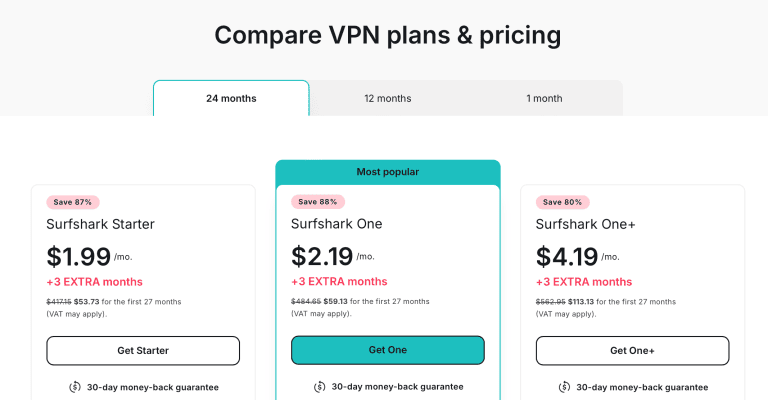
Grab these Surfshark discounts to save more and enjoy the 30-day money-back guarantee on your purchase.
Pros
- 4,500+ servers in 100 countries
- 80 Japanese servers in Tokyo on 10Gbps ports
- Free for 7 days, then a 30-day money-back guarantee
- Fast enough to bypass throttling for fast downloads and streams
- Great torrenting VPN
- Low ping servers for gaming
- Unlimited simultaneous connections
Cons
- Needs a payment method to start the trial
- Fewer Japanese servers than NordVPN, and no Osaka location
ProtonVPN – Best Fully Free VPN With Japan in Its Server Pool

ProtonVPN’s free plan now draws on servers in ten countries: the Netherlands, Japan, Romania, Poland, Norway, Switzerland, Singapore, Mexico, Canada, and the USA.
That’s the widest free spread on this page, and it comes with no data cap, no card, and no ads.
The part that matters here is that Japan is in that pool. The snag is that the free app picks the server for you, so you can’t choose Japan on demand.
When it did hand me a Japanese server, I wanted to make sure it wasn’t just there for show.
So, I tried to unblock Try Knights, Sorcerous Stabber Orphen, and Real Girl anime on Nippon TV. They all played, didn’t lag, and my video didn’t buffer.

On a US server, I also unblocked US-available sites and US-only streams. Some of the content I tested include:
- Sports platforms like MLB TV and NHL TV via ESPN.
- Banned games like PUBG.
- News websites like CNN Go and NBC only available in the USA.
ProtonVPN unblocked the content stream every time and never caused my videos to buffer.
But there’s a lurking issue: ProtonVPN isn’t optimized for streaming service support on the free plan. So, if you use it to unblock content streams long enough, you’ll have some problems.

I confirmed this when I tried to unblock Japanese anime on Netflix with ProtonVPN.
Another area where ProtonVPN shines is in offering unlimited bandwidth over its servers. So, you can stream content, play games, and encrypt your primary internet connection without limits.
Even so, you can’t enjoy torrent download support on the free plan, and you risk getting served nasty warnings and DMCA copyright notices.
That’s unlike NordVPN, Surfshark, and CyberGhost, which all support torrenting with proper protection.

Moving on, I tested ProtonVPN with the same games I played on NordVPN and Surfshark.
I also shared my free plan with an Android user who successfully played other titles like Clash of Clans and League of Legends over ProtonVPN.
In all these tests, we enjoyed buttery smooth gaming.
Unfortunately, ProtonVPN doesn’t offer a Smart DNS service like NordVPN does. But it offers router support to connect your gaming consoles to a secure network.

Despite that, ProtonVPN falls through with only one device connection on its free plan, where Surfshark covers as many devices as you own once its trial (up to 3 devices) turns into a plan. Even when you upgrade to a paid ProtonVPN plan, you’re still limited to ten simultaneous connections.
If you want more out of ProtonVPN, get the paid plan.
Here, you get 20,000+ servers in 140+ countries, up to 10Gbps speeds, the NetShield ad-blocker, torrent support, and Tor over VPN. Its long-term deal does cost more than Surfshark’s or CyberGhost’s, though.
Original pricing screenshot
Offers shown in this screenshot may differ from the current deal.

Grab these ProtonVPN discounts for better savings if you plan to upgrade.
Pros
- Japan is among the ten countries in the free server pool
- No data cap, no card, and no ads on the free plan
- Fast enough to unblock anime, Netflix US, etc.
- Router support for gaming consoles like Xbox and PlayStation
- Unlimited bandwidth on all free servers
Cons
- Free servers are assigned at random, so a Japanese IP isn’t guaranteed
- Not optimized for streaming
- One device connection
- Doesn’t offer smart DNS
Hotspot Shield – Unlimited Bandwidth Free VPN for Japan

Hotspot Shield mimics ProtonVPN in offering unlimited bandwidth whenever you connect for security, privacy, and content unblocking.
But is it worth it? Let’s find out.
For starters, you only get one virtual location in the USA on this VPN.
That’s a narrower choice than ProtonVPN’s ten-country free pool, and it also increases your chances of overloading the server since many users are simultaneously connected.

In other words, you risk unreliable connections and slow speeds on the single free server from Hotspot Shield.
Due to the lack of Japanese servers, you can’t stream Japanese anime on Netflix or watch NTV or NHK outside Japan. It’s also impossible to secure your internet connection over public Wi-Fi in Japan without losing access to local services.
In those cases, you’ll need NordVPN, Surfshark, or CyberGhost (or luck with ProtonVPN’s random server pick).
If you want a Japanese server on this provider so badly, you’ll have to upgrade to the premium plan.

I tested the US server on CNN Go, which is exclusive to the States.
While Hotspot Shield bypassed the geo-restriction to unblock this platform, I got buffering content most of the time. This confirms that its free plan isn’t optimized for content streams.

Sadly, that’s not all.
Hotspot Shield also maintains that its free plans aren’t optimized for gaming either. So, choose any other VPNs for Japan if gaming is a dealbreaker.

The scariest part of Hotspot Shield’s free offering is the absence of a VPN kill switch. That causes an IP address and internet traffic data leak if the VPN connection drops.
If you’re concerned about your online privacy and the integrity of data you’re sharing or enjoying unblocked content, a kill switch is a serious dealbreaker.
On top of that, it only allows one device connection on the free plan.
This is the same with ProtonVPN. Upgrading works the same way, too: ProtonVPN’s paid plans cover ten devices, and Hotspot Shield Premium offers 10 simultaneous device connections.
If you’re paying, Premium costs $29 for the first year, then renews at $95.99 a year (checked September 2026).

So, it’s best to get these HUGE discounts if Hotspot Shield is your preferred VPN.
Pros
- US server location to unblock the majority of the web
- Up to 1Gbps speeds per server
- One device connection
Cons
- No servers in Japan
- Just one free server location
- No gaming or streaming support on the free plan
- No kill switch in the free plan
CyberGhost – 100+ Tokyo Servers and the Longest Refund Window for Japan

CyberGhost rounds out the list for the same reason NordVPN and Surfshark are on it: it isn’t free forever, but it gives you longer to change your mind than anything else here. Plans of six months or more carry a 45-day money-back guarantee (the monthly plan gets 14 days), which is two weeks more testing time than NordVPN or Surfshark allow.
It also has genuine free trials, and the terms depend on your device. At the time of writing, CyberGhost’s trial page lists 24 hours on Windows and macOS with no credit card, 7 days on iOS, and 3 days on Android, with the mobile trials needing a payment method that isn’t charged if you cancel in time. All of them unlock the full premium app and the whole server network.
Japan-wise, CyberGhost lists 108 servers in Tokyo on 10Gbps hardware, and its apps sort servers by task, so you can jump straight to a streaming-optimized Japanese entry instead of hunting for one that works. I’ve used its Japan servers for anime sites and for DAZN Japan, and both played without stalling.

Beyond Japan, you get 9,900 servers across 100 countries and 125 locations, with NoSpy servers in its Bucharest headquarters if you want extra privacy on top of the WireGuard tunnel.
It wasn’t as quick as NordVPN or Surfshark on the long hop from Europe to Tokyo in my testing, which is the honest reason it sits fifth rather than higher, and there’s no Osaka location either.
Seven simultaneous connections, a kill switch, and an ad and malware blocker come with every plan, and the Romanian company’s no-logs policy passed a Deloitte audit published in February 2026.
At about $2.19 a month on the 26-month plan (checked September 2026), you’re risking $56.94, all of it refundable inside 45 days, which makes CyberGhost the cheapest long-term option on this page as well as the one with the longest safety net.
US dollars · checked Oct 13
Original pricing screenshot
Offers shown in this screenshot may differ from the current deal.

Grab these CyberGhost discounts and take the full 45 days to decide whether its Tokyo servers earn a place on your phone.
Pros
- 108 Tokyo servers on 10Gbps hardware
- 9,900 servers in 100 countries and 125 locations
- 45-day money-back guarantee on plans of six months or more
- Free trials on every platform, with no card needed on Windows and macOS
- Streaming- and gaming-optimized server categories
- Seven simultaneous connections
Cons
- No plan that stays free
- Slower than NordVPN and Surfshark over long distances
- Only 14 days to refund the monthly plan
How to Setup a VPN for Japan?
It’s easy to set up a VPN for Japan. Choose the correct VPN protocol for the best balance of speed and security, and connect to preferred servers to enjoy your VPN’s services.
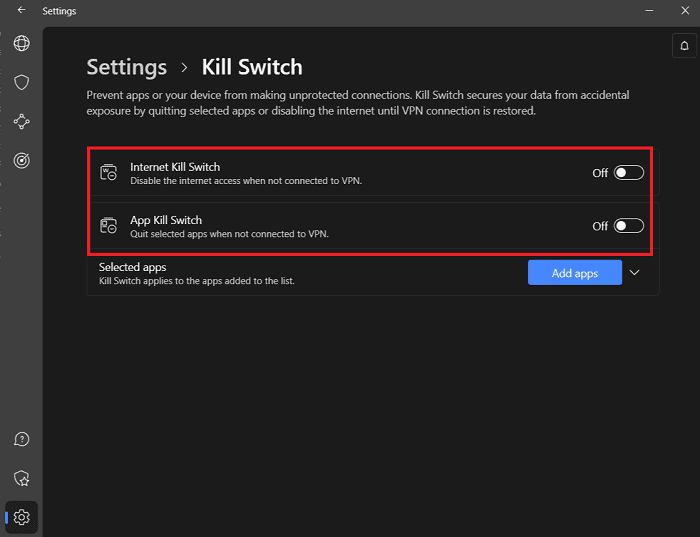
Also, enable the VPN kill switch to prevent getting deanonymized when the connection randomly drops.
Here’s a stepwise guide to setting up your VPN for Japan from anywhere.
- Choose a reputable VPN provider. I preferred the NordVPN risk-free plan.
- Enable the VPN kill switch. Go to Settings > Kill Switch > toggle “Internet Kill Switch.”
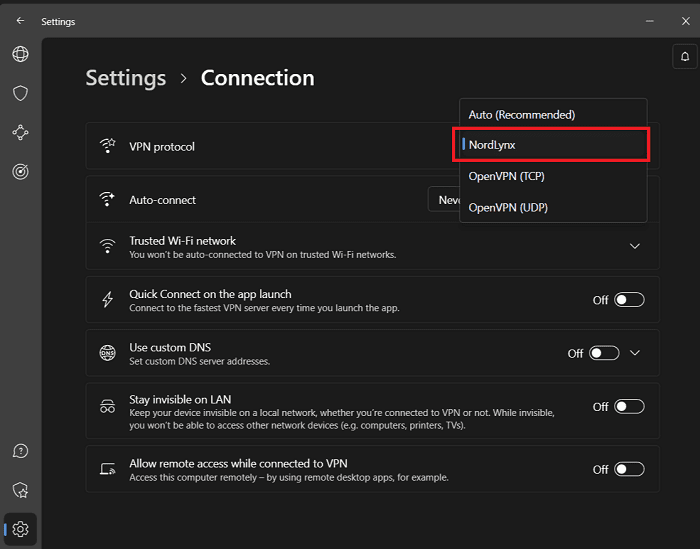
- Choose a protocol or leave it set at Automatic. I recommend NordLynx for impressive unblocking speeds and security on NordVPN.
- Search and connect to a preferred server.
- Wait for the connection confirmation.
- Test for leaks (go to www.ipleak.net).
- Start surfing the web and unblocking content securely.
Limitations of Free VPNs for Japan
The free VPNs for Japan are great because you don’t have to pay.
But in most cases, you’re sacrificing a lot of your speed, some security, and other relevant VPN features to save a few bucks.

Some of the many limitations I encountered when testing these free VPNs include:
- Lack of Japanese servers. This was the case with many of the VPNs I tested, including Hotspot Shield, which made this list, and ProtonVPN only includes Japan as one random option in its free pool. That makes it impossible to stream Japanese content, unblock content like home or encrypt your local internet connection in Japan.
- Lack of global server options. Most free VPNs only give you servers in 1-3 locations. What happens when you must unblock content in a country not provided under the free plan? That’s why I like Surfshark’s risk-free trial plan, which still offers 100 countries!
- Limited bandwidth. A VPN should help bypass your ISP’s speed throttling, not limit your bandwidth. Unfortunately, they must share their resources between you and other free users. Thus, limited bandwidth.
- Limited connectivity. Minimal servers shared by a lot of free users will lead to overcrowding. Thus, it’s only realistic that you’ll sometimes face some connectivity issues when connecting to these servers.
- Unreliable unblocking. I couldn’t access Japanese Netflix on ProtonVPN’s Japan servers, and Hotspot Shield wouldn’t play CNN Go on its US servers. However, NordVPN handled both instances with ease.
- Data logging. Most free VPNs will have to make their money in a way. Suppose they don’t pepper you with ads. In that case, some collect your internet browsing data to sell to advertisers and other third-party bodies.
Instead of facing these issues, I believe you’ll fare better with an affordable VPN like Surfshark. It offers unlimited simultaneous connections to servers in 100 countries, and you can get it for almost nothing with these HUGE deals.
Frequently Asked Question
Are VPNs Legal in Japan?
VPNs are legal in Japan. So, you can use them to secure your local web experience, unblock content, get faster gaming speeds, and download torrent files without getting nasty copyright notices. Travelers to Japan can also use a VPN to access content in their home country, encrypt their internet connection on free Wi-Fi networks or keep internet service providers out of their data.
Save More and Stay Safe
If you’ve been wondering whether a free VPN can really cover Japan, ProtonVPN proves it can, up to a point: no card, no data cap, and Japan in its server pool, but one device and no say over which server you get.
For everything the free plans can’t do (a Japanese IP on demand, HD streams, torrenting, ad blocking), my answer is NordVPN: free for 7 days through its website trial, refundable for 30 on every plan, and 200+ Japanese servers behind it.
No matter which you choose, I’m sure you have all the information to make the best choice at your disposal.





