
Virgin Media can see every site you visit, can be ordered to keep a record of it under UK law, and has every commercial reason to slow you down when you stream a rival’s content over its line. NordVPN is the best VPN for Virgin Media because it deals with all three at once.
It held 27 Mbps of my 30 Mbps connection over NordLynx, its audited no-logs policy and Panama base keep your browsing history out of the ISP’s reach, and Threat Protection picks up where Virgin’s Web Safe filter leaves off the moment your traffic is encrypted. It also runs on the third-party routers you can pair with a Virgin Media Hub in modem mode, so one setup can cover every device in the house.
Other noteworthy alternatives include Surfshark (unlimited simultaneous connections), CyberGhost (largest server network), ExpressVPN (fastest speeds), and PureVPN (most affordable price plans).
If you’re a resident of the UK or you plan to visit, read this piece to the end to find out how you can still consume any online content without restrictions.
Top 3 VPNs for Virgin Media (September, 2026)

Surfshark
Best for whole-household use
- 28 Mbps over WireGuard
- Unlimited simultaneous connections
- Camouflage Mode obfuscation

NordVPN
Best for privacy on Virgin Media
- 8,400+ servers in 167+ countries
- Audited no-logs and Threat Protection
- Runs on VPN routers behind the Hub

CyberGhost
Best for a 45-day risk-free trial
- 9,000+ global servers
- Streaming and torrenting servers
- 45-day money-back guarantee
Virgin Media is one of the largest telecommunication companies in the UK that provides internet, telephone, and television services. This creates a conflict of interest for Virgin Media if they have customers who want to use their Virgin Media subscription to stream competitor content, for example.
Although the company may not explicitly admit to slowing speeds (which is illegal), don’t be surprised when it happens. This is why a VPN is necessary, and I’ll show you how each of the 5 VPNs below can help you gain total freedom over your internet subscription.
Beat Speed Throttling and Unblock Any Restricted Content Using These 5 VPNs
Dealing with heavy buffering due to unnecessary speed throttles can be frustrating.
But here are the 5 VPNs to make your life easier.
- NordVPN – Best Overall for Privacy and Unblocking on Virgin Media
- Surfshark – Unlimited Simultaneous Connections for Virgin Media Subscribers
- CyberGhost – Largest Server Network for Bypassing Virgin Media Blocks
- ExpressVPN – Fastest Speeds With Automatic Obfuscation
- PureVPN – Best Public Network Protection With Affordable Plans
For all the speed tests, I used base internet speeds of 30 Mbps to demonstrate how each VPN held its ground as far as maintaining connections and bypassing speed throttling was concerned.
The 5 Best VPNs for Virgin Media
Are you ready to beat Virgin Media at their own game without getting in trouble?
Strap yourself in and read this to the end.
NordVPN - Best Overall for Privacy and Unblocking on Virgin Media

| Location | Servers | Connections | Average Speeds | Best Deal |
|---|---|---|---|---|
| Panama | 8400+ | 10 | 27 Mbps | Show Offer |
Bypassing Virgin Media Blocks

Peacock, Sling TV, Hulu, Disney Plus, Pandora: most of what a Virgin Media customer wants to unblock lives in the US, and that’s exactly where NordVPN has its deepest bench. It runs 2,000+ US servers spread across all 50 states, the biggest US count any VPN on this list publishes, so there’s always an uncrowded American exit a click away.
The wider network comes to 8,400+ servers in 167+ countries, second only to CyberGhost here. Hulu, Disney Plus, Pandora, and Qobuz all opened on the first server I tried, and Virgin Media saw nothing but an encrypted connection to a NordVPN address.
Then there are the extras. P2P now works on every standard server, so downloads from Pirate Bay never put your real IP in the swarm, and obfuscated servers disguise the VPN traffic itself should Virgin Media ever start leaning on it. Both come in the same app, no separate add-on required.
Bypassing Speed Throttling

Throttling only works if Virgin Media can tell what kind of traffic you’re pushing. Over the NordLynx protocol, it can’t, and I averaged 27 Mbps on my 30 Mbps line: a megabit behind Surfshark, two behind ExpressVPN, and comfortably above the 25 Mbps that 4K streaming asks for. Large downloads finished at the same pace with the VPN on as off, which is the whole point.
If you only want privacy from the ISP rather than a foreign IP, connect to one of NordVPN’s UK servers in London, Manchester, Edinburgh, or Glasgow and the speed loss shrinks further still.
The one place NordVPN gives speed away is its obfuscated servers, which were the slowest obfuscation option in my tests. Save them for VPN blocks and use plain NordLynx for everything bandwidth-heavy.
User Privacy and Anonymity
Here’s the part that matters most on a UK line. Under the Investigatory Powers Act, an ISP like Virgin Media can be required to keep a year of your internet connection records. A VPN turns that record into a list of connections to NordVPN and nothing else, which only helps if the VPN itself keeps no record.
NordVPN’s no-logs policy has been independently audited more than once, and the company sits in Panama, outside every surveillance alliance and with no data retention law of its own. Torrent as heavily as you like; there’s nothing for Virgin Media or a copyright lawyer to ask for.
The AES-256-bit encryption takes care of the snooping in the first place, and the public Wi-Fi protection feature connects automatically on hotspots, including the Virgin Media ones dotted around town, something I lean on whenever I step out of the house for coffee. A hacker won’t stand a chance.

Furthermore, accidental IP leaks are a thing of the past, thanks to NordVPN’s kill switch. The moment your VPN connection drops, the kill switch shuts down the internet, making it impossible for Virgin Media to know where you are.
There’s one more Virgin Media-specific reason I rate NordVPN above the rest. Virgin’s Web Safe filter blocks dodgy sites at the network level, but a VPN routes your DNS elsewhere, so you leave that protection behind the moment you connect. NordVPN’s Threat Protection fills the gap: it blocks malicious domains, trackers, and ads on every plan, and the Pro version (on the higher-tier plans) scans downloads for malware too. On a family’s Virgin Media connection, that’s the difference between trading one safety net for another and going without.
Device Compatibility

NordVPN is compatible with Android, iOS, macOS, Windows, and Linux, with Fire TV and Android TV apps on top, and one subscription covers 10 devices at once, level with ExpressVPN and PureVPN and three more than CyberGhost.
The Virgin Media Hub can’t run a VPN itself, but NordVPN runs on the routers you can put behind it. Switch the Hub to modem mode, plug in a VPN-capable router with NordVPN installed, and the smart TV, consoles, and everything else go through the tunnel without a single app install. My NordVPN Virgin Media guide walks through the modem-mode setup.
It costs a little more than Surfshark or PureVPN and a fair bit less than ExpressVPN, and the 30-day money-back guarantee applies either way. If NordVPN satisfies your needs, grab these amazing discounts for the best deal.
Pros
- 27 Mbps over NordLynx for 4K streaming and torrenting
- 2,000+ US servers in all 50 states plus 8,400+ worldwide
- Audited no-logs policy in Panama, kill switch, and AES 256-bit encryption
- Threat Protection covers the Web Safe filtering a VPN bypasses
- P2P on all standard servers + obfuscated servers
- 10 simultaneous connections and router support for the whole house
Cons
- Two megabits behind ExpressVPN in my tests
- Obfuscated servers are the slowest obfuscation option here
Surfshark - Unlimited Simultaneous Connections for Virgin Media Subscribers
| Location | Servers | Connections | Average Speeds | Best Deal |
|---|---|---|---|---|
| The Netherlands | 4500+ | Unlimited | 28 Mbps | Show Offer |
Bypassing Virgin Media Blocks

Surfshark runs 4,500+ servers in 100 countries, a fair way behind CyberGhost, NordVPN, and PureVPN. Fortunately, that doesn’t affect the VPN’s ability to bypass restrictions.
You can unblock streaming platforms like Sling TV, Showbox, ViX, and many more, and there’s very little Virgin Media can do to stop that.
There’s also an obfuscation feature called Camouflage Mode that’s still slower than ExpressVPN but slightly faster than NordVPN’s obfuscation.
You can use it to keep your data safe when traveling to other restricted regions like the UAE or China.
Bypassing Speed Throttling

Surfshark was the second fastest VPN with 28 Mbps, a megabit ahead of NordVPN, allowing me to breeze through heavy streaming of 4K shows and large downloads.
The VPN can stop Virgin Media interferences like ISP throttling, which is common whenever the ISP detects heavy usage.
Like CyberGhost, this handy VPN software predominantly relies on the WireGuard protocol but also goes the extra mile using IKEv2.
These two are behind these stellar speeds that allowed me to breeze through any streaming service.
User Privacy and Anonymity
Like all the other VPN providers, you get the industry standard AES 256-bit encryption that keeps all unwanted parties out, including hackers, snooping government agencies, and Virgin Media. Additionally, like CyberGhost, PureVPN, and NordVPN, a dedicated public Wi-Fi protection feature safeguards your device even when you’re on the move using unsecured public networks.

VPN connections drop from time to time, and this has happened to me more times than I can count, but thanks to the VPN kill switch, my actual IP address never leaked. The icing on the cake? Virgin Media users with Android get two kill switches, with the extra one blocking the internet even when the VPN isn’t active.
Surfshark doesn’t store user logs either, and it has had auditors confirm as much, so Virgin Media can do nothing to get their hands on your data if they feel like you’ve flouted DMCA rules.
Surfshark isn’t obligated to hand over anything since nothing is ever saved in the first place. So Virgin Media VPN users can browse torrent sites without looking over their shoulders. Its CleanWeb feature also blocks the same sort of malicious domains NordVPN’s Threat Protection does, though it doesn’t scan downloads.
Device Compatibility
You can install Surfshark directly on Android, iOS, macOS, Windows, and Linux, all devices that may need to use Virgin Media services.
In addition, Surfshark is one of the only VPN services that allow an unlimited number of devices to be connected to the same account simultaneously.
This is ideal for large groups if you have friends and family who may also want a solution to deal with Virgin Media. If the whole household shares one Virgin Media line and everybody wants the VPN, Surfshark is the one to buy, and my Surfshark Virgin Media guide covers the setup on every device.
Beyond that extra megabit, though, the comparison tilts NordVPN’s way on every count: Surfshark has roughly half the servers, far fewer US locations for the streaming most of us are after, no download scanning, and a home in the Netherlands, a Nine Eyes country, rather than Panama.
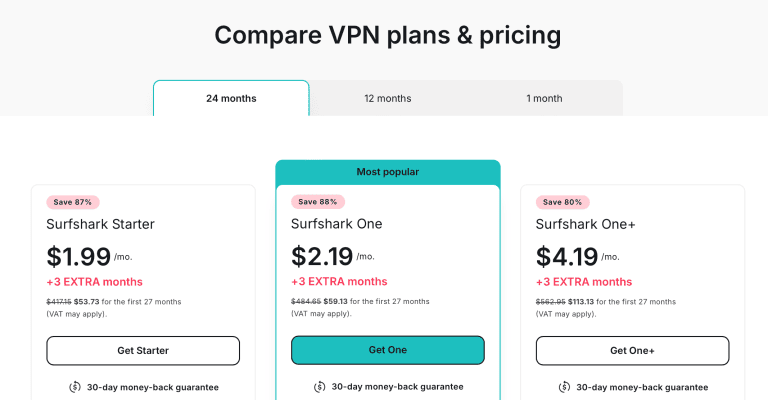
On the price front, Surfshark is one of the cheaper Virgin Media VPNs, alongside PureVPN and CyberGhost, so you’ll be getting great value for your money.
You also get a 30-day money-back guarantee that you can combine with our amazing discounts.
Pros
- Unblocks restricted content via 4,500+ servers in 100 countries
- IP leaks protection + encryption + public Wi-Fi protection
- 28 Mbps for streaming and torrenting
- Device compatibility + unlimited simultaneous device connections
Cons
- Slower than ExpressVPN
- Fewer servers and US locations than NordVPN, and based in a Nine Eyes country
CyberGhost - Largest Server Network for Bypassing Virgin Media Blocks

| Location | Servers | Connections | Average Speeds | Best Deal |
|---|---|---|---|---|
| Romania | 9000+ | 7 | 26 Mbps | Show Offer |
Bypassing Virgin Media Blocks

If you’re in the UK and want to stream Peacock TV or Sling TV, which are exclusively found in the US, CyberGhost will get you there.
It has the largest server network among the 5 VPNs on this list, with 9000+.
Of these, 1,600+ are in the US alone (third largest after NordVPN and PureVPN).
So you can stream your favorite shows like Yellowstone or tap on some nostalgia with all the Days of Our Lives episodes using any VPN server.
Virgin Media won’t have the power to do anything, as they can’t tell where you’re streaming from.
Bypassing Speed Throttling
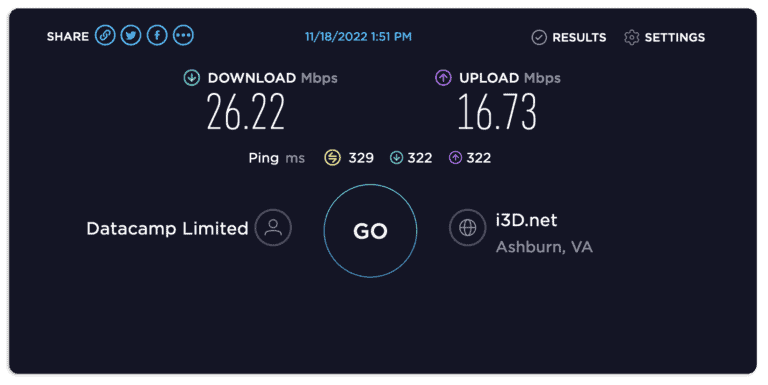
CyberGhost averaged 26 Mbps, fourth of the five here behind ExpressVPN, Surfshark, and NordVPN.
This was still enough to handle 4K streaming and huge torrenting files without buffering or long waiting times. The VPN comfortably beat Virgin Media’s speed throttling, and at no point did I feel like the speeds were slowing down.
This reliable VPN service also has dedicated servers for streaming and torrenting, which, when combined with the WireGuard protocol, gives you the best speeds possible. You can further boost the performance by selecting servers closest to your physical location.
That one-megabit gap to NordVPN is nothing you’d notice mid-stream, but it’s part of why CyberGhost sits third for me: it’s the VPN to pick when you want the widest choice of streaming and torrenting servers, not when you want the quickest line or the deepest privacy toolkit.
User Privacy and Anonymity
When dealing with an ISP like Virgin Media, best believe everything you do with their internet passes through their servers. They can see everything.
But with CyberGhost’s military-grade encryption, it becomes impossible, as it keeps any snooping at bay.

On top of this, there’s no risk of Virgin Media seeing your actual IP addresses, thanks to reliable IP leak protection through the kill switch.
Anytime your virtual private network connection drops, the kill switch shuts down the internet, maintaining your anonymity until the VPN connection is restored.
Suppose you also connect to public networks running on Virgin Media infrastructure. In that case, CyberGhost will keep you safe through its public Wi-Fi protection feature that scans every new network you connect to for hackers and surveillance.
What it doesn’t have is an obfuscation mode, so if Virgin Media ever starts leaning on VPN traffic, NordVPN, Surfshark, and ExpressVPN all give you a way around it that CyberGhost can’t.
Device Compatibility
Whether using your PC, smartphone, or tablet with Virgin Media internet, you can use the compatible Cyberghost VPN app to ensure you’re well protected.
The VPN has native Android, iOS, macOS, Windows, and Linux apps.
Additionally, you can connect up to 7 devices simultaneously, the fewest on this list now that NordVPN, ExpressVPN, and PureVPN all allow ten and Surfshark has no cap at all.

The plans are also affordable, with CyberGhost offering a 45-day money-back guarantee if you subscribe to long-term plans.
This is the longest by far.
Also, check out these fantastic discounts.
Pros
- Largest server network with 9000+ servers
- IP leaks protection + encryption + public Wi-Fi protection
- 26 Mbps for streaming and torrenting
- Dedicated streaming and torrenting servers + 45-day money-back guarantee
Cons
- Fourth of five for speed in my tests
- 7 simultaneous connections, the fewest here
- No obfuscation mode
ExpressVPN - Fastest Speeds With Automatic Obfuscation

| Location | Servers | Connections | Average Test Speeds | Best Deal |
|---|---|---|---|---|
| British Virgin Islands | 113 countries | 10 | 29 Mbps | Show Offer |
Bypassing Virgin Media Blocks

ExpressVPN no longer publishes a server count, but its network spans 113 countries, and you can unblock any content from anywhere using Virgin Media internet.
Whether you want to catch the latest TV shows or movies from Amazon Prime or watch your favorite NBA team play live in the US, ExpressVPN will get you there without issues.
Automatic obfuscation is ExpressVPN’s calling card (besides having the fastest speeds). Every connection is disguised on every protocol and every server, with no special server category to hunt for, and it’s the only VPN here that works that way.
While other VPNs use OpenVPN, which results in slower speeds, ExpressVPN’s automatic obfuscation works with all protocols across all servers.
So you can bypass VPN blocks by Virgin Media without losing your speeds.
Bypassing Speed Throttling
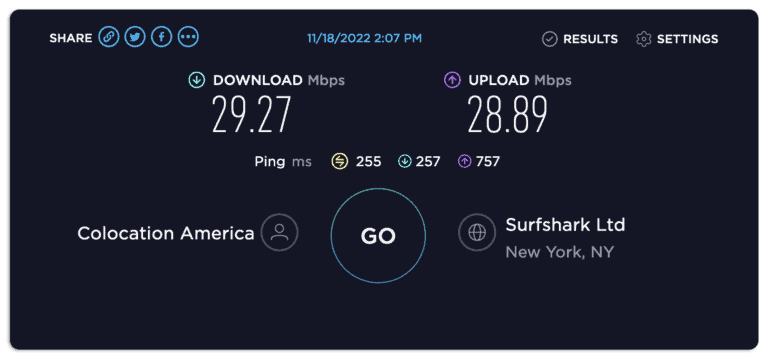
ExpressVPN was the fastest VPN I tested, with an average speed of 29 Mbps. There’s not much Virgin Media can do to interfere with your speeds since ExpressVPN hides your IP and ensures you have a stable internet connection to handle anything you want.
29 Mbps is enough to stream 4K content without buffering and conduct fast downloads with short waiting times. The Lightway UDP Protocol is partly the reason for these impressive speeds, so ensure you select it before browsing the internet.
User Privacy and Anonymity
Like all the premium VPNs on this list, ExpressVPN offers AES 256-bit encryption that will keep Virgin Media out of your online activities alongside other snooping parties. You’ll never catch me torrenting with a VPN that lacks this. I’ve had run-ins with hackers in the past, and I learned my lesson.
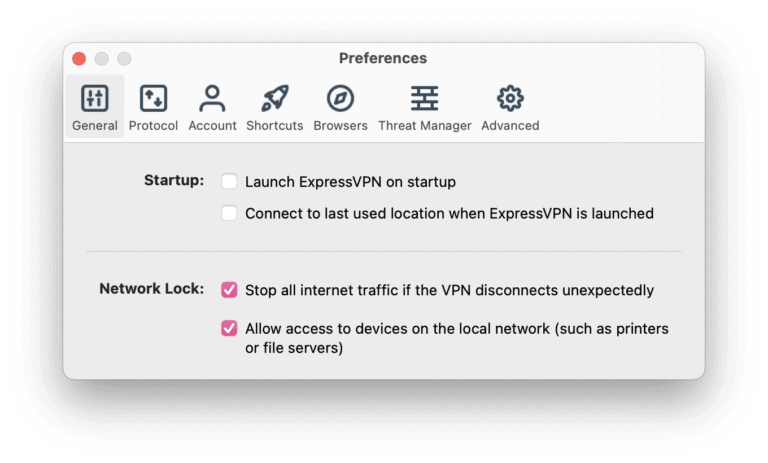
A Network Lock kill switch also disconnects the internet to stop accidental IP leaks when your VPN connection disconnects. Without this, Virgin Media can get its hands on every piece of sensitive information about you.
This premium VPN also has a strict no-logs policy bolstered by their TrustedServer technology that wipes all your data with every reboot.
Virgin Media can come with all the copyright lawyers in the world, but there’s nothing they can do to force ExpressVPN to spill your details, thanks to that and its jurisdiction in the British Virgin Islands.
Device Compatibility
You can install this VPN client directly on Android, iOS, macOS, Windows, and Linux, so you can browse the internet on any available device without worrying about interference or snooping from Virgin Media.
The Basic plan now covers 10 simultaneous devices, level with NordVPN and PureVPN, which is plenty for personal use.

The price plans aren’t that friendly, though, as it costs more than Surfshark, CyberGhost, and PureVPN, and that’s the reason ExpressVPN doesn’t finish higher on a Virgin Media line. At about NordVPN’s price, its two extra megabits don’t buy you download scanning or a network anywhere near as large. If you want the quickest possible connection with obfuscation switched on by default, it’s still where I’d put my money.
The good news is that you’ll get a 30-day money-back guarantee, and we graciously offer you these exclusive discounts to cut down that price further.
Pros
- Unblocks restricted content via servers in 113 countries
- IP leaks protection + military-grade encryption
- 29 Mbps for streaming and torrenting
- Device compatibility + 10 simultaneous device connections
Cons
- Expensive
- No published server count
- No specialty P2P or streaming server categories
PureVPN - Best Public Network Protection With Affordable Plans

| Location | Servers | Connections | Average Speeds | Best Deal |
|---|---|---|---|---|
| BVI | 6000+ | 10 | 25 Mbps | Show Offer |
Bypassing Virgin Media Blocks

Last on the board is PureVPN, with 6000+ servers, the third largest network here after CyberGhost and NordVPN. This is sufficient to unblock any restricted website from anywhere in the world.
Do you want to watch anime on Netflix from the UK but can’t access the Japanese library? Connect to a Japanese server and binge-watch every anime you want. I highly recommend the new Bleach.
On top of this, there’s reliable but slow obfuscation that will stop Virgin Media from blocking your VPN. But you won’t be able to handle bandwidth-heavy activities like streaming.
Bypassing Speed Throttling

This VPN provider is the perfect VPN for streaming sites that offer live content, all thanks to its dedicated streaming servers. I managed 25 Mbps, the slowest but sufficient for streaming HD content without buffering.
There was no significant internet traffic interference.
The main VPN protocols that this Virgin Media VPN uses for speeds are WireGuard and IKEv2 protocols. Another handy feature that can help you get better speeds is the App Filter which closes any background app that could be using too much bandwidth. This leaves enough for streaming, downloading, or any activity you want to prioritize.
User Privacy and Anonymity
There’s solid encryption that will take care of any attempts by Virgin Media to snoop in on your online activities. This makes you a ghost they can’t track or pinpoint. Furthermore, a reliable Secure Wi-Fi feature, one of the best in the game, keeps track of all types of threats every time you use an unsecured public network, including Wi-Fi hotspots run by Virgin Media.

PureVPN is also equipped with a kill switch that disconnects your internet on the spot when your VPN connection drops. I’ve had to scramble for dear life more than once after getting a “We see you’ve changed your location” notification from my ISP, all because I had the kill switch off.
Plus, like ExpressVPN, PureVPN is located in the British Virgin Islands, which isn’t affiliated with any surveillance alliances. Therefore, you can rest easy knowing that your online footprint is erased when you’re done using the VPN.
Device Compatibility
PureVPN can be installed on Android, iOS, macOS, Windows, and Linux.
Additionally, you can connect up to 10 simultaneous devices, the same allowance as NordVPN and ExpressVPN. So you can share the logins with friends and family members in need of a Virgin Media counter.

PureVPN is also the cheapest VPN on this list, with a 31-day money-back guarantee. To get the best out of your subscription, remember to grab these amazing discounts before they run out.
Pros
- Unblocks restricted content via 6000+ servers
- IP leaks protection + encryption + Secure Wi-Fi
- 25 Mbps for streaming and torrenting
- Device compatibility + 10 simultaneous device connections
Cons
- Obfuscation is slower than ExpressVPN
- Slowest connection speeds
How to Use a VPN on Virgin Media Network?
Once you’ve settled on the VPN, here’s how to set it up to work with the Virgin Media network. I’ve used NordVPN for the screenshots, but the steps are much the same for the others.
- Subscribe to and install NordVPN.

- Go to Settings > Connection and select the NordLynx protocol for the best speeds.

- Still in Settings, ensure the Kill Switch is activated.

- Now connect to a server. I recommend a US server if you want to unblock Hulu or HBO Max.

- Start browsing the internet without restrictions or speed throttling.

Want the whole house covered, smart TV and consoles included? The Virgin Media Hub can’t run a VPN, so switch it to modem mode and put NordVPN on a compatible router behind it. My NordVPN router guide has the router setup, and the NordVPN Virgin Media guide covers the modem-mode switch.
VPN Not Working With Virgin Media? Troubleshooting Guide
Running into issues when using a VPN with Virgin Media is common.
Here are some troubleshooting tips you can try to resolve all possible problems.
- Adjust Virgin Media’s Web Safe filters: Virgin Media’s Web Safe (its Virus Safe and Child Safe settings) blocks sites at the network level and occasionally catches VPN websites and servers in the net. Turn it off in your Virgin Media account if you can’t connect with an active VPN, and let NordVPN’s Threat Protection take over the malware blocking.
- Reconfigure router settings: Installing a VPN directly on your router saves you the hassle of installing the VPN on every other device. The Virgin Media Hub can’t run one, though, so switch it to modem mode and connect a VPN-compatible router (ASUS and TP-Link models are the usual choices) with NordVPN installed. Additionally, if the process is too complicated, you can buy an already pre-configured VPN router.
- Use another network: The last thing you can try if you can’t access or even download a VPN is to use another public network to download and install a VPN on your devices before connecting to Virgin Media. A proxy service could also be a good substitute, although it wouldn’t be as effective as a VPN.
FAQ
Will My VPN Work With Virgin Media Router?
No VPN runs on the Virgin Media Hub itself. The Hub 3, Hub 4 and Hub 5 don’t support VPN clients, so you can’t install NordVPN or any other provider directly on them. The best option is to switch the Hub to modem mode and connect a VPN-compatible router running NordVPN behind it, so every device in the house is covered at once.
If all this is too much work, install the native VPN apps on every device when Virgin Media blocks access to your favorite sites.
What’s the Best VPN for Virgin Media Superhub 3?
The best VPN for Virgin Media Superhub 3 is NordVPN, though not on the Hub itself.
The Superhub 3 can’t run a VPN client, so put it in modem mode and plug in a VPN-compatible router with NordVPN installed. Every device on the network is then encrypted from the router outward, and you don’t need to install NordVPN on anything else.
Does Virgin Media Allow VPN Use?
Virgin Media doesn’t allow VPN use because it is hard for the ISP to keep track of their users, which doesn’t reflect well on the profits. VPNs also make it easy for users to unblock Virgin Media and access restricted services from competitor companies and download copyrighted materials that go against the telecommunication company’s terms of use.
Will a Free VPN Bypass Virgin Media’s Speed Throttling?
For several reasons, a free VPN can’t bypass Virgin Media’s speed throttling effectively. Most free VPNs are extremely slow since many features are limited.
For instance, they may lack fast a fast VPN protocol, which won’t help you counter speed throttling from Virgin Media.
Additionally, free VPNs have very limited server networks that tend to get overcrowded. This negatively impacts the overall performance of the VPN when handling streaming services, making it hard for the VPN to do anything about speed throttling. So stick to premium VPNs like NordVPN, Surfshark or ExpressVPN.
Final Word
A VPN is becoming necessary when dealing with ISPs if you want to unlock your internet usage fully. NordVPN is my top recommendation because of the 27 Mbps NordLynx speeds that shrug off throttling, the audited no-logs policy in Panama that keeps your browsing out of Virgin Media’s records, Threat Protection to replace the Web Safe filter you leave behind, 2,000+ US servers for the streaming most of us are after, and router support for everything in the house.
Grab these fantastic discounts if NordVPN also meets your needs.
You better hurry, though, before the offer runs out.





