
NordVPN is the best VPN for Ecuador, offering an Ecuador server to get a local IP address, 8,400+ servers in 167+ countries, specialty P2P and obfuscated servers, and an audited no-logs policy to keep CNT and the government out of your traffic.
Of the other VPNs I tested, Surfshark is the best-value alternative, with its own Ecuador server and unlimited device connections, and ExpressVPN is the pick if you want obfuscation switched on by default.
Besides, PureVPN also performed brilliantly in some aspects of my Ecuador VPN tests.
But how do these VPNs compare? Which should you pick over the others? What makes them stand out?
Keep reading to discover my test criteria, individual VPN performance, and juicy discounts to save more on your preferred VPN provider.
Top 3 VPNs for Ecuador

Surfshark
Best for unlimited Ecuador use
- Virtual Ecuador server
- Fastest speeds in my tests
- Unlimited users

NordVPN
Best for Ecuador
- Ecuador server
- 8,400+ servers in 167+ countries
- P2P servers and audited no-logs

ExpressVPN
Best for always-on obfuscation
- Ecuador server
- Obfuscation on every server
- Router port forwarding
Ecuador’s biggest ISP, the state-owned CNT, holds over 40% of the market share.
Thus, it can tailor the web version many Ecuadorians see.
A leaked memo also shows that the Association of Internet Providers of Ecuador (AEPROVI) collaborated with the government to block access to YouTube and Google on March 28, 2014. Thus, it can only be imagined how many more times such has occurred since then
Likewise, CNT’s reach puts it in a prime position to see what the majority of Ecuadorians are doing online, collect such data and share it with the government/other governments. The government can also impose on other ISPs to collect and share the same data, but it’s easier with CNT, that’s internally owned.
It’s time to get the free, fair, and fast web from Ecuador or anywhere else.
Keep reading to find out how my top VPNs can help.
Bypass Government Surveillance & Censorship, Unblock Websites, and Download Torrents With My Top Ecuador VPNs

My top VPNs for Ecuador are engineered for reliable content unblocking, secure torrent downloads, fast web surfing, and bypassing ISP throttling.
They’ll also keep your web activities hidden from ISPs like CNT, Megadatos, and Setel.
Here’s a brief overview of what you get from each provider:
- NordVPN – Get an Ecuador IP address or pick from 8,400+ servers in 167+ countries, encrypt your internet connection from Ecuadorian ISPs, unblock torrent sites and download over secure P2P servers.
- Surfshark – Get Ecuador servers or 4500+ other servers in 100 countries to encrypt your internet connections, unblock content anywhere and protect unlimited devices.
- ExpressVPN – Fast obfuscation to hide your VPN traffic from Ecuadorian ISPs, bypass firewalls and VPN blocks and maintain ultra-fast content unblocking speeds.
- PureVPN – Get quantum-resistant servers for improved online security, P2P servers for torrent downloads, and 6500+ ultra-fast servers to unblock content anywhere.
- CyberGhost – Get a virtual Quito location for an Ecuador IP, 9,900 servers sorted into streaming, torrenting, and gaming tabs, and the longest money-back guarantee here at 45 days.
Should you go for the paid options, or are you better off with the free pick?
What makes these VPNs stand out, or are they all the same?
I answer these questions below with details of my tests and comparisons of the best VPNs for Ecuador.
Reviews And Comparisons of the Best VPNs for Ecuador
Whether you want to get an Ecuador IP address, unblock content abroad, use the web without government surveillance or encrypt your internet for other purposes, these VPNs have you covered.
But first, how do they beat the 21+ other VPNs I tested for Ecuador?
Find out below.
NordVPN – Best Overall Ecuador VPN With an Ecuador Server & 8,400+ Servers in 167+ Countries

NordVPN is the best VPN for Ecuador I’ve tested. When I first ran these tests, it had no Ecuador server, which kept it behind ExpressVPN and Surfshark in the pecking order. It has since added an Ecuador location, and with the widest network here, specialty servers, and an audited no-logs policy, there’s no longer a weak link in its case.
Like Surfshark’s, NordVPN’s Ecuador location is virtual: the servers sit elsewhere but hand you an Ecuadorian IP address, and they’re P2P-enabled too. That’s what you need to reach Ecuador-only services and bank logins from abroad, or to keep a local IP while encrypting your connection at home.
For starters, NordVPN uses the industry-standard AES 256-bit encryption on its 8,400+ servers in 167+ countries. No other provider on this list comes close on countries, and only CyberGhost fields more servers, so overcrowding is rarely a concern on your connections.
Before anything else, I tested NordVPN’s encryption across a few servers and didn’t get any leaks.

That should keep Ecuador ISPs, the government, and copyright trolls at bay when using the internet. Otherwise, they’ll keep having a front-row seat to everything you do online.
I also checked that NordVPN’s international servers are equally impressive at unblocking content. So, I got
- BBC iPlayer on its UK servers
- Peacock TV on its US servers
- ViX content via its Mexican servers
- Hulu, Amazon Prime Video, and CNN Go via its US servers
I also liked the ease of unblocking Netflix Australia, Netflix Japan, and Netflix US libraries on NordVPN. I only had to log out of my Netflix account, connect to the desired region, and log in again to get the exclusive Netflix content there. Super!
NordVPN is the third provider I tried that didn’t throttle my streaming speeds or induce lag in any of the videos I watched.
So, it makes sense that it’ll score 33Mbps in my speed tests.

That’s a few Mbps behind Surfshark (39Mbps) and ExpressVPN (35Mbps), even over NordLynx, its fastest protocol.
The saving grace is that these speeds are still fast enough for 4K streams, and they held steady on every server I tried. Can’t complain.

Additionally, NordVPN’s content unblocking doesn’t relate to streaming content alone. So, it can access news, social media, and other websites restricted by the Ecuadorian government or on your ISP.
For these, it’s best to connect to US servers (of which there are 2,800+), and you’ll get access to most of the web’s content.
That translated into unblocking YTS, RARBG, The Pirate Bay, and some of my other favorite torrent sites usually monitored on Ecuadorian internet network services.
But before downloading torrents, I checked if it’s legal to do so with NordVPN. Yes, it is!
In fact, the VPN provider offers specialty P2P servers that are best optimized for faster and more secure torrent downloads.

On top of that, it uses SOCKS5 Proxy on some of its servers.
If you’re a bit technical savvy, you can set this up for even faster speed and anonymity when downloading torrent files.
The VPN provider won’t tell copyright trolls what files you downloaded, either. It’s based in Panama, a data privacy advocate outside Ecuador’s jurisdiction, and has an audited no-logs policy to back that promise up.
Thus, it can’t give what it doesn’t have.
But NordVPN doesn’t support torrent seeding either, following in Surfshark’s footsteps. That wasn’t a dealbreaker for me, considering I’m more of a leecher than a seeder.

If you’re willing to look past that, NordVPN gives you ten simultaneous connections, the same as ExpressVPN and PureVPN. Only Surfshark’s unlimited plan beats it.
Its long-term plans also cost noticeably less than ExpressVPN’s, which seals the deal for me.

Interested in a NordVPN plan? Grab these HUGE Savings while they last and get a 30-day money-back guarantee.
Pros
- Ecuador location for a local IP address
- 8,400+ servers in 167+ countries, the widest reach here
- AES 256-bit encryption for IP/DNS leak protection
- 33Mbps speed guarantees 4K content streams
- P2P-optimized servers and SOCKS5 proxy for torrent downloads
- Audited no-logs provider in Panama
- Ten simultaneous device connections
Cons
- A few Mbps behind Surfshark and ExpressVPN in my speed tests
- Doesn’t support torrent seeding
Surfshark – Virtual Ecuador Server & Reliable Content Unblocking for Unlimited Users

Surfshark, NordVPN, ExpressVPN, and CyberGhost are the four providers here with an Ecuador IP address, and Surfshark is the only one that gives it to you on unlimited devices. So, it’s your best alternative to NordVPN if you want a local IP address on every device you own without paying premium prices.
The good news is that Surfshark does some things differently from the other two. So, we have a lot to unpack.
To start with, Surfshark uses a virtual Ecuador server rather than a physical one. This means the server isn’t placed in Ecuador but in another country, even though it can generate an Ecuador IP address.
There are pros and cons to this. On the plus side, I like virtual servers because
- The Ecuador government can’t seize the server since it’s not in its jurisdiction
- Surfshark can ensure faster internet speeds by placing the server in a faster location (like the USA)
- They allow reliable VPNs like Surfshark to provide much-needed servers fast before they can expand into the target country
Still, there’s the concern that virtual servers aren’t as secure or don’t reliably unblock content. So, I tested both claims.

Luckily, I didn’t get any IP/DNS request leaks on the Ecuador server.
In fact, my leak tests returned the VPN-assigned IP address.
That way, anyone snooping around my traffic only sees that IP address rather than my actual IP address.
The second thing I did was stream Canela TV, Ecuavisa, and Unimax TV over the server, all without issues. So, it’s safe to say that Surfshark engineered this server the right way.
Thankfully, virtual servers aren’t all Surfshark is known for.
It also carries 4,500+ more servers in 100 countries. That’s more servers than ExpressVPN, though NordVPN covers far more of both.
However, Surfshark doesn’t use automatic obfuscation on its servers.
In fact, its obfuscation causes slow internet speeds.

But none of that deters this VPN from unblocking content from around the globe. For my tests, I streamed the following:
- France TV over its Paris servers
- Sling TV over its USA servers
- CBC over its Canada servers
- Hulu over its US servers
- Amazon Prime Video over its US servers
Like ExpressVPN, Surfshark also unblocks regional Netflix and Amazon Prime Video libraries.
During one of my tests, I also discovered that Surfshark has a NoBorders Mode that triggers automatically when it detects geo-restrictions.
It even suggests the best servers to get around these geo-restrictions!

That’s a unique feature over the other VPNs I tested and a nice-to-have one too.
Moving on, Surfshark displayed impressive picture quality during my streaming tests. Thus, it wasn’t surprising that it averaged 39Mbps on my speed tests. That’s the fastest of all the VPNs I tested and represents the least connection drop.

I think ExpressVPN can still be considered faster since Surfshark gets slower once obfuscation is enabled. That said, use the Surfshark WireGuard protocol to get the best internet-over-VPN speeds in Ecuador and beyond.
Since speed isn’t an issue, I naturally gravitated toward torrent download tests. But I first checked Surfshark’s privacy model, so I don’t land myself in hot waters with copyright trolls.
Fortunately, it supports torrenting, and I even got some P2P-optimized server suggestions from the live chat support personnel.
However, its app doesn’t have a dedicated P2P server section like NordVPN and PureVPN.

Likewise, I was concerned about Surfshark being based in the Netherlands, a 14 Eyes member country. But Surfshark is also audited for its no-logs policy, so I’m sure it doesn’t even collect any data to share.
With that in hand, I grabbed a few torrent files off The Pirate Bay, and it’s been cricket chirps from my ISP. The results will be the same even if you use CNT, Celerity, Netlife, Claro, Xtrim, or others.

However, Surfshark doesn’t have a port forwarding add-on and doesn’t support torrent seeding on its servers. Defer to ExpressVPN or PureVPN if that’s a serious dealbreaker.
Even so, Surfshark compensates with its unlimited simultaneous device connection promise. NordVPN, ExpressVPN, and PureVPN all stop at ten, which is still a far cry from Surfshark’s offering.
Thus, you can encrypt the internet connection on all your mobile devices, unblock content on all PCs, and bypass geo-restriction on your smart TVs/gaming consoles from one account.
Why is it second rather than first? It has no specialty P2P or obfuscated server categories, no SOCKS5 proxy, and a network about half the size of NordVPN’s. For a household that wants an Ecuador IP on every device for the least money, though, that’s a trade worth making.
It’s even more exciting that Surfshark is one of the most affordable VPNs here, despite these offerings. Scaling what it offers to the others, it’s the cheapest VPN listed.
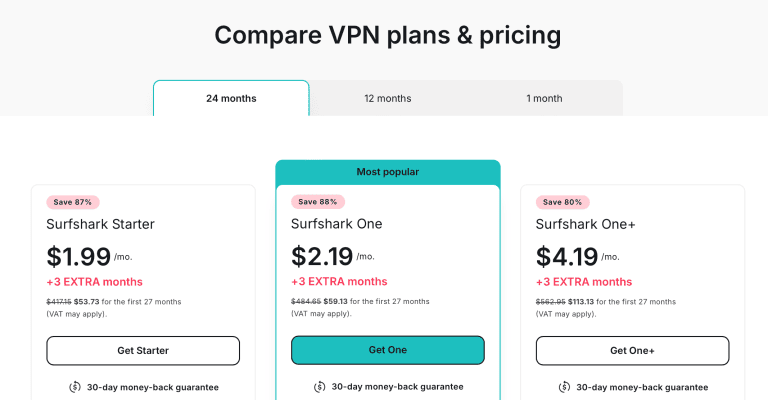
That doesn’t stop you from enjoying these Surfshark discounts while they last.
Pros
- Reliable virtual server in Ecuador
- 4,500+ servers in 100 countries
- Fastest VPN: 39Mbps on a 45Mbps connection
- Reliable encryption against IP/DNS leaks
- Supports torrent unblocking and downloads
- Unlimited simultaneous device connections
Cons
- Doesn’t offer fast obfuscation
- Doesn’t support torrent seeding
- No specialty P2P or obfuscated servers like NordVPN
ExpressVPN – Ecuador Server, 3000+ Servers & Fast Obfuscation in Ecuador

ExpressVPN is one of four providers here that offer Ecuadorian IP addresses, and the only one that switches obfuscation on by default. That makes it a strong pick to
- Get access to local Ecuadorian content like Canela TV, Econet TV, and ECTV from abroad
- Encrypt your local connections in Ecuador without losing access to local services
- Connect to gaming peers in Ecuador or nearby for less ping and added benefits (such as DDoS protection)
I first tested the AES 256-bit encryption promise that ExpressVPN makes on all its servers, including the one in Ecuador. Fortunately, I didn’t get any IP or DNS leaks. This means
- Your Ecuadorian ISP or any other ISP can’t see what you’re doing online anymore
- You can unblock Ecuadorian online services from abroad without detection
- You’re protected from hackers, online scammers, and Wi-Fi sniffers who may be lurking around for an internet data leak

Furthermore, I checked that this server is also great for unblocking content.
As you can see, I got access to TC Television which was previously unavailable since I’m outside Ecuador!
This makes ExpressVPN a great pick for Ecuadorian expats, students, and travelers who want to keep up with their local news or check their Banco Delbank/Banco Amazonas/Banco Cofiec online accounts without raising any red flags.
But that’s not the best part. It’s that ExpressVPN offers automatic obfuscation on this Ecuador server. Thus, it hides your VPN usage from your ISP.
I’m impressed because it’s the only VPN provider with speedy obfuscation on the Ecuador server or any server at all.

In contrast, other VPN providers suffer a severe speed hit once you enable their obfuscation protocols. Likewise, you can easily bypass tougher censorship, firewalls (at school or work), and other VPN traffic blocks over ExpressVPN.
Even so, I know that the best VPN for Ecuador shouldn’t be all about the local servers alone. Thankfully, ExpressVPN has 3000+ servers in 113 countries to unblock content almost anywhere. Only NordVPN (167+ countries) reaches further.
However, ExpressVPN publishes the smallest server count of my paid picks. Since each server features automatic and fast obfuscation on all protocols, ExpressVPN’s server quality makes up for the numbers.
So, I moved on to the international server tests. I didn’t get any IP/DNS leaks on these either, and they reliably unblocked all the content I threw at them.

For example, I streamed
- France TV over its Paris servers
- NRK TV over its Oslo servers
- CNN Go over the New York servers
- Crave TV on the Ontario servers
- Voot from the Indian servers
In my next tests, I checked that I could get Netflix US and Netflix Japan content in Ecuador. Otherwise, I was limited to only the local content and couldn’t stream some US-exclusive series or Japanese anime.
Besides unblocking this content, I didn’t get any lags or buffering.
This indicates a fast VPN. Testing ExpressVPN on my 45Mbps connection yielded almost 35Mbps! That’s more than enough to stream 4K content without any issues!

You’ll get these speeds over ExpressVPN’s Lightway (UDP) protocol since it’s the fastest. Otherwise, fall back to the Lightway (TCP) protocol which is equally secure but less (negligibly) fast.
Don’t worry; you get the same fast obfuscation on all these protocols, which work with all servers.
But there remained a concern: how ExpressVPN performs with torrenting.
After all, some popular torrent platforms like The Pirate Bay and RARBG are sometimes unavailable from Ecuador. No thanks to CNT, Megadatos, and other ISPs constantly monitoring my data and blocking access.

Fortunately, connecting to ExpressVPN’s P2P-friendly servers unblocks these torrent sites, helps with fast downloads by bypassing ISP throttling and prevents your ISP from seeing your torrent activity.
Thus, you don’t risk getting a nasty notice from copyright trolls, suffering bandwidth throttling, or getting your ISP account terminated.
It gets better:
ExpressVPN supports port forwarding on its router app to aid torrent seeding. It’s also free, unlike the PureVPN offering. Finally, it’s the only one of two providers to support torrent seeding on its servers.
However, ExpressVPN lacks dedicated P2P servers like NordVPN and PureVPN. So, I contacted support and learned that all ExpressVPN’s servers are P2P-optimized.

Yet another reason why it decided to maintain fewer servers for quality purposes, I believe.
On top of that, ExpressVPN has an audited no-logs policy.
That means it doesn’t collect any data about what you do online.
So, even if your government, copyright trolls, or ISP was to ask the VPN provider for your online data, it wouldn’t have anything to share.
Plus, one of the benefits of being based in the British Virgin Islands is that it doesn’t have to answer to your government or any privacy-invading government. After all, it’s outside their jurisdiction and based in one of the most privacy-friendly locations.
If you have multiple devices to protect and unblock content, ExpressVPN’s Basic plan now covers ten simultaneous device connections, the same as NordVPN and PureVPN. Only Surfshark offers more.
ExpressVPN is also the most expensive VPN provider I listed.
That, plus the fact that NordVPN now matches its Ecuador IP address with a far bigger network, specialty P2P and obfuscated servers, and cheaper long-term plans, is why ExpressVPN ends up behind NordVPN here. Considering that it offers always-on fast obfuscation, P2P-optimized servers, and an in-house protocol, though, it’s worth the price if hiding your VPN use from your ISP is the priority.

You can get these ExpressVPN deals to save more and enjoy a 30-day money-back guarantee.
Pros
- Offers Ecuador IP address
- 3000+ servers in 113 countries
- Uses reliable AES 256-bit encryption
- Supports torrent download and seeding
- Twice audited no-logs VPN provider
- Fast enough for 4K streams (35Mbps/45Mbps)
Cons
- Most expensive VPN service here
- No specialty P2P or obfuscated server categories like NordVPN
PureVPN – Top-Notch Security, Privacy, and Unblocking in Ecuador Over 6500+ Servers

PureVPN has a generous server spread of 6500+ servers in 78+ countries, behind only CyberGhost and NordVPN on count. Thus, I was disappointed that it doesn’t have an Ecuador server.
So, besides not having the local server to get an Ecuador IP address, what’s PureVPN good for? Well, several things.
The VPN provider is optimized against IP and DNS leaks on each server.
I tested this across multiple locations and virtually hopped continents with no issues.

On top of that, it adds a quantum-resistant technology to some of its servers in the US, UK, Canada, Germany, and a few other locations.
I’ve observed that these are the servers in the 14 Eyes surveillance countries where your live traffic is more likely to be hacked. Thus, it makes sense that it adds an extra layer of security that can’t be breached, not even by next-gen quantum computers. Brilliant!

But what about these servers’ unblocking ability?
For fairness and stability of the tests, I tried the same services on PureVPN as the other providers. Fortunately, I had no issues accessing Netflix, Amazon Prime Video, BBC iPlayer, Sling TV, NRK TV, France TV, and my other streaming channels. I know, I stream way too much content – but it’s better than paying for a limiting cable plan!
If you like to play bets in the USA, I discovered that PureVPN has a New Jersey server that’s perfect for that. Using that server, I’ve had success unblocking and placing small test bests on
- DraftKings
- Roobet
- Fanduel and
- GG Poker
NordVPN and ExpressVPN have since added New Jersey locations of their own, so PureVPN no longer stands alone here, but it’s the one I tested these sites on.
Fortunately, PureVPN continues to impress in the speed department.
It may not have an in-house protocol like ExpressVPN and NordVPN, but it got a decent 27Mbps on the 45Mbps connection test.

I’ll be wary of streaming 4K content over this bandwidth, even though that requires 25Mbps. After all, network spikes may bring the speed down a little and cause buffering. But I’m sure it’ll perform well for 1080p HD streams.
Since it maintains good speeds, I wanted to see how that translates into torrent downloads. But I had to check that PureVPN is a suitable torrenting VPN first.
Thankfully, it has P2P servers optimized for torrent downloads and offers port forwarding for torrent seeding. However, you’ll have to pay for its port forwarding to use the torrent seeding feature, unlike ExpressVPN.

The difference, however, is that you get the port forwarding on all devices, not just the router like ExpressVPN.
Likewise, PureVPN is significantly cheaper than ExpressVPN.
Even after adding the port forwarding, it’s a steal. So, you may prefer it for torrenting, but you won’t get an Ecuador IP address.
Despite going head-to-head, PureVPN and ExpressVPN have both been audited twice for their trustworthy no-logs policies and are based in BVI.
So, the same thing applies here: Ecuador, or any other government, can’t see what files you downloaded on torrent sites or get logs on anything else you do online.
Despite that common ground, it offers ten simultaneous connections, the same as ExpressVPN and NordVPN.
Remember when I said PureVPN is cheaper than ExpressVPN?
It’s also one of the cheapest premium providers I reviewed.

Get the best PureVPN deals here and enjoy its 31-day money-back guarantee.
Pros
- 6500+ servers in 78+ countries
- 27Mbps on a 45Mbps connection (good for HD streams)
- AES 256-bit encryption + quantum-resistant servers
- P2P servers for secure and fast torrent downloads
- Offers port forwarding for torrent seeding
- Twice audited no-logs provider based in the BVI
Cons
- No servers in Ecuador
- Not as fast as the other VPNs
CyberGhost – Virtual Quito Servers, 9,900 Global Servers & a 45-Day Guarantee for Ecuador
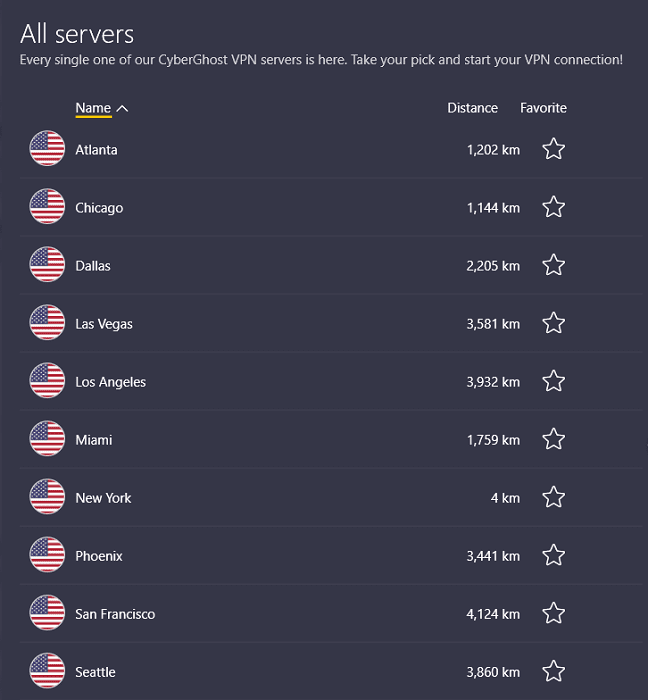
CyberGhost brings the biggest network on this list to Ecuador: 9,900 servers across 100 countries and 125 locations, 28 of which answer to a Quito location. Like Surfshark’s and NordVPN’s, that Ecuador location is virtual, meaning the hardware sits in another country while the IP address you get is Ecuadorian.
That IP is what TC Televisión, Ecuavisa, and Teleamazonas look for before they’ll stream, and it stops Banco Pichincha or Banco Guayaquil from treating a login from abroad as suspicious. From inside Ecuador, the same location keeps CNT, Claro, or Netlife from reading your traffic without cutting you off from local sites.
CyberGhost marks the Quito location as P2P-friendly on its own server list, so torrent traffic is allowed on an Ecuadorian IP, and the app sorts the rest of the network into streaming, torrenting, and gaming tabs so you pick a server built for the job instead of guessing. What it doesn’t offer is port forwarding, so seeders are still better off with ExpressVPN or PureVPN.

On the same 45Mbps line as the others, CyberGhost held 37Mbps over WireGuard, second only to Surfshark’s 39Mbps and comfortably above the 25Mbps a 4K stream needs.

For everything Ecuador doesn’t get, the streaming tab lists servers labeled for Netflix US, Hulu, BBC iPlayer, and Amazon Prime Video, and a 100-country spread ties Surfshark, behind only NordVPN and ExpressVPN here.
Privacy is a strong suit rather than a caveat this time. CyberGhost is based in Romania, outside the 14 Eyes and well outside Ecuador’s reach, and Deloitte completed an independent no-logs audit of it in February 2026, so the CNT surveillance this page opened with runs into a provider with nothing stored to hand over. Its NoSpy servers, housed in CyberGhost’s own Bucharest data center, add a hardware layer to that if you want it.
The gap against ExpressVPN is obfuscation: CyberGhost has none, so if CNT ever moves from watching VPN traffic to blocking it outright, ExpressVPN’s automatic version or NordVPN’s obfuscated servers are the tools for that. VPN use is legal in Ecuador, so for now it’s a nice-to-have rather than a requirement.
You get seven simultaneous connections, the fewest on this list, but the 26-month plan works out to $1.99 a month, and the 45-day money-back guarantee is the longest here, which gives you six weeks to test the Quito location before the money is gone for good.

Claim these CyberGhost discounts while they’re live and use the full 45 days to decide.
Pros
- Virtual Quito location (28 servers) for an Ecuador IP address
- 9,900 servers in 100 countries, the largest network here
- Second fastest VPN: 37Mbps on the 45Mbps connection
- P2P allowed on the Quito location, plus streaming, torrenting, and gaming tabs
- Deloitte-audited no-logs policy and NoSpy servers in Romania
- $1.99/mo on the 26-month plan with a 45-day money-back guarantee
Cons
- No obfuscation, unlike ExpressVPN and NordVPN
- No port forwarding for torrent seeding
- Seven simultaneous connections, the fewest here
The State of the Internet in Ecuador
Freedom House scored Ecuador 62/100 on the internet freedom scale for 2021.
That’s a relatively high number, but it doesn’t accurately reflect the government-influenced social media takedowns, online activity-related arrests, and the blatant geo-restrictions in Ecuador.
Internet Censorship
The Ecuadorian government tries to maintain the façade of free and fair internet, but it has its hands in the control and censorship of what citizens and residents can see on the web.
A notable mention is the 2014 case which showed that AEPROVI censored access to Google and YouTube for a few hours. It only reversed this issue when it discovered that censorship affected some of its clients.

Even so, it’s already obvious what the government can do through its authorities.
On top of that, another leaked document shows that the Ecuadorian president paid about $4.7 million of taxpayers’ money to a Mexican firm to remove some content regarding him and his wife from YouTube, Vimeo, Facebook, and Dailymotion.

Thus, we’re left to wonder who else has been paid and what else has been removed from the local internet space.
The Role of ISPs
ISPs are also complicit in this, but some may have no choice since they’ll have to operate under the country’s laws to keep their license.
Besides, CNT, the largest ISP in the country, is state-owned.
That makes it possible to access internet data transmitted by most Ecuadorian citizens and residents. Likewise, it’s easier for CNT to block user access to certain websites.

These are why you need a reliable VPN to bypass such blocks and encrypt your personal data from CNT. Thus, this ISP and others won’t see what you’re doing online and can’t block your access to desired platforms anymore.
The Ugly Geo-Restrictions
This isn’t an Ecuador-only problem, but it’s still a problem.
Since content creators don’t always have the licensing rights to show their content everywhere, they sometimes must restrict what regions get access.

For example, BBC iPlayer won’t show outside the UK, and Crave TV won’t work once you leave Canada. In fact, popular services like Netflix that’s available in Ecuador have limited content for viewers in the area.
In other words, you’re never getting the full web experience.
Not if you use a reliable VPN, as I will show you below.
How to Setup a VPN in Ecuador?
Setting up your Ecuador VPN is as easy as selecting a choice provider, choosing the preferred VPN protocol, and connecting to a server. Remember to enable the kill switch to prevent IP/DNS leaks if your CNT, Claro, or Netlife connection randomly drops.
For clarity, here’s a stepwise approach to setting up a VPN in Ecuador:
- Choose a preferred VPN provider. I recommend NordVPN.
- Download the VPN app for your preferred device. I recommend going to your device’s official app store.
- Log in to the app with your account credentials.
- Enable the kill switch. For NordVPN, go to Settings > Kill Switch > toggle on the “Internet Kill Switch.”

- Choose a preferred protocol. I recommend NordVPN’s fastest protocol, NordLynx, for Ecuador. You’ll find it under Settings > Connection.

- Hit “Quick Connect” to let NordVPN pick the fastest server and encrypt your internet traffic.

- Optional: OR type a preferred country into the search bar above the country list. Click the country to connect.

- Wait for the connection confirmation. Then test for leaks (I use www.ipleak.net).
- Browse the secure web.
How to Get an Ecuador IP Address?
Not all reliable VPNs have an Ecuador IP address. However, I’ve found a few that have it, and here’s how to get one:
- Choose a VPN provider with an Ecuador IP address. I recommend NordVPN; Surfshark, ExpressVPN, and CyberGhost offer one too.
- Follow steps 2-5 from above.
- On the NordVPN home screen, type “Ecuador” into the search bar above the country list.
- Click the Ecuador location and wait for the connection confirmation.
- Test for leaks.
- Start browsing the web via your Ecuador IP if there are no leaks.
Can You Use a Free VPN in Ecuador?
You can use a genuinely free plan like Proton VPN’s in Ecuador, but you won’t get an Ecuador server, you’re assigned one of about ten countries at random, and streaming isn’t supported.
Using other free VPN providers is even worse since they’ll collect your internet data to sell, may infect your device with malware, and throttle your internet speeds.

Thus, it’s best to choose premium VPNs like NordVPN to get reliable encryption, no-logs privacy, an Ecuador IP address, fast speeds, and multi-connections. If price is a factor, consider Surfshark, which gets you the same Ecuador IP on unlimited devices for less.
Is It Legal to Use a VPN in Ecuador?
It’s legal to use a VPN in Ecuador as the country has no laws against using such software. However, Ecuador also has defined cybersecurity laws. So, committing a cybercrime while using a VPN is still illegal.
Likewise, many VPN providers don’t condone the use of their servers for crime and may expose you for that.
So, only use a VPN to encrypt your internet activities from your ISP/the government, unblock websites, stream content abroad, download torrents securely and bypass ISP throttling.
FAQ
Which VPN Server Should I Connect to in Ecuador?
The best VPN server to connect to in Ecuador depends on your internet needs.
For example, you should connect to an Ecuador server to get local IPs.
However, you should connect to foreign IPs to unblock geo-restricted content like CraveTV (Canada server), NRK TV (Norway server), and France TV (France server).
Oye Pana, Secure Your Internet Experience Today!
There’s no better time than now to secure your Ecuadorian internet experience, bypass ISP surveillance, beat the government’s invasive data collection, and unblock anything from anywhere.
If that sounds like what you want, then NordVPN is your best bet.
Thanks to its Ecuador location, 8,400+ servers in 167+ countries, specialty P2P servers, and an audited no-logs policy, your ISP/government won’t see what you do online, and its obfuscated servers hide that you’re using a VPN at all.
Thankfully, I’ve got NordVPN discounts to sweeten the deal and get you a 30-day money-back guarantee.





