
Suppose you travel a lot or plan to do domestic/international travel soon. In that case, you need a VPN to unblock content from home, secure your internet experience abroad and safeguard your digital privacy. Thus, NordVPN is the best VPN for traveling, with servers in 150 countries and all 50 US states.
Being a digital nomad has allowed me to travel to different countries/cities and test 21+ free and paid VPN providers. Of these, only four come close to NordVPN in travel VPN requirements: Surfshark (unlimited devices for the whole travel party), PrivateVPN (a steady home-country IP for banking), CyberGhost, and PureVPN.
In this piece, I’ll discuss how I tested these VPNs for traveling, how they compare against one another, and how to get the best of them.
Top 3 VPNs for Traveling

Surfshark
Best for connected travelers
- Protects all your devices
- 4,500+ servers in 100 countries
- Fastest in my travel tests

NordVPN
Best for balanced travel use
- Servers in 150 countries
- 2,500+ US servers in 55 cities
- Obfuscated servers for hotel Wi-Fi

PrivateVPN
Best for banking abroad
- Static IPs in 63 countries
- Stealth VPN for hotel Wi-Fi
- Kill switch for public Wi-Fi
Traveling can be fun, but losing access to the content you had back home is frustrating. For example, you stop getting Hulu once you’re outside the US, lose access to BBC iPlayer outside the UK, and much more.
Likewise, you don’t know how secure the internet infrastructure is in the country you’re visiting, especially if you’ll be connecting to public Wi-Fi network services.
You may only be one network connection away from having a hacker steal your sensitive banking logins, account passwords, conversations, and other sensitive details exchanged on these networks.
That’s not to mention the local P2P laws, which may get you in trouble if you download torrent files without encrypting this activity from your ISP in the new country.
I considered these and more before testing these VPNs. And, having been to over a dozen cities, my top VPNs have shown reliability everywhere.
In a rush? Read the summary of my best VPNs for traveling below to get started.
Unblock Geo-Restricted Websites and Ensure Your Digital Privacy With These VPNs for Traveling

You don’t have to worry about losing connection to your family and friends on your favorite social media networks, suffering withdrawal from your preferred streaming services, or looking over your shoulder when torrenting content abroad anymore.
Here’s how my top VPNs be the best travel pal for you:
- NordVPN – Download torrents securely on any standard server, unblock content available in 150 countries, and encrypt your internet data over 7,000+ servers, including 2,500+ in all 50 US states.
- Surfshark – Protect your mobile devices, PCs, routers, and other internet-enabled units from a single Surfshark account with unlimited simultaneous connections, and hide VPN use on strict networks with Camouflage Mode.
- PrivateVPN – Keep a static IP in your home country for banking and streaming, slip past hotel and airport Wi-Fi blocks with Stealth VPN, and cover ten devices for one of the lowest prices here.
- CyberGhost – Avoid server overcrowding to get the best VPN experience over 9000+ servers, unblock content in 100 countries, and securely torrent/stream/play games on this provider.
- PureVPN – Get quantum-resistant servers in the US and beyond for premium data privacy, enhanced DDoS protection on all servers, and premium unblocking activity in 65+ countries.
If you’re like me, you’ve fallen in love with more than one VPN on that list.
So, I’ve shared details of my travel VPN tests below to help you make the best buying decision and choice.
Let’s discuss!
Reviews, Tests, and Comparisons of My Top VPNs for Traveling
I tested my top travel VPNs based on US servers that unblock most of the web’s content, global servers to access content from everywhere, fast speeds, reliable privacy, and security. For the speed tests, I used a base 45Mbps connection.
Here’s how my top VPNs performed.
NordVPN – 2500+ US Servers & DDoS-Protected 7,000+ Global Servers

NordVPN is my top travel VPN, and it starts with the biggest US network on this list: 2,500+ servers in 55 US cities, covering all 50 states since its May 2026 expansion. Surfshark comes next with 24 US cities, and nobody else here gets close.
I’m fascinated by the large US server count since this location holds the largest content library on the web. So, you can unblock and access the freest internet, streaming services libraries, and other choice content from anywhere while connected to these servers.
Knowing that, it’s no wonder many VPN users will also want to connect to these servers. Since you have 2,500+ of these, the chances of overcrowding a server are low. You can even click on the general United States server location to let NordVPN automatically assign the best and fastest server to you.

To be sure these servers aren’t a fluke, I conducted two quick tests on them.
First, I checked that they don’t leak any IP or DNS requests.
Thanks to NordVPN’s active AES 256-bit encryption on all servers and protocols, these servers never leaked my IP.
NordVPN even has a kill switch that you should always activate when traveling to prevent IP address/internet activity exposure if the VPN connection randomly drops.

Secondly, I unblocked some US-only content like Hulu, MLB TV, NHL TV, CNN Go, Peacock TV, and the ViX US version, all with ease.
I even streamed up to 4K content on these and wasn’t surprised to learn that NordVPN managed 33Mbps speeds on my connection.

Lest I forget, always enable the in-house NordLynx protocol on NordVPN to get the fastest speeds and security. It’s the provider’s exclusive alternative to WireGuard, which you get on most other providers.

Surfshark and CyberGhost posted slightly higher numbers in this test, but 33Mbps on a 45Mbps line never left me waiting on a stream. Moving on.
NordVPN’s server library consists of 7,000+ servers in 150 countries.
Thus, you’re not limited to unblocking content in the US only.
This is suitable for non-US citizens and residents who want local content in their countries, access their banking apps without raising red flags or connect to gaming peers in another country.
I’ve managed to unblock NRK TV (via Norway servers), BBC iPlayer (via UK servers), and France TV (on the French servers).

NordVPN’s 150 countries are the widest spread on this list, well ahead of the 100 that Surfshark and CyberGhost each reach.
So, whichever country you land in, there’s a good chance NordVPN has a server there or right next door.
Remember NordVPN’s encryption I mentioned earlier? It does more than keep IP leaks away.
It’s also responsible for keeping your ISP, public Wi-Fi operator (hotel, Starbucks, airport, anywhere else), and local government out of your internet data. This is important if you’re in countries with several data retention laws and invasive ISPs that look at everything you’re doing online.

This also ties into the reason I trust NordVPN for torrenting files.
After all, I’m sure any ISP I use or copyright trolls won’t see the torrent sites I visit or know the files I downloaded. Everything stays on NordVPN’s servers.
For example, I once unblocked The Pirate Bay in Canada, even though it’s blocked in some regions. I haven’t gotten any notices from Rogers to indicate it caught on to my torrent downloads.
NordVPN now allows P2P traffic on all its standard servers, so you can torrent from whichever location you’re already on instead of hunting for a special one.
When a hotel network or a whole country blocks VPN traffic, its obfuscated servers disguise the connection. And Threat Protection blocks the malicious domains that fake airport and café login pages like to push.
The best part is that NordVPN uses a no-logs policy.
Thus, it won’t have any data to hand over to government authorities if they ask for what you’ve been doing online over its servers.
But don’t use the VPN for anything illegal, as that breaches its Terms of Use and may get you in trouble with the country you’re traveling to.
Finally, you can install and use NordVPN on your mobile devices and PCs for protection on all devices. It allows ten simultaneous device connections to enjoy all its features on multiple units without paying for another plan.
That’s more than CyberGhost’s seven, and only Surfshark goes further, so unless you’re covering a whole tour group, you won’t run out.
While NordVPN isn’t the cheapest provider I reviewed, it’s still reasonably priced for what it offers, and a 30-day money-back guarantee lets you try it on your next trip.

And you can grab these NordVPN discounts for an even better deal.
Pros
- 2,500+ US servers in all 50 states to unblock most of the web anywhere
- 7,000+ servers in 150 countries to unblock geo-restricted content
- Fast for 4K streaming with 33Mbps speeds
- Privacy-focused: Uses AES 256-bit encryption on audited no-logs policy
- Obfuscated servers and Threat Protection for hotel and airport Wi-Fi
- Offers ten simultaneous device connections
Cons
- Not the fastest VPN here
- Not the most simultaneous connections
Surfshark – 600+ US Servers & 4500+ Global Servers on Unlimited Simultaneous Connections

Are you traveling for the holidays with family and need an affordable VPN for everyone? Do you have a lot of devices to secure while on your trip?
Are you part of a travel group with other online security and privacy enthusiasts like yourself?
If you answered yes to any of those questions, Surfshark, my runner-up, is the one I’d hand a travel group. Thanks to its unlimited simultaneous connections and bandwidth, it could easily become your cheapest VPN provider.
Fortunately, Surfshark doesn’t mask poor performance, speed, and security with its unlimited simultaneous connections offer. In fact, it’s the fastest VPN provider I tested, offering 39Mbps speeds on my base connection.

I got these speeds using WireGuard, the fastest Surfshark protocol.
So, you know what protocol to connect to for the best speed and security.
However, it carries fewer US servers than NordVPN, CyberGhost, or PureVPN. But with a haul of 600+ servers in 24 US cities, it has the second-widest US spread here after NordVPN for even more regional options. This may come in handy when you want to unblock a Major League Baseball game blacked out in some US regions, for example.

I tested Surfshark’s encryption promise on these servers and got zero IP/DNS request leaks. I also unblocked Hulu US, Disney+ US, Amazon Prime Video US, and Netflix US on its US servers. Likewise, I got some US-specific content like ESPN+ and CNN, so these servers get the job done.
Besides unblocking content streams in 4K, Surfshark has also helped me save money while abroad. I remember connecting to these US servers to enjoy some Black Friday deals on Amazon. Those deals weren’t available to me once I disconnected the VPN since I was outside the USA.
So, you can even connect to any of Surfshark’s servers to browse cheaper hotels and flight prices when traveling.

Speaking of Surfshark’s servers, this provider brings 4,500+ reliable servers in 100 countries. Only NordVPN reaches more countries on this list.
Thus, you’ll still get elusive countries that many other VPN providers skip.
Again, unblock anything anywhere!
One of the things I quickly liked about Surfshark is its easy-to-use iOS app.
This is like the Android app build, so you get the same experience.
Thus, I was up and going in less than 5 minutes; most of that time was spent paying for the VPN and downloading the app.

Its PC apps are also wonderful and highly straightforward.
In fact, I’m hard-pressed to choose a winner between Surfshark and NordVPN here.
But it doesn’t label P2P-optimized servers the way CyberGhost does, so I had to ask the customer support staff which ones are best for downloading torrents. Fortunately, it has a 24/7 live chat option (like the other VPNs).

You don’t have to worry about your torrent download, content streaming, web unblocking, or censorship-bypassing activities falling into the government’s hands. Besides Surfshark’s encryption on all servers, it also has an audited no-logs policy.
Suppose you don’t do anything illegal on these servers.
In that case, you won’t be breaking its ToS, and the VPN provider won’t have any data about your activities to share with any government.
For travel, the extras matter as much as the servers. Camouflage Mode hides the fact that you’re using a VPN on hotel and airport networks that block them, NoBorders switches on by itself in restrictive countries, and Bypasser lets a local ride-hailing or maps app use your real connection while everything else stays in the tunnel. There’s a kill switch in every app, too.
NordVPN still beats it on reach: 55 US cities to Surfshark’s 24 and 150 countries to its 100 mean fewer trips where I can’t find a server near home.
Remember that you can use Surfshark on unlimited devices? Yet, it’s cheap!
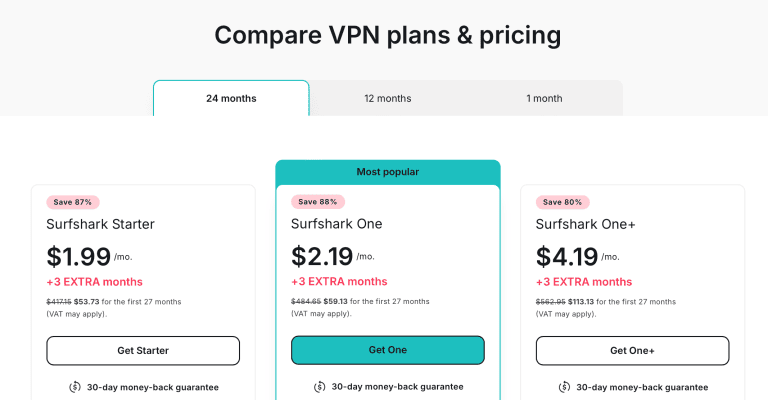
How about these Surfshark discounts to save more and test the VPN risk-free for 30 days?
Pros
- 600+ US servers in 24 cities
- 4,500+ servers in 100 countries
- Fastest VPN: 39Mbps speed for ultra-fast 4K streaming
- Offers encryption and no-logs for digital privacy
- Camouflage Mode, NoBorders, and Bypasser for restrictive networks
- Unlimited simultaneous device connections
Cons
- Fewer US cities and countries than NordVPN
- Doesn’t have an exclusive protocol like NordVPN
PrivateVPN – Static Home-Country IPs & Stealth VPN for Hotel Wi-Fi

PrivateVPN fixes a travel headache the bigger networks tend to cause: accounts back home that panic when your IP address keeps changing. Every PrivateVPN location uses a shared static IP, so when you connect to your home country, your bank, tax portal, or streaming profile sees the same address it saw yesterday.
That works across 200+ servers in 63 countries, including 12 US cities, London and Manchester, Toronto, Montreal and Vancouver, and four Australian cities. For banking apps that fire off an SMS check whenever your location jumps, a steady address from home is worth more than a thousand random ones.
Hotel and airport networks are the other half of the problem. Plenty of them block or throttle anything that looks like a VPN, and PrivateVPN’s Stealth VPN disguises the tunnel as regular web traffic so you can still connect. It runs over OpenVPN and is slower than WireGuard, so I’d only switch it on when a normal connection fails.
On any public Wi-Fi, leave the full-system kill switch on. It works on Windows, macOS, iOS, Android, and Linux, and it halts your traffic if the tunnel drops in a departure lounge rather than letting it spill onto a network anyone can join.
PrivateVPN wasn’t part of this page’s 45Mbps test run. The closest line I’ve measured it on is the 42.92 Mbps connection in my Spotify roundup, where it held 38.33 Mbps, more than enough for HD streaming from a hotel room.
Third place comes down to reach. With 63 countries, it’s the network on this list most likely to be missing the country you’ve just landed in, where NordVPN covers 150 and Surfshark 100. Its zero-logs claim also hasn’t been independently audited, and it’s based in Sweden, a 14 Eyes member.
What you get for the money is hard to argue with, though: ten devices, enough for two travelers’ phones, laptops, and tablets, for $2.00 a month on the 36-month plan (it renews at $72 a year), backed by a 30-day money-back guarantee.

Pack it for your next trip with these PrivateVPN deals.
Pros
- Shared static IP on every location, handy for banking from abroad
- 200+ servers in 63 countries, including 12 US cities
- Stealth VPN for hotel and airport networks that block VPNs
- Full-system kill switch for public Wi-Fi
- Ten devices for $2.00 a month on the 36-month plan
Cons
- Fewest countries on this list
- Zero-logs claim not independently audited
- No split tunneling or ad blocker
CyberGhost – 1300+ US Servers & 9000+ Torrenting, Streaming, and Gaming Servers

CyberGhost goes head-to-head with NordVPN on multiple fronts.
Still, they’re unique in how they offer some services to aid your traveling experience.
For instance, CyberGhost has 1300+ servers in 11 US cities, behind NordVPN and PureVPN on this list.
However, I’m impressed with CyberGhost’s ease of use on these servers, quickly helping you to find those US servers that are best for downloading torrent files, playing mobile/PC games, or streaming content.

In fact, CyberGhost tells you what streaming platform (like Netflix US, Hulu, HBO Max, etc.) its servers are best optimized for.
Of course, I didn’t take any of these at face value. So, I tested for server security (and got zero leaks, by the way) and unblocking ability.
CyberGhost unblocked my preferred US content streams every time without buffering or lag.
I also noticed that the non-streaming-optimized servers are equally great for unblocking content anywhere. Thus, you’re not limited to only the US services CyberGhost mentions on its servers.
Like NordVPN, CyberGhost handled all the streaming tests on my PC and mobile device without lag. Checking the speeds that ensured this buffer-less streaming, I got 37Mbps! That’s higher than NordVPN’s speeds, and it’s the second fastest in this test.

This shows that this provider really optimizes its servers for speed.
While CyberGhost falls behind NordVPN on the US server count, it wins on raw server numbers. With an arsenal of 9000+ servers in 100 countries, overcrowding is rarely an issue, although NordVPN still reaches more countries.
Non-US travelers who want to access content in their country, or anyone who needs a specific server somewhere else for various reasons, will feel at home here.
I connected to a few of these servers to stream BBC iPlayer (UK servers), France TV (France servers), Crave TV (Canada servers), and Qatar TV channels (Qatari servers) without lag. I never doubted CyberGhost’s unblocking but had to ensure it maintains stellar speeds on other servers too, which it does.

But CyberGhost lacks an in-house protocol like NordVPN.
So, it’s best to choose WireGuard to get amazing speeds and security.
You can also select IKEv2 on mobile for even faster speeds and lesser encryption burden.
Speaking of encryption, CyberGhost is reliable at keeping your new ISP, the government in your new country, or hackers out of your internet data.
In fact, I use its automatic public Wi-Fi connection feature to protect my banking activities and sensitive internet operations whenever my device picks up a public Wi-Fi connection.

Furthermore, it needs no telling that you can download torrent files securely over CyberGhost. It even labels its torrent-optimized servers, which NordVPN no longer does now that it allows P2P on every standard server. Those labels make it easy to find a local torrent server in the country you’ve traveled to, getting the best download speed while unblocking torrent sites securely.

And there’s the recently audited no-logs policy too.
Even if the country you’re traveling to can prove you’re using CyberGhost, the VPN can’t tell the authorities what you were doing on its servers.
How neat!
I found that CyberGhost supports router apps and smart TVs.
But I didn’t care much for that since I don’t travel with those devices.
Instead, I was happy to see its easy-to-setup mobile and PC apps.
Even so, the PC app (I use Windows) can take a minute to figure out.
This is where the VPN service could take a book out of NordVPN’s simple user interface design.

Where CyberGhost falls short for travel is the device allowance. Seven simultaneous connections sounds generous until two people each pack a phone, laptop, tablet, and e-reader; NordVPN and PrivateVPN give you ten, and Surfshark sets no cap. It is priced lower than NordVPN, though, and its 45-day money-back guarantee is the longest here.

Plus, you can get these CyberGhost deals to save more and enjoy a 45-day money-back guarantee.
Pros
- 1300+ US servers to unblock almost any content
- 9000+ servers in 100 countries to bypass geo-restrictions in most places
- Second-fastest VPN with 37Mbps speeds
- Combines AES 256-bit encryption with no-logs policy for privacy
- Easy-to-setup PC and mobile apps
- 45-day money-back guarantee, the longest here
Cons
- Not as many US servers or cities as NordVPN
- Doesn’t have an in-house protocol
- Seven devices, fewer than NordVPN and PrivateVPN
PureVPN – 1800+ Quantum-Resistant US Servers for Reliable Streaming & Content Unblocking Abroad

PureVPN is the closest to NordVPN in the US server count, offering 1800+ servers in 11 cities. Its US servers also feature reliable encryption and unblock US-available content anywhere.
Given that most of the web is unrestricted in the USA, these US servers can bypass censorship/geo-restrictions better.
Besides, PureVPN has a New Jersey server (NordVPN and PrivateVPN have one too).
But why does the New Jersey server matter? New Jersey has access to legal online US-betting websites if you like to place online bets in the US.
Outside of this location, you may be unable to place online bets in the USA.

I’ve tested PureVPN to place small bets on Roobet, GG Poker, and DraftKings. I’m confident it’ll handle other US-available betting and online gambling services just fine.
During my content unblocking tests, I discovered that PureVPN also has streaming-optimized servers like CyberGhost, but only in the USA.
Luckily, that didn’t affect its ability to unblock content streams, bypass geo-blocks, and defeat censorship anywhere else.
Enough of the US servers. What about the other PureVPN servers?

Its 6,000+ servers in 65+ countries trail NordVPN’s network (see my PureVPN vs NordVPN comparison), but they still let you access country-specific content in most regions travelers visit.
I tested these servers with BBC iPlayer (UK servers), Canal TV (Mexico servers), and Bilibili (Hong Kong servers) to ensure they live up to their name too.
The VPN unblocked everything I threw at it, but it’s not as fast as the other VPNs I tested, recording a mere 27Mbps.

That’s still fast enough for 4K streams, but almost a half connection drop from the base 45Mbps speeds I started with.
Luckily, PureVPN also has specialty P2P servers like CyberGhost. Connect to these to download torrents, and you’ll never have to worry about
- Your favorite torrent sites being blocked from you
- Your foreign ISP throttling your torrent download speeds
- Copyright trolls coming after you for your torrent downloads
- The foreign government/authorities finding out what files you pulled off torrent sites

But there’s more.
Like the other providers, PureVPN combines encryption with a no-logs policy to ensure top-notch data privacy. KPMG audits its no-logs claims on an always-on basis.
Even so, it adds quantum-resistance technology to some of its servers for extra protection.
So, your online data is protected from next-gen quantum computer hacks.
That keeps the most privacy-invasive governments out of your online data and ensures strict digital privacy anywhere!

Unfortunately, this extra protection isn’t on all servers yet.
But it’s better than nothing.
PureVPN uses a similar interface on mobile and PC. Thus, it’s also easy to set up and use but might require a slight learning curve for the first time.
I got around the major icons and features in about seven minutes, and I’m sure you can, too.

You can also use the VPN on your preferred mobile and PC devices.
With ten simultaneous device connections, it matches NordVPN and PrivateVPN and beats CyberGhost’s seven, though Surfshark still wins with no limit at all.
It’s also one of the cheapest providers here at $2.15 a month on its 2-year plan, despite all its premium offerings.

Interested? Save more with these PureVPN offers and get a 31-day risk-free guarantee.
Pros
- 1800+ servers in 12 US cities
- 6,000+ servers in 65+ countries
- Fast enough for sustained HD content unblocking
- Combines encryption with no-logs policy
- Quantum-resistant servers for extra security
- Ten simultaneous device connections
Cons
- Slowest VPN on the list
How to Setup a VPN for Traveling?
It’s best to enable the VPN kill switch, choose the correct protocol per region you’re in, and connect to a suitable server for proper travel VPN setup.
Here’s a stepwise guide to get the best of your VPN while traveling domestically or to other countries:
- Purchase a reliable travel VPN. I recommend NordVPN.
- Download the VPN app for your preferred device. It’s best to download the app from your device’s official app store or via the VPN’s website. I’ll use Windows for this demonstration.
- Enable the VPN kill switch to prevent IP/DNS leaks on disconnection. Go to Settings > Kill Switch > toggle “Internet Kill Switch.”
- Optional: Configure the app kill switch to protect certain apps from IP leaks. I prefer the all-encompassing internet kill switch, though.
- Select a preferred VPN protocol. Use NordLynx for speed and security.
- Optional: Choose OpenVPN protocols instead to use obfuscated servers to bypass firewall blocks, VPN traffic blocks, and tough censorship in some countries.
- Go to the NordVPN home page. Search for a preferred server. I’ll use the United States for this example.
- Click on the United States location to get the fastest server in the fastest city. Or manually select the city you’ll prefer to connect to.
- Wait for the connection confirmation and test for leaks. I use www.ipleak.net.
- If there are no leaks, unblock content from anywhere and browse the internet securely.
Can You Use a Free VPN While Traveling?
You can use a free VPN while traveling, but it won’t give you the best internet connection speeds, reliable security, and dependable privacy features and may compromise your internet experience.

Some free VPN providers are also known to throttle bandwidth and collect your personal data to sell to third parties. After all, they need to get paid for their ‘free’ service.
Instead, choose an affordable yet reliable VPN provider like NordVPN with encrypted server technology, an exclusive ultra-fast protocol, and a premium suite of privacy features.
Enjoy Your Travels
Whether you’re going to Canada for some sightseeing, holidaying in the Caribbean, doing business in China, or meeting new friends in other US states, a VPN will always be handy to protect you online.
Since you never want complete strangers to pry into your personal life on trips, you should also accord your online sessions the same level of privacy.
Thankfully, NordVPN makes that happen. With 7,000+ servers in 150 countries, you can unblock content almost anywhere, encrypt your internet activity, download torrents securely, and stream content like home.
Don’t forget to grab these NordVPN discounts to save more and test the VPN risk-free for the first 30 days.





