
NordVPN is the best VPN for the USA after numerous tests considering server location spread, data privacy and security, speed, and torrent support. Its 2,800+ US servers now cover all 50 states.
Beyond NordVPN, my tests showed that Surfshark (unlimited devices), PrivateVPN (New Jersey plus port forwarding), PureVPN, and CyberGhost are impressive alternatives for users in the USA or those looking for US IP addresses.
Some of these VPNs even allow you to access online betting sites like 888 Poker, GGPoker, and DraftKings from inside the USA.
So, continue reading to know why these VPNs passed the test, what they offer, and how to get the best out of them.
Top 3 VPNs for the USA

Surfshark
Best for multi-device US access
- 600+ US servers in 24 cities
- Unlimited simultaneous connections
- Deloitte-audited no-logs policy

NordVPN
Best for nationwide US IPs
- 2,800+ US servers in all 50 states
- New Jersey server in Trenton
- 8,400+ servers in 167+ countries

PrivateVPN
Best for seeding from the US
- 12 US cities including New Jersey
- Port forwarding for seeding
- Dynamic dedicated IPs in NY and LA
The USA is at the heart of the 14 Eyes Alliance countries. So, the government is heavy on collecting user data and won’t hesitate to share that data with other countries.
However, the US government isn’t the only one to blame here.
Private tech companies like Facebook, Google, and Microsoft are also digging their hands into the data pie, and there are no stops in sight.
On top of that, the US government signed an “ISP Selling Data” bill in 2017 to allow providers like Verizon and AT&T to collect and sell your data without consent.
Before then, your ISPs were still collecting your data, but they had to ask for your consent to share it with others. Now, they can aggregate all that data and sell it without your knowledge.
Sadly, this is a product we’re paying for, but our data is being sold like we’re freeloaders. Worse, they’ll throttle your internet speed – so you don’t get the full breadth of the service you’re paying for.
Likewise, your internet service provider (ISP) can see EVERYTHING you do online.
This leads to copyright issues from downloading files on torrent sites.
In fact, these concerns stop most students, workers, and everyday persons from accessing relevant files on torrent sites.
You don’t have to deal with this massive online surveillance, internet restrictions, speed throttling, and other privacy issues. Thanks to my top Virtual Private Networks (VPNs), those issues can quickly become a thing of the past.
Want to Safely Download Torrents and Prevent ISP Spying in the USA? Try My Top VPNs

What if I told you that you could download torrent files, unblock almost any website, and browse privately in the USA? Find out how my best VPNs for USA can help you do that:
- NordVPN – A reliable no-logs VPN service provider with 2,800+ US servers in all 50 states and 8,400+ secure servers worldwide for privacy and content unblocking.
- Surfshark – The best budget-friendly VPN for robust privacy and encryption over unlimited simultaneous connections, with servers in 24 US cities.
- PrivateVPN – Offers 12 US cities including New Jersey, dynamic dedicated IPs in New York and Los Angeles, and port forwarding for torrent seeding.
- PureVPN – Features a massive global server count, impressive USA server count, and a New Jersey server for online gambling enthusiasts.
- CyberGhost – Lightweight, simple, secure, and fast VPN provider with a massive 8000+ server count globally.
I know the summaries might have you excited about what VPNs to pick.
But they don’t tell the whole story.
After spending hours testing each Virtual Private Network (VPN), I compared them below to help you identify their strengths and weaknesses.
So, let’s go!
Comparisons and Mini-Reviews of the Best VPNs for the USA
I tested 20+ VPNs over 36 combined hours, looking for the best performers across speed, security, local ISP support, privacy, torrent support, and notable extras.
Here’s how the top 5 VPNs compare.
NordVPN – Reliable Security on 2,800+ US Servers and 8,400+ Global Servers

NordVPN carries the largest US server count of the VPNs I tested, and it’s the only one here with a server in every state, so there’s always a NordVPN location near you.
I connected to a few of these 2,800+ US servers and
- I never got an IP leak. So, you can encrypt your local internet connection in the US.
- My internet activity was tunneled to prevent my ISP, hackers, or the government from seeing what I was doing online.
- I got better security over public Wi-Fi networks at my local Starbucks and Mcdonald’s.
- I still retained access to US-specific content (like Netflix, Hulu, my banking apps, Venmo services, etc.).

These US servers are also life savers anytime I travel outside the country.
Thus, non-US residents, travelers, international students, and expats can connect to these US servers to
- Unblock sports content like MLB.tv, NHL.tv, etc.
- Get region-specific content like Netflix US, Amazon Prime Video US, etc.
- Keep accessing banking apps and financial services from abroad.
I’m also impressed that these US servers are distributed across 55 cities, covering all 50 states since May 2026 (I checked its server list today). Thus, I could choose the ones in my city/closest to me to enjoy better speeds and less ping.

Gamers would care about the low ping when choosing a suitable VPN server. Fortunately, NordVPN didn’t lag and even gave me DDoS protection when playing online titles like
- League of Legends
- Clash of Clans
- Mobile Legends: Bang Bang
- PUBG
- Fortnite
- FIFA 21
That now includes the three betting states it used to skip: Trenton (New Jersey), Wilmington (Delaware), and New Haven (Connecticut), which puts it level with PrivateVPN and PureVPN for a New Jersey IP. One caveat: licensed sportsbooks also check your device’s physical location, so an in-state IP doesn’t make a bet legal where you are.
Moving on, NordVPN is more than just US servers.

While we have a lot of content here in the States, some region-specific content elsewhere eludes us. Thus, NordVPN’s 8,400+ servers in 167+ countries come into play to unblock services like
- BBC iPlayer over UK servers
- CraveTV over Canadian servers
- Voot over Indian servers
- France TV over French servers
- Netflix Australia over Oz servers, and many more.
Fortunately, NordVPN is fast enough to unblock content in HD quality across these platforms. Even though VPNs cause connection drops (due to their encryption), it’s negligible with NordVPN.
In fact, I sometimes bypass throttling from Verizon and AT&T to get better speeds, thanks to NordVPN.
Perhaps one of the biggest reasons I like NordVPN is its torrent downloads support. P2P traffic is allowed on all of its standard servers, so the nearest US server doubles as your torrent server.

So, you can unblock torrent sites on Verizon, CenturyLink, and AT&T and download files without getting nasty copyright notices.
NordVPN’s AES 256-bit encryption also makes it possible to protect your torrent activity from your school/workplace’s network admins.
To be sure, I set up and tried NordVPN over
I didn’t suffer any IP or DNS data leaks, get nasty copyright notices, or suffer slow download speeds on any of these clients.

Furthermore, not seeing your internet activity makes it impossible for ISPs to throttle your speeds based on the specific activity. That contributes to overall better torrent download speeds without compromising privacy.
Make sure you’ve enabled the NordVPN kill switch and choose the fast, in-house NordLynx protocol.

Finally, NordVPN is based in Panama.
That’s significant because it’s outside US’s jurisdiction and not in any data-sharing alliance with the States. Thus, the US government can’t legally require it to hand over data on your VPN activity and what you’re doing online.
Likewise, NordVPN has an audited, strict zero-data logging policy even if such requests go out. In other words, it doesn’t collect any data on you.
Thus, it can’t give what it doesn’t have.
For all that goodness, you can set up NordVPN on ten devices under one account. Thus, your mobile phones, PCs, gaming consoles, smart TVs, and routers can enjoy premium protection and content unblocking.
Its Threat Protection also blocks the trackers and malicious ads that feed the data brokers I mentioned earlier, and the Pro version (Plus plan and up) scans downloads for malware too.

Use these NordVPN discounts to get better deals and a 30-day risk-free money-back guarantee.
Pros
- 2,800+ US servers in 55 cities across all 50 states
- 8,400+ servers in 167+ countries to unblock content
- Fast enough to bypass throttling
- P2P allowed on all standard servers
- Ten simultaneous connections
- Audited zero data logging policy
Cons
- No port forwarding, so torrent seeding is limited
- Dedicated IP costs extra
Surfshark – Secure Your Entire Family Over 4,500+ Servers
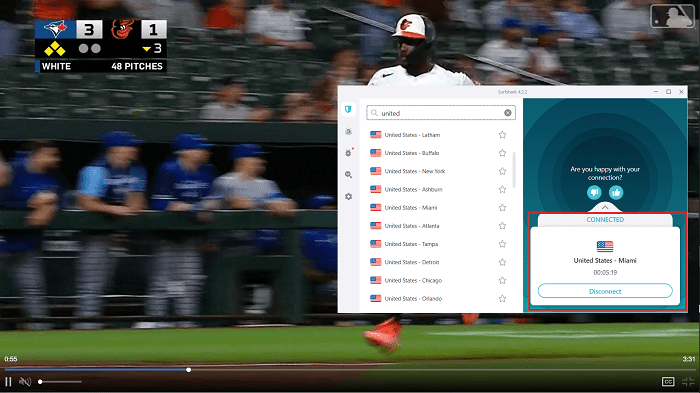
Surfshark is my runner-up for the USA, and the one I’d hand to a whole household. It’s the best VPN to get if
- You plan on safely sharing your VPN with a large family group
- You’re traveling into the US and need a decent US VPN for the group
- You’re traveling outside of the US and need a great group-buy VPN for the trip
- You have numerous devices to protect with a VPN service
But what makes it that appealing?
To start with, it offers unlimited simultaneous connections on a single account. That comes with unlimited bandwidth too. Given that its servers are optimized for 1Gbps – 10Gbps speeds, you don’t have to worry about speed.

Surfshark operates the second least US servers on this list, just ahead of PrivateVPN. However, its server page lists 600+ US servers in 24 cities across 19 states when I checked it today, a city spread only NordVPN beats here.
I’m sure gamers would love this to connect to the closest server for less ping while getting DDoS protection, better gaming speeds, and reliable in-game content unblocking.

Likewise, non-gamers can easily switch cities to view preferred content unavailable in a US city. For example, accessing a blacked-out sports game stream in your US region.
Sadly, Surfshark doesn’t include a New Jersey server; New York City is as close as it gets.
So, online bettors in the US who want a New Jersey IP address should use NordVPN’s Trenton server or the New Jersey locations on PrivateVPN and PureVPN.

That said, Surfshark offers 4,500+ global servers in 100 countries.
That’s fewer servers and countries than NordVPN, which is the main reason it sits second.
Still, 100 countries covers every major streaming region.

Despite that good news, there’s a significant issue I have with Surfshark:
The VPN provider is based in the Netherlands, part of the 14 Eyes alliance with the USA. So, technically, the US government can ask the Netherlands to collect and hand over your user data from Surfshark.
That’s scary, but Surfshark’s audited no-logs claims nullify the fear: Deloitte checked them in 2023 and again in 2025.
So, the government can ask for your data, but there won’t be any to share.
Thankfully, that increased my trust in Surfshark’s torrent downloading capabilities. So far, I’ve downloaded many torrents without getting nasty copyright notices or cease-and-desist letters from Verizon.

The only downside is that Surfshark mimics NordVPN in not supporting torrent seeding. I defer to PrivateVPN’s port forwarding or PureVPN to do this safely.
Thankfully, I get better download speeds by bypassing my ISP’s throttling, especially over Surfshark’s WireGuard protocol.

CleanWeb blocks the ads and trackers that feed data brokers, and Bypasser lets banking or streaming apps (websites on iOS) skip the tunnel when they object to a VPN IP.
On top of that, its unlimited simultaneous connections promise doesn’t translate to a higher price. In fact, it’s one of the cheapest VPNs I reviewed.
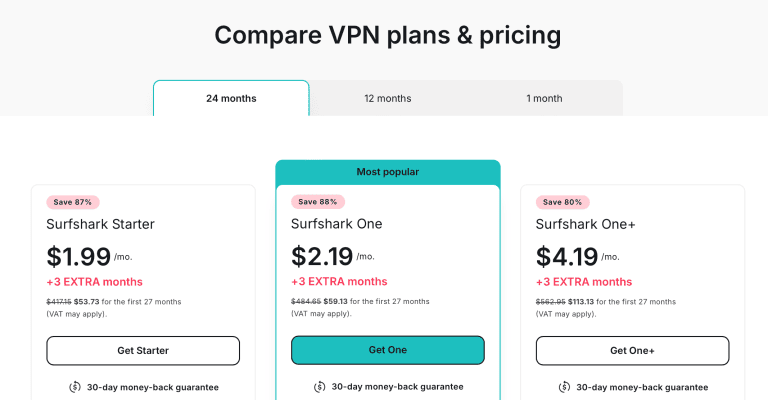
That said, grab these Surfshark discounts while they last to sweeten the deal further, backed by a 30-day money-back guarantee.
Pros
- 600+ US servers in 24 cities across 19 states
- 4,500+ global servers in 100 countries
- Deloitte-audited zero data logging policy
- Torrent downloads support
- Servers optimized for 1Gbps – 10Gbps speeds
- Offers unlimited simultaneous connections
Cons
- Doesn’t support seeding torrents
- No New Jersey servers in the USA
- Based in a 14 Eyes member country
PrivateVPN – Dynamic Dedicated US IPs and Online Betting-Supported Servers

PrivateVPN hauls the least servers on this list, packing just 200+ VPN servers in 63 countries. It still takes third place, because for US torrenting and betting-state IPs it gives you more per dollar than the bigger names below it:
- 12 US server cities, one more than CyberGhost.
- Dynamic dedicated IP addresses in the USA (New York and Los Angeles).
- A US server location in New Jersey.

NordVPN, Surfshark, PureVPN, and CyberGhost all sell dedicated IP addresses too, but as paid add-ons (NordVPN’s costs about $3.69 a month). PrivateVPN’s version works differently: you pick one of its dedicated-IP servers in New York or Los Angeles and connect over OpenVPN.
But there’s a catch.
The dedicated IP address on PrivateVPN isn’t unchanging like the one with PureVPN and NordVPN. Instead, the VPN assigns you a new, unused IP address in the chosen server location anytime you connect.

Still, it’s better to unblock financial services and other location-sensitive services that may block common VPN-assigned IP addresses.
Whether you’re using the regular servers on PrivateVPN or its dedicated US servers, you can still access
- Streaming sites like Netflix, Amazon Prime Video, Hulu and DAZN
- US content on streaming services like Roku, Amazon Fire TV, etc.
- US gaming servers on titles like League of Legends, Mobile Legends, etc.
Furthermore, the VPN manages super-fast speeds for reliable HD content unblocking on streaming platforms. The ping value is also surprisingly low, ensuring faster gameplay and lesser latency for the core gamers.

Since PrivateVPN isn’t only a collection of US servers, you also get European, Asian, Oceanic, and African servers to
- Unblock content like NRK TV (Norway), Crave TV (Canada), and France TV (France) not available in the US.
- Access local content, banking apps, and other services in your country if you’re traveling to the US.
Outside the US, those dynamic dedicated IPs cover six more countries: the UK (London), Sweden, Norway, Poland, Japan, and Australia. Every other location hands you a shared static IP, so your address doesn’t hop around between sessions.
NordVPN’s paid dedicated IPs reach more countries (30+) and stay fixed, so pick that if a bank or employer needs the exact same address every time.
PrivateVPN now supports WireGuard alongside OpenVPN, IKEv2, L2TP, and PPTP. Its dedicated IPs run over OpenVPN, though, and it still manages ultra-fast speeds on mobile and PC with its OpenVPN (UDP+1194) protocol.

These speeds help bypass ISP throttling to unlock better download and upload times for streaming, file sharing, and torrent downloading.
You can also seed torrents with PrivateVPN, which is best done when connected to any of the Dedicated IP addresses it provides.

Furthermore, PrivateVPN offers an easy-to-setup port forwarding feature on selected servers to get even faster torrent download speeds without sacrificing security.
PureVPN is the only other provider with port forwarding, but only as a paid add-on. That makes PrivateVPN the more affordable VPN for the bundled features.
One feature I didn’t expect at this price is Stealth VPN, which disguises the connection so campus, office, and hotel networks that block VPNs let it through.
Even so, I’m concerned that PrivateVPN is based in Sweden, also a member of the 14 Eyes countries. Thankfully, it has a no-logs policy but hasn’t been independently audited.
The only saving grace is that it hasn’t been caught in any data logging, sharing, or government cooperation scandals.
If you’re willing to look past that, you’ll also enjoy the ten simultaneous device connections here. That ties in with NordVPN and PureVPN, only behind Surfshark, and the 36-month plan works out to $2.08 a month (billed $75 a year afterward) with a 30-day money-back guarantee.

Luckily, I have these PrivateVPN discounts to save more on your chosen plan.
Pros
- US servers in 12 cities, including New Jersey
- 200+ servers in 63 countries
- Zero data logging policy
- Supports torrent download and seeding with port forwarding
- Dynamic dedicated IPs in New York and Los Angeles
- 10 simultaneous device connections
Cons
- Located in Sweden, a 14 Eyes member country
- Unaudited VPN service
- Dedicated IPs change every time you connect
PureVPN – Fast Content Unblocking and Streaming on 6,000+ Servers

PureVPN is the closest to NordVPN in US server counts, offering 1800+ servers in the States. However, PureVPN impresses more with quantum-resistant technology on its AES 256-bit encryption over these US servers.

Thus, not even next-generation quantum computers can hack the data you transmit over these US servers.
I know it’s important to keep the US-based big tech companies and our nosy ISPs out of our online business. Given that the US government has advanced tech at its disposal, I can also rest easy with this level of data protection.
Fortunately, these servers aren’t just there to make up the numbers.
So, I took PureVPN through the paces, and I unblocked content like
- Netflix US
- Amazon Prime Video US
- Hulu
- CNN Go

Besides content unblocking, you can also connect to these US servers to encrypt your internet connection, preventing your ISP and network admins from seeing what you’re doing. That way, you don’t lose access to US-specific banking apps, services, and online platforms on your secure internet.
In fact, the last time I was touring New York, these US servers encrypted my connection over public Wi-Fi networks at The Hotel @ Fifth Avenue, The Shake Shack, and Asuka Sushi.
Otherwise, I could have fallen victim to
- Session hijacking
- Malware infection
- Sensitive data theft (banking passwords, online logins, etc.)
- Man in the middle attacks
- Other common public Wi-Fi hacks
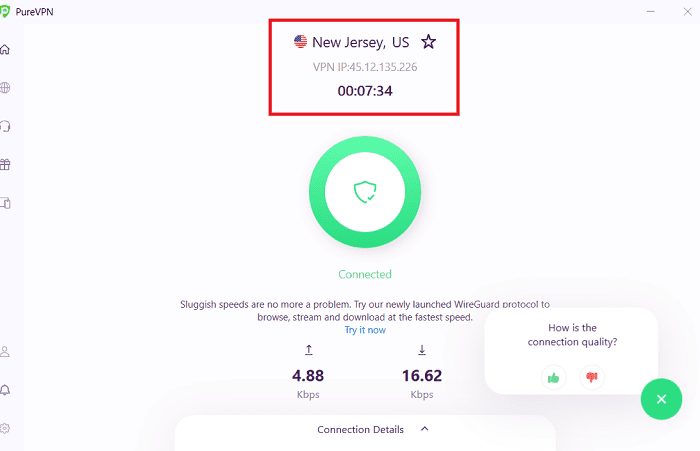
Furthermore, PureVPN has a New Jersey server. It’s the server I used to reach betting sites that are blocked on many US networks, such as
The catch is that this server isn’t a PureVPN exclusive anymore: NordVPN runs one in Trenton on a far bigger US network, and PrivateVPN pairs New Jersey with port forwarding for less than PureVPN plus its port forwarding add-on. That’s why PureVPN lands fourth here (more in my PureVPN vs NordVPN comparison).
When you’re not using the US servers, you can get a lot of value over the global servers too. Here, PureVPN manages a combined 6,000+ global server count across more than 65 countries, fewer than NordVPN on both counts but plenty for most travelers.
These servers are relevant for
- Travelers (students, expats, tourists, etc.) in the USA want to unblock content from their home country.
- US residents who want to watch Crave TV, NRK TV, France TV, or unblock other websites not available in the USA.
- Gamers interested in playing against peers in other countries/server locations.
Speaking of gaming, PureVPN did excellent in my tests over titles like
However, I was surprised it doesn’t bundle DDoS protection on its basic plan. So, you’ll have to pay extra for that, unlike with NordVPN, Surfshark, or CyberGhost.

Of course, I didn’t get DDoS-ed while gaming on PureVPN, but I might not have extra protection if that happens.
Fortunately, PureVPN is no slouch when it comes to speeds.
In fact, it scores better than NordVPN on some tests and servers.
And that’s with the extra quantum resistance!
These stellar speeds combine with robust server security to deliver some of the best torrent download speeds and privacy I’ve seen.
Luckily, PureVPN also offers specialty P2P-optimized servers to ensure maximum torrent download speeds. Better still, PureVPN allows seeding through its port forwarding add-on, which NordVPN doesn’t offer.

Sadly, you don’t get P2P servers in the US or UK, some of the fastest locations I tested across all VPNs.
If that isn’t a major dealbreaker, which it shouldn’t be, you should know that PureVPN is also twice audited for its no-logs policy.
So, suppose Verizon, Comcast, AT&T, or any other ISP traces your internet activity to it and asks for your web data. In that case, PureVPN won’t have anything to give.
On top of that, PureVPN is based in the British Virgin Islands.
That’s as beyond US jurisdiction as they can get. Plus, the BVI is a data privacy-centric hub.

Finally, PureVPN matches NordVPN and PrivateVPN with ten simultaneous device connections. You can also use this across your mobile devices, smart TVs, PC units, and routers. Best of all, the VPN is still affordable.

Even so, these PureVPN discounts will help you save more costs.
Pros
- 1800+ US servers in 13 cities (including New Jersey)
- 6,000+ servers in more than 65 countries
- Twice audited no-logs policy
- Supports torrent download and seeding
- Ultra-fast VPN to unblock content in 4K
- Ten simultaneous device connections
Cons
- DDoS protection is a paid add-on
- No P2P servers in the US or UK
CyberGhost – Massive Server Count for Privacy, Security, and Unblocking

If raw server count is what you’re after for unblocking content, CyberGhost is your best bet.
With 8900+ servers in 115 locations across 91 countries, there’s almost no country you won’t find on the list.
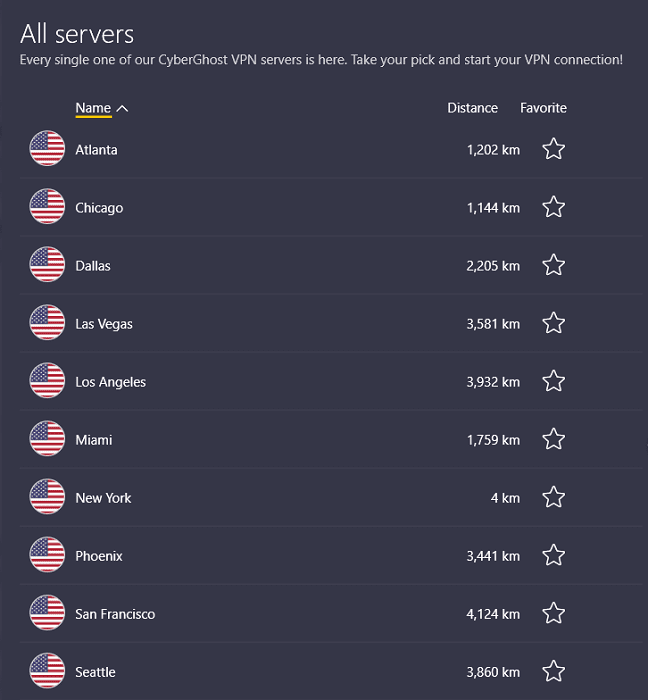
US servers are plentiful, too, recorded at 1300+ across 11 cities.
This makes it the third highest provider of US servers I reviewed, only behind PureVPN and NordVPN.

CyberGhost impressed me by splitting its servers into categories, offering some for
- Torrenting
- Gaming
- Streaming

The VPN provider has US servers optimized for each of these connection speed-intensive activities. That includes torrenting, unlike PureVPN, which doesn’t have a supported US server.
In fact, I’m impressed at how each streaming-optimized server also tells you what US-specific or abroad content you should best watch over the server.

Looking at the impressive effort put into these servers, I wasn’t surprised to see my CyberGhost VPN unblock
- Netflix
- HBO Max
- MTV
- Hulu
- BBC iPlayer
- Amazon Fire TV content
- Canal+
- DAZN
- Disney+
Those are some of the platforms I could test, and CyberGhost brilliantly handled everything I threw at it!
By these, it needs no telling that
- CyberGhost is optimized for speed.
- The VPN provider will unblock and download content on torrent sites while keeping you anonymous.
- You can get the best gaming experience + DDoS protection over CyberGhost servers.
I still tested each of these concepts, and I wasn’t wrong.
In fact, CyberGhost presented one of the most minor connection drops over its WireGuard protocol.

When I tested its servers for gaming, CyberGhost didn’t disappoint at
- Getting me into new flags on Mobile Legends
- Ensuring lower ping and DDoS protection when gaming on Steam
- Unblocking region-locked games on Game Loop
- Playing titles like CS:GO, PUBG, Fortnite, League of Legends, etc.
Surprisingly, CyberGhost has no New Jersey servers with its extensive reach. That puts it out of contention if you need a USA VPN to play Roobet, 888 Poker, or GG Poker, or unblock other online casinos.
That said, CyberGhost is based in data-friendly Romania, which isn’t in any data-sharing agreement with the USA. In fact, Romania turned down the data-sharing alliance with other EU countries that it’s a part of.
Add that to the no-logs policy on all its servers, which Deloitte audited for the third time in February 2026, and you can rest easy.
CyberGhost trails NordVPN on simultaneous connections, though: you get seven devices, where NordVPN, PrivateVPN, and PureVPN allow ten and Surfshark sets no limit.
Still, this affordable, secure VPN protects your mobile devices, smart TVs, and gaming consoles under a single subscription.

Enjoy these CyberGhost deals while they last and get a 45-day money-back guarantee.
Pros
- 1300+ US servers in 11 cities
- 8900+ global servers in 91 countries
- Deloitte-audited zero data logging policy
- Specially-optimized torrent supported servers
- Fast speeds for downloads and lag-free content stream
- 45-day money-back guarantee
Cons
- Seven simultaneous connections, the fewest here
- No servers in New Jersey
How to Setup a VPN for the USA?
Setting up a VPN for the USA is as easy as enabling the VPN kill switch, choosing the correct VPN protocol, and connecting to suitable servers.
These processes can require some steps. Fortunately, my chosen VPNs are easy to use with stepwise setup guides like the one below:
- Choose a preferred USA VPN. I recommend NordVPN.
- Pay for your subscription and download the VPN app.
- Login with your account credentials.
- Enable the VPN kill switch. Go to Settings > Kill Switch > Internet Kill Switch (toggle on).

- Choose the correct protocol. I recommend NordLynx.
- On the VPN home, search for a preferred server location. I’ll use the USA for this example.
- Click the general US server location to automatically get the nearest and fastest server.
- Wait for the VPN connection confirmation. Then, test for leaks (go to www.ipleak.net).
- Start unblocking content and surfing the free internet over an encrypted connection.
Can I Use a Free VPN in the USA?
You can’t use free VPNs in the USA as they lack robust enough technology to stay anonymous from big data companies, the government, and your ISPs.
Thus, free VPNs still expose you to data privacy risks, compromise your online security, and harvest your data for themselves.
Alternatively, it’s best to choose a reliable yet affordable provider like NordVPN. Considering its no-logs policy, fast servers, and reliable encryption, it doesn’t compromise your security nor puts a dent in your pocket.
Frequently Asked Questions
Are VPNs Legal in the USA?
VPNs are legal in the USA, and you can use them freely without fear of getting arrested, searched, or charged with a crime. However, always choose VPN software with a reliable no-logs policy that isn’t within the US jurisdiction.
Otherwise, the US government may collect your data from the VPN provider to deanonymize and charge you based on your online activity.
Will VPNs Work With US ISPs?
VPNs will work with internet service providers like Verizon, AT&T, Comcast, HughesNet, and others in the USA.
Some US ISPs may block VPN traffic on their services sometimes.
In that case, enable obfuscation (usually possible via OpenVPN protocols) on reliable VPNs like NordVPN to bypass the firewall.
Which VPN Services Have All USA States?
NordVPN has had servers in all 50 US states, spread across 55 cities, since May 2026. ExpressVPN and PIA also cover every state.
Among the other VPNs on this list, Surfshark has servers in 24 US cities across 19 states, while PrivateVPN (12 US cities) and PureVPN both include a New Jersey location.
What’s the Best VPN for a USA Server?
NordVPN is the best VPN to get a US server and IP address.
The VPN provider offers 2,800+ servers across 55 US cities in all 50 states, ensuring several options for reliable connection, low congestion, and better connection speeds.
That list includes Trenton, New Jersey, so you no longer need a second VPN just for a New Jersey IP address.
Can the USA Read My VPN Data Over US Servers?
The US government, big tech companies, or other authorities can’t read or access your user data over US remote VPN servers. However, you need to have connected via a trustworthy, no-logs VPN provider like NordVPN.
This provider uses military-grade AES 256-bit encryption to ensure your live internet traffic can’t be decoded or fall into anyone’s hands.
And There You Go!
Never let anyone tell you that you can’t safely download torrents in the USA, escape your ISP’s notorious throttling habits, or unblock content available in other regions.
And if you bet online, these US VPNs keep your accounts and payments private on any network, as long as you only place bets from a state where it’s legal.
I recommend NordVPN for its massive spread of US servers (every state is covered now), reliable encryption, ultra-fast speeds, and robust security practices. Surfshark suits households with a pile of devices, and PrivateVPN is the budget route to a New Jersey IP with port forwarding.
Don’t forget to enjoy these NordVPN discounts while they last.





